
🔊 AudioSeal: Efficient Localized Audio Watermarking


This repo contains the official implementation for AudioSeal, a method for efficient audio watermarking, with state-of-the-art robustness and detector speed.
🚀 Quick Links:
[arXiv]
[🤗Hugging Face]
[Colab Notebook]
[Webpage]
[Blog]
[Press]
✨ Key Updates:
- 2024-12-12: AudioSeal 0.2 is out, with streaming support and other improvement
- 2024-06-17: Training code is now available. Check the instruction!!!
- 2024-05-31: Our paper gets accepted at ICML'24 :)
- 2024-04-02: We have updated our license to full MIT license (including the license for the model weights) ! Now you can use AudioSeal in commercial application too!
- 2024-02-29: AudioSeal 0.1.2 is out, with more bug fixes for resampled audios and updated notebooks
📖 Abstract
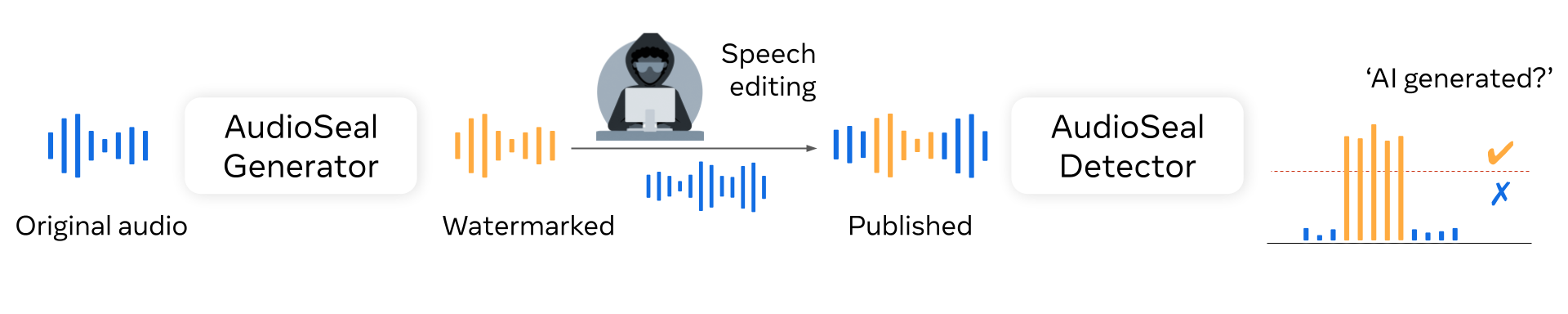
AudioSeal introduces a novel audio watermarking using ocalized watermarking and a novel perceptual loss. It jointly trains two components: a generator that embeds an imperceptible watermark into audio and a detector that identifies watermark fragments in long or edited audio files.
- Key Features:
- Localized watermarking at the sample level (1/16,000 of a second). AudioSeal works well with other sampling rates as well (24 khZ, 44.5 kHz, 48 kHz)
- Minimal impact on audio quality.
- Robust against various audio edits like compression, re-encoding, and noise addition.
- Fast, single-pass detection designed to surpass existing models significantly in speed — achieving detection up to two orders of magnitude faster, making it ideal for large-scale and real-time applications.
🧉 Installation
Requirements:
- Python >= 3.8 (>= 3.10 for streaming support)
- Pytorch >= 1.13.0
- Omegaconf
- Numpy
- einops (for streaming support)
Install from PyPI:
pip install audioseal
To install from source: Clone this repo and install in editable mode:
git clone https://github.com/facebookresearch/audioseal
cd audioseal
pip install -e .
⚙️ Models
You can find all the model checkpoints on the Hugging Face Hub. We provide the checkpoints for the following models:
- AudioSeal Generator: Takes an audio signal (as a waveform) and outputs a watermark of the same size as the input, which can be added to the input to watermark it. Optionally, it can also take a secret 16-bit message to embed in the watermark.
- AudioSeal Detector: Takes an audio signal (as a waveform) and outputs the probability that the input contains a watermark at each sample (every 1/16k second). Optionally, it may also output the secret message encoded in the watermark.
Note that the message is optional and has no influence on the detection output. It may be used to identify a model version for instance (up to $2**16=65536$ possible choices).
🧮 Usage
Here’s a quick example of how you can use AudioSeal’s API to embed and detect watermarks:
from audioseal import AudioSeal

# model name corresponds to the YAML card file name found in audioseal/cards
model = AudioSeal.load_generator("audioseal_wm_16bits")
model.eval()

# Other way is to load directly from the checkpoint
# model =  Watermarker.from_pretrained(checkpoint_path, device = wav.device)

# a torch tensor of shape (batch, channels, samples) and a sample rate
# It is important to process the audio to the same sample rate as the model
# expects. The default AudioSeal should work well with 16kHz and 24kHz, and
# in the case of 48 khZ, it should work well for most speech audios
wav = [load audio wav into a tensor of BatchxChannelxTime]

watermark = model.get_watermark(wav)

# Optional: you can add a 16-bit message to embed in the watermark
# msg = torch.randint(0, 2, (wav.shape(0), model.msg_processor.nbits), device=wav.device)
# watermark = model.get_watermark(wav, message = msg)

watermarked_audio = wav + watermark

detector = AudioSeal.load_detector("audioseal_detector_16bits")

# To detect the messages in the high-level.
result, message = detector.detect_watermark(watermarked_audio)

print(result) # result is a float number indicating the probability of the audio being watermarked,
print(message)  # message is a binary vector of 16 bits


# To detect the messages in the low-level.
result, message = detector(watermarked_audio)

# result is a tensor of size batch x 2 x frames, indicating the probability (positive and negative) of watermarking for each frame
# A watermarked audio should have result[:, 1, :] > 0.5
print(result[:, 1 , :])

# Message is a tensor of size batch x 16, indicating of the probability of each bit to be 1.
# message will be a random tensor if the detector detects no watermarking from the audio
print(message)
🧮 Streaming support
Starting AudioSeal 0.2, you can watermark a stream of audio signals with model.streaming(batch_size). The context retains convolution and LSTM history in both the encoder and decoder and clears it when the session ends. Use a causal streaming checkpoint and keep the batch size and message fixed throughout the session.
Each input chunk must contain a positive multiple of model.frame_size samples, which is 320 samples for audioseal_wm_streaming. Buffer incomplete frames until more audio arrives. At the end of the stream, pad the final remainder with zeros to one frame, watermark it within the same context, and trim the result to the remainder's original length. Do not pad intermediate chunks, since those samples would become part of the retained history.
For whole-clip equivalence checks, apply the same final waveform padding before the whole-clip call and trim its output too. Passing a partial frame directly to a non-streaming model uses per-layer padding instead and can produce different values at the end.
import torch

model = AudioSeal.load_generator("audioseal_wm_streaming")
model.eval()

# wav is a nonempty tensor of shape (batch, 1, samples), sampled at 16 kHz.
audio = wav.split(5 * model.frame_size, dim=-1)
secret_message = torch.zeros(wav.shape[0], 16, dtype=torch.int32, device=wav.device)
streaming_watermarked_audio = []

with torch.no_grad(), model.streaming(batch_size=wav.shape[0]):

    # Watermark each incoming chunk of the streaming audio
    for chunk in audio:
        length = chunk.shape[-1]
        # Only the final chunk from split() can contain an incomplete frame.
        chunk = torch.nn.functional.pad(chunk, (0, (-length) % model.frame_size))
        watermarked_chunk = model(chunk, message=secret_message, alpha=1)
        streaming_watermarked_audio.append(watermarked_chunk[..., :length])

streaming_watermarked_audio = torch.cat(streaming_watermarked_audio, dim=-1)


# You can detect a chunk of watermarked output, or the whole audio:

detector = AudioSeal.load_detector("audioseal_detector_streaming")
detector.eval()

wm_chunk = 100
partial_result, _ = detector.detect_watermark(streaming_watermarked_audio[:, :, :wm_chunk])


full_result, _ = detector.detect_watermark(streaming_watermarked_audio)
See example notebook for full details.
To switch between streams on one generator, save and restore the complete generator state inside a streaming context:
with model.streaming(batch_size=1):
    first_output = model(first_chunk, message=secret_message)
    state = model.get_streaming_state()

with model.streaming(batch_size=1):
    model.set_streaming_state(state)
    next_output = model(next_chunk, message=secret_message)
The state contains both networks' history. Saving only model.encoder.get_streaming_state() is insufficient. Treat the returned state as owned by that stream, not as an immutable snapshot; the context, state, input batch size, and message must correspond to the same stream. Serialize access when sharing a generator between requests.
🧠 Train your own watermarking model
See here for details on how to train your own Watermarking model.
See Also
The team also develops other open-source watermarking solutions:
- WMAR: Autoregressive watermarking models for images
- Video Seal: Open and efficient video watermarking
- WAM: Watermark Any Images with Localization
🎮 Troubleshooting
-
If you encounter the error
ValueError: not enough values to unpack (expected 3, got 2), this is because we expect a batch of audio tensors as inputs. Add one dummy batch dimension to your input (e.g.wav.unsqueeze(0), see example notebook for getting started). -
In Windows machines, if you encounter the error
KeyError raised while resolving interpolation: "Environmen variable 'USER' not found": This is due to an old checkpoint uploaded to the model hub, which is not compatible in Windows. Try to invalidate the cache by removing the files inC:\Users\<USER>\.cache\audiosealand re-run again. -
If you use torchaudio to handle your audios and encounter the error
Couldn't find appropriate backend to handle uri ..., this is due to newer version of torchaudio does not handle the default backend well. Either downgrade your torchaudio to2.1.0or earlier, or installsoundfileas your audio backend.
❤️ Acknowledgements
We borrow the code with some adaptations from the following repos:
- AudioCraft in
libs/audiocraft/. - Moshi in
libs/moshi/.
🤝 Contributions
We welcome Pull Requests with improvements or suggestions. If you want to flag an issue or propose an improvement, but don't know how to realize it, create a GitHub Issue.
🧾 License
- The code in this repository is released under the MIT license as found in the LICENSE file.
✍️ Citation
If you find this repository useful, please consider giving a star ⭐ and please cite as:
@article{sanroman2024proactive,
  title={Proactive Detection of Voice Cloning with Localized Watermarking},
  author={San Roman, Robin and Fernandez, Pierre and Elsahar, Hady and D´efossez, Alexandre and Furon, Teddy and Tran, Tuan},
  journal={ICML},
  year={2024}
}
1 maintainer

Metadata
1 maintainer
Release files for audioseal 0.2.1
For a detailed explanation of source distributions (sdists) and built distributions (wheels), please see the package formats documentation.
Source distribution (sdist)
| File | Size | Uploaded | Provenance | Actions |
|---|---|---|---|---|
| audioseal-0.2.1.tar.gz | 54.5 kB | Without provenance | Details for audioseal-0.2.1.tar.gz |
Built distribution (wheel)
| File | Interpreter | ABI | Platform | Actions Reset |
|---|---|---|---|---|
| audioseal-0.2.1-py3-none-any.whl | Python 3 | none | any | Details for audioseal-0.2.1-py3-none-any.whl |
Total release size: 119.4 kB
Release files / audioseal-0.2.1.tar.gz
| Download URL | audioseal-0.2.1.tar.gz |
|---|---|
| Size | 54.5 kB |
| Tags | Source |
|
SHA-256 checksum How to use checksums |
fe185c8474249d866a09c92b4788d828956c9407fd2664e2755c57dd72d8c1a9
|
|
BLAKE2b-256 checksum How to use checksums |
3cfa09cf455e2abb7698afe98f284aa268d15d55cc282db997b9b20ae174483a
|
| Upload date | |
|
Uploaded using Trusted Publishing? What is trusted publishing? |
No |
| Uploaded via |
python-requests/2.32.5
|
Release files / audioseal-0.2.1-py3-none-any.whl
| Download URL | audioseal-0.2.1-py3-none-any.whl |
|---|---|
| Size | 65.0 kB |
| Tags | Python 3 |
|
SHA-256 checksum How to use checksums |
e51ee84850d5e2351346c52b1711373cdedb952676da91484fd0cff430236c25
|
|
BLAKE2b-256 checksum How to use checksums |
64c14ac1f07b873a5c9dc9d08a81cb7ef42fc2b1f8cb0a2ba6492c71518c0778
|
| Upload date | |
|
Uploaded using Trusted Publishing? What is trusted publishing? |
No |
| Uploaded via |
python-requests/2.32.5
|
Security for audioseal 0.2.1
Provenance
Provenance describes where a file came from. On PyPI, provenance is shared via attestations, which provide a verifiable record of the build or publishing details. View details, limitations and caveats.
No provenance found
None of the files in this release were uploaded with provenance metadata.
A note on package security
PyPI is a repository for distributing packages, not a service for auditing them. While third-party security researchers and our staff do their best to detect and remove malicious packages, PyPI cannot guarantee the quality, security or suitability of any given package.
To learn more about protecting yourself from malicious actors, visit our package security documentation.














