
AudioTrace
CI/CD for voice AI



What is AudioTrace?
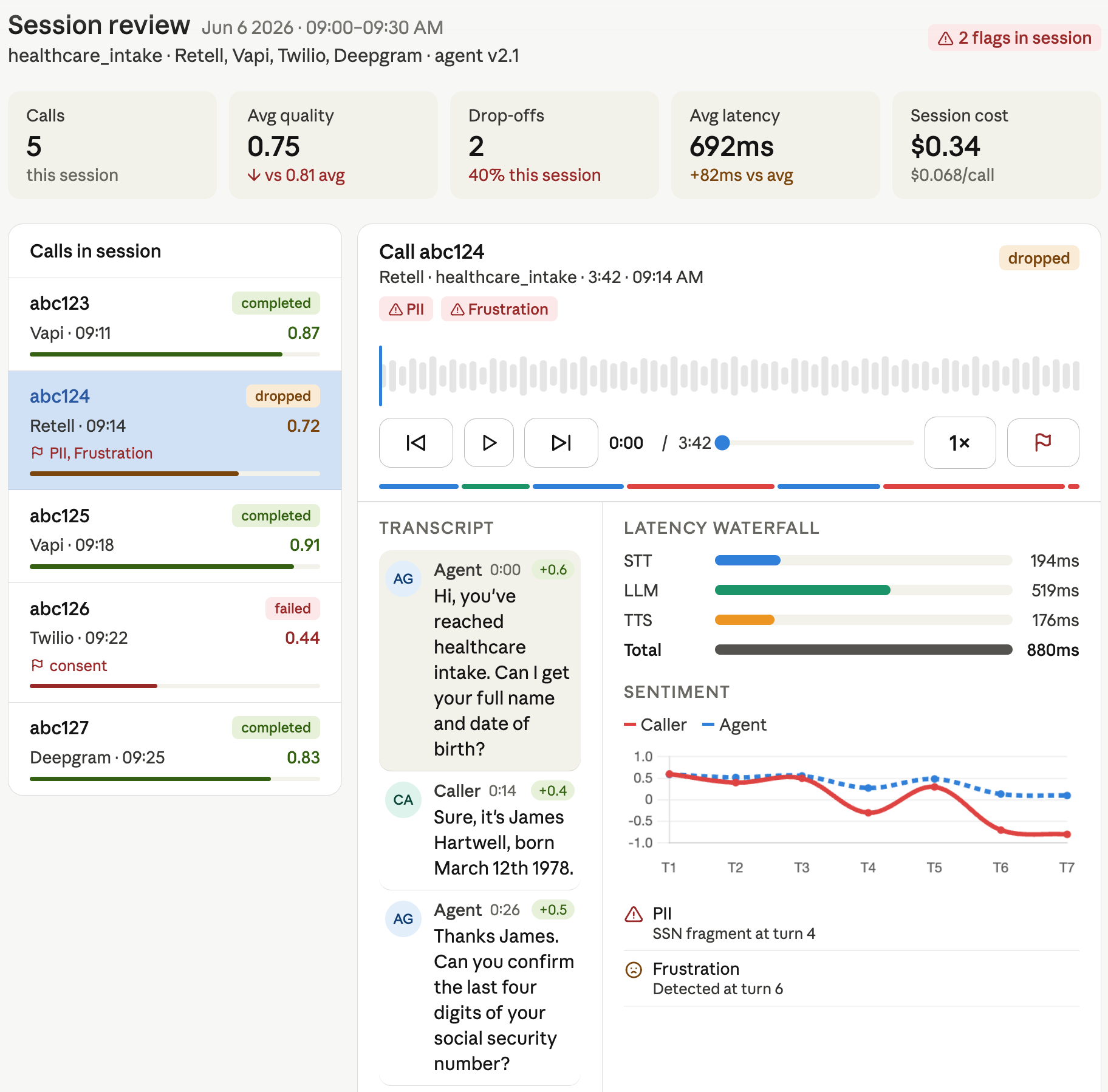
Voice Agents AI plumbing tool every team rebuilds from scratch — until now. Drop in a call recording. Get back everything: transcript, quality scores, sentiment shifts, latency breakdown, cost attribution, compliance flags. Normalized. Structured. Queryable. Works with any provider, any stack. One integration. Zero plumbing. Ship faster.
import audiotrace

report = audiotrace.analyze(
    audio    = "call_recording.wav",
    metadata = {"agent_version": "v2.1", "provider": "vapi"}
)

print(report.quality.overall_score)        # 0.87
print(report.sentiment.caller_frustration) # False
print(report.latency.llm_first_token_ms)   # 420
print(report.events.drop_off)              # False
print(report.cost.total_usd)               # 0.063
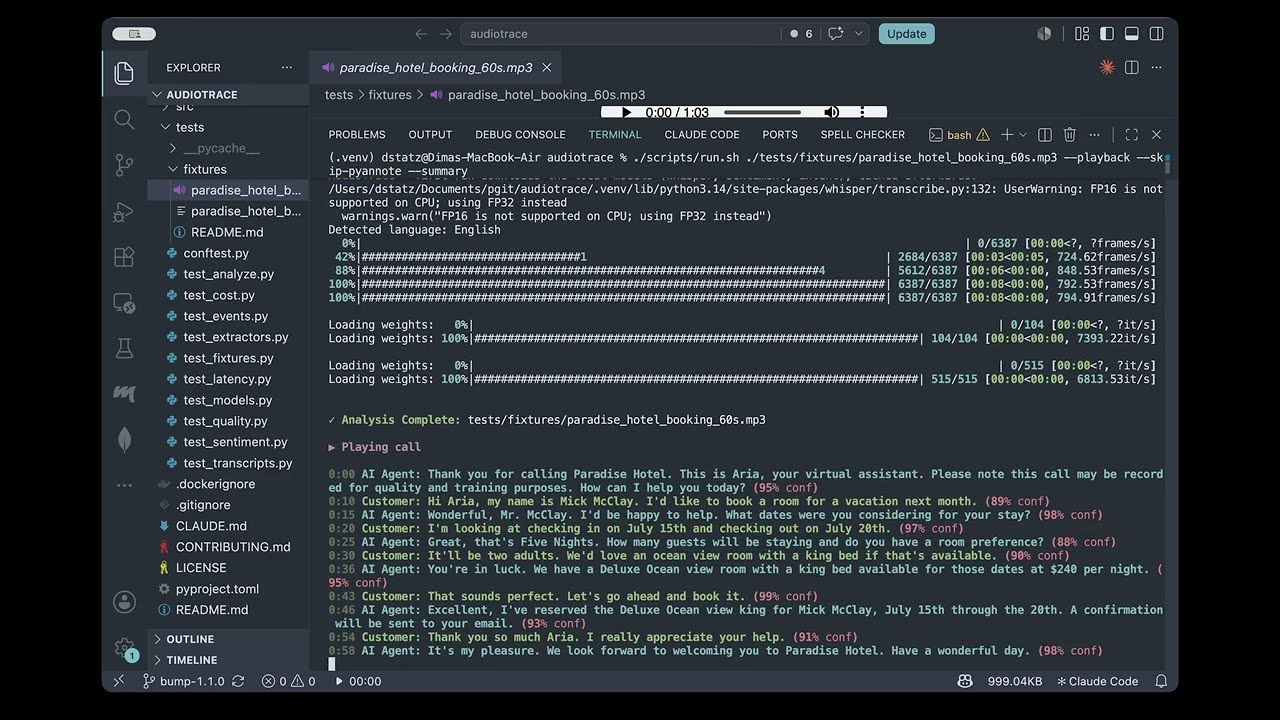
📺 Watch the demo:
Why AudioTrace?
Every team building voice agents faces the same problem: raw audio is a black box. You can listen to recordings manually, or you can build your own signal extraction pipeline from scratch — but no open-source framework normalizes the full call into a structured, queryable object.
AudioTrace exists to be that shared layer. It handles the hard parts so you can focus on what you're building:
- Transcription with speaker diarization
- Silence gaps, interruptions, speaking pace, and pitch analysis
- Per-turn sentiment tracking and frustration detection
- Per-stage latency breakdown (STT → LLM → TTS → telephony)
- Unified cost calculation across any provider mix
- Compliance flag detection (PII leakage, consent gaps)
Installation
pip install audiotrace

# With specific provider adapter
pip install audiotrace[vapi]
pip install audiotrace[retell]
pip install audiotrace[twilio]

# Full install
pip install audiotrace[all]
Docker
docker build -f docker/Dockerfile -t audiotrace .
docker run -it audiotrace
Requirements: Python 3.9+, FFmpeg installed on system
Quick start
Analyze a single call
import audiotrace

report = audiotrace.analyze(
    audio    = "call.wav",
    metadata = {
        "call_id":       "abc123",
        "agent_version": "v2.1",
        "provider":      "vapi",
        "campaign":      "healthcare_intake"
    }
)

# Media
print(report.media.duration_ms)          # int
print(report.media.codec)                # str

# Transcript
print(report.transcript.full_text)
for turn in report.transcript.turns:
    print(f"{turn.speaker}: {turn.text}")

# Quality
print(report.quality.overall_score)       # float 0.0–1.0
print(report.quality.interruptions)       # int
print(report.quality.silence_gaps)        # List[Gap]
print(report.quality.speaking_pace_wpm)   # float

# Sentiment
print(report.sentiment.overall)           # float -1.0 to 1.0
print(report.sentiment.shift_points)      # List[int] — turn indices
print(report.sentiment.caller_frustration)# bool

# Latency
print(report.latency.stt_ms)             # int
print(report.latency.llm_first_token_ms) # int
print(report.latency.tts_ms)             # int
print(report.latency.total_ms)           # int

# Cost
print(report.cost.stt_usd)               # float
print(report.cost.llm_usd)               # float
print(report.cost.total_usd)             # float

# Events
print(report.events.outcome)             # "completed" | "dropped" | "failed"
print(report.events.drop_off_turn)       # int | None
print(report.events.compliance_flags)    # List[str]
Use provider adapters
from audiotrace.adapters import VapiAdapter

adapter = VapiAdapter(api_key="...")
call    = adapter.fetch_call(call_id="abc123")
report  = audiotrace.analyze(call.audio, call.metadata)
Output — CallReport
CallReport
├── media
│   ├── duration_ms: int
│   ├── sample_rate_hz: int
│   ├── channels: int
│   ├── codec: str
│   ├── file_size_bytes: int
│   ├── file_format: str
│   └── bitrate_kbps: float
├── transcript
│   ├── full_text: str
│   ├── turns: List[Turn]   # speaker · text · start_ms · end_ms · confidence · words[]
│   ├── language: str
│   └── diarization_confidence: float | None   # pitch-fallback speaker separability (0-1); None if not measured
├── quality
│   ├── overall_score: float
│   ├── interruptions: int
│   ├── silence_gaps: List[Gap]
│   ├── speaking_pace_wpm: float
│   ├── pitch_variance: float
│   └── turn_length_avg_ms: float
├── sentiment
│   ├── by_turn: List[float]
│   ├── overall: float
│   ├── shift_points: List[int]
│   └── caller_frustration: bool
├── latency
│   ├── stt_ms: int
│   ├── llm_first_token_ms: int
│   ├── llm_full_response_ms: int
│   ├── tts_ms: int
│   ├── total_ms: int
│   └── waterfall: List[LatencySpan]
├── cost
│   ├── stt_usd: float
│   ├── llm_usd: float
│   ├── tts_usd: float
│   ├── telephony_usd: float
│   └── total_usd: float
└── events
    ├── outcome: str
    ├── drop_off: bool
    ├── drop_off_turn: int | None
    ├── intent_detected: str
    ├── failure_type: str | None
    └── compliance_flags: List[str]
Provider support
Provider adapters are TBD — not yet implemented. The integrations below are planned; today you pass a local audio file path to
analyze()directly. The adapter example above is illustrative of the intended API.
| Provider | Adapter | Status |
|---|---|---|
| Vapi | audiotrace[vapi] |
TBD |
| Retell | audiotrace[retell] |
TBD |
| Twilio | audiotrace[twilio] |
TBD |
| ElevenLabs | audiotrace[elevenlabs] |
TBD |
| Deepgram | audiotrace[deepgram] |
TBD |
| Custom webhook | CustomAdapter |
TBD |
How it works
AudioTrace builds on top of best-in-class audio libraries so you don't have to:
Raw audio file
      │
      ▼
  FFmpeg              — format normalization, turn splitting
      │
      ├── Whisper     — transcription
      ├── pyannote    — speaker diarization
      ├── Librosa     — silence gaps, pace, pitch, energy
      └── Transformers — sentiment, intent detection
      │
      ▼
  CallReport (Pydantic)
Part of the Lang ecosystem TBD
AudioTrace is the open-source foundation that powers two commercial products:
| Product | What it does | Built on |
|---|---|---|
| LangTrace | Live call observability & analytics dashboards | AudioTrace |
| LangGate | Pre-deploy simulation & CI/CD quality gate | AudioTrace |
AudioTrace is free and MIT-licensed. The commercial products are optional hosted layers on top.
Want it run for you today? We're taking a few paid design-partner pilots — "early access + we run it for you." See COMMERCIAL.md.
Running locally
For quick testing or interactive analysis, you can use the provided runner script. It automatically handles virtual environment setup and dependency validation.
# Analyze default golden data fixture
./scripts/run.sh

# Concise per-section summary tables instead of the raw JSON
./scripts/run.sh --summary

# Playback, inferring speakers by pitch (no pyannote token needed)
./scripts/run.sh --playback --skip-pyannote

# Analyze a specific file
./scripts/run.sh path/to/your/audio.wav
Development & Validation
Before submitting changes, ensure everything passes the local validation suite (formatting, linting, type-checking, and tests):
./scripts/test_local.sh test
Regression gating in CI
Treat a handful of representative recordings as golden fixtures, commit a baseline, and fail the build when a prompt/model/voice change makes the agent measurably worse — slower, colder, less compliant.
# 1. Commit a baseline from your golden calls (one time, and after intentional changes)
audiotrace baseline tests/calls -o baseline.json

# 2. Gate every change against it — exits non-zero on regression, writes per-call reports
audiotrace check tests/calls -b baseline.json --report audiotrace-report
A metric only fails the build when it drifts past its tolerance (quality −0.05, sentiment −0.10, latency +15%, cost +20%; frustration / drop-off / compliance have zero slack). New recordings not in the baseline are skipped, not failed.
GitHub Action
Drop the gate into CI in a few lines. It installs AudioTrace, runs the check, and uploads the HTML report as an artifact even when the build fails:
# .github/workflows/voice-quality.yml
name: Voice quality
on: [pull_request]
jobs:
  audiotrace:
    runs-on: ubuntu-latest
    steps:
      - uses: actions/checkout@v4
      - uses: dimastatz/audiotrace@v1.2.1
        with:
          calls: tests/calls
          baseline: baseline.json
Contributing
Contributions are welcome — especially new provider adapters, persona definitions for simulation, and compliance rule sets.
git clone https://github.com/audiotrace/audiotrace
cd audiotrace
./scripts/test_local.sh test  # Run all checks (formatting, lint, types, tests)
See CONTRIBUTING.md for guidelines.
License
MIT — see LICENSE
1 maintainer

Metadata
1 maintainer
Release files for audiotrace 1.2.3
For a detailed explanation of source distributions (sdists) and built distributions (wheels), please see the package formats documentation.
Source distribution (sdist)
| File | Size | Uploaded | |
|---|---|---|---|
| audiotrace-1.2.3.tar.gz | 2.0 MB | Details |
Built distribution (wheel)
| File | Interpreter | ABI | Platform | Reset |
|---|---|---|---|---|
| audiotrace-1.2.3-py3-none-any.whl | Python 3 | none | any | Details |
Total release size: 2.0 MB
Release files / audiotrace-1.2.3.tar.gz
| Download URL | audiotrace-1.2.3.tar.gz |
|---|---|
| Size | 2.0 MB |
| Tags | Source |
|
SHA-256 checksum How to use checksums |
966b637a9d8f4462026042397a88ec301cc1df97620b4c58690e62f652b70433
|
|
BLAKE2b-256 checksum How to use checksums |
273585ff507137605114b34dd23a76f96f253aa7786cc7ea66096b79ac0f8fae
|
| Upload date | |
|
Uploaded using Trusted Publishing? What is trusted publishing? |
No |
| Uploaded via |
twine/6.2.0 CPython/3.14.3
|
Release files / audiotrace-1.2.3-py3-none-any.whl
| Download URL | audiotrace-1.2.3-py3-none-any.whl |
|---|---|
| Size | 37.6 kB |
| Tags | Python 3 |
|
SHA-256 checksum How to use checksums |
d6cde2b9030320d289061b92a642938120f0246fad5a7f55495d06d61140f767
|
|
BLAKE2b-256 checksum How to use checksums |
953dda53a95b2d4f2a4ac54d0351b2f2351c40246b19c6db130e7d52e4cfc748
|
| Upload date | |
|
Uploaded using Trusted Publishing? What is trusted publishing? |
No |
| Uploaded via |
twine/6.2.0 CPython/3.14.3
|














