
Structured analysis for voice-agent call recordings — transcript, quality, sentiment, latency, cost, and events from raw audio.

Project description
AudioTrace
CI/CD for voice AI



What is AudioTrace?
Voice Agents AI plumbing tool every team rebuilds from scratch — until now. Drop in a call recording. Get back everything: transcript, quality scores, sentiment shifts, latency breakdown, cost attribution, compliance flags. Normalized. Structured. Queryable. Works with any provider, any stack. One integration. Zero plumbing. Ship faster.
import audiotrace

report = audiotrace.analyze(
    audio    = "call_recording.wav",
    metadata = {"agent_version": "v2.1", "provider": "vapi"}
)

print(report.quality.overall_score)        # 0.87
print(report.sentiment.caller_frustration) # False
print(report.latency.llm_first_token_ms)   # 420
print(report.events.drop_off)              # False
print(report.cost.total_usd)               # 0.063
Why AudioTrace?
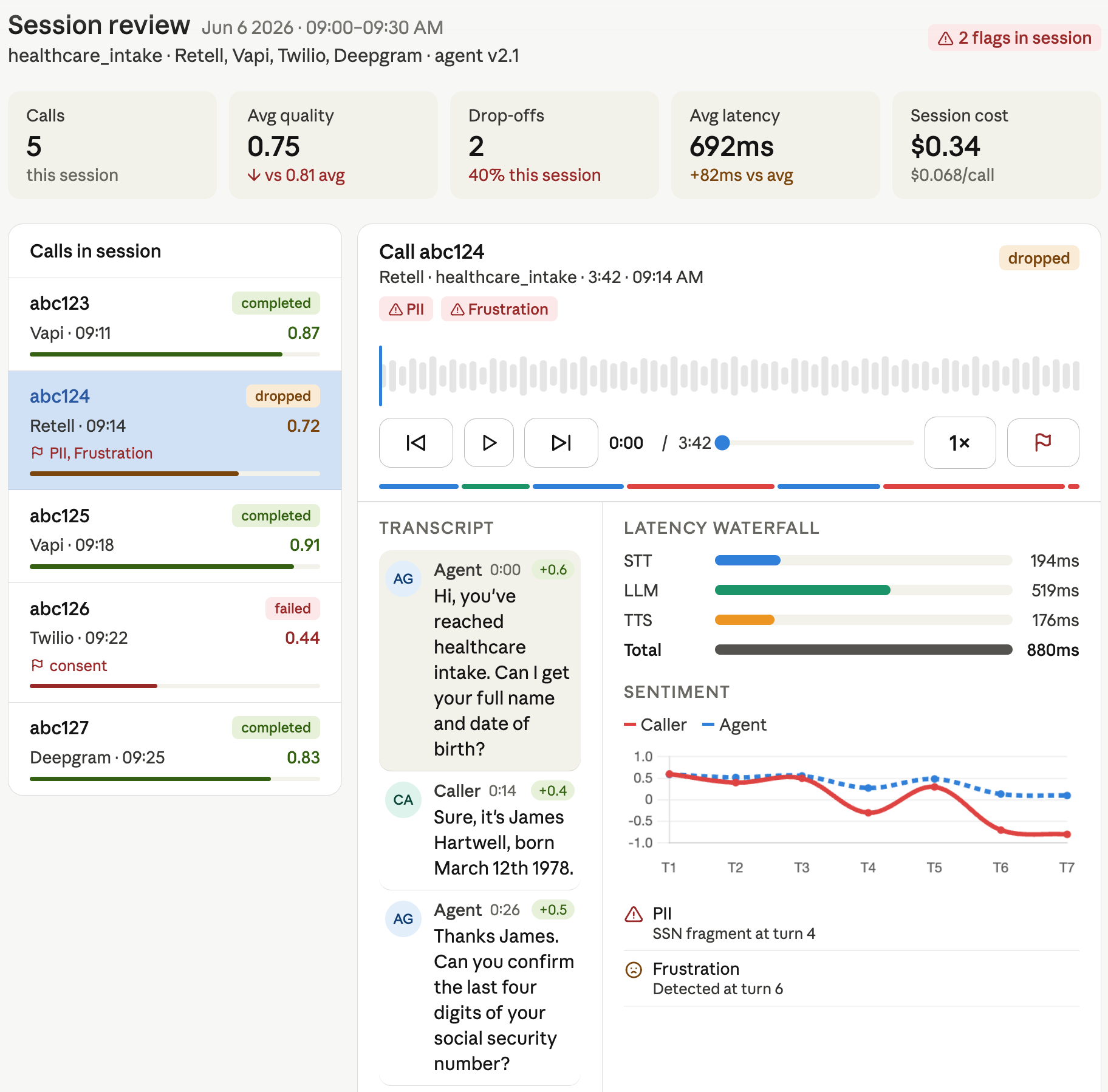
Every team building voice agents faces the same problem: raw audio is a black box. You can listen to recordings manually, or you can build your own signal extraction pipeline from scratch — but no open-source framework normalizes the full call into a structured, queryable object.
AudioTrace exists to be that shared layer. It handles the hard parts so you can focus on what you're building:
- Transcription with speaker diarization
- Silence gaps, interruptions, speaking pace, and pitch analysis
- Per-turn sentiment tracking and frustration detection
- Per-stage latency breakdown (STT → LLM → TTS → telephony)
- Unified cost calculation across any provider mix
- Compliance flag detection (PII leakage, consent gaps)
Installation
pip install audiotrace

# With specific provider adapter
pip install audiotrace[vapi]
pip install audiotrace[retell]
pip install audiotrace[twilio]

# Full install
pip install audiotrace[all]
Docker
docker build -f docker/Dockerfile -t audiotrace .
docker run -it audiotrace
Requirements: Python 3.9+, FFmpeg installed on system
Quick start
Analyze a single call
import audiotrace

report = audiotrace.analyze(
    audio    = "call.wav",
    metadata = {
        "call_id":       "abc123",
        "agent_version": "v2.1",
        "provider":      "vapi",
        "campaign":      "healthcare_intake"
    }
)

# Media
print(report.media.duration_ms)          # int
print(report.media.codec)                # str

# Transcript
print(report.transcript.full_text)
for turn in report.transcript.turns:
    print(f"{turn.speaker}: {turn.text}")

# Quality
print(report.quality.overall_score)       # float 0.0–1.0
print(report.quality.interruptions)       # int
print(report.quality.silence_gaps)        # List[Gap]
print(report.quality.speaking_pace_wpm)   # float

# Sentiment
print(report.sentiment.overall)           # float -1.0 to 1.0
print(report.sentiment.shift_points)      # List[int] — turn indices
print(report.sentiment.caller_frustration)# bool

# Latency
print(report.latency.stt_ms)             # int
print(report.latency.llm_first_token_ms) # int
print(report.latency.tts_ms)             # int
print(report.latency.total_ms)           # int

# Cost
print(report.cost.stt_usd)               # float
print(report.cost.llm_usd)               # float
print(report.cost.total_usd)             # float

# Events
print(report.events.outcome)             # "completed" | "dropped" | "failed"
print(report.events.drop_off_turn)       # int | None
print(report.events.compliance_flags)    # List[str]
Use provider adapters
from audiotrace.adapters import VapiAdapter

adapter = VapiAdapter(api_key="...")
call    = adapter.fetch_call(call_id="abc123")
report  = audiotrace.analyze(call.audio, call.metadata)
Output — CallReport
CallReport
├── media
│   ├── duration_ms: int
│   ├── sample_rate_hz: int
│   ├── channels: int
│   ├── codec: str
│   ├── file_size_bytes: int
│   ├── file_format: str
│   └── bitrate_kbps: float
├── transcript
│   ├── full_text: str
│   ├── turns: List[Turn]   # speaker · text · start_ms · end_ms
│   └── language: str
├── quality
│   ├── overall_score: float
│   ├── interruptions: int
│   ├── silence_gaps: List[Gap]
│   ├── speaking_pace_wpm: float
│   ├── pitch_variance: float
│   └── turn_length_avg_ms: float
├── sentiment
│   ├── by_turn: List[float]
│   ├── overall: float
│   ├── shift_points: List[int]
│   └── caller_frustration: bool
├── latency
│   ├── stt_ms: int
│   ├── llm_first_token_ms: int
│   ├── llm_full_response_ms: int
│   ├── tts_ms: int
│   ├── total_ms: int
│   └── waterfall: List[LatencySpan]
├── cost
│   ├── stt_usd: float
│   ├── llm_usd: float
│   ├── tts_usd: float
│   ├── telephony_usd: float
│   └── total_usd: float
└── events
    ├── outcome: str
    ├── drop_off: bool
    ├── drop_off_turn: int | None
    ├── intent_detected: str
    ├── failure_type: str | None
    └── compliance_flags: List[str]
Provider support
| Provider | Adapter | Status |
|---|---|---|
| Vapi | audiotrace[vapi] |
Stable |
| Retell | audiotrace[retell] |
Stable |
| Twilio | audiotrace[twilio] |
Stable |
| ElevenLabs | audiotrace[elevenlabs] |
Beta |
| Deepgram | audiotrace[deepgram] |
Stable |
| Custom webhook | CustomAdapter |
Stable |
How it works
AudioTrace builds on top of best-in-class audio libraries so you don't have to:
Raw audio file
      │
      ▼
  FFmpeg              — format normalization, turn splitting
      │
      ├── Whisper     — transcription
      ├── pyannote    — speaker diarization
      ├── Librosa     — silence gaps, pace, pitch, energy
      └── Transformers — sentiment, intent detection
      │
      ▼
  CallReport (Pydantic)
Part of the Lang ecosystem TBD
AudioTrace is the open-source foundation that powers two commercial products:
| Product | What it does | Built on |
|---|---|---|
| LangTrace | Live call observability & analytics dashboards | AudioTrace |
| LangGate | Pre-deploy simulation & CI/CD quality gate | AudioTrace |
AudioTrace is free and MIT-licensed. The commercial products are optional hosted layers on top.
Running locally
For quick testing or interactive analysis, you can use the provided runner script. It automatically handles virtual environment setup and dependency validation.
# Analyze default golden data fixture
./run.sh

# Analyze a specific file
./run.sh path/to/your/audio.wav
Development & Validation
Before submitting changes, ensure everything passes the local validation suite (formatting, linting, type-checking, and tests):
./scripts/test_local.sh test
Contributing
Contributions are welcome — especially new provider adapters, persona definitions for simulation, and compliance rule sets.
git clone https://github.com/audiotrace/audiotrace
cd audiotrace
./scripts/test_local.sh test  # Run all checks (formatting, lint, types, tests)
See CONTRIBUTING.md for guidelines.
License
MIT — see LICENSE
Release history Release notifications | RSS feed


Download files
Download the file for your platform. If you're not sure which to choose, learn more about installing packages.
Source Distribution
Built Distribution
Filter files by name, interpreter, ABI, and platform.
If you're not sure about the file name format, learn more about wheel file names.
Copy a direct link to the current filters
File details
Details for the file audiotrace-1.0.1.tar.gz.
File metadata
- Download URL: audiotrace-1.0.1.tar.gz
- Upload date:
- Size: 1.8 MB
- Tags: Source
- Uploaded using Trusted Publishing? No
- Uploaded via: twine/6.2.0 CPython/3.14.3
File hashes
| Algorithm | Hash digest | |
|---|---|---|
| SHA256 |
80317ca6d278d6c09715558dda9b9eda6455778230d107810268b5116cb60dcb
|
|
| MD5 |
a57173347e1719559b942a82e2bc489c
|
|
| BLAKE2b-256 |
bb06cd714c75aa7fde77d83ac18cf6d1318e2acda771c140d41a2e6c7725b1a7
|
File details
Details for the file audiotrace-1.0.1-py3-none-any.whl.
File metadata
- Download URL: audiotrace-1.0.1-py3-none-any.whl
- Upload date:
- Size: 22.8 kB
- Tags: Python 3
- Uploaded using Trusted Publishing? No
- Uploaded via: twine/6.2.0 CPython/3.14.3
File hashes
| Algorithm | Hash digest | |
|---|---|---|
| SHA256 |
1868ac28a2844808f26c1d0ee7b85511c5aeecd47b0aa8f7097561db7d3ba80d
|
|
| MD5 |
3beb9dac1cc7bb4290f52d3741b06454
|
|
| BLAKE2b-256 |
729acb7cba194458970276985af37386f2006d6766fa88826ea4f6bf570de4d4
|






