
An audio/acoustic activity detection and audio segmentation tool

Project description






auditok is a lightweight audio activity detection library for Python with a numpy-only core. It splits audio streams into events by thresholding signal energy — the threshold can be set manually or estimated automatically from the audio — and can optionally use the WebRTC voice activity detector to target speech specifically.
Use it for voice activity detection, silence removal, audio segmentation, or any task where you need to find “where the sound is” in an audio stream. It works with files, microphone input, and streams, supports mono and multi-channel audio, and runs from a few lines of Python or the command line.
Full documentation is available on Read the Docs.
Installation
auditok requires Python 3.8 or higher. The core library depends only on numpy:
pip install auditokOptional features are installed via extras:
pip install auditok[plot]       # plotting (matplotlib)
pip install auditok[device-io]  # microphone input and playback
                                # (sounddevice, tqdm)
pip install auditok[webrtcvad]  # WebRTC VAD as frame decider
                                # (webrtcvad-wheels)
pip install auditok[all]        # all of the above
Note: Processing non-WAV formats (MP3, OGG, FLAC, video files, etc.) requires ffmpeg to be installed on your system.
Quick start
import auditok

# split returns a generator of AudioRegion objects
audio_events = auditok.split(
    "audio.wav",
    min_dur=0.2,     # minimum duration of a valid audio event in seconds
    max_dur=4,       # maximum duration of an event
    max_silence=0.3, # maximum tolerated silence within an event
    energy_threshold=55 # detection threshold
)

for i, r in enumerate(audio_events):
    # AudioRegions returned by split have start and end attributes
    print(f"Event {i}: {r.start:.3f}s -- {r.end:.3f}s")

    # play the audio event
    r.play(progress_bar=True)

    # save the event with start and end times in the filename
    filename = r.save("event_{start:.3f}-{end:.3f}.wav")
    print(f"Event saved as: {filename}")
Example output:
Event 0: 0.700s -- 1.400s
Event saved as: event_0.700-1.400.wav
Event 1: 3.800s -- 4.500s
Event saved as: event_3.800-4.500.wav
...
API at a glance
Function |
Purpose |
Key parameters |
|---|---|---|
split() |
Detect and yield audio events as a generator |
min_dur, max_dur, max_silence, energy_threshold, validator |
trim() |
Remove leading and trailing silence |
min_dur, max_silence, energy_threshold |
fix_pauses() |
Normalize pauses between events to a fixed duration |
silence_duration, min_dur, max_silence, energy_threshold |
split_and_plot() |
Split and visualize results (matplotlib or interactive Jupyter widget) |
split params + interactive, save_as |
load() |
Load audio from file, bytes, or mic into an AudioRegion |
sr, sw, ch |
All functions accept file paths, raw bytes, AudioRegion objects, or None (to read from the microphone). split(), trim(), fix_pauses(), and split_and_plot() are also available as AudioRegion methods.
Automatic energy threshold
Instead of tuning energy_threshold by hand, let auditok estimate it from the audio itself:
import auditok

# estimate the threshold from the input's energy distribution
audio_events = auditok.split("audio.wav", energy_threshold="auto")

# or select the estimation method explicitly:
# "otsu" (default): balanced, suited to audio with clear pauses
# "percentile": noise floor + margin, suited to dense/far-field speech
audio_events = auditok.split("audio.wav", validator="percentile")

# "percentile" reads the noise floor at the 10th percentile of window
# energies; use "pXX" to read it elsewhere (e.g., "p20" for a higher,
# more selective threshold)
audio_events = auditok.split("audio.wav", validator="p20")
Automatic thresholding adapts to each file’s noise floor and level, so the same code works across recordings that would otherwise need different manual thresholds. For offline input (files, bytes, AudioRegion), the whole signal is used for estimation (compressed input is decoded only once).
For live input (microphone, stdin), the threshold is calibrated on the first seconds of the stream (calibration_dur, default 3 s) and guarded by a lower bound (min_energy_threshold, default 40 dB): the resolved threshold is max(min_energy_threshold, estimate), so a calibration window containing only background noise — a PC fan, air conditioning, or a muted microphone — cannot produce a meaningless threshold. The calibration audio is replayed, so nothing is lost:
# detect events from the microphone with a calibrated threshold
events = auditok.split(None, sr=16000, sw=2, ch=1, max_read=60,
                       energy_threshold="auto")
On the command line, use -e auto or -V otsu|percentile|pXX (--calibration-duration and -y/--min-energy-threshold control live calibration). Automatic estimation is optional — if you know a threshold that works for your audio and setup, pass it explicitly (energy_threshold=55 / -e 55) and no estimation takes place.
Detecting speech with the WebRTC VAD
Energy thresholding accepts any sufficiently loud audio. To detect speech specifically, auditok can use the WebRTC voice activity detector as its frame-level decider, while keeping auditok’s event machinery (min_dur, max_silence, leading/trailing silence handling) on top. This requires the webrtcvad extra:
pip install auditok[webrtcvad]import auditok
# webrtc as frame decider; mode (0-3) sets the aggressiveness:
# 0/1 for far-field or noisy audio, 2 for clean close-talk audio
speech_events = auditok.split("audio.wav", validator="webrtc:1")
# full control via the validator object
from auditok.validators import WebRTCVADValidator
validator = WebRTCVADValidator(16000, 2, 1, mode=2, aggregation="any")
speech_events = auditok.split("audio.wav", validator=validator)This also works with live input (microphone, stdin). On the command line, use -V webrtc or -V webrtc:2. As a frame validator, the WebRTC VAD may work better with a smaller max_silence value than the default 0.3 s — typically max_silence=0.1 (-s 0.1). The WebRTC VAD requires a sampling rate of 8000, 16000, 32000 or 48000 Hz; for files with other rates, pass sr=16000 (-r 16000) to have ffmpeg resample the audio on the fly.
Trimming, pauses, and event boundaries
Trim silence
import auditok

# Remove leading and trailing silence
trimmed = auditok.trim("audio.wav", energy_threshold=55)
trimmed.save("trimmed.wav")
Normalize pauses
import auditok

# Replace all pauses with exactly 0.5s of silence
cleaned = auditok.fix_pauses("audio.wav", silence_duration=0.5)
cleaned.save("cleaned.wav")
Improving detection boundaries
Energy-based detection can clip the natural onset and fade-out of speech, where the signal rises gradually from or falls back into silence. The max_leading_silence and max_trailing_silence parameters let you extend detection boundaries to capture these transitions:
events = auditok.split(
    "audio.wav",
    max_leading_silence=0.2,   # prepend up to 200ms before each event
    max_trailing_silence=0.15, # keep up to 150ms of silence after each event
)
Values of 0.1 – 0.3 seconds typically work well. These parameters are available on split(), trim(), fix_pauses(), and their AudioRegion method counterparts, as well as on the command line (-l / --max-leading-silence and -g / --max-trailing-silence).
How max_trailing_silence interacts with max_silence
max_silence and max_trailing_silence control two different things:
max_silence decides when an event ends — it is the longest run of silence tolerated inside an event before the event boundary is closed.
max_trailing_silence decides how much silence to keep at the end of the delivered event, as perceptual padding around the natural fade-out.
The accepted values for max_trailing_silence are:
None (default): keep all trailing silence up to max_silence (no trimming, no extension).
0: drop all trailing silence.
A value <= max_silence: trim trailing silence to that duration.
A value > max_silence: once the event boundary is decided (at max_silence), continue collecting silent frames past the boundary up to max_trailing_silence total. Collection stops early if a valid frame appears (in which case the current event is delivered with its accumulated trailing silence and a new event starts immediately from that frame, so separate events are not merged) or if the audio ends.
This decoupling is useful when you want short, well-segmented events but still need enough fade-out padding to sound natural. A small max_silence keeps events tight, while a larger max_trailing_silence adds the fade-out:
events = auditok.split(
    "speech.wav",
    max_silence=0.1,           # close events on 100ms of silence
    max_trailing_silence=0.4,  # but keep up to 400ms of fade-out
)
Split and plot
Visualize the audio signal with detected events (requires the plot extra):
import auditok

audio = auditok.load("audio.wav")
events = audio.split_and_plot(max_leading_silence=0.1,
                              max_trailing_silence=0.1) # or audio.splitp(...)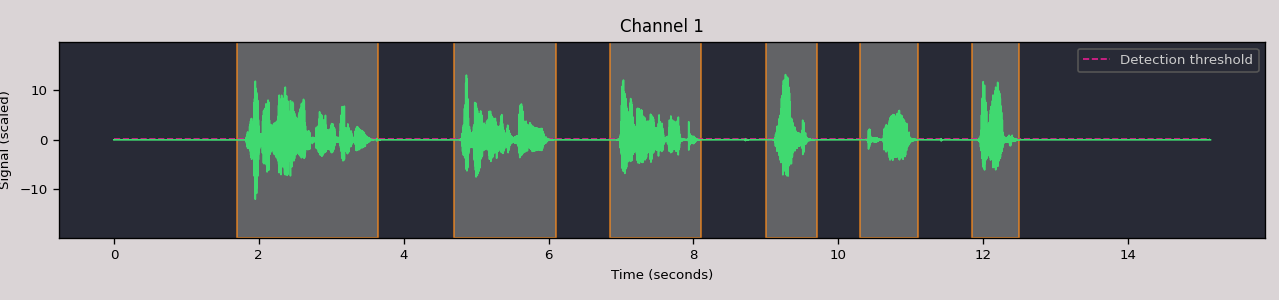
Interactive widget in Jupyter
Pass interactive=True to split_and_plot to get an HTML5/Canvas/WebAudio widget with clickable detection regions and inline playback:
events = audio.split_and_plot(interactive=True,
                              max_leading_silence=0.1,
                              max_trailing_silence=0.1)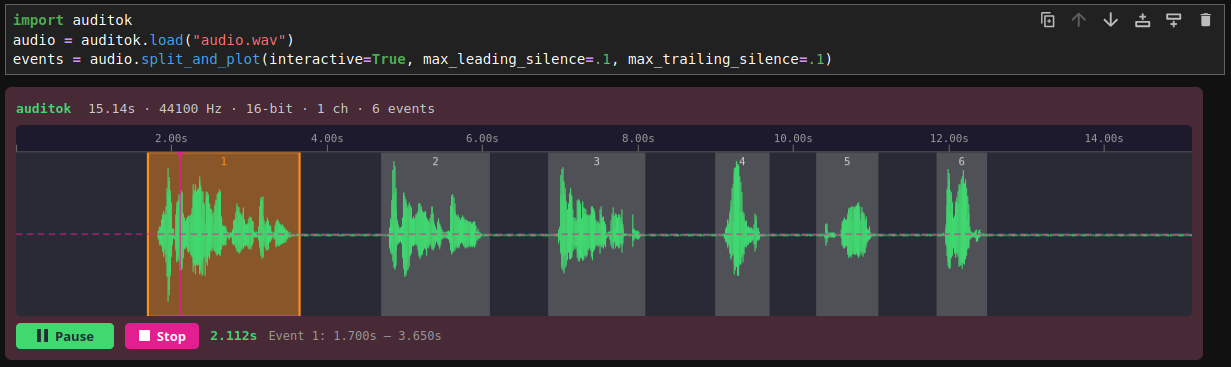
Working with AudioRegion
AudioRegion is the central data structure. It wraps raw audio bytes with metadata (sampling rate, sample width, channels) and provides a rich API for slicing, combining, and exporting audio.
import auditok

region = auditok.load("audio.wav")

# Time-based slicing (returns a new AudioRegion)
first_five_seconds = region.sec[0:5]
middle = region.ms[1500:3000]  # milliseconds

# Concatenation
combined = region1 + region2

# Repetition
repeated = region * 3

# Playback
region.play(progress_bar=True)

# Save with template placeholders
region.save("output_{start:.3f}-{end:.3f}.wav")

# Export as numpy array: shape (channels, samples)
x = region.numpy()
assert x.shape[0] == region.channels
assert x.shape[1] == len(region)
In Jupyter notebooks, AudioRegion objects render as inline HTML5 audio players automatically.
Command line
auditok provides three subcommands: split (default), trim, and fix-pauses. All three support file input and microphone recording.
Split audio into events
# Split a file (default subcommand, both forms are equivalent)
auditok split audio.wav -e 55 -n 0.5 -m 10 -s 0.3
# Or simply
auditok audio.wav -e 55 -n 0.5 -m 10 -s 0.3

# Estimate the threshold from the file instead of fixing it
auditok audio.wav -e auto

# Save detected events to individual files
auditok audio.wav -o "event_{id}_{start:.3f}-{end:.3f}.wav"

# Stream from microphone
auditok

# Stream from microphone with a threshold calibrated on the
# first 3 seconds of audio
auditok -e auto
Trim silence
# Remove leading and trailing silence
auditok trim audio.wav -o trimmed.wav

# Record from microphone, trim, and save
auditok trim -o trimmed.wav
Normalize pauses
# Replace all pauses with 0.5s of silence
auditok fix-pauses audio.wav -o cleaned.wav -d 0.5

# Record from microphone, normalize pauses, and save
auditok fix-pauses -o cleaned.wav -d 0.5
Common options
-e, --energy-threshold     Detection threshold, a number or 'auto'
                           [default: 50]
-V, --validator            Detection strategy: 'otsu', 'percentile',
                           'pXX' (threshold estimation method) or
                           'webrtc[:MODE]' (WebRTC VAD)
-y, --min-energy-threshold Lower bound for the threshold calibrated
                           on live input [default: 40]
-U, --calibration-duration Seconds of live audio used for threshold
                           calibration [default: 3]
-n, --min-duration         Minimum event duration in seconds [default: 0.2]
-m, --max-duration         Maximum event duration in seconds (split only) [default: 5]
-s, --max-silence          Max silence within an event [default: 0.3]
-l, --max-leading-silence  Silence to retain before events [default: 0]
-g, --max-trailing-silence Trailing silence to keep [default: all]
Limitations
auditok’s core is energy-based: it detects any sufficiently loud audio, not speech specifically. It works best in low-noise environments – podcasts, language lessons, recordings in quiet rooms – where the signal is clearly above the background noise.
Automatic thresholding removes the need to tune the threshold per recording, and the WebRTC validator adds frame-level speech detection, but neither turns auditok into a neural voice activity detector: in noisy, far-field, or music-heavy audio, a model-based VAD will be more accurate (at a much higher computational cost). auditok’s trade-off is speed and footprint: a numpy-only core that processes audio orders of magnitude faster than real time.
License
MIT.
Release history Release notifications | RSS feed


Download files
Download the file for your platform. If you're not sure which to choose, learn more about installing packages.
Source Distribution
Built Distribution
Filter files by name, interpreter, ABI, and platform.
If you're not sure about the file name format, learn more about wheel file names.
Copy a direct link to the current filters
File details
Details for the file auditok-0.5.0.tar.gz.
File metadata
- Download URL: auditok-0.5.0.tar.gz
- Upload date:
- Size: 135.2 kB
- Tags: Source
- Uploaded using Trusted Publishing? No
- Uploaded via: uv/0.11.14 {"installer":{"name":"uv","version":"0.11.14","subcommand":["publish"]},"python":null,"implementation":{"name":null,"version":null},"distro":{"name":"Ubuntu","version":"24.04","id":"noble","libc":null},"system":{"name":null,"release":null},"cpu":null,"openssl_version":null,"setuptools_version":null,"rustc_version":null,"ci":null}
File hashes
| Algorithm | Hash digest | |
|---|---|---|
| SHA256 |
7e9739f229bc0e6f89a5ee025bc199888e7377d6c6c2daf3f556263291085d53
|
|
| MD5 |
2ae1c81f9d11675784d2aadf57a3865a
|
|
| BLAKE2b-256 |
eaa422e178ad7d5b781f0fdc77d4b208c565e61d5c57506ce0e6bf3c1402f85d
|
File details
Details for the file auditok-0.5.0-py3-none-any.whl.
File metadata
- Download URL: auditok-0.5.0-py3-none-any.whl
- Upload date:
- Size: 83.3 kB
- Tags: Python 3
- Uploaded using Trusted Publishing? No
- Uploaded via: uv/0.11.14 {"installer":{"name":"uv","version":"0.11.14","subcommand":["publish"]},"python":null,"implementation":{"name":null,"version":null},"distro":{"name":"Ubuntu","version":"24.04","id":"noble","libc":null},"system":{"name":null,"release":null},"cpu":null,"openssl_version":null,"setuptools_version":null,"rustc_version":null,"ci":null}
File hashes
| Algorithm | Hash digest | |
|---|---|---|
| SHA256 |
7b50d94bb7458d40003c5de27930b5c29f3b654b665219f781f8bc5d69c70a2a
|
|
| MD5 |
5e1d8de45462a2a785a5950b42c9681e
|
|
| BLAKE2b-256 |
f4024b450029658592b587bd7eb7b72d7d355afc8f68660636cff80009409715
|






