
This release is a pre-release and may not be stable for production use.
🕷️ ScrapeGraphAI: You Only Scrape Once
English | 中文 | 日本語 | 한국어 | Русский






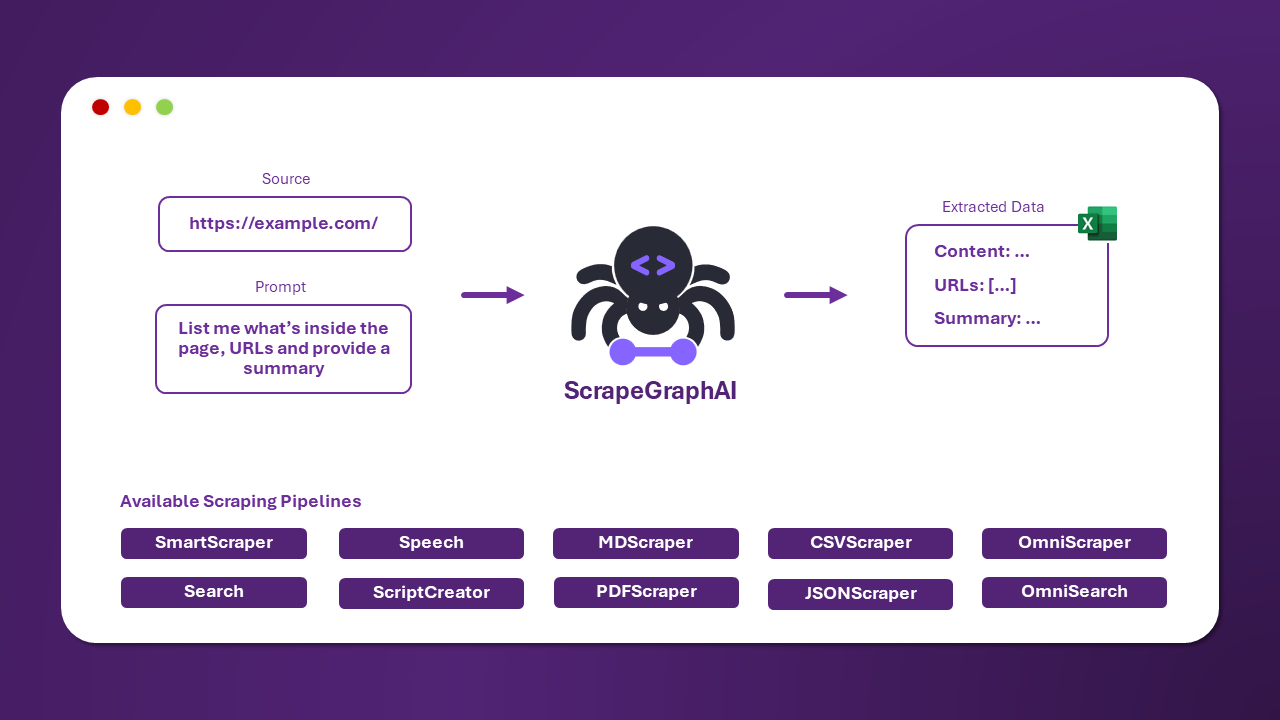
ScrapeGraphAI is a web scraping python library that uses LLM and direct graph logic to create scraping pipelines for websites and local documents (XML, HTML, JSON, Markdown, etc.).
Just say which information you want to extract and the library will do it for you!
🚀 Quick install
The reference page for Scrapegraph-ai is available on the official page of PyPI: pypi.
pip install scrapegraphai

playwright install
Note: it is recommended to install the library in a virtual environment to avoid conflicts with other libraries 🐱
Optional Dependencies
Additional dependecies can be added while installing the library:-
More Language Models: additional language models are installed, such as Fireworks, Groq, Anthropic, Hugging Face, and Nvidia AI Endpoints.
This group allows you to use additional language models like Fireworks, Groq, Anthropic, Together AI, Hugging Face, and Nvidia AI Endpoints.
pip install scrapegraphai[other-language-models]
-
Semantic Options: this group includes tools for advanced semantic processing, such as Graphviz.
pip install scrapegraphai[more-semantic-options]
-
Browsers Options: this group includes additional browser management tools/services, such as Browserbase.
pip install scrapegraphai[more-browser-options]
💻 Usage
There are multiple standard scraping pipelines that can be used to extract information from a website (or local file).
The most common one is the SmartScraperGraph, which extracts information from a single page given a user prompt and a source URL.
import json
from scrapegraphai.graphs import SmartScraperGraph

# Define the configuration for the scraping pipeline
graph_config = {
    "llm": {
        "api_key": "YOUR_OPENAI_APIKEY",
        "model": "openai/gpt-4o-mini",
    },
    "verbose": True,
    "headless": False,
}

# Create the SmartScraperGraph instance
smart_scraper_graph = SmartScraperGraph(
    prompt="Find some information about what does the company do, the name and a contact email.",
    source="https://scrapegraphai.com/",
    config=graph_config
)

# Run the pipeline
result = smart_scraper_graph.run()
print(json.dumps(result, indent=4))
The output will be a dictionary like the following:
{
    "company": "ScrapeGraphAI",
    "name": "ScrapeGraphAI Extracting content from websites and local documents using LLM",
    "contact_email": "contact@scrapegraphai.com"
}
There are other pipelines that can be used to extract information from multiple pages, generate Python scripts, or even generate audio files.
| Pipeline Name | Description |
|---|---|
| SmartScraperGraph | Single-page scraper that only needs a user prompt and an input source. |
| SearchGraph | Multi-page scraper that extracts information from the top n search results of a search engine. |
| SpeechGraph | Single-page scraper that extracts information from a website and generates an audio file. |
| ScriptCreatorGraph | Single-page scraper that extracts information from a website and generates a Python script. |
| SmartScraperMultiGraph | Multi-page scraper that extracts information from multiple pages given a single prompt and a list of sources. |
| ScriptCreatorMultiGraph | Multi-page scraper that generates a Python script for extracting information from multiple pages and sources. |
For each of these graphs there is the multi version. It allows to make calls of the LLM in parallel.
It is possible to use different LLM through APIs, such as OpenAI, Groq, Azure and Gemini, or local models using Ollama.
Remember to have Ollama installed and download the models using the ollama pull command, if you want to use local models.
🔍 Demo
Official streamlit demo:

Try it directly on the web using Google Colab:

📖 Documentation
The documentation for ScrapeGraphAI can be found here.
Check out also the Docusaurus here.
🏆 Sponsors



🤝 Contributing
Feel free to contribute and join our Discord server to discuss with us improvements and give us suggestions!
Please see the contributing guidelines.


📈 Telemetry
We collect anonymous usage metrics to enhance our package's quality and user experience. The data helps us prioritize improvements and ensure compatibility. If you wish to opt-out, set the environment variable SCRAPEGRAPHAI_TELEMETRY_ENABLED=false. For more information, please refer to the documentation here.
❤️ Contributors
🎓 Citations
If you have used our library for research purposes please quote us with the following reference:
  @misc{scrapegraph-ai,
    author = {Marco Perini, Lorenzo Padoan, Marco Vinciguerra},
    title = {Scrapegraph-ai},
    year = {2024},
    url = {https://github.com/VinciGit00/Scrapegraph-ai},
    note = {A Python library for scraping leveraging large language models}
  }
Authors

| Contact Info | |
|---|---|
| Marco Vinciguerra |  |
| Marco Perini | |
| Lorenzo Padoan | |
📜 License
ScrapeGraphAI is licensed under the MIT License. See the LICENSE file for more information.
Acknowledgements
- We would like to thank all the contributors to the project and the open-source community for their support.
- ScrapeGraphAI is meant to be used for data exploration and research purposes only. We are not responsible for any misuse of the library.
1 maintainer

Metadata
1 maintainer
Release files for auk-scrapegraphai 1.26.0b19
For a detailed explanation of source distributions (sdists) and built distributions (wheels), please see the package formats documentation.
Source distribution (sdist)
| File | Size | Uploaded | |
|---|---|---|---|
| auk_scrapegraphai-1.26.0b19.tar.gz | 3.5 MB | Details |
Built distribution (wheel)
| File | Interpreter | ABI | Platform | Reset |
|---|---|---|---|---|
| auk_scrapegraphai-1.26.0b19-py3-none-any.whl | Python 3 | none | any | Details |
Total release size: 3.7 MB
Release files / auk_scrapegraphai-1.26.0b19.tar.gz
| Download URL | auk_scrapegraphai-1.26.0b19.tar.gz |
|---|---|
| Size | 3.5 MB |
| Tags | Source |
|
SHA-256 checksum How to use checksums |
9bf36431256fb86fbd0846ebc3b8b2d8df87281b55017f10aebe4cb87da1ad0a
|
|
BLAKE2b-256 checksum How to use checksums |
2bab0adde7b6c9d37acdaa9c1976b5e446988c218352a355db1c1055411c22e3
|
| Upload date | |
|
Uploaded using Trusted Publishing? What is trusted publishing? |
No |
| Uploaded via |
twine/5.1.1 CPython/3.11.10
|
Release files / auk_scrapegraphai-1.26.0b19-py3-none-any.whl
| Download URL | auk_scrapegraphai-1.26.0b19-py3-none-any.whl |
|---|---|
| Size | 164.0 kB |
| Tags | Python 3 |
|
SHA-256 checksum How to use checksums |
c8928f7fd784ef5225985dea644a29ba8cf5713ac5e87ee639865b5e2f604f69
|
|
BLAKE2b-256 checksum How to use checksums |
1ff5bcb9608ddbdae7f50dbec6b532b05e9ec870dfa65cc6b67719975d1d750a
|
| Upload date | |
|
Uploaded using Trusted Publishing? What is trusted publishing? |
No |
| Uploaded via |
twine/5.1.1 CPython/3.11.10
|














