
AURA
Automated Realtime Assistant
An autonomous agent that turns a plain-English goal into a plan, then carries it out on your own machine:
shell, files, web, a logged-in browser, Gmail and Calendar, and the desktop itself, driven by on-screen OCR.



Demos | Quick start | How it works | Tools | Python library | Configuration
pip install "aura-autonomous-agent[all]"
aura run "schedule a Meet with the team tomorrow at 10 and email them the link"
Highlights
- Plans, then acts. A dedicated planner call breaks each goal into up to 10 ordered subtasks; a ReAct executor then calls tools, reads every result and self-corrects until each subtask is done.
- 35 built-in tools across shell, files, web search, Playwright, Gmail, Google Calendar, Google Meet, Google Forms and OS-level mouse and keyboard control.
- Sees the screen without spending tokens. Native Windows OCR turns the display into a map of every text line and its pixel position, so the agent clicks by coordinates on apps that have no API. A vision model is the fallback for purely graphical screens.
- Learns new tools by watching you. Record yourself doing a task once; a vision model writes it up as a Python tool, which is hot-registered and available immediately, with no restart.
- Works as you. Drives your real Chrome profile with its logins and cookies, and your Google account over OAuth.
- Model-agnostic. Runs against any OpenAI-compatible endpoint: OpenAI, a LiteLLM proxy, vLLM or a self-hosted open-weight model.
- Safe by default. Writes and shell commands ask Y/N first; deletes,
sudo,git pushand package installs always ask, even with safe mode off. - A CLI and a library. Use
aura runin a terminal orfrom aura import Agentin your own code, with your own Python functions as extra tools.
Demos
Each clip is a single prompt typed or spoken into aura run. AURA plans the steps and carries them out on its own. Previews are sped up; click one to watch the full recording.
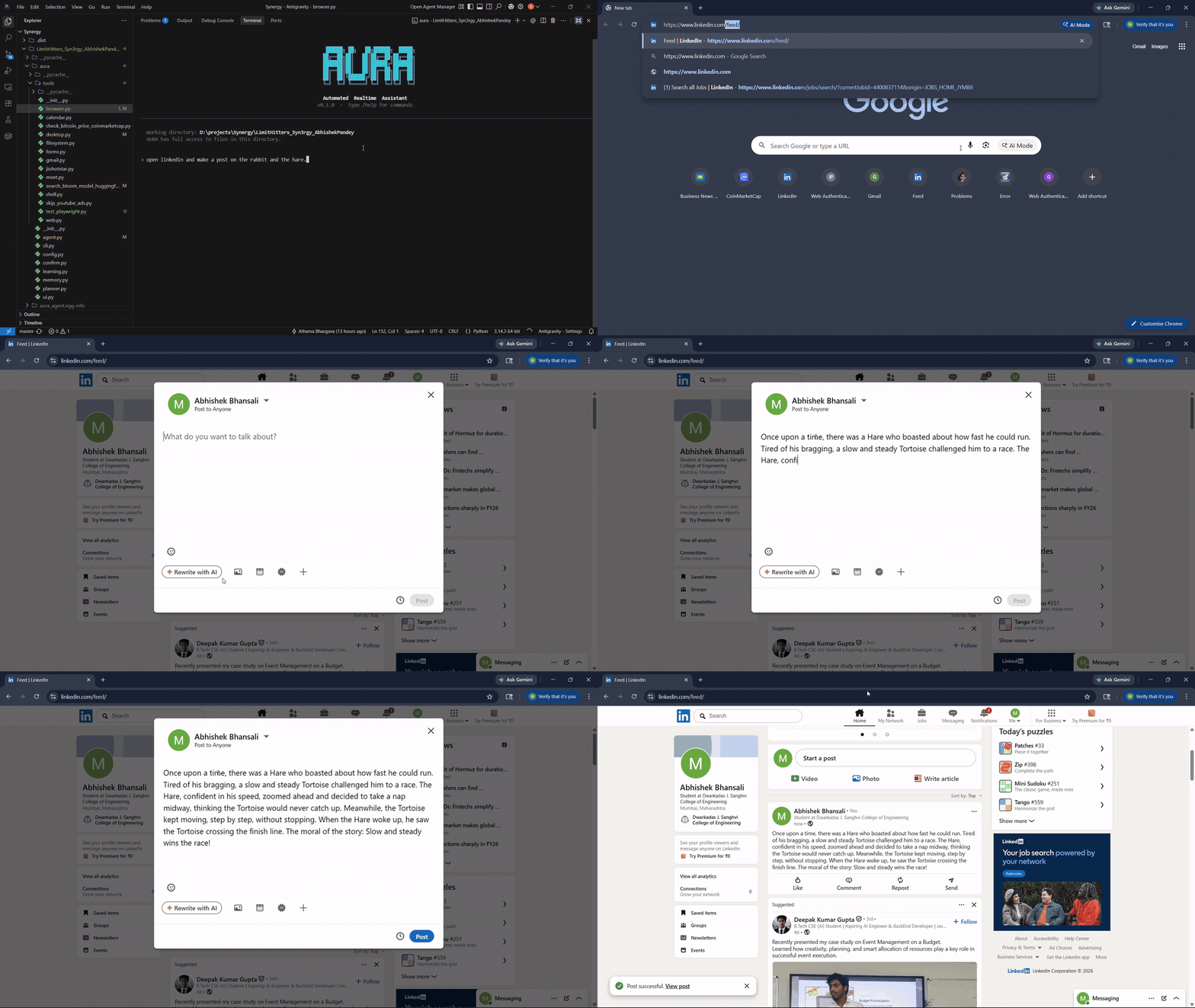
Writes and publishes a LinkedIn post
"open linkedin and make a post on the rabbit and the hare"
Opens Chrome on the logged-in profile, writes the story into the post composer and clicks Post.
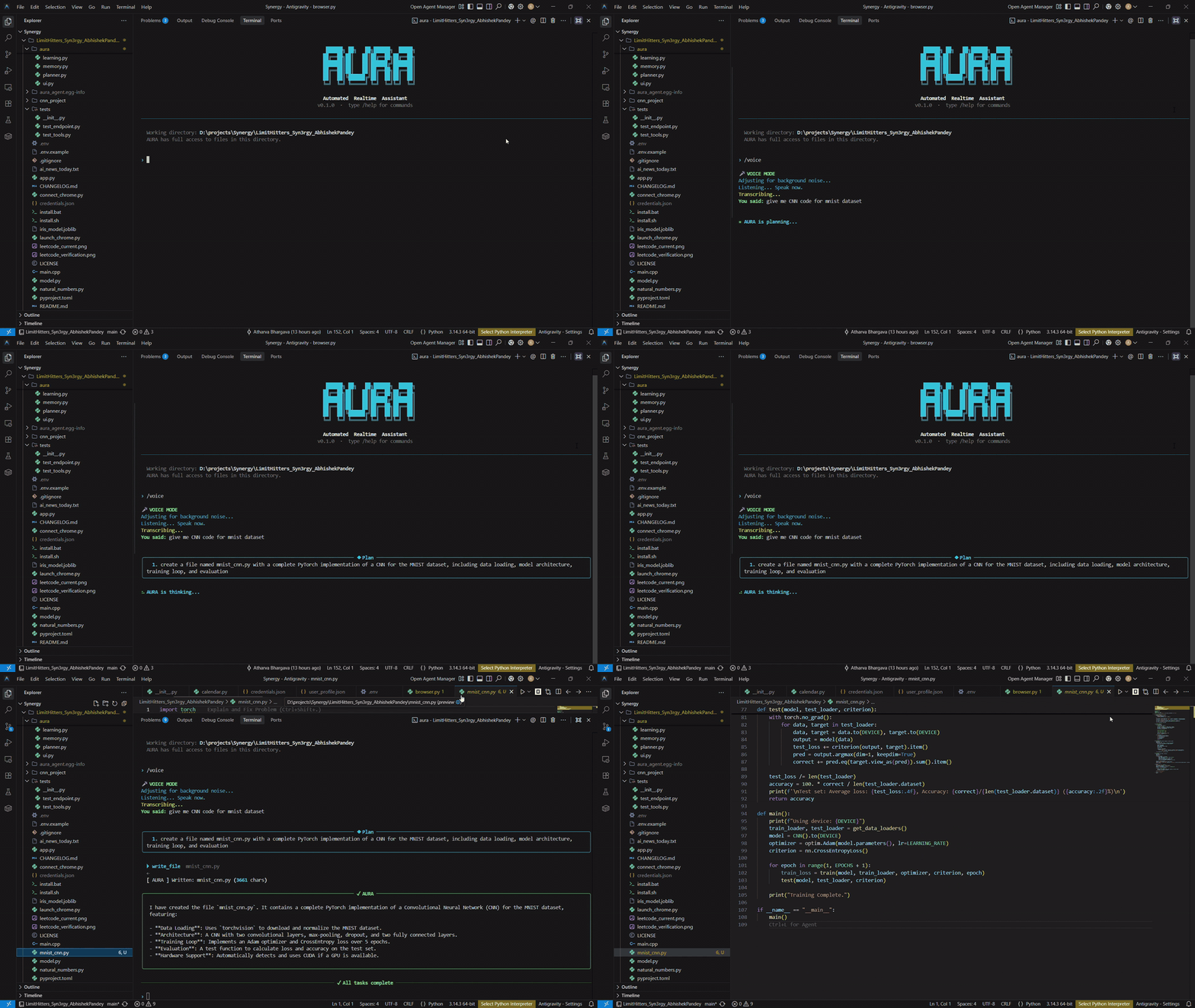
Voice to code
/voice then "give me CNN code for mnist dataset"
Transcribes the request, plans it and writes a complete PyTorch MNIST CNN with data loading, model, training loop and evaluation.
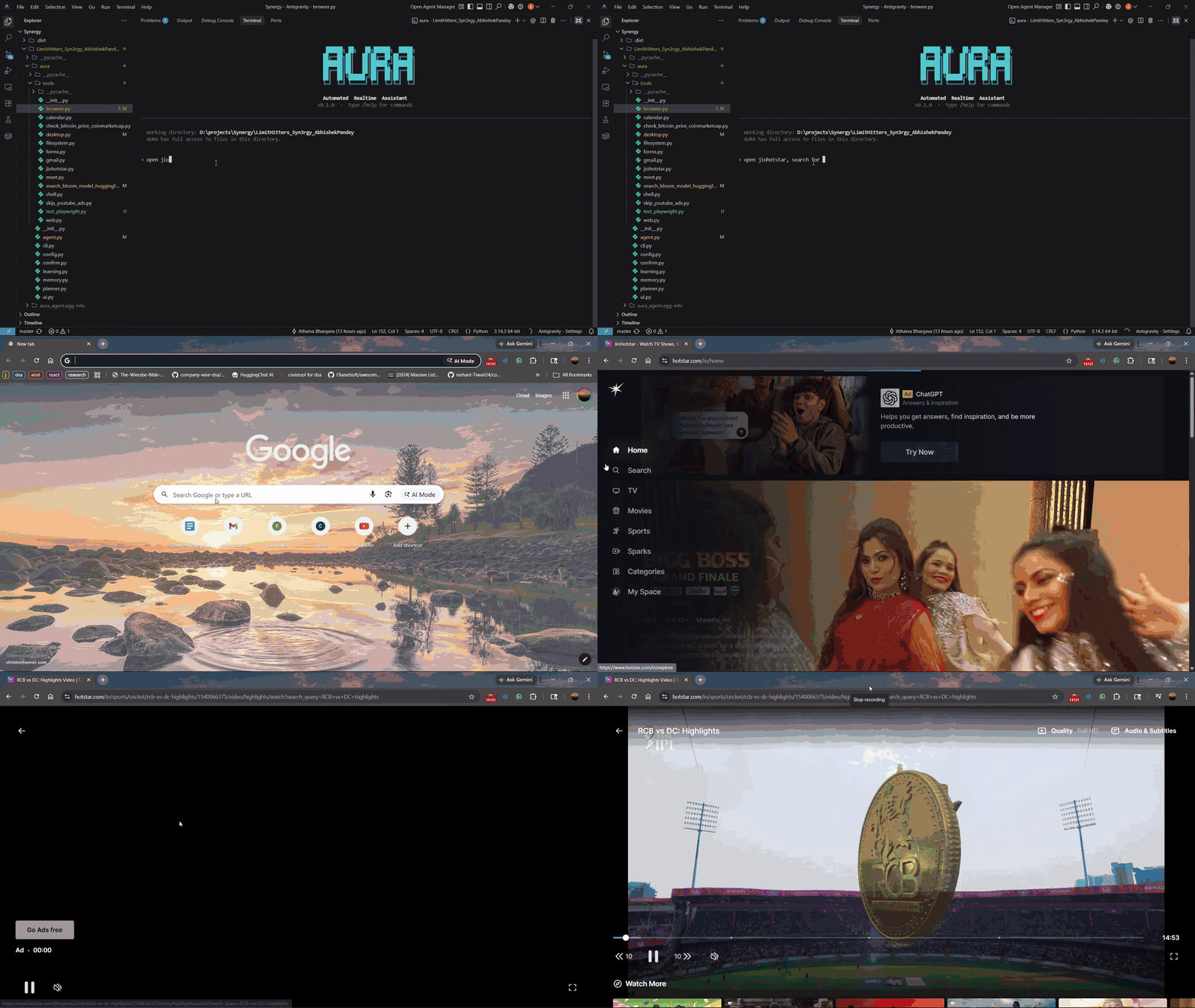
Finds and plays IPL highlights on JioHotstar
"open jiohotstar, search for RCB vs DC highlights and play the first video"
Launches the app from the Start menu, searches for the match and starts playback.
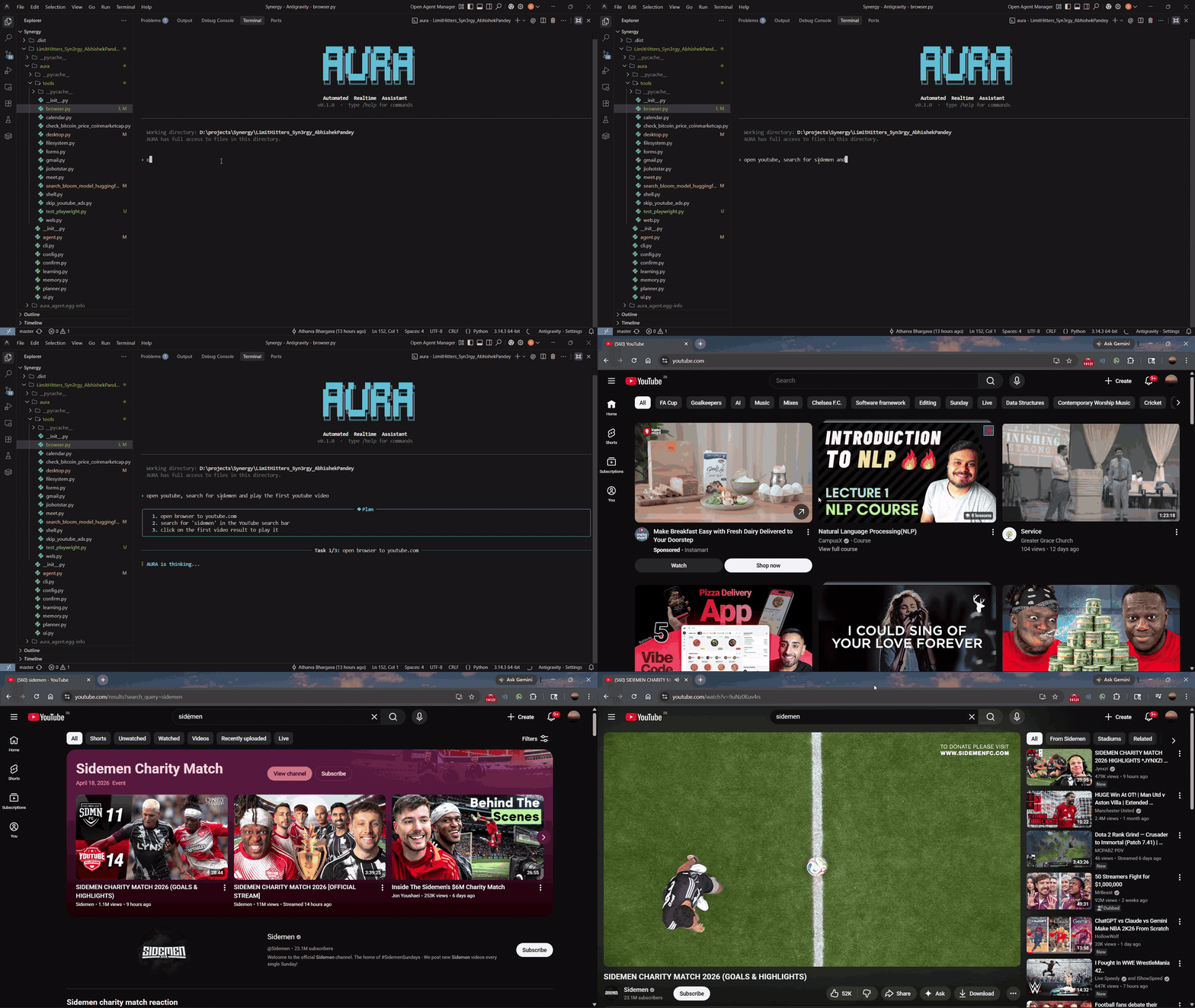
Searches YouTube and plays a video
"open youtube, search for sidemen and play the first youtube video"
Opens the browser, runs the search and plays the top result.
Quick start
1. Install
pip install "aura-autonomous-agent[all]"   # every tool
pip install aura-autonomous-agent          # core only: agent loop + shell, file and web tools
playwright install chromium                # once, for the browser tools
2. Point it at a model. Any OpenAI-compatible endpoint works. Put this in a .env file in your working directory or in ~/.aura/.env:
INFERX_BASE_URL=https://api.openai.com/v1
INFERX_API_KEY=sk-...
INFERX_MODEL=gpt-4o-mini
3. Run it
aura run                                         # interactive session
aura run "create a Flask app with a /ping endpoint and run it"
aura learn "check my bank balance"               # record a workflow, get a new tool
Or call it from Python
from aura import Agent

agent = Agent(api_key="sk-...", base_url="https://api.openai.com/v1", model="gpt-4o-mini")
print(agent.run("create hello.py that prints hi, then run it"))
How it works
  goal  (typed, spoken with /voice, or passed to Agent.run)
    |
    v
+---------------------------+
|  Planner                  |   one low-temperature LLM call
|  goal -> up to 10 tasks   |   falls back to [goal] if planning fails
+---------------------------+
    |  for each task
    v
+---------------------------+   tool calls    +-----------------------------+
|  Executor (ReAct loop)    | --------------> |  Tool registry: 35 tools    |
|  think -> act -> observe  |                 |  shell, files, web,         |
|  capped at 30 iterations  | <-------------- |  browser, desktop, Google,  |
+---------------------------+   observations  |  learned tools              |
    |                |                        +-----------------------------+
    v                v                                      ^
 Confirmation     Session memory                            |
 gate (Y/N)       ~/.aura/sessions/*.json         watch-and-learn writes
                  (resumable)                     new tools here at runtime
Planner. A separate LLM call with its own prompt, a 512-token cap and one job: return a JSON list of concrete subtasks. It is a soft dependency; if the endpoint fails or returns malformed JSON, the whole goal runs as a single task.
Executor. A ReAct loop. Every request carries the conversation and every tool schema; tool calls are executed and their output is fed back as observations. When the model answers without calling a tool, the task is done. A cap of 30 iterations stops a confused model from looping forever.
Tool registry. aura/tools/ is a plugin package. On first use AURA scans it, imports each module, and registers any TOOL_DEFS schema whose function exists. Adding a tool means dropping in one file; there is no central list to edit. Tools whose optional dependencies are missing are skipped, so a core install still works.
Desktop perception. desktop_read_screen screenshots the display and runs it through the native Windows OCR engine, returning every visible line of text with its pixel centroid. The model reads that map and clicks by coordinates. OCR is local and free, so most perception costs no tokens; desktop_analyze_screen sends a screenshot to a vision model only when the screen is graphical.
Watch-and-learn. aura learn "<goal>" records your clicks and keystrokes with timestamps plus before and after screenshots. A vision model turns the trace into a Python module with a tool schema and a function, which is saved to ~/.aura/tools/ and registered on the spot. The four tools in aura/tools/ for Bitcoin prices, JioHotstar, Hugging Face search and YouTube ad skipping were generated this way.
Safety. With safe mode on, file writes and shell commands show a confirmation panel first. Deletes, rm, sudo, chmod, shutdown, git push and package installs always ask, even with safe mode off. Routine mouse and keyboard actions are auto-approved so a 30-click task stays usable.
Resilience. LLM calls retry up to 3 times with 5 and 10 second backoff on 5xx errors, timeouts and dropped connections, and fail fast on errors that a retry cannot fix, such as a bad key. Sessions are written to disk after every message, so an interrupted run can be resumed with /resume.
Tools
| Area | Tools | Install extra |
|---|---|---|
| Shell | bash |
core |
| Files | read_file, write_file, patch_file, list_dir, delete_file |
core |
| Web | web_search, web_fetch |
core |
| Browser (Playwright) | browser_navigate, browser_click, browser_fill, browser_get_text, browser_screenshot |
browser |
| Desktop | desktop_click, desktop_move_mouse, desktop_type, desktop_press, desktop_scroll, desktop_get_position, desktop_read_screen, desktop_find_text, desktop_analyze_screen |
desktop |
| Gmail | gmail_send, gmail_read_inbox |
google |
| Google Calendar | calendar_list_events, calendar_add_event, calendar_delete_event |
google |
| Google Meet | meet_create (creates the Meet, the calendar event and emails the link in one call) |
google |
| Google Forms | forms_load_profile, forms_update_profile, forms_generate_prefill_url |
google |
| Learned by watching | check_bitcoin_price_coinmarketcap, jiohotstar_play, search_bloom_model_huggingface, skip_youtube_ads |
desktop |
Extras combine: pip install "aura-autonomous-agent[desktop,google]". The voice extra adds /voice speech input and spoken notifications; all installs everything.
Python library
from aura import Agent

agent = Agent(
    api_key="sk-...",                       # or INFERX_API_KEY
    base_url="https://api.openai.com/v1",   # any OpenAI-compatible endpoint
    model="gpt-4o-mini",
    verbose=False,                          # no terminal output
    approve=lambda action, detail: False,   # decline risky actions instead of prompting
)

print(agent.plan("set up a FastAPI project with tests"))   # just the plan
result = agent.run("set up a FastAPI project with tests")  # plan and execute
Add your own tools. Any function becomes a tool; the schema is built from its signature and docstring.
@agent.add_tool
def get_order_status(order_id: str) -> str:
    """Look up an order's shipping status."""
    return orders.status(order_id)

agent.run("has order 1042 shipped yet?")
Agent(...) option |
Default | Purpose |
|---|---|---|
api_key, base_url, model |
from environment | LLM endpoint |
plan |
True |
False runs the goal as a single task without the planner |
max_iterations |
30 |
Executor loop cap per task |
safe_mode |
AURA_SAFE_MODE |
Ask before writes and shell commands |
approve |
interactive prompt | callback(action, detail) -> bool for scripts with no terminal |
verbose |
True |
Rich terminal output |
session_id |
new session | Resume a saved session |
client |
built for you | Inject your own OpenAI-compatible client |
agent.tools lists every available tool name. Importing aura never needs an API key; creating an Agent without one raises aura.ConfigError with setup instructions.
CLI
| Command | What it does |
|---|---|
aura run |
Interactive session in the current directory |
aura run "<goal>" |
Run one goal and exit |
aura learn "<goal>" |
Record a workflow and generate a new tool from it |
aura version |
Show the version |
Inside a session:
| Command | What it does |
|---|---|
/voice |
Speak the next goal instead of typing it |
/learn <goal> |
Record a workflow and generate a new tool |
/tools |
List available tools |
/sessions |
List past sessions |
/resume |
Resume a previous session |
/clear |
Clear the conversation |
/cwd |
Show the working directory |
/help |
Show all commands |
/exit |
Quit |
Configuration
Settings come from environment variables or a .env file, read from the current directory, then ~/.aura/.env, then the source checkout.
| Variable | Default | Purpose |
|---|---|---|
INFERX_BASE_URL |
https://api.openai.com/v1 |
OpenAI-compatible endpoint |
INFERX_API_KEY |
required | API key |
INFERX_MODEL |
gemma-4-31b |
Model name |
AURA_SAFE_MODE |
true |
Ask before writes and shell commands |
AURA_HOME |
~/.aura |
Sessions, learned tools, Google credentials and the form profile |
AURA_CHROME_PROFILE |
your OS's Chrome profile | Profile used by the browser tools |
AURA_USER_NAME |
none | Name used in the spoken "task completed" message |
Google tools. Create an OAuth client (Desktop app) in Google Cloud with the Gmail and Calendar APIs enabled and save it as ~/.aura/credentials.json. The first Google tool call opens a browser to sign in and stores token.json next to it.
Install from source
git clone https://github.com/abhishek-pandey7/AURA-Automated-Realtime-Assistant
cd AURA-Automated-Realtime-Assistant
cp .env.example .env

bash install.sh          # macOS / Linux
install.bat              # Windows
Or manually:
python -m venv .venv
source .venv/bin/activate          # Windows: .venv\Scripts\activate
pip install -e ".[all,dev]"
playwright install chromium
Platform notes
- Screen OCR (
desktop_read_screen,desktop_find_text) uses the Windows OCR engine and is Windows only. Mouse and keyboard control work on Windows, macOS and Linux. - macOS:
/voiceneedsbrew install portaudio flac. On Apple Silicon, SpeechRecognition ships an x86flac; replace it with the native one:cp /opt/homebrew/bin/flac "$(python -c 'import speech_recognition, os; print(os.path.dirname(speech_recognition.__file__))')/flac-mac"
- Windows: if
pyaudiohas no wheel for your Python, runpip install pipwinand thenpipwin install pyaudio.
Project structure
aura/
  agent.py        Agent class and the ReAct executor loop
  planner.py      Goal to subtask planner
  tools/          Plugin registry and every built-in tool, one module per area
  learning.py     Watch-and-learn recorder and tool generator
  confirm.py      Human-in-the-loop confirmation gate
  memory.py       Session persistence and resume
  config.py       Settings, .env loading and data paths
  ui.py           Interactive terminal session
  cli.py          `aura` command entry point
tests/
  test_library.py   Library API tests against a fake LLM client (no key needed)
  test_tools.py     Tool checks for shell, files, web, config and memory
  test_endpoint.py  Connectivity check for your LLM endpoint
Testing
pytest tests/test_library.py     # no API key or network needed
python tests/test_tools.py       # tool checks
python tests/test_endpoint.py    # checks your configured endpoint
Roadmap
- Learned tools that locate targets with OCR instead of fixed coordinates, so they survive layout changes
- Long-term memory across sessions with vector search
- Context compaction for long multi-step runs
- Sandboxed execution in a container or virtual desktop for unattended use
- A web dashboard to watch runs and approve actions remotely
Authors
Built by Abhishek Pandey.
License
1 maintainer

Metadata
1 maintainer
Release files for aura-autonomous-agent 0.2.1
For a detailed explanation of source distributions (sdists) and built distributions (wheels), please see the package formats documentation.
Source distribution (sdist)
| File | Size | Uploaded | Provenance | Actions |
|---|---|---|---|---|
| aura_autonomous_agent-0.2.1.tar.gz | 56.4 kB | Without provenance | Details for aura_autonomous_agent-0.2.1.tar.gz |
Built distribution (wheel)
| File | Interpreter | ABI | Platform | Actions Reset |
|---|---|---|---|---|
| aura_autonomous_agent-0.2.1-py3-none-any.whl | Python 3 | none | any | Details for aura_autonomous_agent-0.2.1-py3-none-any.whl |
Total release size: 110.1 kB
Release files / aura_autonomous_agent-0.2.1.tar.gz
| Download URL | aura_autonomous_agent-0.2.1.tar.gz |
|---|---|
| Size | 56.4 kB |
| Tags | Source |
|
SHA-256 checksum How to use checksums |
b3e3132f353109cf933b3376458d639206302306bd561b74958b0716a7632383
|
|
BLAKE2b-256 checksum How to use checksums |
6b9aec40e90dd41b5ba068c41a0f1cd16892cb1511344749cdb1ab175aa0196b
|
| Upload date | |
|
Uploaded using Trusted Publishing? What is trusted publishing? |
No |
| Uploaded via |
twine/7.0.0 CPython/3.12.10
|
Release files / aura_autonomous_agent-0.2.1-py3-none-any.whl
| Download URL | aura_autonomous_agent-0.2.1-py3-none-any.whl |
|---|---|
| Size | 53.7 kB |
| Tags | Python 3 |
|
SHA-256 checksum How to use checksums |
06d00f4755238cd39e0a17a613162e2d2c0955b5133263fa7eccaba484611d00
|
|
BLAKE2b-256 checksum How to use checksums |
e5a760603c73952e4dd0141323cd982c7bac1e0dd8026346ca2e5d3f29bc5ae5
|
| Upload date | |
|
Uploaded using Trusted Publishing? What is trusted publishing? |
No |
| Uploaded via |
twine/7.0.0 CPython/3.12.10
|
Security for aura-autonomous-agent 0.2.1
Provenance
Provenance describes where a file came from. On PyPI, provenance is shared via attestations, which provide a verifiable record of the build or publishing details. View details, limitations and caveats.
No provenance found
None of the files in this release were uploaded with provenance metadata.
A note on package security
PyPI is a repository for distributing packages, not a service for auditing them. While third-party security researchers and our staff do their best to detect and remove malicious packages, PyPI cannot guarantee the quality, security or suitability of any given package.
To learn more about protecting yourself from malicious actors, visit our package security documentation.














