
AURA - Automated Realtime Assistant
A CLI-based autonomous AI agent that plans, executes, and adapts. Powered by open-weight LLMs via an OpenAI-compatible endpoint, AURA is designed to bridge the gap between simple text-based AI assistants and full-fledged system operators.
From writing complete projects in an IDE to utilizing custom computer vision for desktop interaction, AURA interacts with your operating system the same way you do.
Demos
Each clip is a single prompt typed (or spoken) into aura run. AURA plans the steps and carries them out on its own. The previews are sped up, so click any of them to watch the full recording.
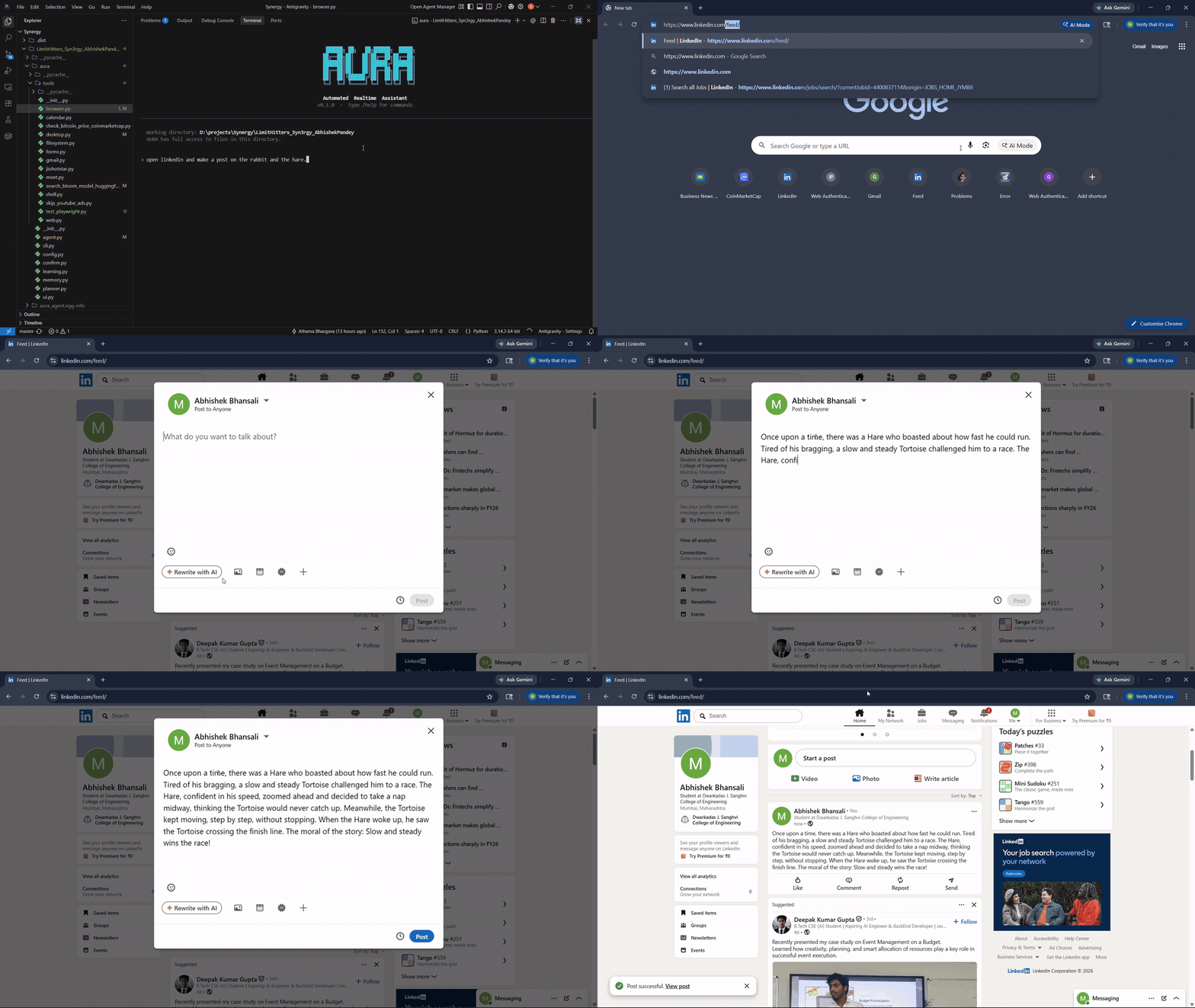
1. Writes and publishes a LinkedIn post
Prompt: "open linkedin and make a post on the rabbit and the hare"
AURA opens Chrome on the logged-in profile, writes the story into the post composer, and clicks Post.
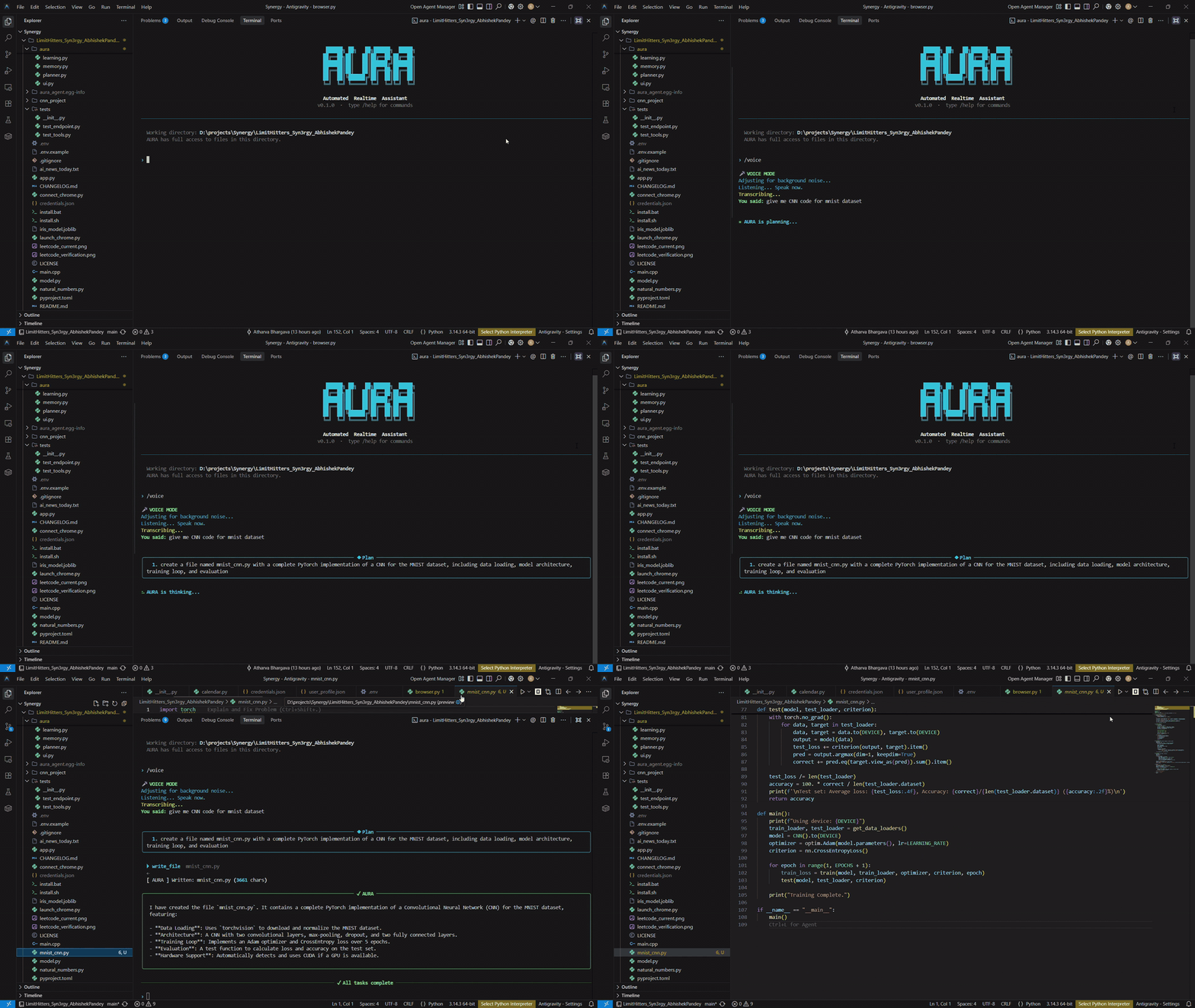
2. Voice to code
Prompt (spoken via /voice): "give me CNN code for mnist dataset"
AURA transcribes the request, plans it, and writes a complete PyTorch MNIST CNN with data loading, model, training and evaluation.
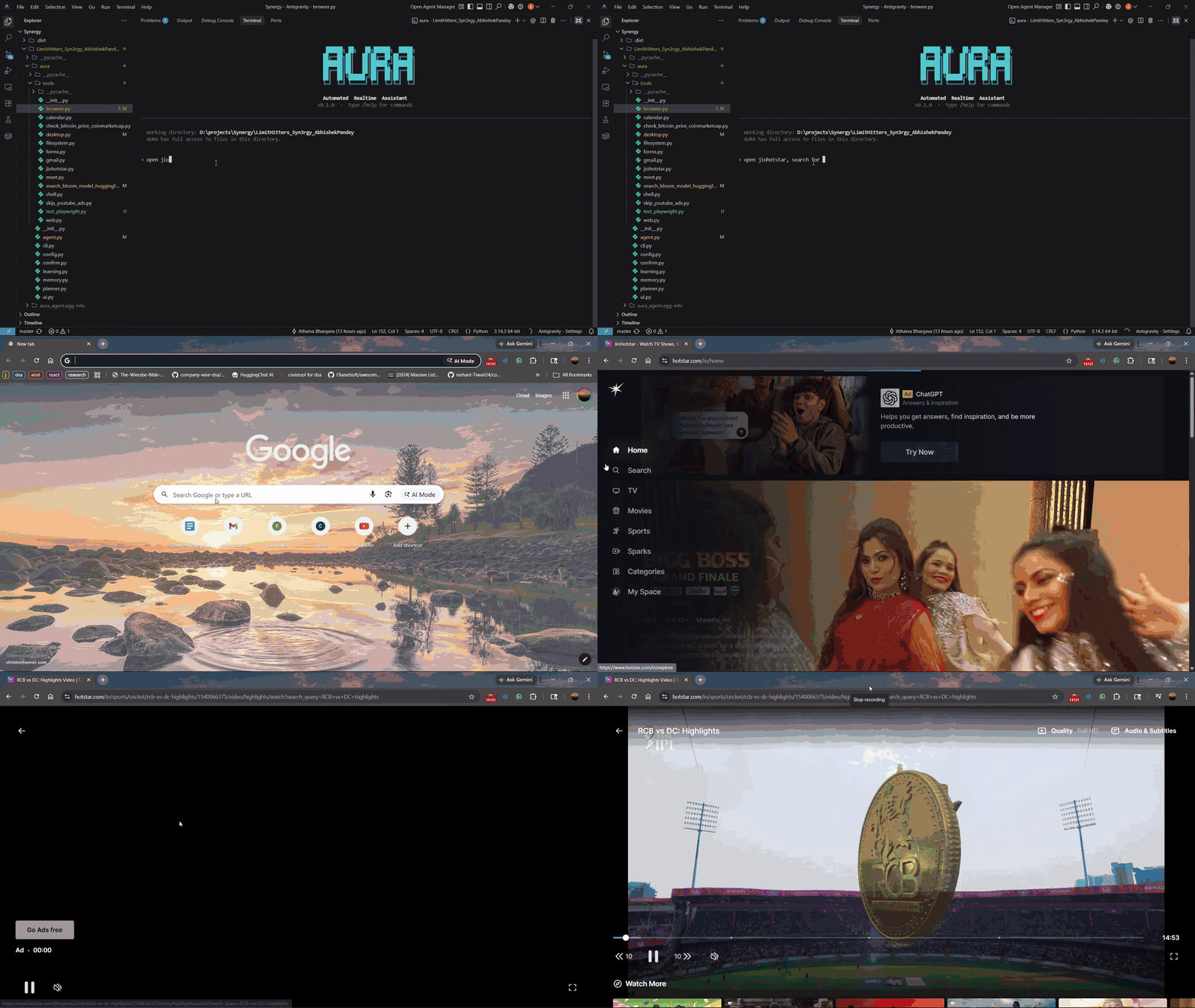
3. Finds and plays IPL highlights on JioHotstar
Prompt: "open jiohotstar, search for RCB vs DC highlights and play the first video"
AURA launches the app from the Start menu, searches for the match, and starts playback.
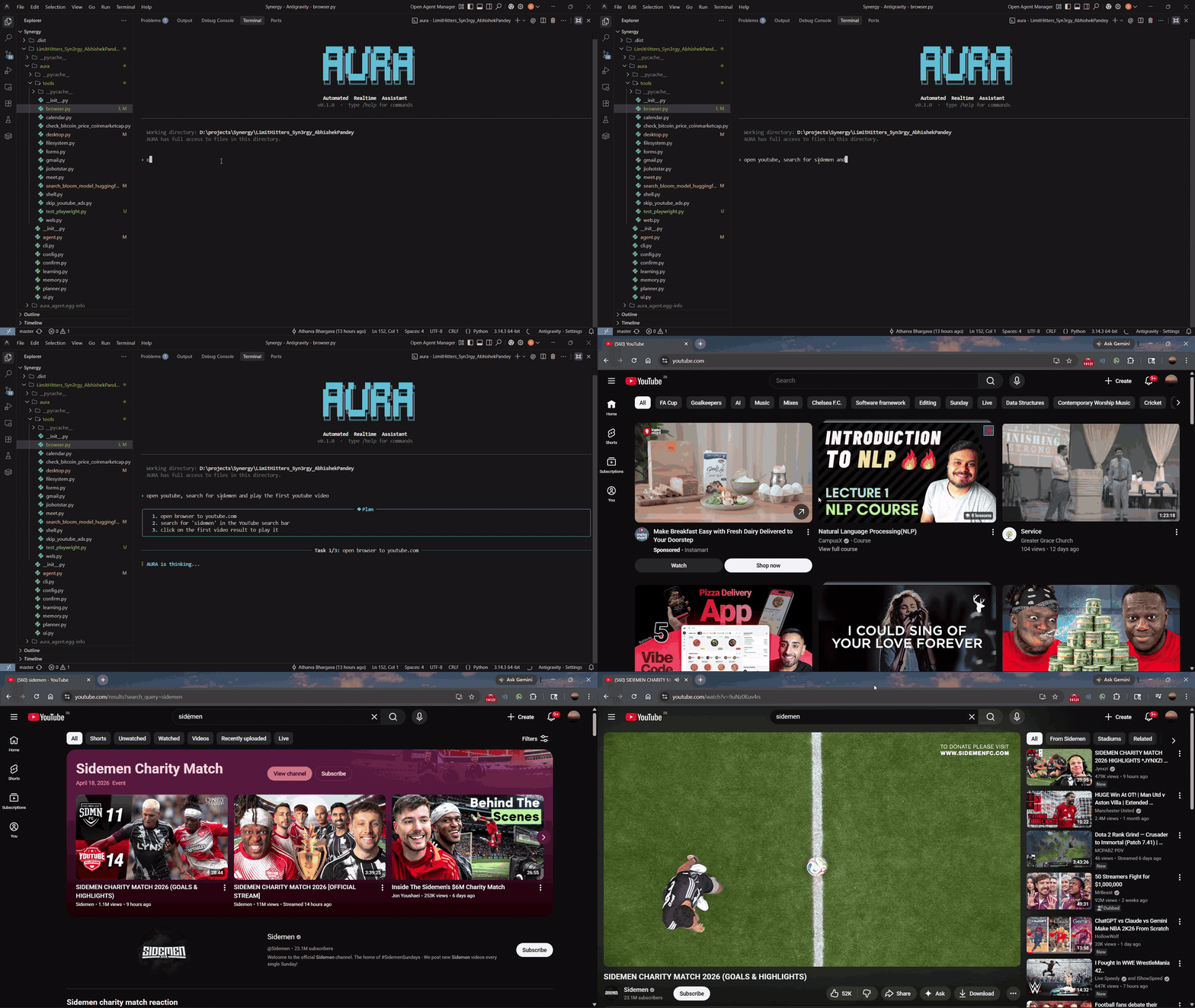
4. Searches YouTube and plays a video
Prompt: "open youtube, search for sidemen and play the first youtube video"
AURA opens the browser, runs the search, and plays the top result.
1. Overview
You provide a goal in natural language. AURA takes that goal, breaks it down into a chronological sequence of steps, and autonomously executes each step using a suite of native tools (shell execution, filesystem manipulation, web browsing, and raw desktop input).
Unlike simple code-generation tools, AURA operates in an Observe -> Think -> Act -> Verify feedback loop. If a test fails, a layout changes, or an error is thrown, AURA reads the output, adjusts its plan, and tries a new approach without needing manual intervention.
Example Execution Trace:
$ aura run

> Build a simple Flask web hook, write tests, run them, and ensure it passes.

Plan
  1. Create project directory and initialize Python files.
  2. Implement Flask app with a basic POST endpoint.
  3. Write pytest test suite.
  4. Run tests and self-correct any failures.

Action      bash         $ mkdir hook_test && cd hook_test
Action      write_file   hook_test/app.py
Action      write_file   hook_test/test_app.py
Action      bash         $ cd hook_test && pytest -v
Observation 1 failed, 0 passed
Action      patch_file   hook_test/app.py   (Self-Correcting issue)
Action      bash         $ pytest -v
Observation 1 passed
2. Advanced Capabilities
AURA goes significantly beyond shell and file manipulation. It incorporates profound systems designed for complex operating workflows:
Full-Screen Spatial Desktop Vision
AURA does not rely purely on text matching or hardcoded coordinates. It features a complete Desktop Vision Engine capable of reading the entire screen layout. It generates a structured spatial map of text and UI elements. This allows AURA to:
- Intelligently understand the visual hierarchy of an application.
- Perform coordinate-based interaction, scrolling, and hover-based navigation on any application, even those not strictly accessible via an API.
- Recover from aggressive bot protection or captchas by visually parsing interfaces.
Imitation Learning ("Watch and Learn")
AURA can learn directly from your behavior. By activating Imitation Learning, AURA uses pynput to listen to your mouse clicks, keyboard inputs, and navigation habits. It captures these user actions and passes them to a Vision-Language Model (VLM) code generation pipeline.
This pipeline synthesizes your organic workflow into reusable Python macros utilizing pyautogui. Once generated, AURA dynamically registers these new macros at runtime, adding them permanently to its toolchain.
Persistent Browser Automation
AURA does not just use stateless HTML scraping. It incorporates headless and non-headless browser automation (utilizing Playwright) that integrates directly with your active Chrome profiles. This enables:
- A deterministic navigation sequence: Launch, focus Chrome, navigate to a target URL, and interact seamlessly.
- State persistence: Logins and cookies from your active Chrome profile allow AURA to perform tasks as an authenticated user.
- Real-time interaction with elements like search bars, infinite scrolling feeds, and dynamically generated single-page applications.
Deep Integration Capabilities
AURA features dedicated automation pipelines for standard office workflows:
- Google Meet & Calendar: Autonomously schedule video conferences, draft meeting agendas, and dynamically email Google Meet links to intended participants.
- Google Forms: Interactively fill out complex web forms relying on a secure, locally-stored user profile and historical context.
3. Tool Architecture
AURA is equipped with a vast tool registry. The agent decides precisely when and how to deploy these tools.
- Filesystem Controls: Read documents, overwrite source files, incrementally patch files, create/delete directories.
- Shell Controls: Execute bash or windows command prompt operations. Read STDOUT and STDERR to verify outcomes.
- Web Engine: Pure HTTP retrieval, localized scraping, and pure web searching to inject research before generating code.
- Desktop Controls: Control the mouse matrix, simulate keyboard events at the OS level, deploy Windows OCR and Tesseract screen captures.
- Playwright Engine: Fully capable Chrome orchestration for front-end manipulation.
4. How it Differs from Cloud Coding Assistants
| Feature | Cloud Assistants (e.g., Claude Code, Codex) | AURA |
|---|---|---|
| Underlying LLM Engine | Proprietary (Anthropic/OpenAI) | Agnostic / Self-hostable (Any OpenAI-compatible API) |
| Architecture Philosophy | Reactive to simple instructions | Proactive upfront Task Planning |
| Desktop & Computer Vision | No | Yes (OS-level Mouse/KB bindings & OCR map generation) |
| Organic Imitation Learning | No | Yes (Macro generation via pynput/VLM) |
| Browser Handling | Limited HTML curl | Native Playwright bindings with Profile Persistence |
| Confirmation Guards | Yes | Yes (Granular Y/N safeguards for Destructive actions) |
| Complete Autonomy | Low, prompts constantly | High, handles multi-hour execution chains |
5. Software Architecture
aura/
|-- __init__.py
|-- cli.py              Command Line entry point
|-- ui.py               Rich Terminal UI, spinners, and REPL loop integration
|-- agent.py            The core LLM prompt loop. Feeds observations back into memory.
|-- planner.py          Converts overarching instructions into ordered subtask structures.
|-- memory.py           Abstracts conversation persistence, contextual truncation, and state saving.
|-- learning.py         Imitation learning loop, VLM code synthesis, and runtime macro injection.
|-- confirm.py          Prompts human-in-the-loop validation for sys-admin actions.
|-- config.py           Validates and orchestrates the environment config payload.
|-- tools/
    |-- shell.py        Isolated subprocess deployment.
    |-- filesystem.py   Advanced string manipulation and file targeting.
    |-- browser.py      AURA browser automation engine targeting Playwright.
    |-- web.py          General HTTP handlers.
    |-- desktop.py      Windows/macOS computer vision interface.
    |-- forms.py        Automated data filling engine.
    |-- meet.py         Conference scheduler integration.
    |-- ...             (various generated action macros)
6. Installation
Provide the necessary execution credentials in a configuration file:
git clone https://github.com/abhishek-pandey7/AURA-Automated-Realtime-Assistant
cd AURA-Automated-Realtime-Assistant
cp .env.example .env
macOS / Linux automated setup
bash install.sh
source .venv/bin/activate
aura run
Windows automated setup
install.bat
.venv\Scripts\activate
aura run
Manual Dependency Installation
python3 -m venv .venv
source .venv/bin/activate        # Windows: .venv\Scripts\activate
pip install -e ".[all]"          # Core only: pip install -e .
playwright install chromium      # To support browser tooling
Optional extras
The core install covers the agent loop plus shell, file and web tools. Everything else is an extra, and tools whose extra isn't installed are simply skipped:
| Extra | Adds |
|---|---|
browser |
Playwright browser automation |
desktop |
Mouse/keyboard control, screen OCR (Windows), watch-and-learn recording |
voice |
/voice speech input and spoken notifications |
google |
Gmail, Calendar, Meet and Forms tools |
all |
Everything above |
pip install -e ".[desktop,google]"
Use AURA as a Python library
pip install aura-autonomous-agent            # core
pip install "aura-autonomous-agent[all]"     # every tool
from aura import Agent

agent = Agent(
    api_key="sk-...",                         # or set INFERX_API_KEY
    base_url="https://api.openai.com/v1",     # any OpenAI-compatible endpoint
    model="gpt-4o-mini",
)
print(agent.run("create hello.py that prints hi, then run it"))
Give the agent your own tools. The schema is built from the function signature:
@agent.add_tool
def get_order_status(order_id: str) -> str:
    """Look up an order's shipping status."""
    return lookup(order_id)
Useful options:
plan=Falseskips the planner and runs the goal as a single task.verbose=Falseturns off the terminal output.approve=callbackreplaces the Y/N prompt for risky actions, for scripts with no terminal:approve=lambda action, detail: Falsedeclines everything.safe_modeandapproveapply to the whole process.agent.plan(goal)returns the planned subtasks without running them, andagent.toolslists the available tool names.
Importing aura never needs an API key; Agent() raises aura.ConfigError with setup instructions if none is configured.
7. Configuration Details
Modify your locally generated .env file to dictate how AURA behaves.
| Variable | Description | Example Default |
|---|---|---|
| INFERX_BASE_URL | Base URL of the endpoint | https://api.openai.com/v1 |
| INFERX_API_KEY | Authorization API key | sk-xxx (Required) |
| INFERX_MODEL | Targeting Model | gemma-4-31b |
| AURA_SAFE_MODE | Demand human verification for destructive tool deployments | true |
| AURA_HOME | Where sessions, learned tools, Google credentials and the form profile live | ~/.aura |
| AURA_CHROME_PROFILE | Chrome profile used by the browser tool | your OS's default Chrome profile |
| AURA_USER_NAME | Name used in the spoken "task completed" message | (none) |
AURA reads .env from the current directory, then ~/.aura/.env, then the source checkout. Google credentials.json/token.json and user_profile.json are read from the checkout root if they're already there, otherwise from AURA_HOME.
8. Platform Specific Setup and Troubleshooting
macOS (Apple Silicon & Intel)
The pyaudio and SpeechRecognition libraries require native system dependencies in order to parse host-level audio successfully. The install.sh sequence usually handles this via Homebrew. If you prefer to install manually:
# Needed for internal audio processing and /voice commands
brew install portaudio flac
pip install -e .

# Manual Fix: SpeechRecognition on Apple Silicon ships an x86 flac binary by default.
# The following script explicitly assigns the native ARM flac binary to the Python package.
FLAC_DST=".venv/lib/$(python3 -c 'import sys; print(f"python{sys.version_info.major}.{sys.version_info.minor}")')/site-packages/speech_recognition/flac-mac"
cp /opt/homebrew/bin/flac "$FLAC_DST"
Windows
Normally all dependencies correctly install via typical pip channels. On some environments pyaudio lacks a pre-compiled wheel for your python distribution:
pip install pipwin
pipwin install pyaudio
Note: The native desktop_find_text and vision toolkit incorporates Windows native UI SDK (winsdk) for OCR, running exceptionally fast on Windows environments. Cross-platform counterparts substitute internal libraries as needed.
9. Comprehensive CLI & REPL Commands
Initiating the CLI:
| CLI arguments | Output |
|---|---|
aura run |
Starts the interactive continuous session |
aura run "Target Context" |
Submits a single task instruction, completes it, and exits |
aura version |
Display tool version information |
In-session Agent REPL Controls:
| Target Command | Execution Result |
|---|---|
/voice |
Engages Speech-To-Text pipeline for hands-free queries |
/help |
Explains all commands |
/clear |
Generates a clean slate by purging the context window |
/sessions |
Parses and lists serialized past execution chains |
/resume |
Hooks an old execution chain back into the present context |
/tools |
Dumps the locally detected tool payloads |
/learn |
Manually invokes the Imitation Learning capture stream |
/cwd |
Returns the current scope path |
/exit |
Gracefully terminate |
10. Verification & Tests
To run the verification suite and ensure that your host configuration has correctly bonded with AURA's toolkit:
# Validates local filesystem, shell, and offline capability functions
python tests/test_tools.py

# Validates connectivity and handshakes with the inference server
python tests/test_endpoint.py
11. Dependencies List
AURA bridges multiple complex open-source libraries.
| Package | Purpose | Platform |
|---|---|---|
| openai | Universal mapping to standard LLM endpoints | All |
| rich | Renders formatted syntax, tables, and progress indicators | All |
| requests | Low level network manipulation and API access | All |
| beautifulsoup4 | Standardizing HTML trees | All |
| playwright | Deep orchestration of WebKit and Chromium processes | All |
| python-dotenv | Inject configurations to the environment safely | All |
| PyAutoGUI | Abstraction of mouse and keyboard simulations | All |
| pynput | Hardware hook extraction for Imitation Learning algorithms | All |
| Pillow | Memory processing of visual data and screen captures | All |
| SpeechRecognition | Decodes array segments to semantic strings | All |
| pyaudio | Live PCM translation from active system microphones | All |
| pyttsx3 | Local text-to-voice synthesization | All |
| winsdk | Native, ultra-low-latency OCR engine mappings | Windows |
13. Future Scope
AURA is under active development. Our roadmap for future enhancements includes:
- Multi-Agent Orchestration: Enabling multiple AURA instances to collaborate on large-scale engineering projects.
- Long-term Memory (RAG): Implementing a vector-based persistent memory system to allow the agent to remember project contexts and user preferences across multiple months.
- Cloud-Native Deployment: Simplified, one-click deployment templates for AWS, GCP, and Azure with pre-configured virtual desktop environments (VNC/RDP) for vision-based tasks.
- Dockerized Infrastructure: A fully containerized version of AURA designed for high-availability execution in CI/CD pipelines and remote clusters.
- Web Dashboard: A central management interface to monitor execution traces, manage secrets, and interact with remote AURA instances via a web browser.
- Native IDE Plugins: Deep integration with VS Code and JetBrains for a more seamless "pair programming" experience.
1 maintainer

Metadata
1 maintainer
Release files for aura-autonomous-agent 0.2.0
For a detailed explanation of source distributions (sdists) and built distributions (wheels), please see the package formats documentation.
Source distribution (sdist)
| File | Size | Uploaded | Provenance | Actions |
|---|---|---|---|---|
| aura_autonomous_agent-0.2.0.tar.gz | 58.6 kB | Without provenance | Details for aura_autonomous_agent-0.2.0.tar.gz |
Built distribution (wheel)
| File | Interpreter | ABI | Platform | Actions Reset |
|---|---|---|---|---|
| aura_autonomous_agent-0.2.0-py3-none-any.whl | Python 3 | none | any | Details for aura_autonomous_agent-0.2.0-py3-none-any.whl |
Total release size: 113.3 kB
Release files / aura_autonomous_agent-0.2.0.tar.gz
| Download URL | aura_autonomous_agent-0.2.0.tar.gz |
|---|---|
| Size | 58.6 kB |
| Tags | Source |
|
SHA-256 checksum How to use checksums |
d3382476218bab1d21d3d91c47f0b5b36a9346ffe6cab3589fe42784ca3f19d3
|
|
BLAKE2b-256 checksum How to use checksums |
b85b41bec8ae4888a3ee0c6b23c396e436ed5c2631402332682d43850aab9c22
|
| Upload date | |
|
Uploaded using Trusted Publishing? What is trusted publishing? |
No |
| Uploaded via |
twine/7.0.0 CPython/3.12.10
|
Release files / aura_autonomous_agent-0.2.0-py3-none-any.whl
| Download URL | aura_autonomous_agent-0.2.0-py3-none-any.whl |
|---|---|
| Size | 54.7 kB |
| Tags | Python 3 |
|
SHA-256 checksum How to use checksums |
c88a7943bad18f635900ab08a7bdb469717fab29a01742294b9e1707a54d8eb6
|
|
BLAKE2b-256 checksum How to use checksums |
b82c3160a2963bdc95e1d54dfd72d899f8fbe65e6d1330bfabaa092c5845eb3f
|
| Upload date | |
|
Uploaded using Trusted Publishing? What is trusted publishing? |
No |
| Uploaded via |
twine/7.0.0 CPython/3.12.10
|
Security for aura-autonomous-agent 0.2.0
Provenance
Provenance describes where a file came from. On PyPI, provenance is shared via attestations, which provide a verifiable record of the build or publishing details. View details, limitations and caveats.
No provenance found
None of the files in this release were uploaded with provenance metadata.
A note on package security
PyPI is a repository for distributing packages, not a service for auditing them. While third-party security researchers and our staff do their best to detect and remove malicious packages, PyPI cannot guarantee the quality, security or suitability of any given package.
To learn more about protecting yourself from malicious actors, visit our package security documentation.














