
Monitor for local or remote opened ports

Project description
auto portforward
Overview
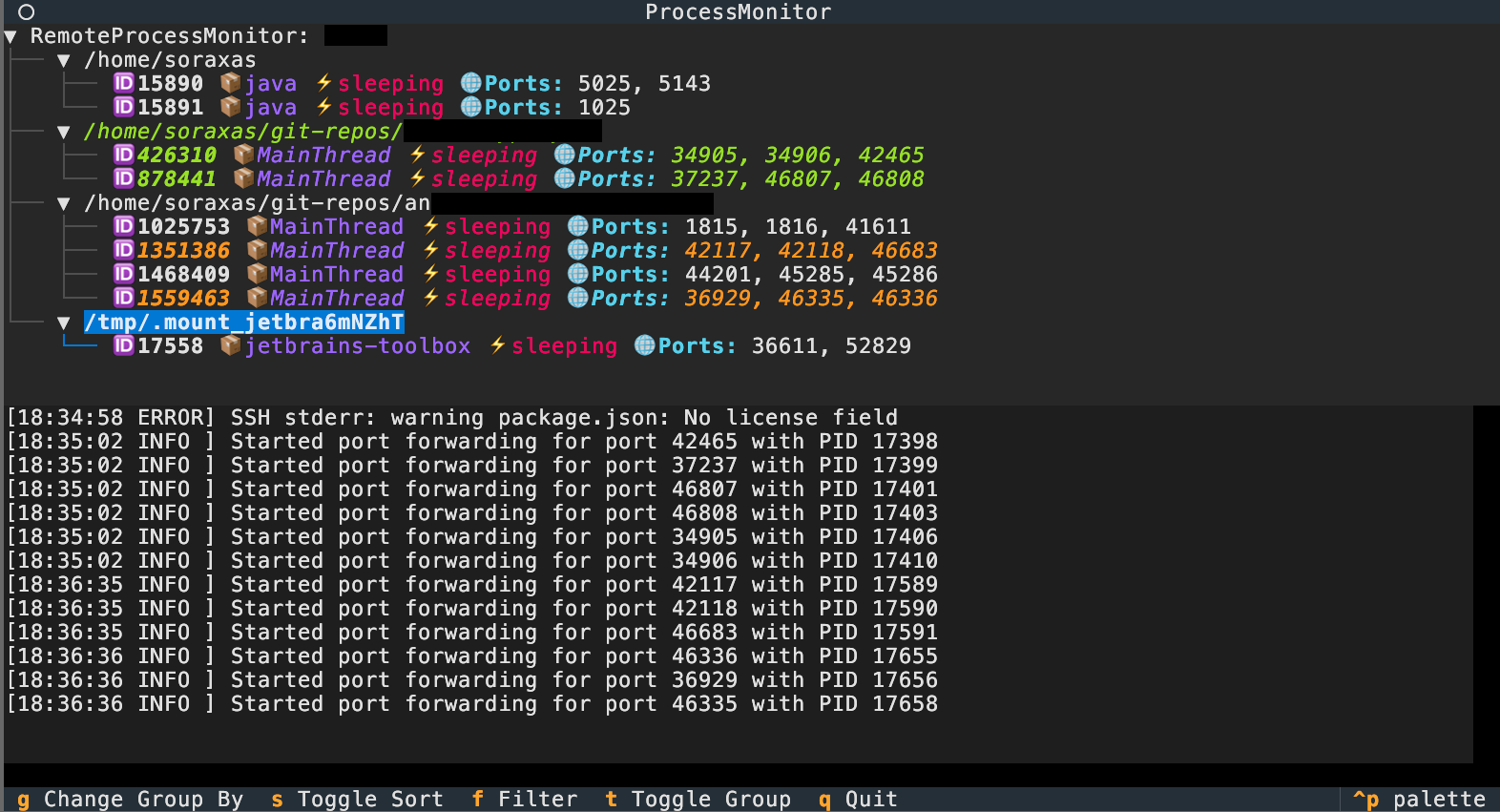
auto-portforward is a Python-based TUI application for monitoring processes and managing port forwarding on local or remote (SSH) machines. It provides a real-time, interactive process tree and can automatically set up SSH reverse port forwarding for processes listening on specific ports.
Features
- TUI interface
- Monitor processes and their listening ports on local or remote (SSH)
- Automatic SSH reverse port forwarding for selected ports
- Works with or without psutil (falls back to lsof/ps)
- Handles sudo password for privileged commands
- Clean resource management (no zombie processes, robust cleanup)
Installation
pipx install auto-portforward
Usage
Run the TUI application with:
auto-portforward [options] [ssh_host]
CLI Options
-l,--local: Use the local process monitor--mock: Use a mock process monitor (for testing)[ssh_host]: SSH host to connect to
Examples:
- Monitor local machine:
python -m auto_portforward.cli --local
- Monitor a remote host via SSH:
python -m auto_portforward.cli myuser@myhost
Sudo Password Handling
Some features (like listing all listening ports) may require sudo privileges.
- Environment variable:
export AP_SUDO_PASSWORD=yourpassword
auto-portforward my@host
Release history Release notifications | RSS feed


Download files
Download the file for your platform. If you're not sure which to choose, learn more about installing packages.
Source Distribution
Built Distribution
Filter files by name, interpreter, ABI, and platform.
If you're not sure about the file name format, learn more about wheel file names.
Copy a direct link to the current filters
File details
Details for the file auto_portforward-0.2.1.tar.gz.
File metadata
- Download URL: auto_portforward-0.2.1.tar.gz
- Upload date:
- Size: 270.8 kB
- Tags: Source
- Uploaded using Trusted Publishing? No
- Uploaded via: twine/6.1.0 CPython/3.13.3
File hashes
| Algorithm | Hash digest | |
|---|---|---|
| SHA256 |
b7854202a00a981541366f297a03227ee633e589a1d5af7617cf6ca2358244d6
|
|
| MD5 |
2b5ca3774df1c47700b94312f7283096
|
|
| BLAKE2b-256 |
768e5a1bc3a4414f4e07ffc3939beeb8ed5ef3e65b52ce05aa65c5e214245f6a
|
File details
Details for the file auto_portforward-0.2.1-py3-none-any.whl.
File metadata
- Download URL: auto_portforward-0.2.1-py3-none-any.whl
- Upload date:
- Size: 269.2 kB
- Tags: Python 3
- Uploaded using Trusted Publishing? No
- Uploaded via: twine/6.1.0 CPython/3.13.3
File hashes
| Algorithm | Hash digest | |
|---|---|---|
| SHA256 |
722f8063dc1be5689fa9258e019b4b37a16b9dfc49dd5819c075369eb2c67811
|
|
| MD5 |
b951261f7e607d7595b0d78f82a794f0
|
|
| BLAKE2b-256 |
90b350a014f16912d01713670206fa2d710716a1c53af04a83840d1a3d35b9b6
|






