
Auto Youtube Audio/Video Downloader Plus
"A feature-rich command-line audio/video downloader" "...with a simple graphical interface".
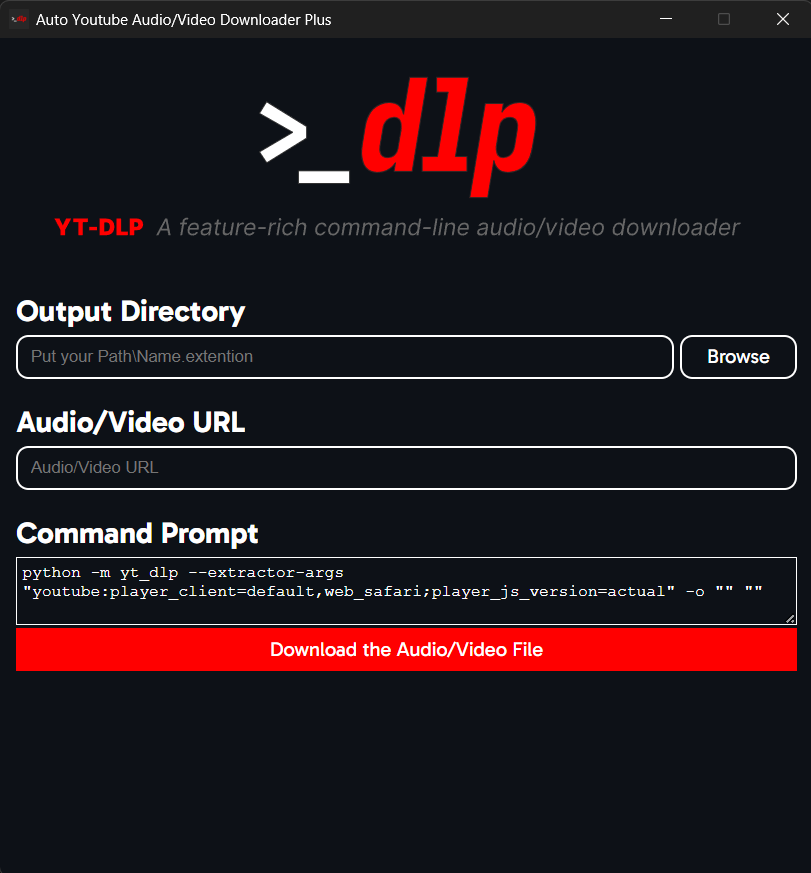





Showcase

Content
How to Install & Use
1. PyPi Installation
Requirements
Python 3.10or higher
Installation & Usage
Run these commands in the command prompt/terminal:
- Run
python -m pip install auto-yt-dlpto install. - Run
python -m auto_yt_dlpor justauto-yt-dlp/auto_yt_dlpto start the app
2. Download the .exe
[!NOTE] This is work in progress.
Requirements
- A working computer ¯\_(ツ)_/¯
Installation & Usage
You can head to the releases section and download the standalone version of the app!
Just put the .exe file wherever and double click on it to start it.
3. Github Download
Requirements
Python 3.10or higher
Installation & Usage
Follow these steps to download and use the app.
- Clone/download the repository.
- Open command prompt/terminal and
cdinto the project's root folder. - Run
python -m pip install -r requirements.txt - Run
python -m auto_yt_dlpto run the application
Can i contribute to this?
Yes, you can. (And also thanks, i really appreciate it :D)
How?
In whatever you think you can by adding any missing features (by forking it), telling me any mistakes/errors an whatnot from the issues (check the "Report an Issue!" title first!) or localizing it to your native language or to the ones you know (just make a fork and translate it. I will do the in-app language settings stuff later.)
Report an Issue!
[!NOTE] Logging is on by default. So, once you run the app, there will be an
auto_yt_dlp.logfile created in the app folder. If you have any errors or problems, provide the log file as well. Some errors might not have been saved to the log file, make sure to check the console and copy the errors from there too.
But, if you want to disable this, just go to theconfig.pyfile in the app folder. Open it, findLOGGINGand change theTruetoFalse.
You can report any problems from right here.
Before Reporting...
[!NOTE] If you get any errors in the Command Output in the app, it's probably something to do with
yt-dlpor the way you wrote yourURLorOutput Path.
[!IMPORTANT] If you are manually setting your path, don't forget to write the file name and extension at the end of the folder directory.
Example:C:\Users\[USERNAME]\Desktop\[FILE_NAME].[FILE_EXTENSION]
Another example:C:\Users\myPC\Desktop\FunnyVideo.mp4
If you want to keep the audio/video's title and extention, just set theOutput Pathby browsing (theBrowsebutton) or, you can just put%(title)s.%(ext)swhere you would put your file name and extension.
The app will automatically turn any/into\for the Output Directory sinceyt-dlpdoesn't acceptOutput Paths with/.
TODO
- Make the app launch-able from CMD.
- Make the app and CMD exit together.
- Design the UI in a re-usable way.
- Make the app input CMD codes and run it.
- Upload to PyPi for others to be able to access it easily.
- Add every other option of
yt-dlp.
1 maintainer

Metadata
1 maintainer
Release files for auto-yt-dlp 0.1.0.post2
For a detailed explanation of source distributions (sdists) and built distributions (wheels), please see the package formats documentation.
Source distribution (sdist)
| File | Size | Uploaded | Provenance | |
|---|---|---|---|---|
| auto_yt_dlp-0.1.0.post2.tar.gz | 114.1 kB | With provenance | Details |
Built distribution (wheel)
| File | Interpreter | ABI | Platform | Reset |
|---|---|---|---|---|
| auto_yt_dlp-0.1.0.post2-py3-none-any.whl | Python 3 | none | any | Details |
Total release size: 226.5 kB
Release files / auto_yt_dlp-0.1.0.post2.tar.gz
| Download URL | auto_yt_dlp-0.1.0.post2.tar.gz |
|---|---|
| Size | 114.1 kB |
| Tags | Source |
|
SHA-256 checksum How to use checksums |
f85f379c14f73f690523ffc8dab04e6c360b6d368d032e07e2fec4cca90eabf1
|
|
BLAKE2b-256 checksum How to use checksums |
6407a46ed8940fe63490f413da5a37c7d00132902ff2eaec69e0dfa2a4025a6c
|
| Upload date | |
|
Uploaded using Trusted Publishing? What is trusted publishing? |
Yes |
| Uploaded via |
twine/6.1.0 CPython/3.13.7
|
Provenance
Provenance describes where a file came from. On PyPI, provenance is shared via attestations, which provide a verifiable record of the build or publishing details. View details, limitations and caveats.


PyPI Publish Attestation
PyPI verified that this artifact, at this checksum, originated from the publisher listed below.
Signed by GitHub Actions, verified by PyPI on Nov 1, 2025.
Transparency logRelease files / auto_yt_dlp-0.1.0.post2-py3-none-any.whl
| Download URL | auto_yt_dlp-0.1.0.post2-py3-none-any.whl |
|---|---|
| Size | 112.4 kB |
| Tags | Python 3 |
|
SHA-256 checksum How to use checksums |
c413d2b322c5c411f64c9d39ed54a27fcea16e6e2a9abcb03efeb6673c380dab
|
|
BLAKE2b-256 checksum How to use checksums |
835d42fde4cd4d286d7bdb0f735b85d9ce4fada17efbc3aeac3a449fc1cb49de
|
| Upload date | |
|
Uploaded using Trusted Publishing? What is trusted publishing? |
Yes |
| Uploaded via |
twine/6.1.0 CPython/3.13.7
|
Provenance
Provenance describes where a file came from. On PyPI, provenance is shared via attestations, which provide a verifiable record of the build or publishing details. View details, limitations and caveats.
PyPI Publish Attestation
PyPI verified that this artifact, at this checksum, originated from the publisher listed below.
Signed by GitHub Actions, verified by PyPI on Nov 1, 2025.
Transparency logSecurity for auto-yt-dlp 0.1.0.post2
Provenance
Provenance describes where a file came from. On PyPI, provenance is shared via attestations, which provide a verifiable record of the build or publishing details. View details, limitations and caveats.
Full provenance
All 2 files in this release have been uploaded with provenance metadata.
Attestation for auto_yt_dlp-0.1.0.post2.tar.gz
PyPI Publish Attestation
PyPI verified that this artifact, at this checksum, originated from the publisher listed below.
Signed by GitHub Actions, verified by PyPI on Nov 1, 2025.
Transparency logA note on package security
PyPI is a repository for distributing packages, not a service for auditing them. While third-party security researchers and our staff do their best to detect and remove malicious packages, PyPI cannot guarantee the quality, security or suitability of any given package.
To learn more about protecting yourself from malicious actors, visit our package security documentation.














