
"A feature-rich command-line audio/video downloader" "...with a simple graphical interface".

Project description
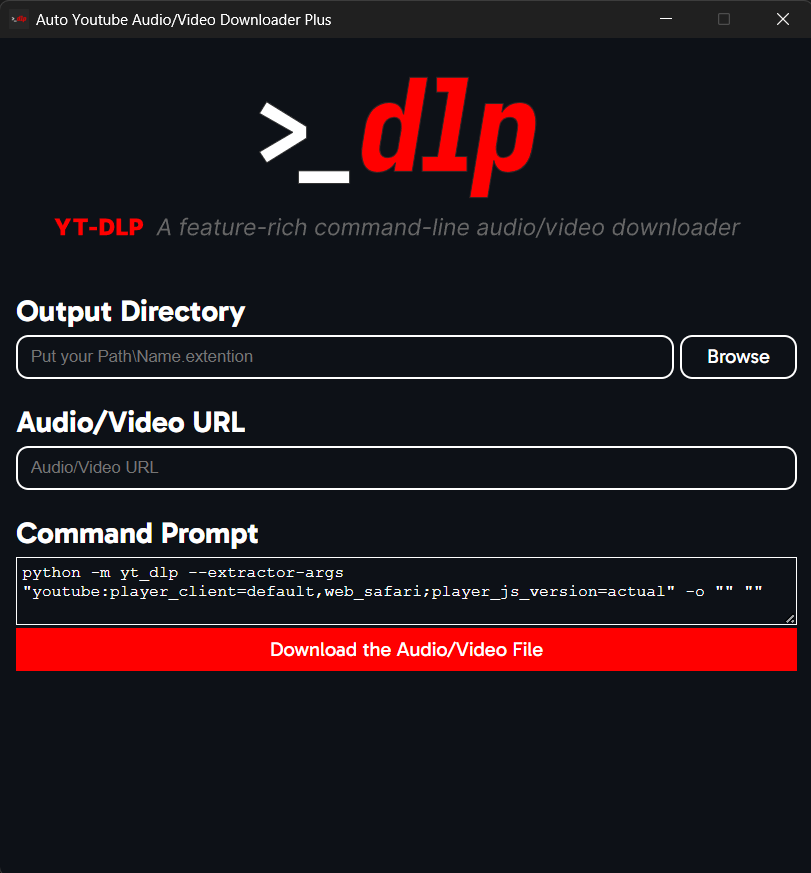
"A feature-rich command-line audio/video downloader" "...with a simple graphical interface".
Content
Can i contribute to this?
Yes, you can. (And also thanks, i really appreciate it :D)
How?
In whatever you think you can by adding any missing features (by forking it), telling me any mistakes/errors an whatnot from the issues or localizing it to your native language or to the ones you know (just make a fork and translate it. I will do the in-app language settings stuff later.)
Report an Issue!
[!NOTE] Logging is on by default. So, once you run the app, there will be an
auto_yt_dlp.logfile created in the app folder. If you have any errors or problems, provide the log file as well. Some errors might not have been saved to the log file, make sure to check the console and copy the errors from there too.
But, if you want to disable this, just go to theconfig.pyfile in the app folder. Open it, findLOGGINGand change theTruetoFalse.
You can report any problems from right here.
Before Reporting...
[!NOTE] If you get any errors in the Command Output in the app, it's probably something to do with
yt-dlpor the way you wrote yourURLorOutput Path.
[!IMPORTANT] If you are manually setting your path, don't forget to write the file name and extension at the end of the folder directory.
Example:C:\Users\[USERNAME]\Desktop\[FILE_NAME].[FILE_EXTENSION]
Another example:C:\Users\myPC\Desktop\FunnyVideo.mp4
If you want to keep the audio/video's title and extention, just set theOutput Pathby browsing (theBrowsebutton) or, you can just put%(title)s.%(ext)swhere you would put your file name and extension.
The app will automatically turn any/into\for the Output Directory sinceyt-dlpdoesn't acceptOutput Paths with/.
TODO
- Make the app launch-able from CMD.
- Make the app and CMD exit together.
- Design the UI in a re-usable way.
- Make the app input CMD codes and run it.
- Upload to PyPi for others to be able to access it easily.
- Add every other option of
yt-dlp.
Release history Release notifications | RSS feed


Download files
Download the file for your platform. If you're not sure which to choose, learn more about installing packages.
Source Distribution
Built Distribution
Filter files by name, interpreter, ABI, and platform.
If you're not sure about the file name format, learn more about wheel file names.
Copy a direct link to the current filters
File details
Details for the file auto_yt_dlp-0.0.1.dev13.tar.gz.
File metadata
- Download URL: auto_yt_dlp-0.0.1.dev13.tar.gz
- Upload date:
- Size: 110.3 kB
- Tags: Source
- Uploaded using Trusted Publishing? Yes
- Uploaded via: twine/6.1.0 CPython/3.13.7
File hashes
| Algorithm | Hash digest | |
|---|---|---|
| SHA256 |
637796f14c3ea28330d07e76190b9fee61aad5ed1250da65f451eff61b996d61
|
|
| MD5 |
93f9af85998a0a2275bc10862435e3e7
|
|
| BLAKE2b-256 |
d5fe833d08c330b6b01c9295a1e86b35e44516ef5c5464ba3042c618593ef172
|
Provenance
The following attestation bundles were made for auto_yt_dlp-0.0.1.dev13.tar.gz:
Publisher:
pypi_publish.yaml on SubFabula/auto-yt-dlp
-
Statement:
-
Statement type:
https://in-toto.io/Statement/v1 -
Predicate type:
https://docs.pypi.org/attestations/publish/v1 -
Subject name:
auto_yt_dlp-0.0.1.dev13.tar.gz -
Subject digest:
637796f14c3ea28330d07e76190b9fee61aad5ed1250da65f451eff61b996d61 - Sigstore transparency entry: 646361514
- Sigstore integration time:
-
Permalink:
SubFabula/auto-yt-dlp@d8793cb39397da0cf04586e2443ab00269fed780 -
Branch / Tag:
refs/tags/0.0.1.dev13 - Owner: https://github.com/SubFabula
-
Access:
public
-
Token Issuer:
https://token.actions.githubusercontent.com -
Runner Environment:
github-hosted -
Publication workflow:
pypi_publish.yaml@d8793cb39397da0cf04586e2443ab00269fed780 -
Trigger Event:
push
-
Statement type:
File details
Details for the file auto_yt_dlp-0.0.1.dev13-py3-none-any.whl.
File metadata
- Download URL: auto_yt_dlp-0.0.1.dev13-py3-none-any.whl
- Upload date:
- Size: 109.9 kB
- Tags: Python 3
- Uploaded using Trusted Publishing? Yes
- Uploaded via: twine/6.1.0 CPython/3.13.7
File hashes
| Algorithm | Hash digest | |
|---|---|---|
| SHA256 |
74fc8a5cc7f311f2c74bddd435f2f21ff94221ff882ce4d6245814721f248003
|
|
| MD5 |
35b03de9e7b444118b0b578c587239b5
|
|
| BLAKE2b-256 |
4834c087a6dbf656042bc310fab92103471b996b9ee053f2e0d35ad32b52875a
|
Provenance
The following attestation bundles were made for auto_yt_dlp-0.0.1.dev13-py3-none-any.whl:
Publisher:
pypi_publish.yaml on SubFabula/auto-yt-dlp
-
Statement:
-
Statement type:
https://in-toto.io/Statement/v1 -
Predicate type:
https://docs.pypi.org/attestations/publish/v1 -
Subject name:
auto_yt_dlp-0.0.1.dev13-py3-none-any.whl -
Subject digest:
74fc8a5cc7f311f2c74bddd435f2f21ff94221ff882ce4d6245814721f248003 - Sigstore transparency entry: 646361546
- Sigstore integration time:
-
Permalink:
SubFabula/auto-yt-dlp@d8793cb39397da0cf04586e2443ab00269fed780 -
Branch / Tag:
refs/tags/0.0.1.dev13 - Owner: https://github.com/SubFabula
-
Access:
public
-
Token Issuer:
https://token.actions.githubusercontent.com -
Runner Environment:
github-hosted -
Publication workflow:
pypi_publish.yaml@d8793cb39397da0cf04586e2443ab00269fed780 -
Trigger Event:
push
-
Statement type:






