
✦ AutoDeploy AI
Git Init · AI Commit · Auto Push — dari terminal mana pun, satu command.
AutoDeploy AI adalah CLI yang mengotomatisasi proses deploy project ke GitHub:
- Git init otomatis
- AI generate commit message
- Push ke GitHub dalam satu command
Tampilan Awal
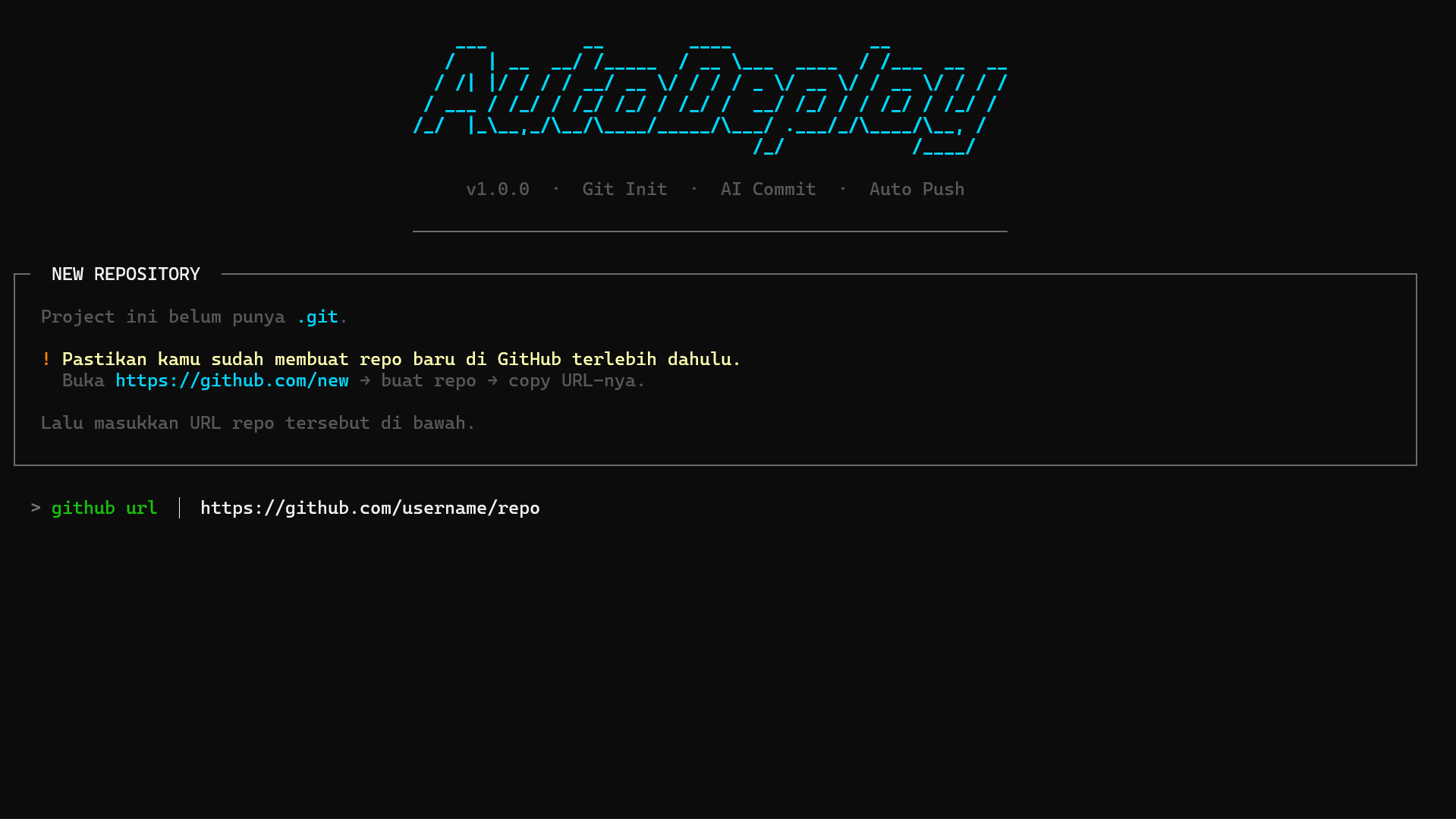
Fitur
- Auto
git initkalau project belum punya.git - Set remote otomatis dari GitHub URL yang lo kasih
- Validasi repo — cek apakah repo GitHub benar-benar ada sebelum deploy
- AI generate commit message pakai OpenRouter, Groq, OpenAI, atau Ollama
- Spinner animasi di tiap step — staging, generating, commit, push
- Setup wizard — pertama kali jalan langsung guided setup, tidak perlu config manual
- Global CLI — bisa dipanggil dari folder project mana pun
- Auto clear credential — kalau push gagal karena akun GitHub beda, credential lama otomatis dihapus dan Git akan minta login ulang
Install
pip install autodeploy-ai --upgrade --no-cache-dir
Setelah install, command autodeploy langsung tersedia dari terminal mana pun.
Cara Pakai
# Project baru — belum ada .git
autodeploy https://github.com/username/repo-name

# Project yang sudah punya remote
autodeploy
Pertama kali menjalankan autodeploy, wizard setup akan otomatis muncul untuk mengatur provider AI dan API key. Konfigurasi disimpan di lokasi berikut dan berlaku dari folder mana pun:
- Windows →
C:\ProgramData\autodeploy\config.env - Linux / Mac →
~/.autodeploy.env
Untuk mengubah konfigurasi:
autodeploy --setup
Untuk uninstall semuanya:
autodeploy --uninstall
Tampilan Uninstall
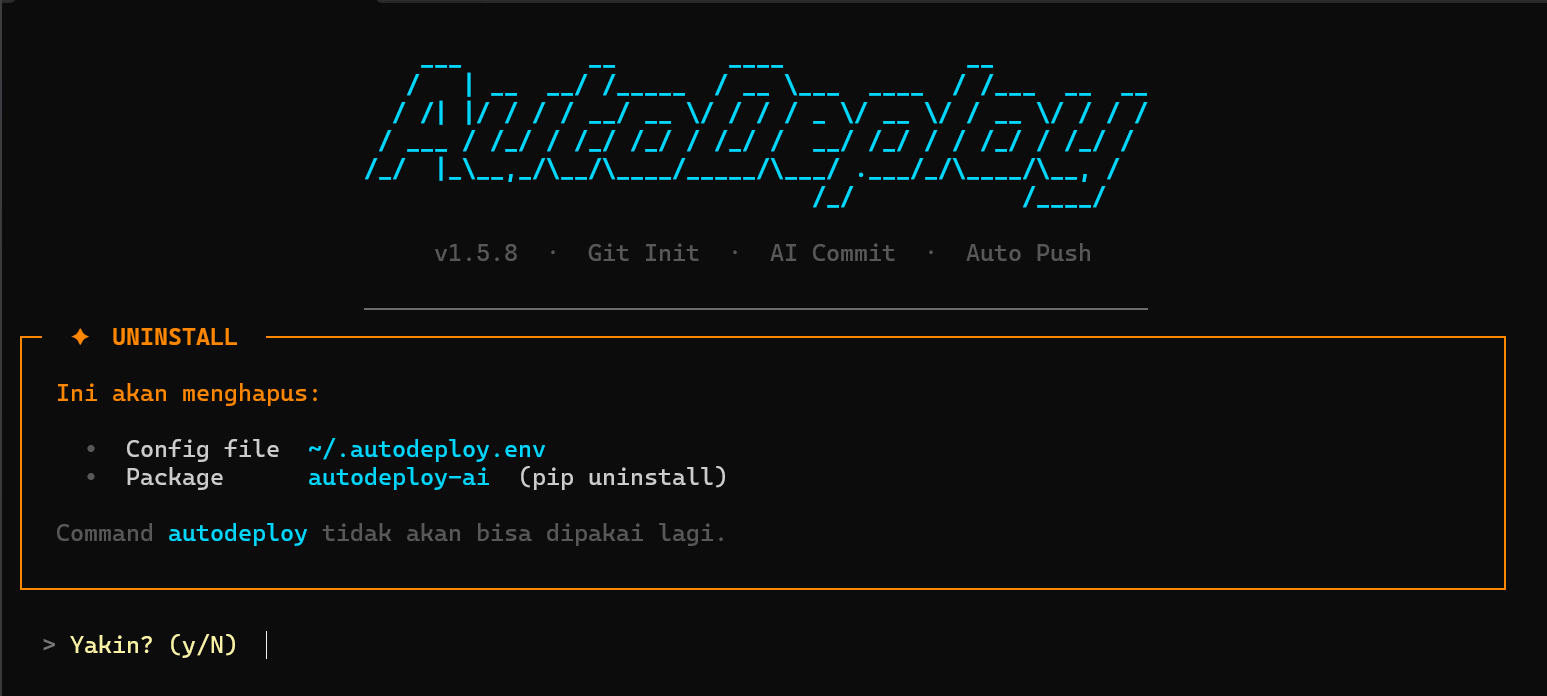
Setup Wizard
Saat pertama kali jalan, wizard akan memandu memilih provider AI dan memasukkan API key:
✦  FIRST TIME SETUP

Pilih AI provider:
  1.  OpenRouter — gratis, 20+ model
  2.  Groq       — gratis, cepat
  3.  Ollama     — lokal, offline, tidak perlu API key
  4.  OpenAI     — berbayar

> Provider (1/2/3/4)
> OpenRouter API Key   sk-or-...

✓  Setup selesai!
   Konfigurasi disimpan di C:\ProgramData\autodeploy\config.env  ← Windows
   Konfigurasi disimpan di ~/.autodeploy.env                     ← Linux/Mac
Flow Deploy
  ✓  Staging changes            → git add .
  ✓  Generating commit message  → AI generate via OpenRouter / Groq / OpenAI / Ollama
                                   └─ konfirmasi atau ketik manual
  ✓  Creating commit            → git commit -m "<pesan>"
  ✓  Pushing to GitHub          → git push -u origin <branch>
Kalau project belum ada .git, sebelum flow di atas akan otomatis:
- Validasi repo GitHub — pastiin sudah dibuat di github.com/new
git initgit remote add origin <url>
Provider AI
| Provider | Model Default | Keterangan | API Key |
|---|---|---|---|
openrouter |
google/gemma-4-31b-it:free |
Online, gratis, 20+ model tersedia | openrouter.ai |
groq |
llama-3.3-70b-versatile |
Online, gratis, cepat | console.groq.com |
ollama |
llama3.2:latest |
Lokal, gratis, butuh Ollama running | Tidak perlu |
openai |
gpt-4o-mini |
Online, berbayar | platform.openai.com |
Model bisa diganti manual di file config:
- Windows →
C:\ProgramData\autodeploy\config.env - Linux / Mac →
~/.autodeploy.env
AI_PROVIDER=openrouter
OPENROUTER_API_KEY=sk-or-...
OPENROUTER_MODEL=google/gemma-4-31b-it:free
Model OpenRouter gratis lainnya yang bisa dipakai:
nvidia/nemotron-3.5-lightning:freegoogle/gemma-4-26b-a4b-it:freeminimax/minimax-m3:free
Multi Akun GitHub
Kalau git push gagal karena akun GitHub yang aktif berbeda dengan pemilik repo, AutoDeploy akan otomatis:
- Mendeteksi error autentikasi (401 / 403 / authentication failed)
- Menghapus credential GitHub lama dari sistem
- Menampilkan panduan login ulang dengan akun yang benar
- Retry push — Git akan meminta login ulang secara otomatis
Gunakan Personal Access Token sebagai password saat login ulang.
Buat token di: github.com/settings/tokens
Konfigurasi Lengkap
Semua konfigurasi disimpan di:
- Windows →
C:\ProgramData\autodeploy\config.env - Linux / Mac →
~/.autodeploy.env
# Provider: openrouter | groq | ollama | openai
AI_PROVIDER=openrouter

OPENROUTER_API_KEY=sk-or-...
OPENROUTER_MODEL=google/gemma-4-31b-it:free

GROQ_API_KEY=gsk_...
GROQ_MODEL=llama-3.3-70b-versatile

OPENAI_API_KEY=sk-...
OPENAI_MODEL=gpt-4o-mini

# Ollama — bisa lokal atau VPS
OLLAMA_URL=http://localhost:11434
OLLAMA_MODEL=llama3.2:latest

DEFAULT_BRANCH=main
1 maintainer

Metadata
1 maintainer
Release files for autodeploy-ai 1.7.9
For a detailed explanation of source distributions (sdists) and built distributions (wheels), please see the package formats documentation.
Source distribution (sdist)
| File | Size | Uploaded | Provenance | |
|---|---|---|---|---|
| autodeploy_ai-1.7.9.tar.gz | 97.9 kB | Without provenance | Details |
Built distribution (wheel)
| File | Interpreter | ABI | Platform | Reset |
|---|---|---|---|---|
| autodeploy_ai-1.7.9-py3-none-any.whl | Python 3 | none | any | Details |
Total release size: 113.7 kB
Release files / autodeploy_ai-1.7.9.tar.gz
| Download URL | autodeploy_ai-1.7.9.tar.gz |
|---|---|
| Size | 97.9 kB |
| Tags | Source |
|
SHA-256 checksum How to use checksums |
bd3247b1ca8308cd5f2ea3cb5ef3719ae37ed00c04a9a092d57b67dbaffe0d8c
|
|
BLAKE2b-256 checksum How to use checksums |
e5b799a292281438566bdaf13b3cd743a9f4756b47a7189005e0bff21549f4d4
|
| Upload date | |
|
Uploaded using Trusted Publishing? What is trusted publishing? |
No |
| Uploaded via |
twine/7.0.0 CPython/3.11.9
|
Release files / autodeploy_ai-1.7.9-py3-none-any.whl
| Download URL | autodeploy_ai-1.7.9-py3-none-any.whl |
|---|---|
| Size | 15.8 kB |
| Tags | Python 3 |
|
SHA-256 checksum How to use checksums |
13ec22d54b4947760f9ac644cea70efd3b54304a2ebc9dea107a5fc668b1f36a
|
|
BLAKE2b-256 checksum How to use checksums |
937654332d6121a48422dfe6c12ebd14f915f25010b3a5026f28b52c3da1915c
|
| Upload date | |
|
Uploaded using Trusted Publishing? What is trusted publishing? |
No |
| Uploaded via |
twine/7.0.0 CPython/3.11.9
|
Security for autodeploy-ai 1.7.9
Provenance
Provenance describes where a file came from. On PyPI, provenance is shared via attestations, which provide a verifiable record of the build or publishing details. View details, limitations and caveats.
No provenance found
None of the files in this release were uploaded with provenance metadata.
A note on package security
PyPI is a repository for distributing packages, not a service for auditing them. While third-party security researchers and our staff do their best to detect and remove malicious packages, PyPI cannot guarantee the quality, security or suitability of any given package.
To learn more about protecting yourself from malicious actors, visit our package security documentation.














