


AutoEIS
What is AutoEIS?
AutoEIS (Auto ee-eye-ess) is a Python package that automatically proposes statistically plausible equivalent circuit models (ECMs) for electrochemical impedance spectroscopy (EIS) analysis. The package is designed for researchers and practitioners in the fields of electrochemical analysis, including but not limited to explorations of electrocatalysis, battery design, and investigations of material degradation.
Contributing
AutoEIS is still under development and the API might change. If you find any bugs or have any suggestions, please file an issue or directly submit a pull request. We would greatly appreciate any contributions from the community. Please refer to the contributing guide.
Installation
Pip
Open a terminal (or command prompt on Windows) and run the following command:
pip install -U autoeis
Julia dependencies will be automatically installed at first import. It's recommended that you have your own Julia installation, but if you don't, Julia itself will also be installed automatically.
How to install Julia? If you decided to have your own Julia installation (recommended), the official way to install Julia is via juliaup. Juliaup provides a command line interface to automatically install Julia (optionally multiple versions side by side). Working with juliaup is straightforward; Please follow the instructions on its GitHub page.
Usage
Visit our example notebooks page to learn how to use AutoEIS.
Workflow
The schematic workflow of AutoEIS is shown below:
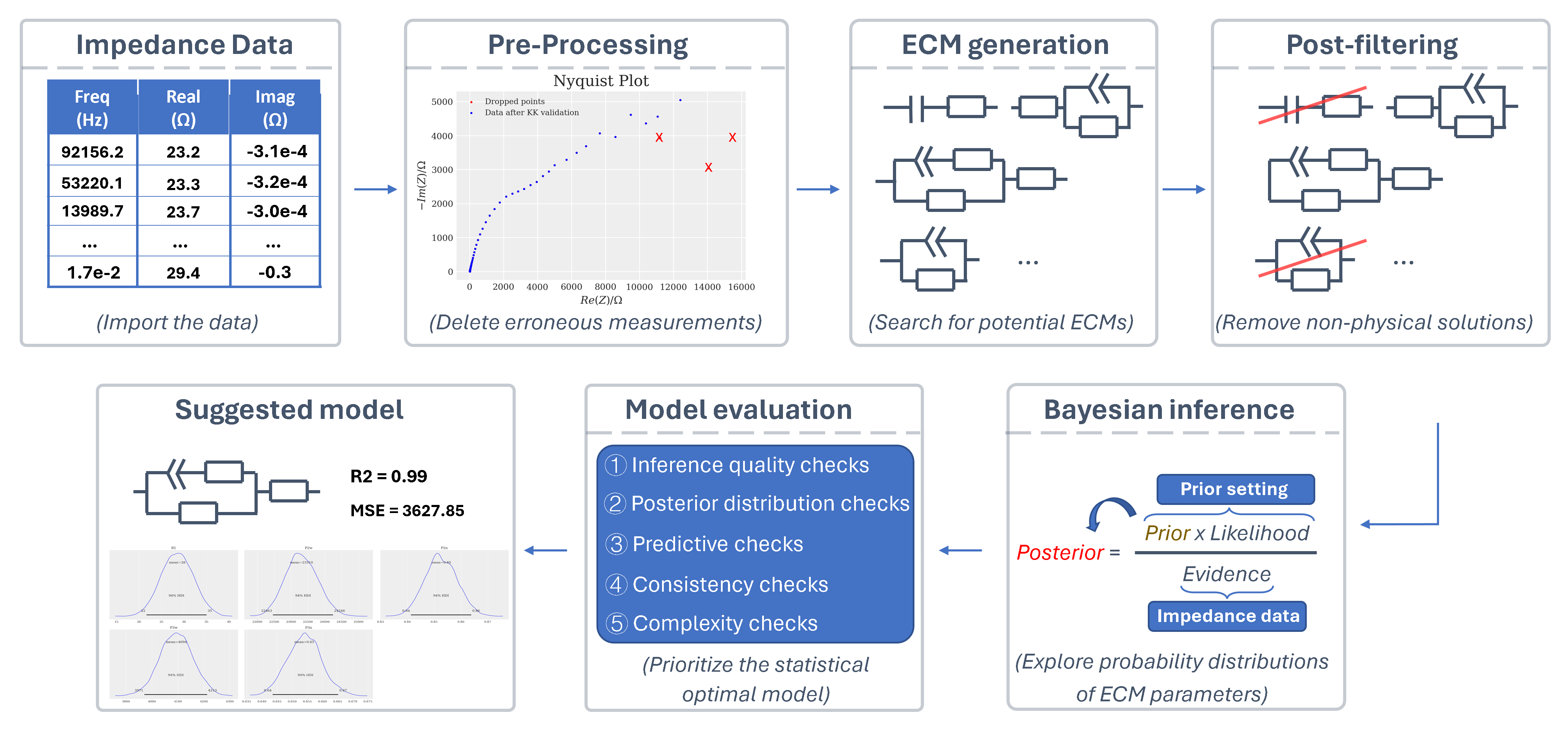
It includes: data pre-processing, ECM generation, circuit post-filtering, Bayesian inference, and the model evaluation process. Through this workflow, AutoEis can prioritize the statistically optimal ECM and also retain suboptimal models with lower priority for subsequent expert inspection. A detailed workflow can be found in the paper.
Acknowledgement
Thanks to Prof. Jason Hattrick-Simpers, Dr. Robert Black, Dr. Debashish Sur, Dr. Parisa Karimi, Dr. Brian DeCost, Dr. Kangming Li, and Prof. John R. Scully for their guidance and support. Also, thanks to Dr. Shijing Sun, Prof. Keryn Lian, Dr. Alvin Virya, Dr. Austin McDannald, Dr. Fuzhan Rahmanian, and Prof. Helge Stein for their feedback and discussions. Special shoutout to Prof. John R. Scully and Dr. Debashish Sur for letting us use their corrosion data to showcase the functionality of AutoEIS—your help has been invaluable!
2 maintainers


Metadata
2 maintainers
Release files for autoeis 0.0.44
For a detailed explanation of source distributions (sdists) and built distributions (wheels), please see the package formats documentation.
Source distribution (sdist)
| File | Size | Uploaded | |
|---|---|---|---|
| autoeis-0.0.44.tar.gz | 374.3 kB | Details |
Built distribution (wheel)
| File | Interpreter | ABI | Platform | Reset |
|---|---|---|---|---|
| autoeis-0.0.44-py3-none-any.whl | Python 3 | none | any | Details |
Total release size: 757.0 kB
Release files / autoeis-0.0.44.tar.gz
| Download URL | autoeis-0.0.44.tar.gz |
|---|---|
| Size | 374.3 kB |
| Tags | Source |
|
SHA-256 checksum How to use checksums |
475bc39f9820334ad804bc437b6b3726b81ce20c838690c3cea742a07cb64e42
|
|
BLAKE2b-256 checksum How to use checksums |
4abbee7b95edebd6c0f5564dcbc6b23ae375b5a9d52f246563f4909ed007824f
|
| Upload date | |
|
Uploaded using Trusted Publishing? What is trusted publishing? |
No |
| Uploaded via |
Hatch/1.16.5 cpython/3.10.20 HTTPX/0.28.1
|
Release files / autoeis-0.0.44-py3-none-any.whl
| Download URL | autoeis-0.0.44-py3-none-any.whl |
|---|---|
| Size | 382.7 kB |
| Tags | Python 3 |
|
SHA-256 checksum How to use checksums |
41fd95ab89f8eaf9bd8d283b74df38138f23996564da6443c93275d93c4995be
|
|
BLAKE2b-256 checksum How to use checksums |
fcc731ec7cc99f89bd028dd5768091ece5d1fa5877f0bd7d8b3606ac3268c835
|
| Upload date | |
|
Uploaded using Trusted Publishing? What is trusted publishing? |
No |
| Uploaded via |
Hatch/1.16.5 cpython/3.10.20 HTTPX/0.28.1
|














