
A tool for automated EIS analysis by proposing statistically plausible ECMs.


Project description


[!NOTE] AutoEIS is now published in the Journal of Open Source Software (JOSS). You can find the paper here. If you find AutoEIS useful, please consider citing it in your work.
Sadeghi et al., (2025). AutoEIS: Automated equivalent circuit modeling from electrochemical impedance spectroscopy data using statistical machine learning. Journal of Open Source Software, 10(109), 6256, https://doi.org/10.21105/joss.06256
Zhang, Runze, et al. "Editors’ choice—AutoEIS: automated bayesian model selection and analysis for electrochemical impedance spectroscopy." Journal of The Electrochemical Society 170.8 (2023): 086502. https://doi.org/10.1149/1945-7111/aceab2
[!TIP] Want to get notified about major announcements/new features? Please click on "Watch" -> "Custom" -> Check "Releases". Starring the repository alone won't notify you when we make a new release. This is particularly useful since we're actively working on adding new features/improvements to AutoEIS. Currently, we might issue a new release every month, so rest assured that you won't be spammed.
AutoEIS
What is AutoEIS?
AutoEIS (Auto ee-eye-ess) is a Python package that automatically proposes statistically plausible equivalent circuit models (ECMs) for electrochemical impedance spectroscopy (EIS) analysis. The package is designed for researchers and practitioners in the fields of electrochemical analysis, including but not limited to explorations of electrocatalysis, battery design, and investigations of material degradation.
Contributing
AutoEIS is still under development and the API might change. If you find any bugs or have any suggestions, please file an issue or directly submit a pull request. We would greatly appreciate any contributions from the community. Please refer to the contributing guide.
Installation
Pip
Open a terminal (or command prompt on Windows) and run the following command:
pip install -U autoeis
Julia dependencies will be automatically installed at first import. It's recommended that you have your own Julia installation, but if you don't, Julia itself will also be installed automatically.
How to install Julia? If you decided to have your own Julia installation (recommended), the official way to install Julia is via juliaup. Juliaup provides a command line interface to automatically install Julia (optionally multiple versions side by side). Working with juliaup is straightforward; Please follow the instructions on its GitHub page.
Usage
Visit our example notebooks page to learn how to use AutoEIS.
[!WARNING] The examples are designed to be run interactively, so you should use a Jupyter notebook-like environment like Jupyter Lab, IPython Notebook, or VSCode. The examples may not work as expected if you run them in a non-interactive environment like a Python REPL. For a smooth experience, please use a supported environment.
Workflow
The schematic workflow of AutoEIS is shown below:
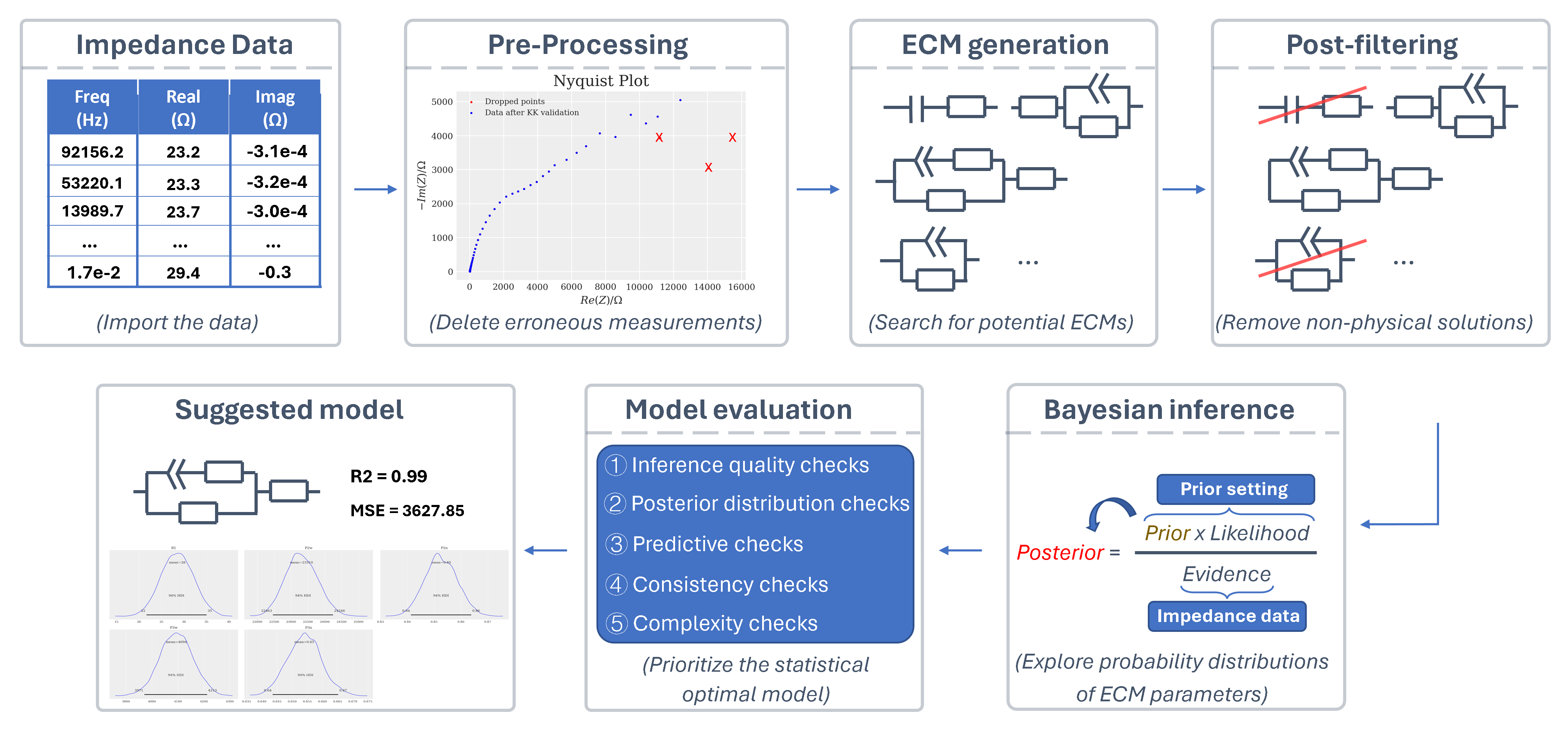
It includes: data pre-processing, ECM generation, circuit post-filtering, Bayesian inference, and the model evaluation process. Through this workflow, AutoEis can prioritize the statistically optimal ECM and also retain suboptimal models with lower priority for subsequent expert inspection. A detailed workflow can be found in the paper.
Acknowledgement
Thanks to Prof. Jason Hattrick-Simpers, Dr. Robert Black, Dr. Debashish Sur, Dr. Parisa Karimi, Dr. Brian DeCost, Dr. Kangming Li, and Prof. John R. Scully for their guidance and support. Also, thanks to Dr. Shijing Sun, Prof. Keryn Lian, Dr. Alvin Virya, Dr. Austin McDannald, Dr. Fuzhan Rahmanian, and Prof. Helge Stein for their feedback and discussions. Special shoutout to Prof. John R. Scully and Dr. Debashish Sur for letting us use their corrosion data to showcase the functionality of AutoEIS—your help has been invaluable!
Release history Release notifications | RSS feed


Download files
Download the file for your platform. If you're not sure which to choose, learn more about installing packages.
Source Distribution
Built Distribution
Filter files by name, interpreter, ABI, and platform.
If you're not sure about the file name format, learn more about wheel file names.
Copy a direct link to the current filters
File details
Details for the file autoeis-0.0.44.tar.gz.
File metadata
- Download URL: autoeis-0.0.44.tar.gz
- Upload date:
- Size: 374.3 kB
- Tags: Source
- Uploaded using Trusted Publishing? No
- Uploaded via: Hatch/1.16.5 cpython/3.10.20 HTTPX/0.28.1
File hashes
| Algorithm | Hash digest | |
|---|---|---|
| SHA256 |
475bc39f9820334ad804bc437b6b3726b81ce20c838690c3cea742a07cb64e42
|
|
| MD5 |
90577ed9650e9201244959e13a857bbc
|
|
| BLAKE2b-256 |
4abbee7b95edebd6c0f5564dcbc6b23ae375b5a9d52f246563f4909ed007824f
|
File details
Details for the file autoeis-0.0.44-py3-none-any.whl.
File metadata
- Download URL: autoeis-0.0.44-py3-none-any.whl
- Upload date:
- Size: 382.7 kB
- Tags: Python 3
- Uploaded using Trusted Publishing? No
- Uploaded via: Hatch/1.16.5 cpython/3.10.20 HTTPX/0.28.1
File hashes
| Algorithm | Hash digest | |
|---|---|---|
| SHA256 |
41fd95ab89f8eaf9bd8d283b74df38138f23996564da6443c93275d93c4995be
|
|
| MD5 |
5d7983274bf15035309e150e20f380a1
|
|
| BLAKE2b-256 |
fcc731ec7cc99f89bd028dd5768091ece5d1fa5877f0bd7d8b3606ac3268c835
|






