
ADA: Automated Data Analyst




ADA is a first pass at a CSV or Excel file you haven't looked at yet. It detects the date, the measure and the grouping column, cleans what it can, and builds the trend, a breakdown by group, anomaly flags and a baseline forecast. Every number comes from pandas and is shown with the calculation that produced it.
It works on sales exports, but it was also built for research data: lab
assays, field surveys, instrument logs. It sums only money and counts, averages
measurements such as temperature, pH or concentration instead of adding them
up, reads NA, nd or <LOD in a numeric column as missing, and checks every
column for values that should not drive a result before it reports one.
Try the web app (no sign-up, no API key) or pip install it.
Quick start
pip install automated-data-analyst
import ada

report = ada.analyze("lab-measurements.csv")   # a path, a DataFrame or raw bytes
print(report)
lab-measurements.csv — 936 rows, 02 Sep 2024 to 23 Feb 2026
  date=Run Date  measure=Viability % (mean)  segment=Treatment

Viability % differs across Treatment: Control has the highest median, 91.9% (n = 232), and
Compound B the lowest, 85.1% (n = 233); ε² = 0.64.
...
  91.9%  Highest median by treatment
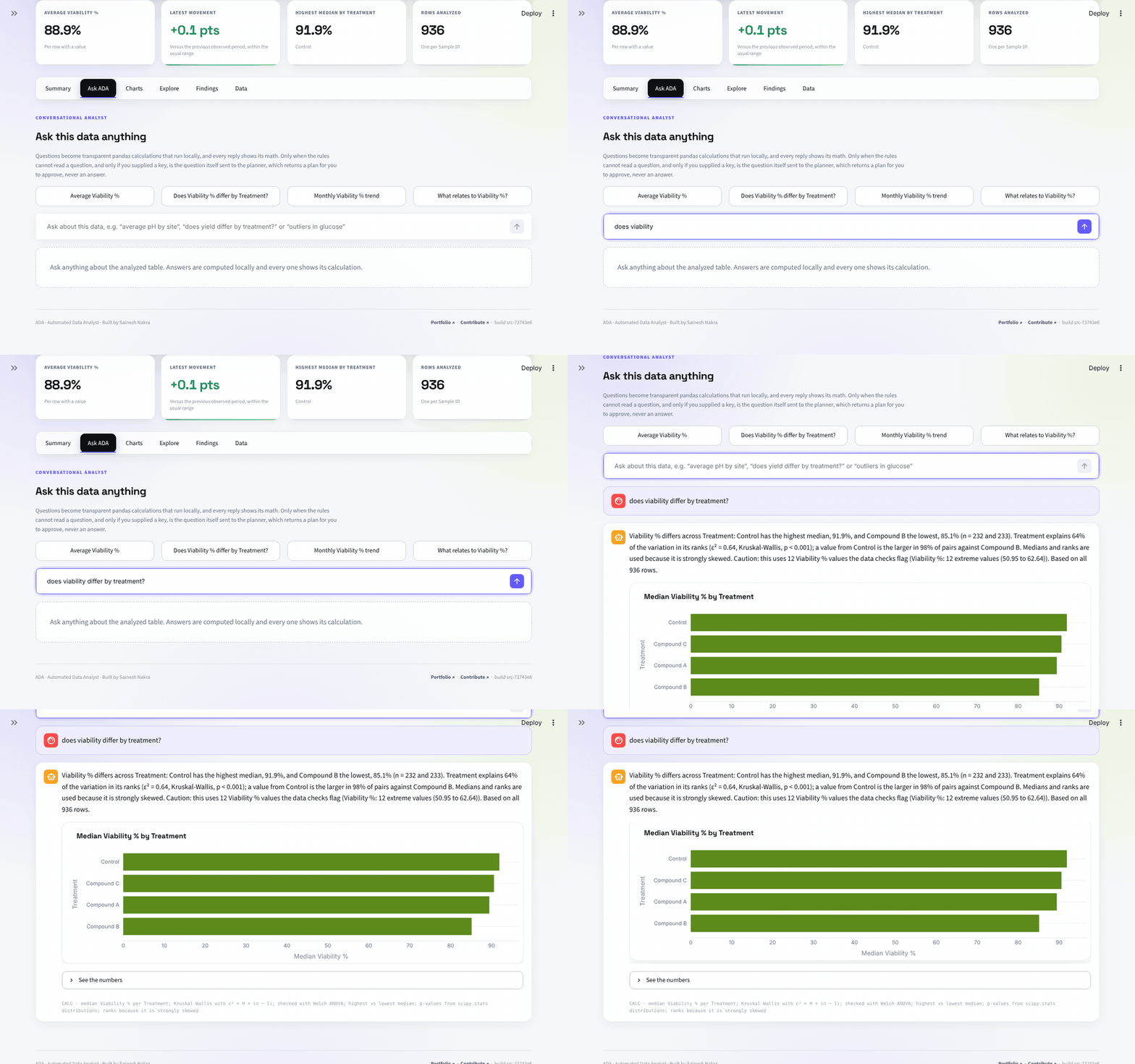
      Viability % differs across Treatment: Control has the highest median, 91.9%, and Compound B
      the lowest, 85.1% (n = 232 and 233). Treatment explains 64% of the variation in its ranks
      (ε² = 0.64, Kruskal-Wallis, p < 0.001); a value from Control is the larger in 98% of pairs
      against Compound B. Medians and ranks are used because it is strongly skewed.
      calc: median Viability % per Treatment; Kruskal-Wallis with ε² = H ÷ (n − 1); checked with
      Welch ANOVA; highest vs lowest median; p-values from scipy.stats distributions; ranks
      because it is strongly skewed
  1 of 3  What differs between groups
      Live Cells differs across Treatment: Compound C has the highest median, 1.2M (n = 234), and
      Compound B the lowest, 1.1M (n = 234); ε² = 0.08. It is the only clear finding among 3
      comparisons across Treatment and Replicate, after a Holm adjustment for all 3 tests.
      calc: each numeric reading compared across Treatment and Replicate: ...
  1  Anomalous periods
      Jul 2025 is the sharpest anomaly: viability % reached 81.5%, below the expected 88.1%–90.1% range.
      1 period sits outside the trendline band.
      calc: Period values vs Theil–Sen trendline ± a band calibrated so that only 1 stable series in 20 raises a flag
  1 issue  Data checks
      The data checks found 1 issue to look at before trusting these figures. Viability %: 12
      extreme values (50.95 to 62.64). ...
That file ships with the package: ada.sample("Lab Measurements") loads it,
and ada.samples() lists all four bundled datasets.
From the command line:
ada analyze measurements.csv          # the same report
ada analyze measurements.csv --json   # as JSON
ada schema measurements.csv           # which column ADA used for what, and how it combines
ada ask orders.csv "which category made the most revenue"
What it does
- Cleans conservatively and says what it changed: encodings (UTF-8,
UTF-16, Latin-1),
;and tab delimiters, a title line above the header, a second header row under group labels,$1,203.55and(48.10)style numbers, day/month order in dates, dates written as19540601, missing-value markers (including a loneTfor a trace,<3,87orNDbelow a detection limit, "not stated" phrases such asno indicaortidak ada data, and placeholders such asUnknown), ranges a spreadsheet turned into dates (Oct-30for10-30), labels spelled differently only in case or accents (Con riego,CON RIEGO). Identical rows are counted, not dropped; repeated headers and dropped empty columns are named. - Checks the data before trusting it: every numeric column is scanned for
values its name or a physical limit rules out (a percentage over 100, a
negative yield, pH past 14, potassium of 19 mmol/L, a wind speed of 280 m/s),
codes such as
-999or999.9, values piled up at a limit, filled-in gaps, values far from the rest, second clusters, swapped and copied columns, max below min, stuck sensors, and gaps that follow a group or another column; the table as a whole for copied rows and for flat, unrelated columns that suggest simulated data. The brief lists the issues covering the most rows and says which to check first;report.quality()returns them all. Only a clear code in the measure is set aside, with a note, but relationships and group comparisons are computed without the cells the checks flagged. - Detects column roles: the date, the measure, the grouping column and an
ID column, from names, values and cardinality. Numeric category codes (a 0/1
flag, a status, a set dose, a swept frequency) group rows instead of being
added up, while rating items (
RDB1toRDB3on 0 to 10) stay quantities; a column of unique row numbers is an ID; a running total such as a rain gauge's, a constant, a p-value or a date stored as a number is never the measure. Coordinates, compass directions and quality flags are never compared as readings. A long table (one column naming the parameter, one holding the result) is analyzed one parameter at a time, a file stacking several tables is read as its largest one, and a matrix of sample or channel columns is measured by its row mean. Override any role withada.analyze(df, measure="OD600")or in the app. - Knows what can be added up: money and counts are summed; rates
(
Viability %,Churn Rate), measured levels (Water Temp (°C),pH,Concentration (mg/L)), per-unit prices and anything it doesn't recognise as money or a count (CO2,mpg) are averaged, and so is a score or count per subject when each row is one participant or sample. Averages get no totals and no "share of total", and a change in a rate is reported in percentage points. When the name misleads,aggregation="sum"or"mean"(or Combine rows by in the app) says how the measure combines. - Prints readings in full:
KandMare kept for money and large counts, so a heart rate of 1,111 is not shown as1.1K; very small or very large readings use scientific notation (3.624e+11). A$needs both a money name and values that look like money, so an income band coded 1 to 15 is not printed as dollars. Figures compared in one sentence never print alike, numeric groups are named with their column ("Status 2"), and an average resting on fewer than 30 rows says so. - Builds a timeline: picks a period grain the data can fill, down to the
hour, minute or second for a sensor log, drops a final period the data only
partly covers, and notes both under the chart. A
Yearcolumn (with aMonthcolumn, if there is one) counts as a date. Clock times with no date are read as times of day, never given today's date, and a column of elapsed seconds or minutes can be the time axis. - Compares like with like: the latest change is measured on the groups that reported in both periods, a series with a yearly cycle is set against the same time of year, and a group's figure says when it covers only part of the dates. Logs stacked one after another in a file, and daily summaries appended below hourly readings, are found and kept apart.
- Flags anomalies and changes in level: periods outside a band around a Theil-Sen trendline, or around the usual level for the time of year when the series has a yearly cycle, checked at a finer grain when the chosen one has too few periods. A lasting change in level (an instrument swap, a method change, a fire) is found by binary segmentation and reported with its start and the levels before and after. Both are calibrated by simulation so a stable series raises a false alarm in about one analysis in twenty.
- Forecasts with a backtest: a trendline plus month-of-year seasonality, scored on held-out periods against a no-change forecast. It refuses to run on too little history, and says plainly when the forecast did worse than assuming no change.
- Answers plain-English questions ("average pH by site", "mean signal by
timepoint", "which month of the year has the highest wind", "is pH
correlated with temperature", "does pH differ by site", "what predicts
strength", "does antibiotic use affect risk", "distribution of pH",
"outliers in HGB", "90th percentile of lead", "how many distinct species
per reef", "count by crop and year", "share of Result 1 by Gender", "which
column has the highest average", "average growth by temperature") by
turning them into a fixed query plan that pandas runs. Every column, value,
grouping and condition the question names must reach the plan; otherwise
the question is refused with the part ADA couldn't use, rather than
answered approximately. A short name that fits one column ("strength" for
Concrete compressive strength (MPa)) is used and the answer says so. Each answer states its filters, how many rows it used and whether the row limit left rows out; a ranking gives each group's n and says whether the groups really differ, a trend gives its Theil-Sen slope and peak, and an answer that uses values the data checks flag says so. - Tests group differences: a measure compared across groups gets the n per group, Welch's test with a Mann-Whitney check (or Welch's ANOVA and Kruskal-Wallis for more groups) and an effect size, by medians and ranks when the data are skewed or capped, and Tukey's HSD names the pairs that differ. A gap within the noise, one whose two tests disagree, or one resting on a group of fewer than five reads as "no clear difference", never as a ranking. Ordered numeric levels (a dose, a depth) also get a trend test, a mostly-zero reading is compared on its means and the share above zero, and a grouping that combines two factors gets each factor's own test. A scan of every reading across every grouping names the largest differences, with p-values adjusted for the number of tests (a false-discovery rate for a screen of hundreds of readings), repeated rows of one subject count once, and exact copies of rows are set aside. A grouping cut from a reading (a size band from acres, an anaemia flag from haemoglobin) is stated as a rule rather than reported as a difference.
- Compares rates and fits joint models: a yes/no outcome gets its rate in each group with a chi-squared or Fisher test and the risk difference with its interval, and the readings that relate to the measure are fitted together by least squares, with coefficients, intervals, R² and a collinearity warning, when that says more than any one of them alone.
- Reports what relates to the measure: every numeric column's Pearson and Spearman r with the measure, with a 95% interval and the sample size, then the strongest other pair, or a plain "none of N pairs reaches |r| = 0.3". A total and its items, a mean or row maximum of other columns, a score standardised within groups, shares that add up to 100, a censoring flag and its capped reading, near-duplicates, participant numbers and plate positions are left out and listed. It leads with the figure one record doesn't decide, says when one record makes or hides a correlation, and when it is stronger, weaker or reversed within groups. Ask about a pair and it reports the same figures for that pair.
- Analyzes a slice you select: draw a box or lasso on the Explore chart, or click some bars, and get the same analysis for those rows beside the whole.
The web app accepts files up to 25 MB. By default up to 1,000,000 rows are
analyzed (row_limit= changes that): the newest rows of a table with a date,
or a random sample of one without, and every answer says which.


What it doesn't do
It runs standard tests (Welch, Mann-Whitney, Kruskal-Wallis, chi-squared, Fisher, Tukey's HSD, least squares) through SciPy and statsmodels, adjusts the p-values for how many it ran, and names the method behind every figure. What it can't know is your study design: it doesn't model paired or repeated measures beyond one value per subject, nested or blocked designs, or covariates you planned to adjust for, and it picks its tests by rule, after seeing the data, not from a plan written before. So treat what it finds as a first pass and its recommendations as what to look at next, not as causal claims. For a confirmatory analysis, ADA is the step before that, and its calculation lines tell you which test to start from.
Using it from Python
report = ada.analyze(df, date="Survey Date", measure="Water Temp (°C)", dimension="Site")
ada.analyze(df, measure="Rainfall (mm)", aggregation="sum")   # monthly totals, not averages

report.profile()          # one row per column: type, missing, distinct values
report.quality()          # every data-check issue, with its rows and the rule that fired
report.evidence           # findings, each with .statement and .calculation
report.trend()            # the measure per period, with notes on adjustments
report.segments()         # the measure by group, as a DataFrame
report.anomalies          # flagged periods
report.forecast()         # forecast with .backtest
report.ask("average pH by site")
report.focus("North Marsh")   # the same analysis for one group
report.to_dict()          # JSON-safe, versioned by schema_version
report.to_markdown()      # the report the web app downloads
When ADA can't answer, it returns a Refusal instead of a number. A refusal is
falsy and has a code from ada.REFUSAL_CODES:
forecast = report.forecast()
if not forecast:
    print(forecast.code, forecast.message)
    # thin_history A forecast needs more history than this; the table has 4 periods.
report.anomalies returns an empty tuple when it checked and found nothing,
and a Refusal when it couldn't check (no date column, too few periods). Both
are falsy, so check the type when the difference matters.
Scheduled checks
ada check runs anomaly detection and reports through its exit code, so it can
sit in a cron job:
ada check saas-subscriptions.csv --frequency M
# anomaly:2025-04-01  162,605.02, below the expected 267,236.53
| Exit code | Meaning |
|---|---|
0 |
checked, nothing flagged |
1 |
at least one period flagged |
2 |
the input could not be read |
3 |
could not check: no date column or too few periods |
Pass --frequency (or frequency= in Python) for anything scheduled, so the
period grain doesn't change from one run to the next. The headline, the
findings, the anomalies and the forecast all use that grain. --aggregation sum
or mean fixes how the measure combines in the same way. A period with no rows
counts as zero for a summed measure and is skipped for an averaged one, so a
gap in a feed of readings is not flagged as a drop to zero.
Sample datasets
All synthetic. Pick one in the web app or load it with ada.sample(name).
| Sample | What it shows |
|---|---|
| Lab measurements | A cell-culture assay by treatment: viability averaged while live-cell counts are summed, one declining arm, one bad plate |
| SaaS subscriptions | A revenue drop in April 2025 that anomaly detection finds |
| Support tickets | No money column, so resolution hours are averaged rather than summed |
| Ecommerce orders | Returns as negative rows, so totals have to handle mixed signs |
Running the web app locally
git clone https://github.com/saineshnakra/automated-data-analyst.git
cd automated-data-analyst
python -m venv .venv && source .venv/bin/activate   # Windows: .venv\Scripts\activate
pip install -e ".[app]"
streamlit run app.py
No API key is needed; the app opens with a demo dataset. pip install -e ".[app,ai,dev]" adds the optional AI layer and the linter. Tested on Python
3.11, 3.12 and 3.13.
Does my data leave my machine?
Running ADA yourself: no. Cleaning, detection, charts and answers are computed locally with pandas, with no network calls.
The hosted web app: your file is uploaded to the Streamlit server and held in memory for the session. It is not written to a database. If that matters, run it locally.
The optional AI layer (only with an API key) adds a query planner for questions the rules can't parse and a written summary. It receives column names, types and the computed findings, not rows. Findings can name a group (for example a site or a product). A planned query is shown to you and runs locally only after you approve it. Model-generated code is never executed.
Details: Privacy · SECURITY.md
Documentation
| Page | Contents |
|---|---|
| Concepts | Terms: measure, segment, period, rates and levels, evidence |
| How it works | The steps from upload to report |
| Architecture | Which module does what |
| Reference | One page per step, with the exact rules and thresholds |
| Development | Setup, tests, CI |
| FAQ | Short answers |
Background on why it refuses rather than guesses: I Built an AI Data Analyst That Tells You When It Hallucinates.
Contributing
Bug reports with a sample file (synthetic is fine) are the most useful thing. For code, see CONTRIBUTING.md, the good first issues and the roadmap. New analysis rules need a test, including how they behave on thin data.
If ADA is useful to you, a star helps other people find it.
Built on
ADA decides what to compute and says it in plain words; the computing is done by open-source scientific Python: pandas, NumPy, SciPy, statsmodels and ruptures, with Streamlit and Plotly for the app. All are permissively licensed. Credits lists what each one does in ADA, how to cite it, and the paper behind each method.
Citing
There is a CITATION.cff in the repository root; GitHub's Cite this
repository button turns it into BibTeX or APA. If you publish results from
ADA, please cite the libraries that computed them too (see
Credits).
License
MIT · Copyright (c) 2024 Sainesh Nakra
1 maintainer

Metadata
1 maintainer
Release files for automated-data-analyst 0.3.0
For a detailed explanation of source distributions (sdists) and built distributions (wheels), please see the package formats documentation.
Source distribution (sdist)
| File | Size | Uploaded | Provenance | |
|---|---|---|---|---|
| automated_data_analyst-0.3.0.tar.gz | 525.9 kB | With provenance | Details |
Built distribution (wheel)
| File | Interpreter | ABI | Platform | Reset |
|---|---|---|---|---|
| automated_data_analyst-0.3.0-py3-none-any.whl | Python 3 | none | any | Details |
Total release size: 929.3 kB
Release files / automated_data_analyst-0.3.0.tar.gz
| Download URL | automated_data_analyst-0.3.0.tar.gz |
|---|---|
| Size | 525.9 kB |
| Tags | Source |
|
SHA-256 checksum How to use checksums |
8fc5594f461059cba83fc4bce2c6799d2775eaaee254c9f3186fc59d956b86f6
|
|
BLAKE2b-256 checksum How to use checksums |
d1057a72462fd6fa2f627c1029445cbe7313227c20a39b48632c6cbd79aec9ef
|
| Upload date | |
|
Uploaded using Trusted Publishing? What is trusted publishing? |
Yes |
| Uploaded via |
twine/7.0.0 CPython/3.13.16
|
Provenance
Provenance describes where a file came from. On PyPI, provenance is shared via attestations, which provide a verifiable record of the build or publishing details. View details, limitations and caveats.


PyPI Publish Attestation
PyPI verified that this artifact, at this checksum, originated from the publisher listed below.
Signed by GitHub Actions, verified by PyPI on Oct 22, 2026.
Transparency logRelease files / automated_data_analyst-0.3.0-py3-none-any.whl
| Download URL | automated_data_analyst-0.3.0-py3-none-any.whl |
|---|---|
| Size | 403.4 kB |
| Tags | Python 3 |
|
SHA-256 checksum How to use checksums |
9280ae248a5b005106d0b152d3552fb539357b19fdd87986ccd745299fe4f886
|
|
BLAKE2b-256 checksum How to use checksums |
44ddcee682aca37d52ed312c32d057fd2677ad32afa6441079519c6ace712556
|
| Upload date | |
|
Uploaded using Trusted Publishing? What is trusted publishing? |
Yes |
| Uploaded via |
twine/7.0.0 CPython/3.13.16
|
Provenance
Provenance describes where a file came from. On PyPI, provenance is shared via attestations, which provide a verifiable record of the build or publishing details. View details, limitations and caveats.
PyPI Publish Attestation
PyPI verified that this artifact, at this checksum, originated from the publisher listed below.
Signed by GitHub Actions, verified by PyPI on Oct 22, 2026.
Transparency logSecurity for automated-data-analyst 0.3.0
Provenance
Provenance describes where a file came from. On PyPI, provenance is shared via attestations, which provide a verifiable record of the build or publishing details. View details, limitations and caveats.
Full provenance
All 2 files in this release have been uploaded with provenance metadata.
Attestation for automated_data_analyst-0.3.0.tar.gz
PyPI Publish Attestation
PyPI verified that this artifact, at this checksum, originated from the publisher listed below.
Signed by GitHub Actions, verified by PyPI on Oct 22, 2026.
Transparency logA note on package security
PyPI is a repository for distributing packages, not a service for auditing them. While third-party security researchers and our staff do their best to detect and remove malicious packages, PyPI cannot guarantee the quality, security or suitability of any given package.
To learn more about protecting yourself from malicious actors, visit our package security documentation.














