
ADA: Automated Data Analyst





checks the data first · the design picks the test · every number computed in code · the calculation under every result · refuses instead of guessing · rebuilds to the same numbers
Your paper's tables and figures, built from your data and traceable to
it. Install ADA in the folder that holds a study's data, answer a few
questions about the study, and ada build makes what the paper needs: a data
audit, a data dictionary, a record of every exclusion, descriptive and results
tables in Word, LaTeX and CSV, figures with their source data and captions, a
methods draft, and a package another researcher can rebuild it all from.
Every number traces back to the data, and ada verify checks that a rebuild
gives the same numbers.
pip install automated-data-analyst
ada init data/measurements.csv     # asks about the study; writes study.yml
ada build                          # writes paper-assets/
ada verify                         # rebuilds in a scratch folder and checks every number
In Claude Code or Codex, add the skill and ask in plain words: "make Table 1 and the figures from data/trial.csv", or "what's in this file?". The assistant asks you what only you know about the study, runs ADA, and reports the numbers ADA computed, each with the test behind it. The arithmetic runs in ADA, not in the model, and when ADA can't answer it says why instead of guessing. More below.
pip install automated-data-analyst && ada skill # the skill, for Claude Code and Codex in this project
ADA also takes a quick first look at any table, in the browser or with one line of Python.
Paper assets for a study
ada demo mice writes a small example study, sixteen mice on two diets weighed
weekly, so you can try it before using your own data. cd mice && ada build
gives this figure, among 17 assets. The
web app builds the
same study on its server and shows every asset, with a zip to download.
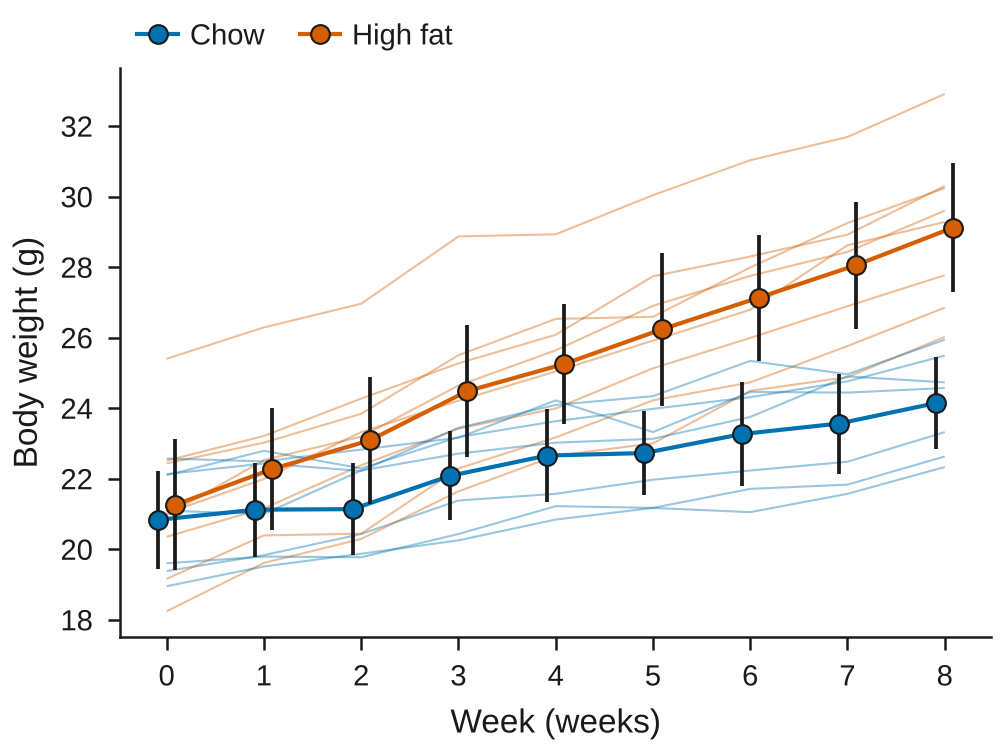
Figure 1. Body weight over week by Diet. Thin lines join the measurements of each subject (Mouse); 15 subjects (7 Chow, 8 High fat). Markers and bars show the mean and 95% confidence interval at each week for each diet, offset slightly so the groups do not overlap. 1 row with no value for Body weight (g) is left out. Analysis weight-gain (linear mixed model over Week, random intercept per subject) was planned before the data were seen.
The caption is written from what was drawn, and the plotted values are saved
beside the figure as weight-curves.source.csv.
You describe the study once. ada init reads the data, guesses each
column's role and unit, and asks what a row is, which columns identify a
subject or site, the outcomes, groups, time points and covariates, the
missing-value codes, the design (independent, paired, repeated or
clustered), which analyses were planned before you saw the data, and what may
be shared. The answers go into study.yml, a plain file you can read and edit.
Exclusions are rules in it, each with a reason:
processing:
  - exclude:
      ids: [M07]
    reason: M07 was given the wrong diet in weeks 2 and 3 (feeding log, entry 12).
ada build makes the assets:
| Folder | What is in it |
|---|---|
audit/ |
What was read, values outside their range, duplicates, and whether the data fits the stated design |
dictionary/ |
Each column's meaning, unit, type, allowed and observed values |
processing/ |
Every step from the original file to the analysed rows, with rows before and after, and the excluded rows themselves |
tables/ |
Descriptive tables and the results of the planned analyses: estimates, confidence intervals, test statistics, p-values, adjusted p-values and effect sizes, as Word, LaTeX and CSV |
figures/ |
Every observation drawn, with means and intervals; paired and longitudinal plots that join each subject's own points; scatter with fit; PDF and SVG with editable text, PNG, TIFF or EPS at a journal's size (PLOS, Nature, Cell, Science, eLife) |
methods/ |
A methods draft written from what was run, with software versions and references, and a results draft |
supplement/ |
Exploratory analyses, model output and checks, and the supplementary material as one Word file |
reproduce/ |
study.yml, pinned package versions, input checksums and instructions |
repository/ |
README, CITATION.cff, .zenodo.json, and data and code availability drafts |
The statistics follow your design, not the data. ADA runs only the
analyses in study.yml and labels each one planned or exploratory. The
design picks the test: Welch's t-test or ANOVA for independent groups, the
paired t-test for paired data, and a linear mixed model with a random
intercept per subject or cluster for repeated and clustered data. p-values are
adjusted within the families you name. ADA never drops a value on its own, and
a design it can't fit (crossover, nested random effects, survival, binary
outcomes measured repeatedly) is refused with the reason, not approximated.
Your own pandas tables, analysis functions and Matplotlib figures can join the
assets through a custom: script.
Every number can be traced. provenance.json records, for each asset, the
input file's checksum, the rows used and the exclusion steps behind them, the
parts of study.yml it depends on, the function that made it, the calculation,
references and package versions. When you change a rule, the next build says
in CHANGES.md which assets changed and how ("rows used 36 → 35, by step 3";
the estimate old → new). ada verify rebuilds from study.yml and the data
alone in a scratch folder and compares every file, number by number.
Restricted data. ada preview lists what would be shared and flags
withheld columns or individual rows in any file; ada share copies only what
may be shared. With sharing.data: demo, ADA writes synthetic data with the
same columns so others can run the reproduction without the real data.
The study.yml format, the tests used and everything ADA writes
A first look at any table
See what is in a table of measurements, in seconds. Drop in a CSV or Excel file from a lab assay, an instrument, a field survey or a clinical study, and ADA tells you what is wrong with the data, which groups differ, what relates to what, and what changed over time. Each finding names the test that produced it and prints the arithmetic, so you can check it before you trust it.
Try it in your browser: it opens on a lab dataset, with no sign-up or install. Or ada analyze data.csv.
What it is for
You have just been sent a file, or exported one from an instrument, and you want to know what is in it before you spend an afternoon in Excel, R or pandas. ADA answers the questions you would ask first:
| You want to know | ADA gives you |
|---|---|
| Can I trust this data? | Missing-value codes such as -999, values that can't be right (pH above 14, a percentage over 100, potassium of 19 mmol/L), stuck sensors, swapped or copied columns and repeated rows, found before anything is reported |
| Do my groups differ? | Each grouping compared with the right test (Welch's or Kruskal-Wallis), the n per group, an effect size and the pairs that differ. A gap within the noise is called no clear difference, never a ranking |
| What relates to my outcome? | Every reading correlated with it, with a 95% interval, leaving out columns built from one another, and the readings that matter fitted together |
| Did anything change over time? | The trend, periods outside the usual range, lasting changes in level, and a forecast scored against assuming no change |
| Something specific? | Ask in plain English: "does viability differ by treatment?", "outliers in glucose", "average pH by site" |
It was built for research data and works on any table, sales exports included. You don't write code in the web app, and you write one line in Python.
An example
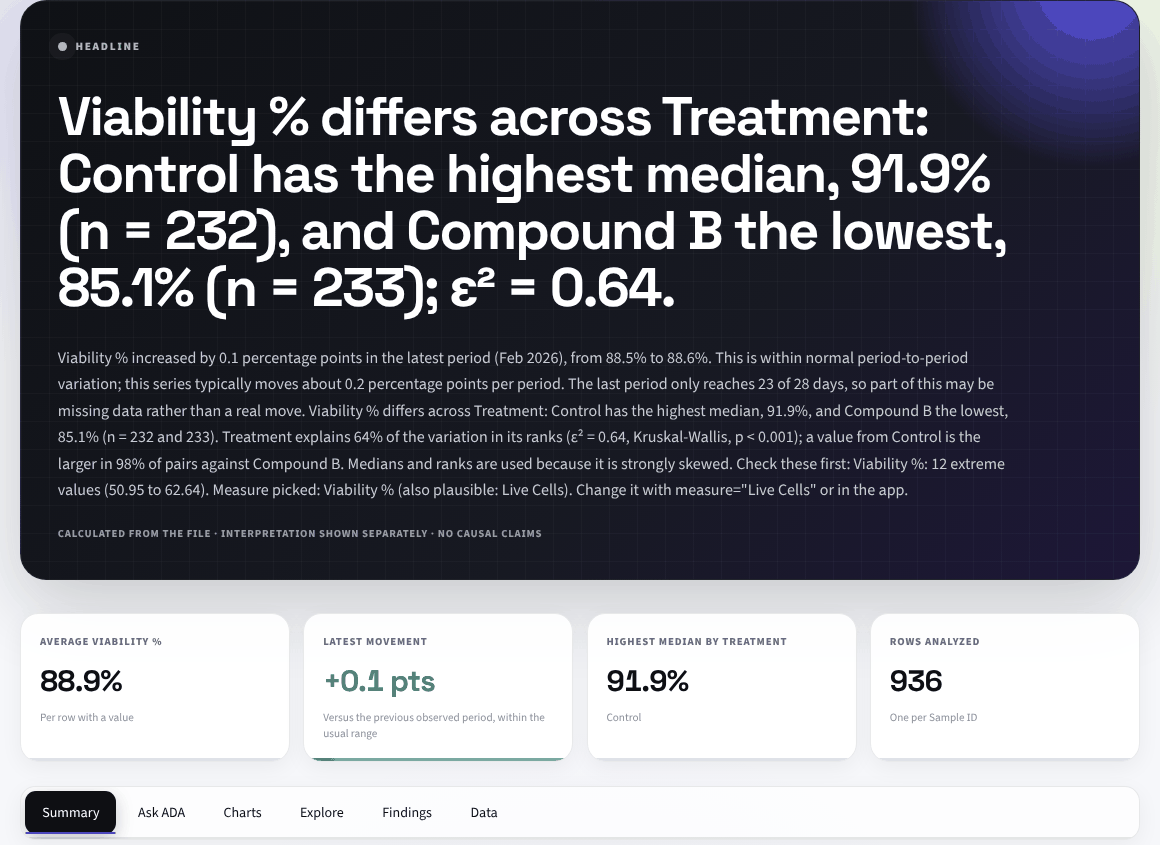
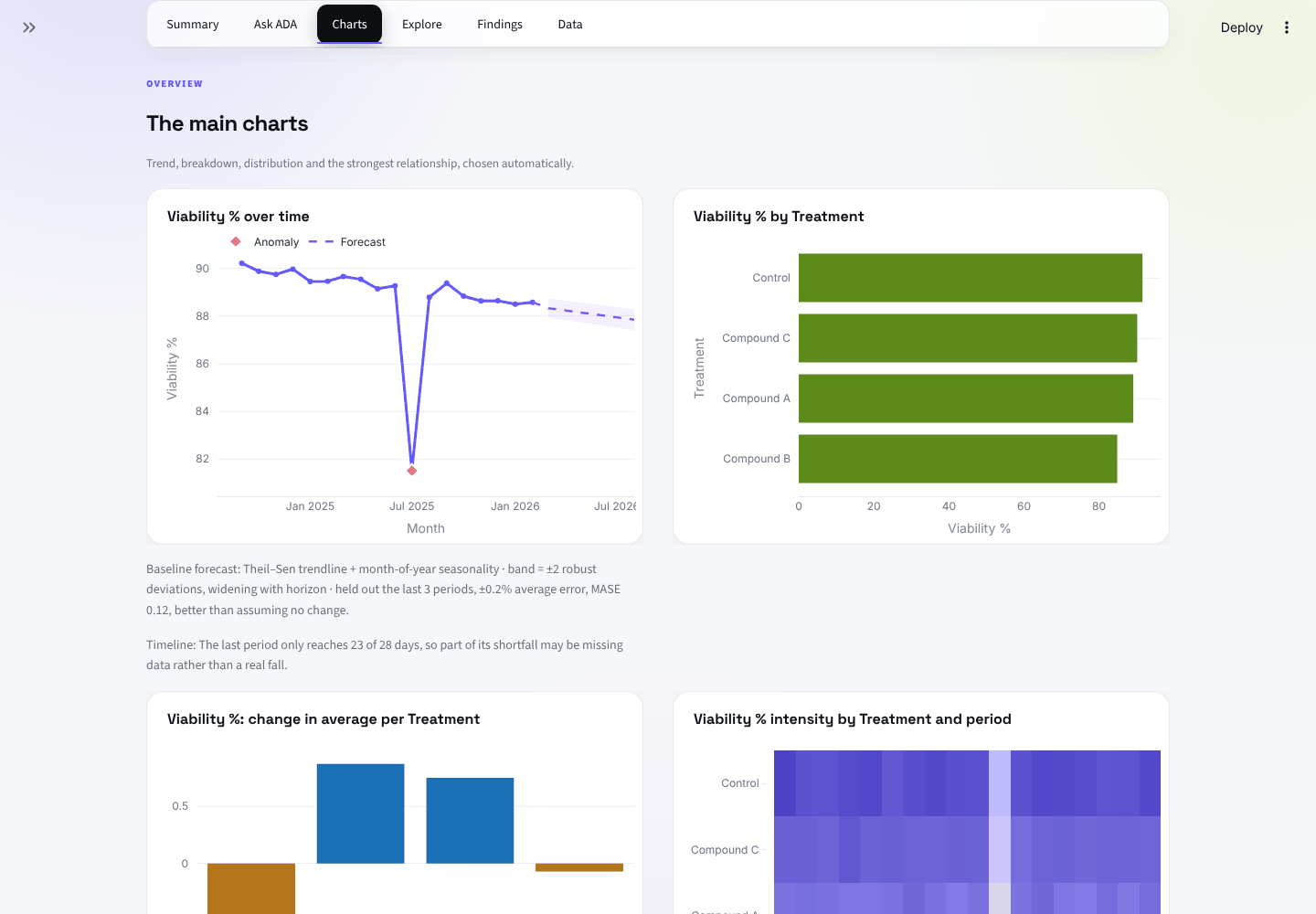
The lab sample that ships with ADA is a weekly cell-culture assay: 936 samples, four treatments, viability and live-cell counts. ADA's report, in short:
- Headline: viability differs across treatments. Control has the highest median, 91.9% (n = 232), and Compound B the lowest, 85.1% (n = 233). Treatment explains 64% of the variation in its ranks (Kruskal-Wallis, p < 0.001).
- Other findings: live-cell counts also differ by treatment, the only clear difference among 3 comparisons after a Holm adjustment. July 2025 is an anomaly: viability fell to 81.5% against an expected 88.1% to 90.1%.
- Data checks: 12 viability readings between 50.95 and 62.64 sit far below the rest. ADA flags them first, and the relationship card says they drive much of the correlation between viability and live cells (r = 0.67 with them, 0.37 without).
- What it chose: viability as the measure, averaged rather than summed because it is a percentage, and treatment as the grouping. Live cells was a close second, and one click switches to it.
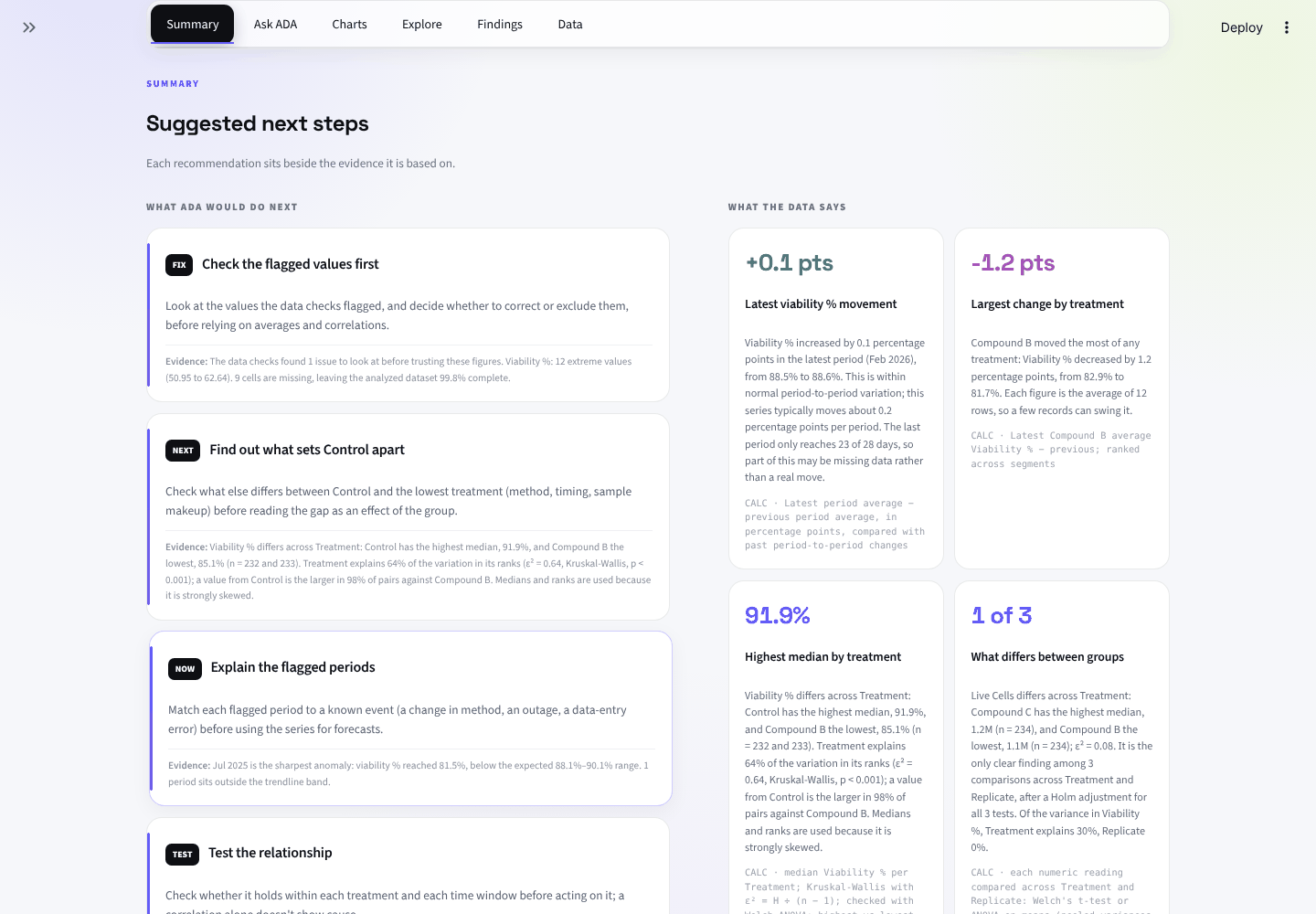
Under every finding is the calculation that produced it:
The same report from Python
import ada

report = ada.analyze("lab-measurements.csv")   # a path, a DataFrame or raw bytes
print(report)
lab-measurements.csv — 936 rows, 02 Sep 2024 to 23 Feb 2026
  date=Run Date  measure=Viability % (mean)  segment=Treatment

Viability % differs across Treatment: Control has the highest median, 91.9% (n = 232), and
Compound B the lowest, 85.1% (n = 233); ε² = 0.64.
...
  91.9%  Highest median by treatment
      Viability % differs across Treatment: Control has the highest median, 91.9%, and Compound B
      the lowest, 85.1% (n = 232 and 233). Treatment explains 64% of the variation in its ranks
      (ε² = 0.64, Kruskal-Wallis, p < 0.001); a value from Control is the larger in 98% of pairs
      against Compound B. Medians and ranks are used because it is strongly skewed.
      calc: median Viability % per Treatment; Kruskal-Wallis with ε² = H ÷ (n − 1); checked with
      Welch ANOVA; highest vs lowest median; p-values from scipy.stats distributions; ranks
      because it is strongly skewed
  1 of 3  What differs between groups
      Live Cells differs across Treatment: Compound C has the highest median, 1.2M (n = 234), and
      Compound B the lowest, 1.1M (n = 234); ε² = 0.08. It is the only clear finding among 3
      comparisons across Treatment and Replicate, after a Holm adjustment for all 3 tests.
      calc: each numeric reading compared across Treatment and Replicate: ...
  1  Anomalous periods
      Jul 2025 is the sharpest anomaly: viability % reached 81.5%, below the expected 88.1%–90.1% range.
      1 period sits outside the trendline band.
      calc: Period values vs Theil–Sen trendline ± a band calibrated so that only 1 stable series in 20 raises a flag
  1 issue  Data checks
      The data checks found 1 issue to look at before trusting these figures. Viability %: 12
      extreme values (50.95 to 62.64). ...
Why you can check it
- The numbers come from pandas, SciPy and statsmodels, never from a language model, and each one prints its method, for example "median Viability % per Treatment; Kruskal-Wallis with ε² = H ÷ (n − 1); checked with Welch ANOVA".
- It refuses rather than guesses. A forecast needs enough history, a question ADA can't turn into a calculation is declined with the part it couldn't read, and a finding that holds by construction (a total and its parts, a label cut from a reading) is named instead of reported.
- It checks the data before it reports. Cells the data checks rule out are left out of the comparisons and correlations, and each card says how many.
- No setup, no account, no API key. The optional AI layer only plans questions and writes a summary; it never computes a number.
What the first look doesn't do
It runs standard tests (Welch, Mann-Whitney, Kruskal-Wallis, chi-squared,
Fisher, Tukey's HSD, paired and repeated-measures tests, Kaplan-Meier
survival, least squares) through SciPy and statsmodels, adjusts the p-values
for how many it ran, and names the method behind every figure. What it can't
know is your study design: it finds subjects, samples and fully crossed
within-subject designs from the table itself, but it doesn't fit mixed
models, nested or blocked designs, or covariates you planned to adjust for
(asked to, Ask holds a reading fixed only as a straight line would), and it
picks its tests by rule, after seeing the data, not from a plan written
before. So treat what it finds as a first pass and its recommendations as
what to look at next, not as causal claims. For results you will report,
describe the study with ada init and let ada build fit the design and the
plan you state.
Get started with the first look
In the browser: open the first look. It starts on the lab sample; choose Upload your file for your own CSV, TSV or Excel file (up to 25 MB). The app's home page explains the research side and links to the example study.
In Python:
pip install automated-data-analyst
import ada

report = ada.analyze("measurements.csv")   # a path, a DataFrame or raw bytes
print(report)                              # the report above
report.ask("does pH differ by site?")
From the command line:
ada analyze measurements.csv          # the same report
ada analyze measurements.csv --json   # as JSON
ada schema measurements.csv           # which column ADA used for what, and how it combines
ada analyze results.xlsx --sheet Data # one worksheet of a workbook
ada ask measurements.csv "average pH by site"
The bundled samples load with ada.sample("Lab Measurements"), and
ada.samples() lists all four.
Ask in plain English
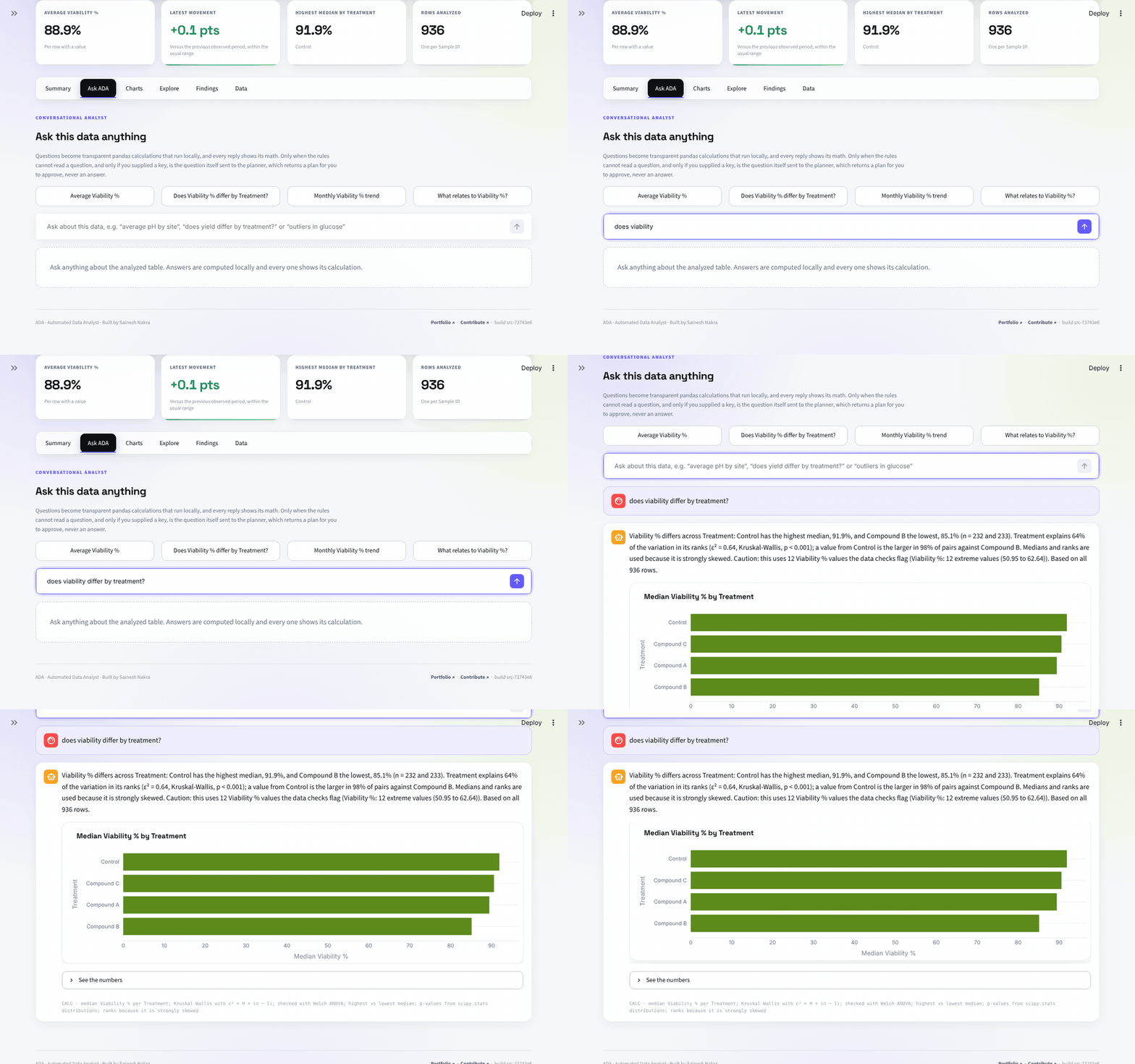
Questions such as "average pH by site", "is pH correlated with temperature", "what predicts strength", "outliers in HGB", "90th percentile of lead" or "share of Result 1 by Gender" become a fixed query plan that pandas runs. Every column, value and condition the question names must reach the plan; otherwise ADA says which part it couldn't use instead of answering something close.
What it does
- Reads messy files and says what it changed: encodings, delimiters, a
title line or a second header row, dates written as
19540601, missing-value markers such asNA,ND,<LODor-999. - Picks the columns: the date, the measure, the grouping and an ID, from
names and values. A numeric code such as a dose or a 0/1 flag groups rows
instead of being added up. Override any choice in the app or with
ada.analyze(df, measure="OD600"). - Knows what adds up: money and counts are summed; readings such as temperature, pH or concentration are averaged.
- Checks the data, then compares groups and rates, reports what relates to the measure, fits a joint model when it says more than one reading alone, and adjusts p-values for the number of tests.
- Builds a timeline with anomaly flags, changes in level and a backtested forecast.
Using it from Python
report = ada.analyze(df, date="Survey Date", measure="Water Temp (°C)", dimension="Site")
ada.analyze(df, measure="Rainfall (mm)", aggregation="sum")   # monthly totals, not averages
ada.analyze(df, date="timept")   # days since infection as the time axis: a profile, no calendar

report.profile()          # one row per column: type, missing, distinct values
report.quality()          # every data-check issue, with its rows and the rule that fired
report.evidence           # findings, each with .statement and .calculation
report.trend()            # the measure per period, with notes on adjustments
report.segments()         # the measure by group, as a DataFrame
report.anomalies          # flagged periods
report.forecast()         # forecast with .backtest
report.long_form()        # a year-by-month table as one row per month
report.ask("average pH by site")
report.focus("North Marsh")   # the same analysis for one group
report.to_dict()          # JSON-safe, versioned by schema_version
report.to_markdown()      # the report the web app downloads
When ADA can't answer, it returns a Refusal instead of a number. A refusal is
falsy and has a code from ada.REFUSAL_CODES:
forecast = report.forecast()
if not forecast:
    print(forecast.code, forecast.message)
    # thin_history A forecast needs more history than this; the table has 4 periods.
report.anomalies returns an empty tuple when it checked and found nothing,
and a Refusal when it couldn't check (no date column, too few periods). Both
are falsy, so check the type when the difference matters.
Use it from Claude Code or Codex
Ask an AI coding assistant to analyse a data file and it will usually write pandas on the spot and tell you what it thinks the numbers say. With ADA's skill, it runs ADA instead:
- It asks you for what it can't know from the file: what a row is, which column identifies a subject, the design, which analyses were planned.
- ADA does the arithmetic with pandas, SciPy and statsmodels and prints the calculation under each result. The assistant reports those numbers rather than its own.
- When ADA refuses (too few rows, a design it can't fit), the assistant passes the reason on instead of working around it.
ada verifylets you, or anyone, check that the numbers rebuild from the data.
This doesn't make a model incapable of a mistake, but it means every number in its answer comes from code you can rerun, with the calculation beside it.
Install it, in either assistant:
pip install automated-data-analyst
ada skill               # .claude/skills/ada (Claude Code) and .agents/skills/ada (Codex)
ada skill --user        # the same in your home folder, for every project
ada skill --for codex   # or one assistant only; --dir PATH for another tool's skills folder
Or as a plugin, which updates with the repository:
# Claude Code
/plugin install ada --marketplace saineshnakra/automated-data-analyst

# Codex
codex plugin marketplace add saineshnakra/automated-data-analyst
codex plugin add ada@automated-data-analyst
Then ask, for example:
- "What's in data/plates.csv? Check it for problems first."
- "Does viability differ between treatments? Each plate has several wells."
- "Make Table 1, the results table and the figures for the paper from data/trial.csv, and a methods draft."
- "I changed an exclusion. Rebuild and tell me which numbers moved."
The skill is a plain SKILL.md in the Agent Skills format, so other assistants
that read .agents/skills can use it too.
llms.txt
gives a language model a short map of the docs.
Scheduled checks
ada check runs anomaly detection and reports through its exit code, so it can
sit in a cron job:
ada check saas-subscriptions.csv --frequency M
# anomaly:2025-04-01  162,605.02, below the expected 267,236.53
| Exit code | Meaning |
|---|---|
0 |
checked, nothing flagged |
1 |
at least one period flagged |
2 |
the input could not be read |
3 |
could not check: no date column or too few periods |
Pass --frequency (or frequency= in Python) for anything scheduled, so the
period grain doesn't change from one run to the next. The headline, the
findings, the anomalies and the forecast all use that grain. --aggregation sum
or mean fixes how the measure combines in the same way. A period with no rows
counts as zero for a summed measure and is skipped for an averaged one, so a
gap in a feed of readings is not flagged as a drop to zero.
Sample datasets
All synthetic. Pick one in the web app or load it with ada.sample(name).
| Sample | What it shows |
|---|---|
| Lab measurements | A cell-culture assay by treatment: viability averaged while live-cell counts are summed, one declining arm, one bad plate |
| SaaS subscriptions | A revenue drop in April 2025 that anomaly detection finds |
| Support tickets | No money column, so resolution hours are averaged rather than summed |
| Ecommerce orders | Returns as negative rows, so totals have to handle mixed signs |
Running the web app locally
git clone https://github.com/saineshnakra/automated-data-analyst.git
cd automated-data-analyst
python -m venv .venv && source .venv/bin/activate   # Windows: .venv\Scripts\activate
pip install -e ".[app]"
streamlit run app.py
No API key is needed. The app has three pages: a home page for researchers,
the example study built on the server, and the first look, which opens on the
lab sample. pip install -e ".[app,ai,dev]" adds the optional AI layer and the linter. Tested on Python
3.11, 3.12 and 3.13.
Does my data leave my machine?
Running ADA yourself: no. Cleaning, detection, charts and answers are computed locally with pandas, with no network calls.
The hosted web app: your file is uploaded to the Streamlit server and held in memory for the session. It is not written to a database. If that matters, run it locally.
The optional AI layer (only with an API key) adds a query planner for questions the rules can't parse and a written summary. It receives column names, types and the computed findings, not rows. Findings can name a group (for example a site or a product). A planned query is shown to you and runs locally only after you approve it. Model-generated code is never executed.
Details: Privacy · SECURITY.md
Tested on 60 research datasets
We ran ADA's first look on 60 lab and research datasets drawn at random from Kaggle (blood tests, soil and water chemistry, gene expression, materials testing, field surveys, behavioural experiments). AI reviewers, each told to act as a sceptical scientist in the field, checked every finding against pandas, SciPy or statsmodels. After each of three rounds of 20 we fixed what they found, as general rules, and checked every dataset again.
| Good | Partly useful | Poor | |
|---|---|---|---|
| First run | 2 | 27 | 31 |
| Now | 29 | 27 | 4 |
The calculations matched wherever they were re-run. What still goes wrong is what ADA chooses to lead with when nobody has told it the design: it can miss the comparison a study was built for, or report a pair of columns that move together by construction. The results cover how the datasets were picked, every dataset's review, what changed, and what ADA still gets wrong.
Documentation
| Page | Contents |
|---|---|
| Paper assets for a study | ada init, ada build and ada verify: the study.yml format, the tests, every file written |
| Concepts | Terms: measure, segment, period, rates and levels, evidence |
| How it works | The steps from upload to report |
| Architecture | Which module does what |
| Reference | One page per step, with the exact rules and thresholds |
| Development | Setup, tests, CI |
| FAQ | Short answers |
| Changelog | What changed in each release, and how to upgrade |
Background on why it refuses rather than guesses: I Built an AI Data Analyst That Tells You When It Hallucinates.
Contributing
Bug reports with a sample file (synthetic is fine) are the most useful thing. For code, see CONTRIBUTING.md, the good first issues and the roadmap. New analysis rules need a test, including how they behave on thin data.
If ADA is useful to you, a star helps other people find it.
Built on
ADA decides what to compute and says it in plain words; the computing is done by open-source scientific Python: pandas, NumPy, SciPy, statsmodels and ruptures, with Matplotlib, python-docx and PyYAML for the paper assets, and Streamlit and Plotly for the app. All are permissively licensed. Credits lists what each one does in ADA, how to cite it, and the paper behind each method.
Citing
There is a CITATION.cff in the repository root; GitHub's Cite this
repository button turns it into BibTeX or APA. If you publish results from
ADA, please cite the libraries that computed them too (see
Credits).
License
MIT · Copyright (c) 2024 Sainesh Nakra
1 maintainer

Metadata
1 maintainer
Release files for automated-data-analyst 0.5.0
For a detailed explanation of source distributions (sdists) and built distributions (wheels), please see the package formats documentation.
Source distribution (sdist)
| File | Size | Uploaded | Provenance | |
|---|---|---|---|---|
| automated_data_analyst-0.5.0.tar.gz | 937.2 kB | With provenance | Details |
Built distribution (wheel)
| File | Interpreter | ABI | Platform | Reset |
|---|---|---|---|---|
| automated_data_analyst-0.5.0-py3-none-any.whl | Python 3 | none | any | Details |
Total release size: 1.7 MB
Release files / automated_data_analyst-0.5.0.tar.gz
| Download URL | automated_data_analyst-0.5.0.tar.gz |
|---|---|
| Size | 937.2 kB |
| Tags | Source |
|
SHA-256 checksum How to use checksums |
718cd9ebf6c8ce3f4fc769a33e3cf446e230667999717aed9f206577434b2f05
|
|
BLAKE2b-256 checksum How to use checksums |
0dd7ec1a1c7eb5b7cdb365a952a1db6ffd3b7dc7db41650e2131df86c2048523
|
| Upload date | |
|
Uploaded using Trusted Publishing? What is trusted publishing? |
Yes |
| Uploaded via |
twine/7.0.0 CPython/3.13.16
|
Provenance
Provenance describes where a file came from. On PyPI, provenance is shared via attestations, which provide a verifiable record of the build or publishing details. View details, limitations and caveats.


PyPI Publish Attestation
PyPI verified that this artifact, at this checksum, originated from the publisher listed below.
Signed by GitHub Actions, verified by PyPI on Oct 23, 2026.
Transparency logRelease files / automated_data_analyst-0.5.0-py3-none-any.whl
| Download URL | automated_data_analyst-0.5.0-py3-none-any.whl |
|---|---|
| Size | 731.1 kB |
| Tags | Python 3 |
|
SHA-256 checksum How to use checksums |
29cac76195220c39ecc73b4ef9bdb01f5f6b8093452a155d8c55fa0abf71c4f5
|
|
BLAKE2b-256 checksum How to use checksums |
b118484980084019524198f44d5a89c7302421d8b46a6f0099d8b648da505899
|
| Upload date | |
|
Uploaded using Trusted Publishing? What is trusted publishing? |
Yes |
| Uploaded via |
twine/7.0.0 CPython/3.13.16
|
Provenance
Provenance describes where a file came from. On PyPI, provenance is shared via attestations, which provide a verifiable record of the build or publishing details. View details, limitations and caveats.
PyPI Publish Attestation
PyPI verified that this artifact, at this checksum, originated from the publisher listed below.
Signed by GitHub Actions, verified by PyPI on Oct 23, 2026.
Transparency logSecurity for automated-data-analyst 0.5.0
Provenance
Provenance describes where a file came from. On PyPI, provenance is shared via attestations, which provide a verifiable record of the build or publishing details. View details, limitations and caveats.
Full provenance
All 2 files in this release have been uploaded with provenance metadata.
Attestation for automated_data_analyst-0.5.0.tar.gz
PyPI Publish Attestation
PyPI verified that this artifact, at this checksum, originated from the publisher listed below.
Signed by GitHub Actions, verified by PyPI on Oct 23, 2026.
Transparency logA note on package security
PyPI is a repository for distributing packages, not a service for auditing them. While third-party security researchers and our staff do their best to detect and remove malicious packages, PyPI cannot guarantee the quality, security or suitability of any given package.
To learn more about protecting yourself from malicious actors, visit our package security documentation.














