
Python interface for the automatic data acquisition of spectral data.

Project description
Automatic spectral acquisition
Python interface for the automatic data acquisition of spectral data. Connects to an arduino running a custom program and to an oscilloscope.
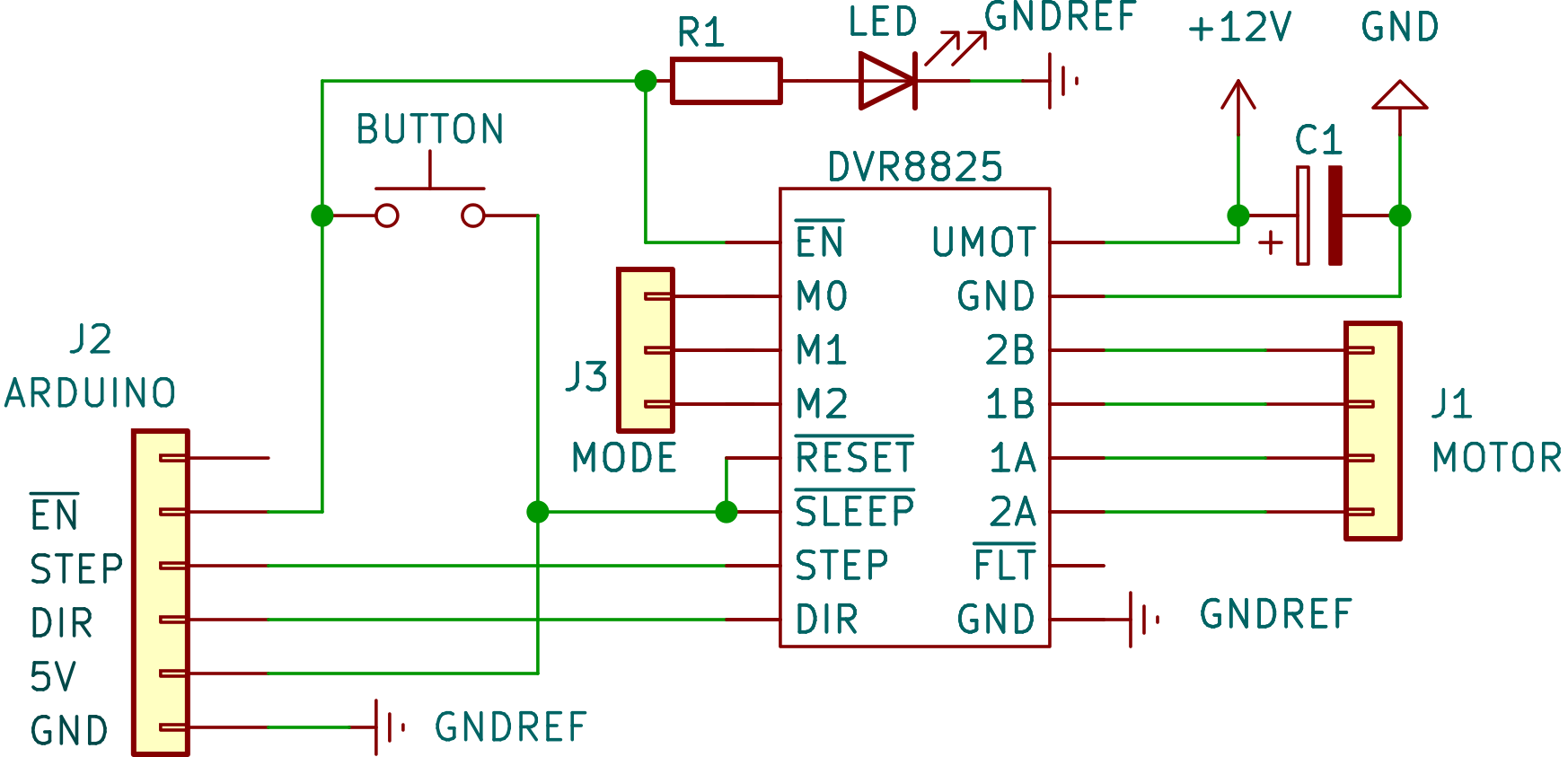
Arduino and motor controller
The diagram for the controller of the stepper motor is shown next.
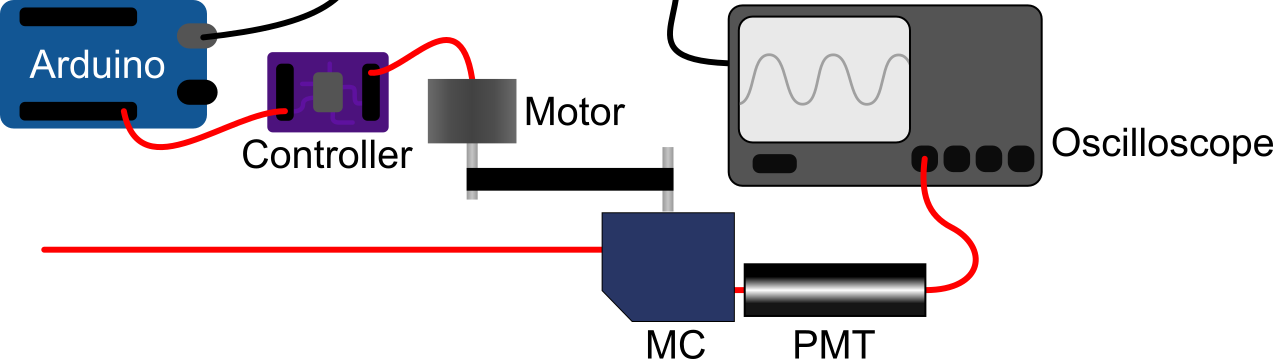
A schematic of the setup:
Calibration process
A initial calibration is necessary for setting the DEFAULT_POSITION (default=0) and CALIBRATION_POSITIONS in automatic_spectral_acquisition\constants.py. This calibration has to be done manually for now, and requires the user to choose a set of points that will be used for further calibrations:
- Define a default position and a default wavelength. Ideally
DEFAULT_POSITION=0and a wavelength in the middle of the available range, e.g., 650 nm. - Choose a set of wavelengths (e.g.: [350, 500, 650, 800, 950] nm)
- Manually set the monochromator to the default wavelength and start the Arduino code.
- Find the associated position by trial and error. Use this values to populate
CALIBRATION_POSITIONS.
As long as the following measurements conclude successfully, there won't be necessary to redefine this constants. Even if there is some problem and the motor doesn't return to the default position, if DEFAULT_POSITION=0, the monochromator can be manually set to the default wavelength associated with the default position to return to normal functionality.
After that, the calibration process can be performed using, e.g., spectral config calibrate. The motor will be moved to the set positions and the user will be asked to input the current wavelength value.
At the end of a measurement the motor will return to the default position to guarantee the correct behavior of further measurements.
The calibration parameters are saved to a file and can be reused for every measurement. However, it is recommended to recalibrate the system every session.


Download files
Download the file for your platform. If you're not sure which to choose, learn more about installing packages.
Source Distribution
Built Distribution
Filter files by name, interpreter, ABI, and platform.
If you're not sure about the file name format, learn more about wheel file names.
Copy a direct link to the current filters
File details
Details for the file automatic_spectral_acquisition-0.1.2.tar.gz.
File metadata
- Download URL: automatic_spectral_acquisition-0.1.2.tar.gz
- Upload date:
- Size: 13.1 kB
- Tags: Source
- Uploaded using Trusted Publishing? No
- Uploaded via: poetry/1.8.3 CPython/3.12.4 Windows/11
File hashes
| Algorithm | Hash digest | |
|---|---|---|
| SHA256 |
e21666b9d74e65233fd369a4d48ab34ac1991c87644ff784a062a11fe3fc64f4
|
|
| MD5 |
51a224b5b4869d1b83dd829083dba5c7
|
|
| BLAKE2b-256 |
8c056e177b48c7a0065a58db67c9d458d0c61b00fbb4a601d561427010a14dde
|
File details
Details for the file automatic_spectral_acquisition-0.1.2-py3-none-any.whl.
File metadata
- Download URL: automatic_spectral_acquisition-0.1.2-py3-none-any.whl
- Upload date:
- Size: 18.0 kB
- Tags: Python 3
- Uploaded using Trusted Publishing? No
- Uploaded via: poetry/1.8.3 CPython/3.12.4 Windows/11
File hashes
| Algorithm | Hash digest | |
|---|---|---|
| SHA256 |
5ece23e842de7a96c28d6de9d5ad376ee0d2f8f0712a95e4bb2b94c9ed994b16
|
|
| MD5 |
340ce9a5b38479e8bc96e9694cc035a1
|
|
| BLAKE2b-256 |
2f1f1acda129225230399e8c12f884cee4b4eb8c7c291204caea716cf05bdbe2
|






