

简介
如果您觉得项目不错,欢迎 ⭐ 也欢迎 PR 合作,如果有任何疑问,欢迎提 issue 交流。
可自定义切片数量和时长的视频自动切片工具,支持 GPU 加速计算,支持命令行使用和 API 使用。
功能
- 基于滑动窗口算法检测弹幕密集的时间段
- 根据弹幕密度自动切片视频
- 支持 Nvidia GPU 加速计算(自动选择是否使用GPU加速)
- 支持自定义数量的视频切片
- 支持自定义切片时长
- 添加详细的日志信息
- 支持命令行使用和API使用
效果展示
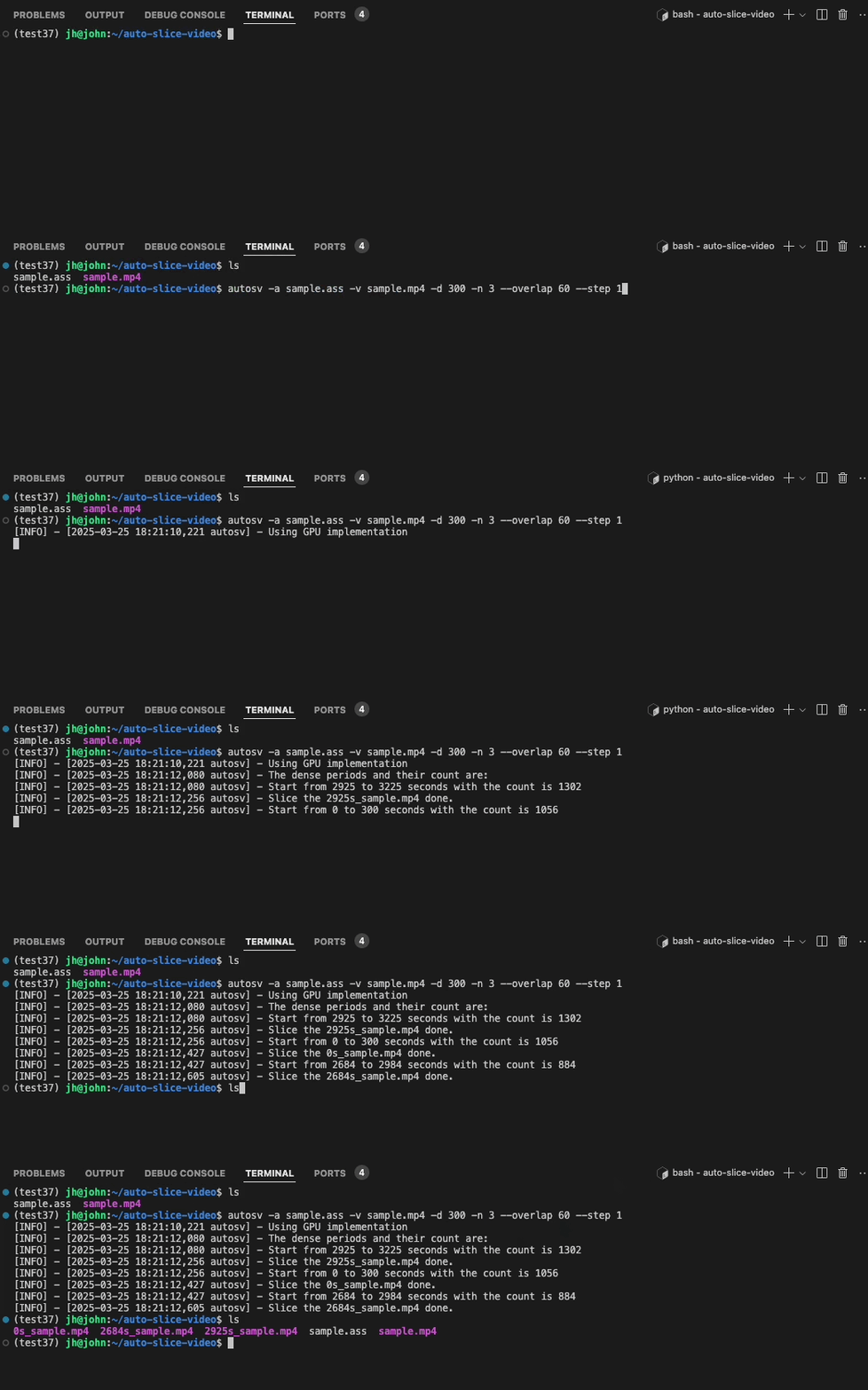
如上,对一段视频提取 3 条高能片段,每个片段 300 秒,允许最大重叠 60 秒。然后计算并且切分出了 3 条高能片段。形式为 xxxs_原始视频名称,xxx 代表该切片在原始视频中的起始时间(秒),方便用户定位。
安装
使用此工具前,您需要先安装ffmpeg:
- Windows:
choco install ffmpeg(通过Chocolatey)或其他方法 - macOS:
brew install ffmpeg(通过Homebrew) - Linux:
sudo apt install ffmpeg(Debian/Ubuntu)
更多操作系统安装 ffmpeg 请参考官方网站。
然后安装 autosv:
pip install autosv
使用方法
命令行使用
# eg. 默认参数见 autosv -h
autosv -a sample.ass -v sample.mp4
autosv -a sample.ass -v sample.mp4 -d 300 -n 3 --overlap 60 --step 1
autosv -h
# optional arguments:
#   -h, --help            show this help message and exit
#   -V, --version         Print version information
#   -a ASS, --ass ASS     The input ass file of the danmaku
#   -v VIDEO, --video VIDEO
#                         The input video file
#   -d DURATION, --duration DURATION
#                         The duration(seconds) of the sliced highlight video, default is 60
#   -n TOP_N, --top_n TOP_N
#                         The number of the top dense periods to return, default is 1
#   --overlap OVERLAP     The overlapped(seconds) between the sliced highlight videos, default is 30
#   --step STEP           The step(seconds) of the sliding window, default is 1
API使用
from autosv import slice_video_by_danmaku
# 基本参数同上
slice_video_by_danmaku(ass_path, video_path, duration=300, top_n=3, max_overlap=60, step=1)
常见问题
GPU 和 CPU 实现有什么区别?
一般来说,当输入计算数据较大时,由于 GPU 是并行计算,因此GPU 计算比 CPU 计算更快且更高效。在我的实测中,当输入数据规模达到3万多条时 (见test/sample2.ass),GPU 计算仅用 2 秒,而 CPU 计算用 33 秒,GPU 实现速度是 CPU 实现的 16.5 倍,并且仅占用 55 MB 的显存。
为什么我不能使用 GPU 加速?
autosv 会通过 nvcc -V 检测机器上是否可用cuda,如果您的机器有NVIDIA GPU,请确保您的驱动已安装且cuda可用。同时,确保您已安装正确版本的numba和numpy。
1 maintainer

Metadata
1 maintainer
Release files for autosv 0.0.3
For a detailed explanation of source distributions (sdists) and built distributions (wheels), please see the package formats documentation.
Source distribution (sdist)
| File | Size | Uploaded | |
|---|---|---|---|
| autosv-0.0.3.tar.gz | 59.5 MB | Details |
Built distribution (wheel)
| File | Interpreter | ABI | Platform | Reset |
|---|---|---|---|---|
| autosv-0.0.3-py3-none-any.whl | Python 3 | none | any | Details |
Total release size: 59.5 MB
Release files / autosv-0.0.3.tar.gz
| Download URL | autosv-0.0.3.tar.gz |
|---|---|
| Size | 59.5 MB |
| Tags | Source |
|
SHA-256 checksum How to use checksums |
00240014df457fad2494cecb493df4c46179aced2cb7e03b7220faf6e0f39c2c
|
|
BLAKE2b-256 checksum How to use checksums |
c01b1dbc6cba304a7c02581d92abefa2f4adea393f61f92c3c28a3a63e54bdc3
|
| Upload date | |
|
Uploaded using Trusted Publishing? What is trusted publishing? |
No |
| Uploaded via |
twine/6.1.0 CPython/3.10.16
|
Release files / autosv-0.0.3-py3-none-any.whl
| Download URL | autosv-0.0.3-py3-none-any.whl |
|---|---|
| Size | 11.5 kB |
| Tags | Python 3 |
|
SHA-256 checksum How to use checksums |
6ec67c9cf715507a6db6ed38c9d49714f760cc63f6c6ce30de2a79ec691cc7fd
|
|
BLAKE2b-256 checksum How to use checksums |
46809ef2acbfc564581c198ad408ffa1fcba308e234b49ac1d6893167a4c39f2
|
| Upload date | |
|
Uploaded using Trusted Publishing? What is trusted publishing? |
No |
| Uploaded via |
twine/6.1.0 CPython/3.10.16
|














