
A command-line tool for validating PDF accessibility, analyzing document structure, and generating detailed reports

Project description
avalpdf - PDF Accessibility Validator
A command-line tool for validating PDF accessibility, analyzing document structure, and generating detailed reports.
Features
- Document structure analysis
- Support for both local and remote PDF files
- Validation of:
- Document tags and metadata:
- Document tagging status
- Title presence
- Language declaration (Italian)
- Heading hierarchy:
- H1 presence
- Correct heading levels sequence
- Figure alt text:
- Missing alternative text detection
- Complex or problematic alt text patterns
- Tables structure:
- Header presence and proper structure
- Empty cells detection
- Duplicate headers check
- Multiple header rows warning
- Empty tables detection
- Lists structure:
- Proper list tagging
- Detection of untagged lists (consecutive paragraphs with bullets/numbers)
- Misused list types (numbered items in unordered lists)
- List hierarchy consistency
- Links:
- Detection of non-descriptive links
- Raw URL text warnings
- Email and institutional domain exceptions
- Formatting issues:
- Excessive underscores (used for underlining)
- Spaced capital letters (like "T E S T")
- Extra spaces used for layout (3+ consecutive spaces)
- Empty elements:
- Empty paragraphs
- Whitespace-only elements
- Empty headings
- Empty spans
- Empty table cells
- Document tags and metadata:
- Multiple output formats:
- Detailed JSON structure
- Simplified JSON
- Accessibility validation report
- Console reports with color-coded structure visualization
- Weighted scoring system based on accessibility criteria
- Detailed issue categorization (issues, warnings, successes)
Installation
Using pip
pip install avalpdf
Or uv
uv tool install avalpdf
Updates
Using pip
pip install avalpdf --upgrade
Or uv
uv tool install avalpdf --upgrade
Usage
After installation, you can run avalpdf from any directory.
Quick start
Simply run
avalpdf thesis.pdf
or
avalpdf https://example.com/document.pdf
to get a report like this
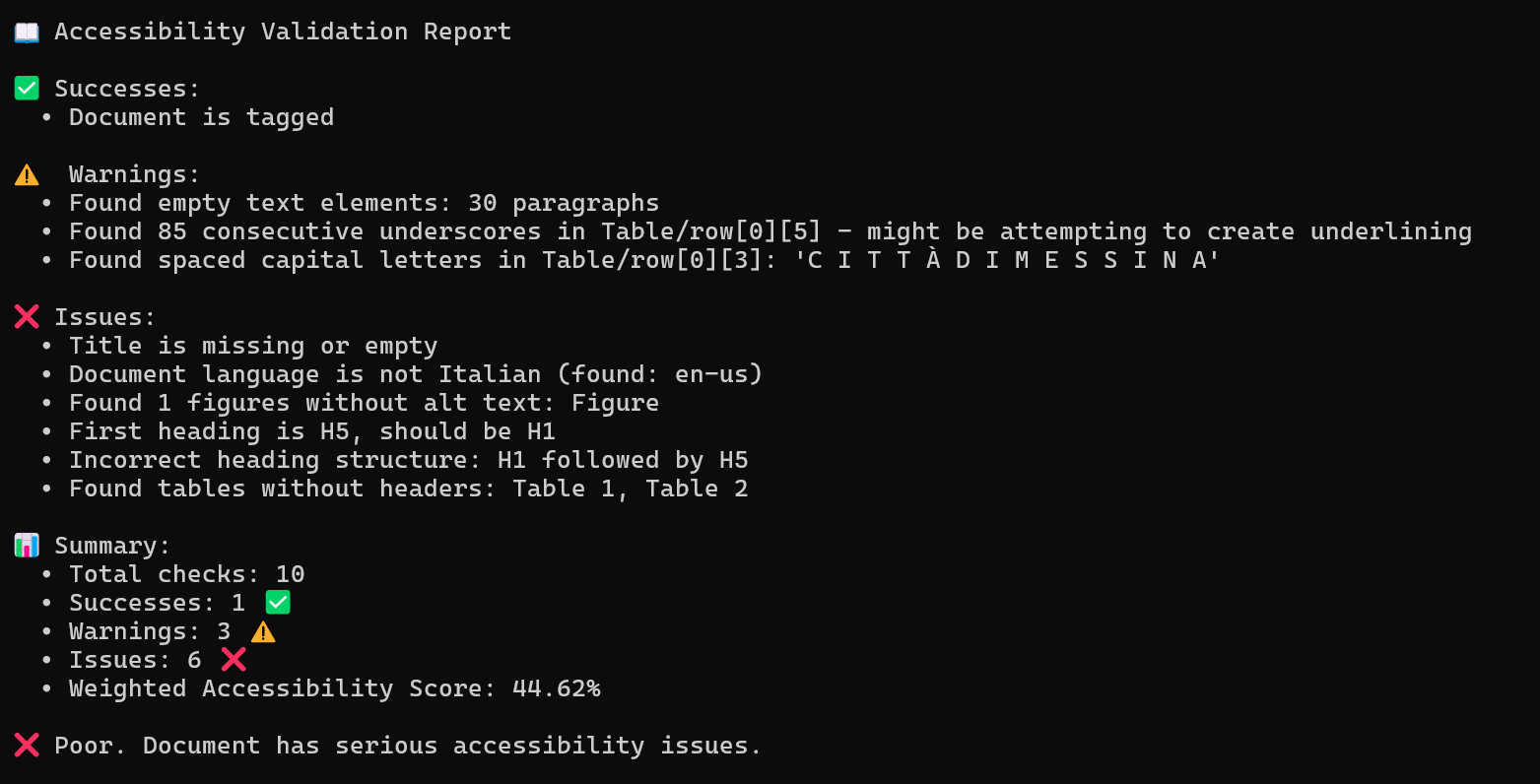
and a preview of the structure
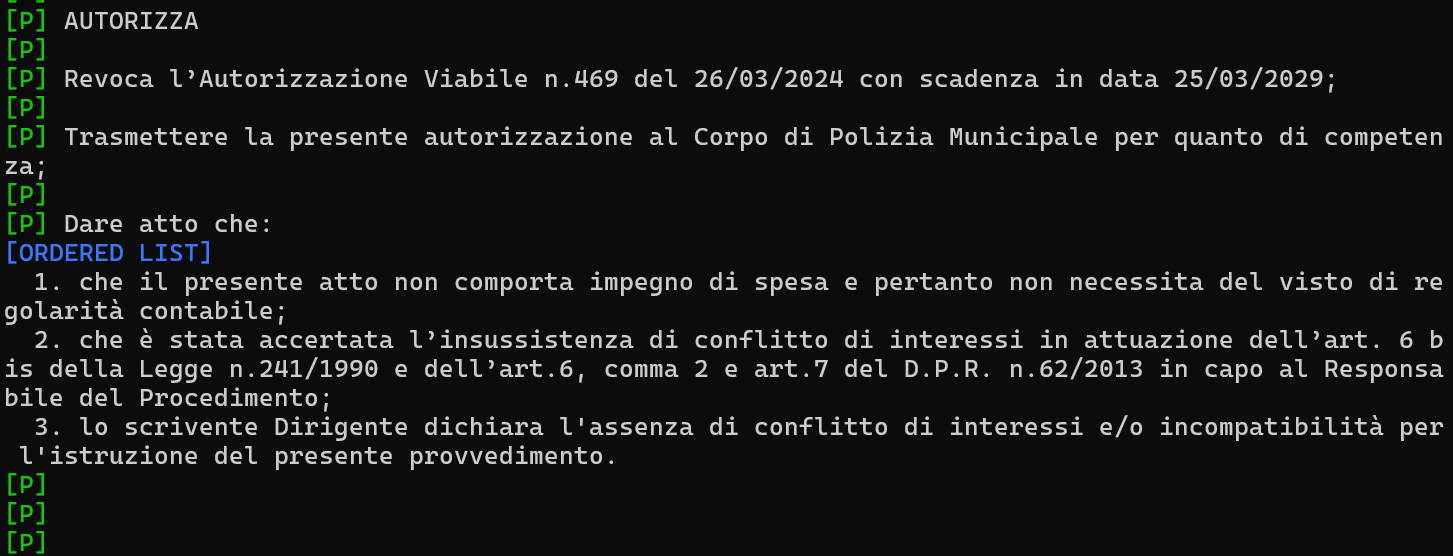
Details
# Basic validation with console output
avalpdf document.pdf

# Complete analysis with all outputs
avalpdf document.pdf --full --simple --report

# Save reports to specific directory
avalpdf document.pdf -o /path/to/output --report --simple

# Show document structure only
avalpdf document.pdf --show-structure
Command Line Options
--full: Save full JSON structure--simple: Save simplified JSON structure--report: Save validation report--output-dir,-o: Specify output directory--show-structure: Display document structure--show-validation: Display validation results--quiet,-q: Suppress console output--rich: Use enhanced visual formatting for document structure--tree: Use tree view instead of panel view with Rich formatting
Examples
- Quick accessibility check:
avalpdf thesis.pdf
- Generate all reports:
avalpdf report.pdf --full --simple --report -o ./analysis
- Silent operation with report generation:
avalpdf document.pdf --report -q
- Analyze multiple files:
for file in *.pdf; do avalpdf "$file" --report --quiet; done
Validation Output
The tool provides three types of findings:
- ✅ Successes: Correctly implemented accessibility features
- ⚠️ Warnings: Potential issues that need attention
- ❌ Issues: Problems that must be fixed
Report Format
{
  "validation_results": {
    "issues": ["..."],
    "warnings": ["..."],
    "successes": ["..."]
  }
}
License
MIT License
Support
For issues or suggestions:
- Open an issue on GitHub
- Provide the PDF file (if possible) and the complete error message
- Include the command you used and your operating system information
Release history Release notifications | RSS feed


Download files
Download the file for your platform. If you're not sure which to choose, learn more about installing packages.
Source Distribution
Built Distribution
Filter files by name, interpreter, ABI, and platform.
If you're not sure about the file name format, learn more about wheel file names.
Copy a direct link to the current filters
File details
Details for the file avalpdf-0.1.4.tar.gz.
File metadata
- Download URL: avalpdf-0.1.4.tar.gz
- Upload date:
- Size: 27.9 kB
- Tags: Source
- Uploaded using Trusted Publishing? No
- Uploaded via: twine/6.1.0 CPython/3.12.3
File hashes
| Algorithm | Hash digest | |
|---|---|---|
| SHA256 |
65a703e8eec544b0856ff841c728a56db55372128d07e9b9ef5869b21ac75ab9
|
|
| MD5 |
38840fa82485f78c3e1075734368c903
|
|
| BLAKE2b-256 |
48155212bd50f29ff20af16bafa62cfd44cc220c6f018386fb620e630b1f352d
|
File details
Details for the file avalpdf-0.1.4-py3-none-any.whl.
File metadata
- Download URL: avalpdf-0.1.4-py3-none-any.whl
- Upload date:
- Size: 28.6 kB
- Tags: Python 3
- Uploaded using Trusted Publishing? No
- Uploaded via: twine/6.1.0 CPython/3.12.3
File hashes
| Algorithm | Hash digest | |
|---|---|---|
| SHA256 |
7fbfd43e4f946bb61b8a8f10500780b972b64a4b5e665220af24dcba9b42f596
|
|
| MD5 |
dc8db5ff1730078c977842ee0c7ea4e6
|
|
| BLAKE2b-256 |
2f12452331a5d572dac09ba300a7d648232e52e179957ab882c48ad867fa2136
|






