

aws-analyzer
Understand your AWS data from a SageMaker notebook.
Readable reports on your buckets, tables, knowledge bases, functions, workflows, APIs, queries and queues:
what's there, what it costs, and what to do next. Windows you click through. An agent you can just ask.





📖 Read the guides · Get started · Services · See it · Permissions · Changelog
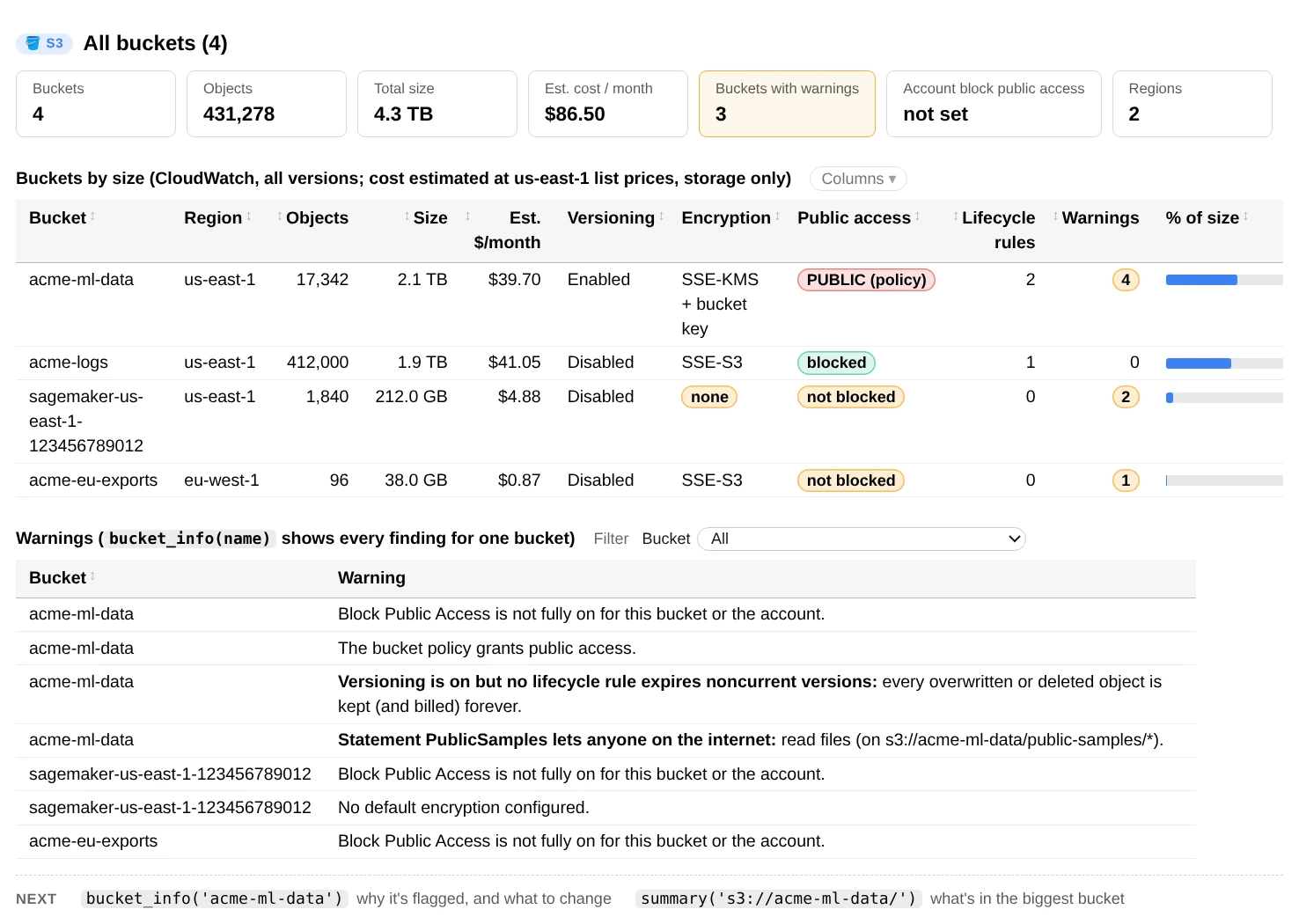
ui.overview(): what to fix first, the changes that clear every warning, and each bucket's risks, size and estimated monthly cost.
Why aws-analyzer
|
🧭 The answer first The few numbers that matter, then the rest in plain English: policies, lifecycle rules, settings. Raw JSON stays folded away. |
💵 Findings you can act on Each warning says what's wrong, what it costs ("$12.40/month") and the next step, with the call or command to copy. |
🔒 Read-only Nothing writes to your account. Where a change would help, the report shows the command instead of running it. |
|
🧾 Honest about cost Estimates are labelled, with the prices used. Expensive scans stop early and say what they read. |
📦 One install%pip install aws-analyzer gives you every service and the agent. Only boto3 is needed for reports.
|
💬 Notes, not tracebacks A missing permission or package becomes a short note on how to fix it, and the rest of the report still renders. |
Services
| Service | What it shows you | Docs |
|---|---|---|
 Amazon S3 |
Every bucket's size, cost and risks; folders, search and previews of CSV, Parquet, JSON, Excel, PDF and Word; what you could save | Guide · Explorer |
 Amazon DynamoDB |
Every table's keys, size and cost; scans and queries as plain tables; the attributes items hold; the read units each report used | Guide · Explorer |
 Bedrock Knowledge Bases |
Settings in plain English, sync health, how each file was indexed; search and answers with every claim linked to its source | Guide · Explorer |
| Knowledge base chat |
A chat window with every RetrieveAndGenerate setting in reach; test a list of questions and see which setup does better | Guide |
 Amazon SageMaker |
The notebook you're in: cost, CPU, memory, disk, GPU; its Python environments; what's running and billing; why a job or pipeline failed | Guide |
 Amazon OpenSearch |
Every vector field in plain English; whether the graphs fit in memory; documents without a vector; nearest neighbours | Guide · Explorer |
 AWS Lambda |
Every function's triggers, calls, errors and cost; where its callers' limits clash with its settings; errors grouped by cause; cold starts and memory; logs run by run; how its code works | Guide · Explorer |
 AWS Step Functions |
Where and why executions fail; one execution step by step, with the Lambda lines of the run that broke it | Guide · Explorer |
 Amazon API Gateway |
Requests, errors, latency and cost per API; routes anyone can call; failed calls from the access log, and the Lambda run behind each | Guide · Explorer |
 Amazon Athena |
What past queries scanned and cost; why they failed, with the fix; tables whose folder is empty or gone; failed crawlers | Guide · Explorer |
 SQS, SNS and EventBridge |
Where a message went, hop by hop; queues backing up; dead-letter queues; the policy or key that keeps a sender out | Guide · Explorer |
| Ask in plain English |
An agent that answers "Which Lambda failed last night?" from the same read-only tools, says what it checked, and on the model you pick | Guide |
Each guide walks through a service with screenshots and a short video tour: setting up, every command, and a ready-made IAM policy.
Get started
1. Install it, in a notebook cell:
%pip install aws-analyzer             # every service and the agent (Python 3.11+)
%pip install "aws-analyzer[all]"      # plus pandas, pyarrow, the PDF and Excel readers, progress bars
2. Look around. It uses the notebook's IAM role, so there's nothing to configure:
from aws_analyzer import S3View, LambdaView, AgentView

ui = S3View()
ui.help()                             # every command, grouped by task
ui.overview()                         # every bucket: what to fix first, size, monthly cost

LambdaView().explore()                # a window: every function, its logs run by run, errors and code
AgentView().ask("Which Lambda failed last night?")
Every report ends with ⚙ Ran with: the options its command used, defaults included, and other ways to run it
to copy (ui.performance('etl', since='7d')), so you learn a command's options without opening help().
Every service has a View (DynamoDBView, BedrockKBView, SageMakerView, OpenSearchView, StepFunctionsView,
APIGatewayView, AthenaView, MessagingView, ...), and each View's .core is the analyzer behind it, which returns
plain Python data instead of a report.
TIP:
notebooks/aws_analyzer_commands.ipynbhas every command of every service in a cell of its own: fill in your names once at the top, then run any cell.
More: no internet in the notebook, another profile or region, your time zone, themes
ui = S3View(S3Analyzer(profile="dev", region="eu-west-1"))   # another AWS profile or region
ui = S3View(mode="text", max_rows=0)                          # plain text, every row

from aws_analyzer import set_timezone, set_theme
set_timezone("Asia/Kolkata")          # times in your zone (or AWS_ANALYZER_TZ)
set_theme("soft")                     # console, soft, editorial, brand or classic (or AWS_ANALYZER_THEME)
A notebook without internet access can install from a bucket: pip download aws-analyzer --no-deps -d wheels on a
machine that has it, copy wheels/ to S3, then %pip install --no-index --find-links wheels aws-analyzer in the
notebook. The guides cover each option in full.
See it
|
S3 explorer 
|
S3 preview 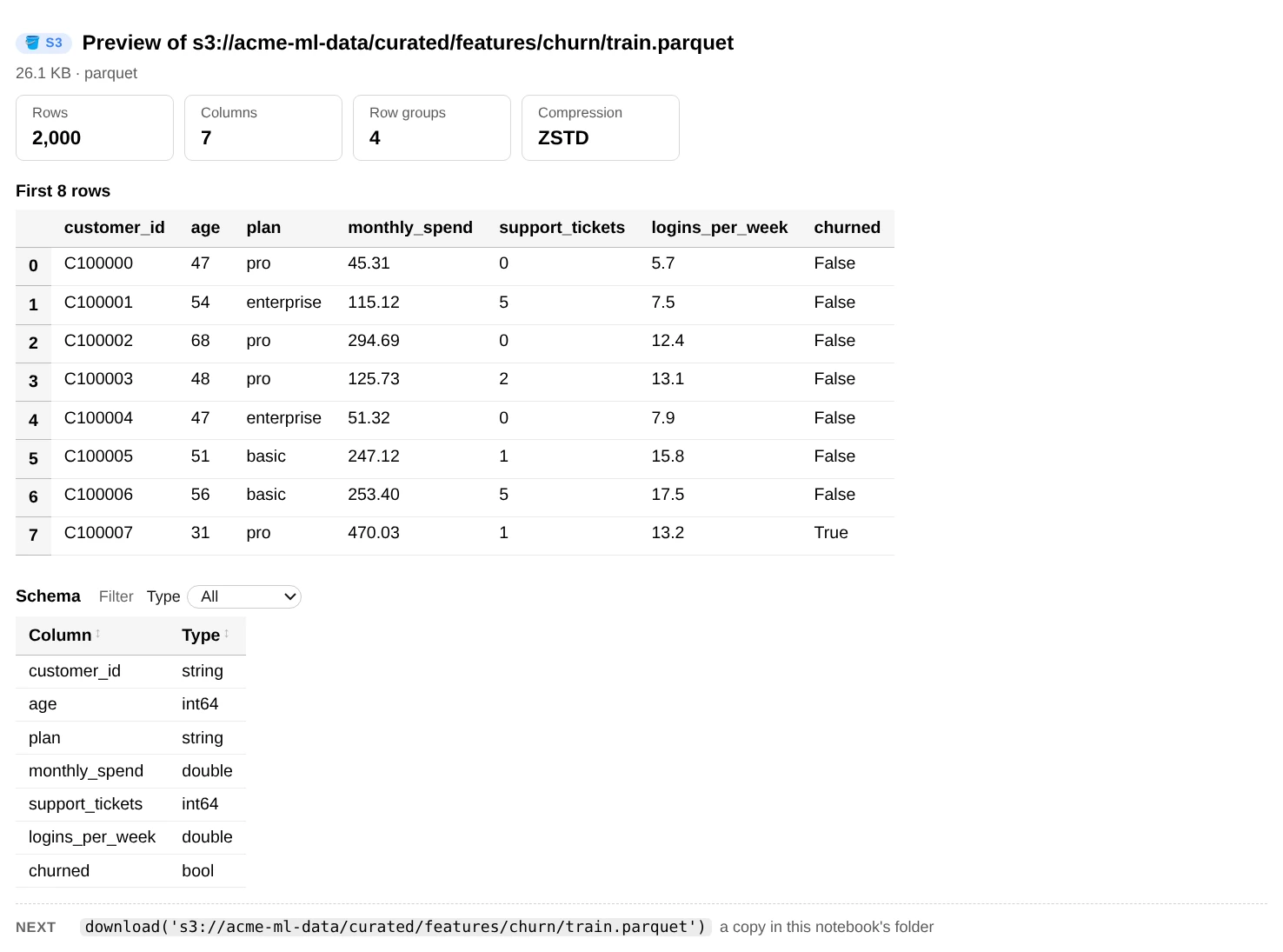
|
|
DynamoDB table 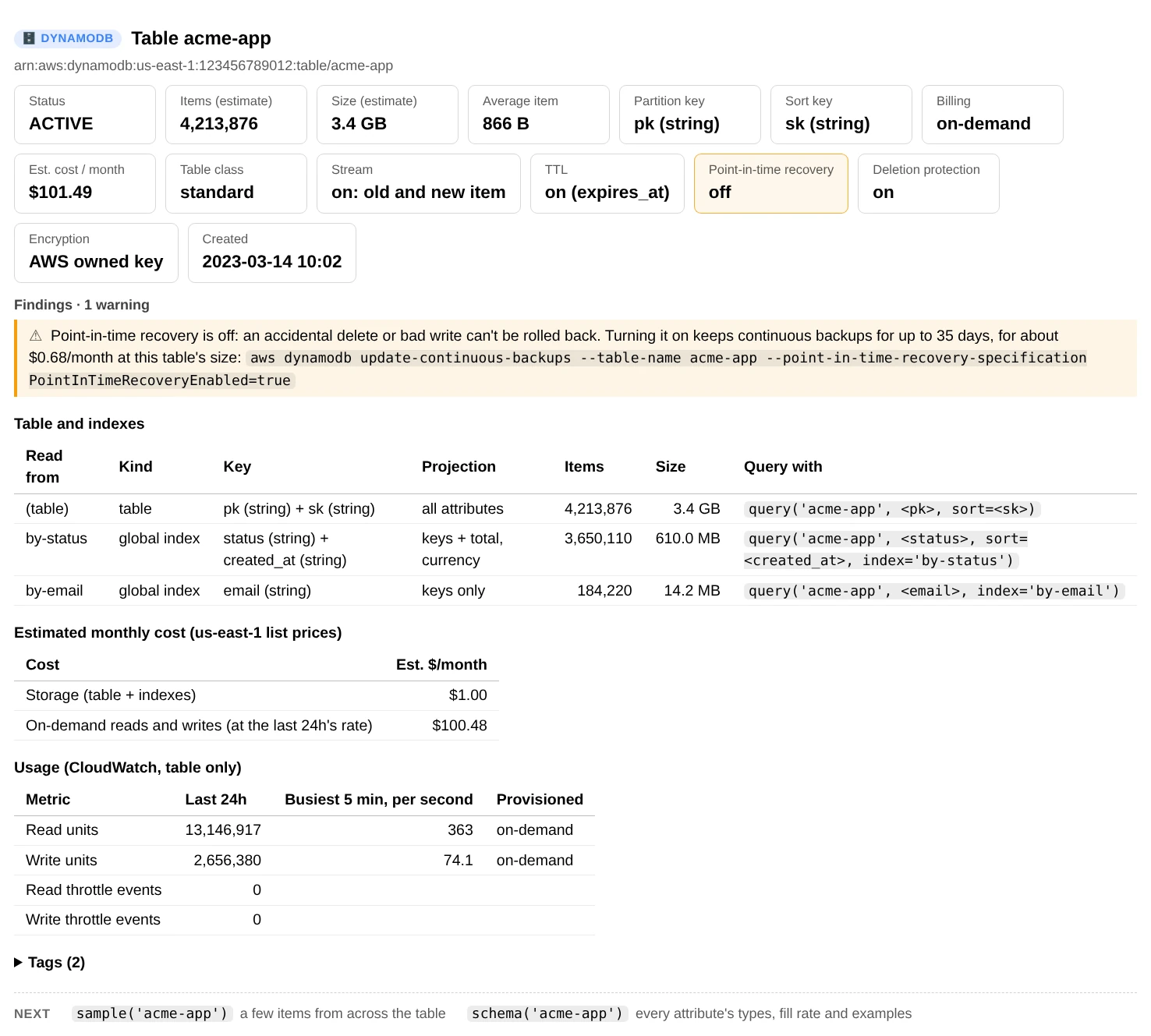
|
DynamoDB scan 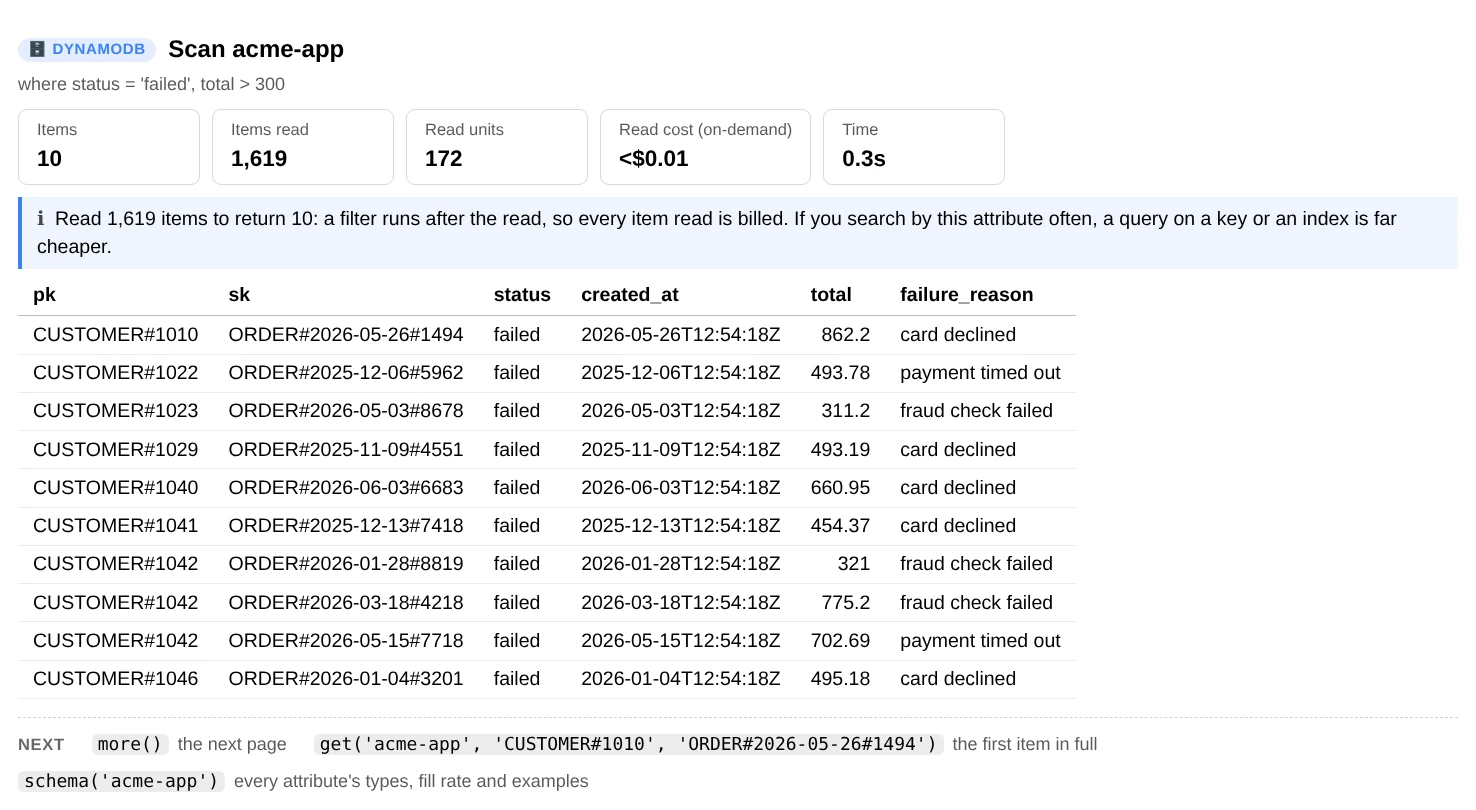
|
|
Knowledge base answer 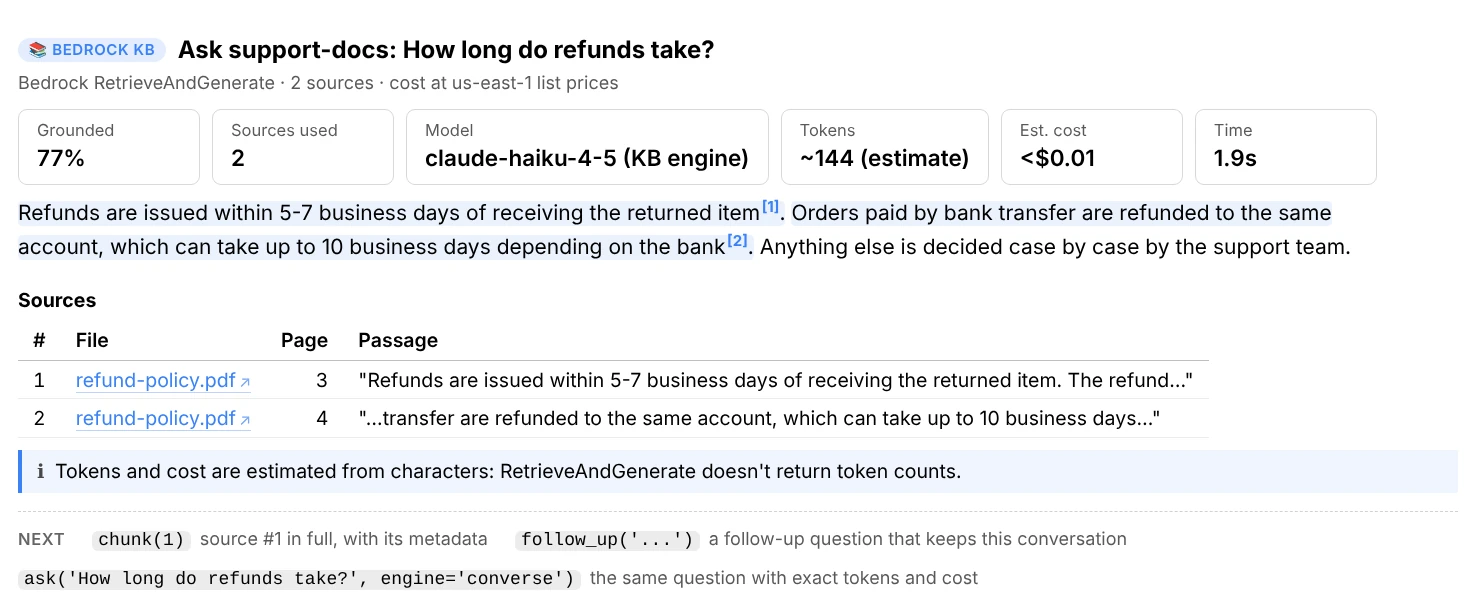
|
Knowledge base explorer 
|
|
Knowledge base chat 
|
SageMaker notebook 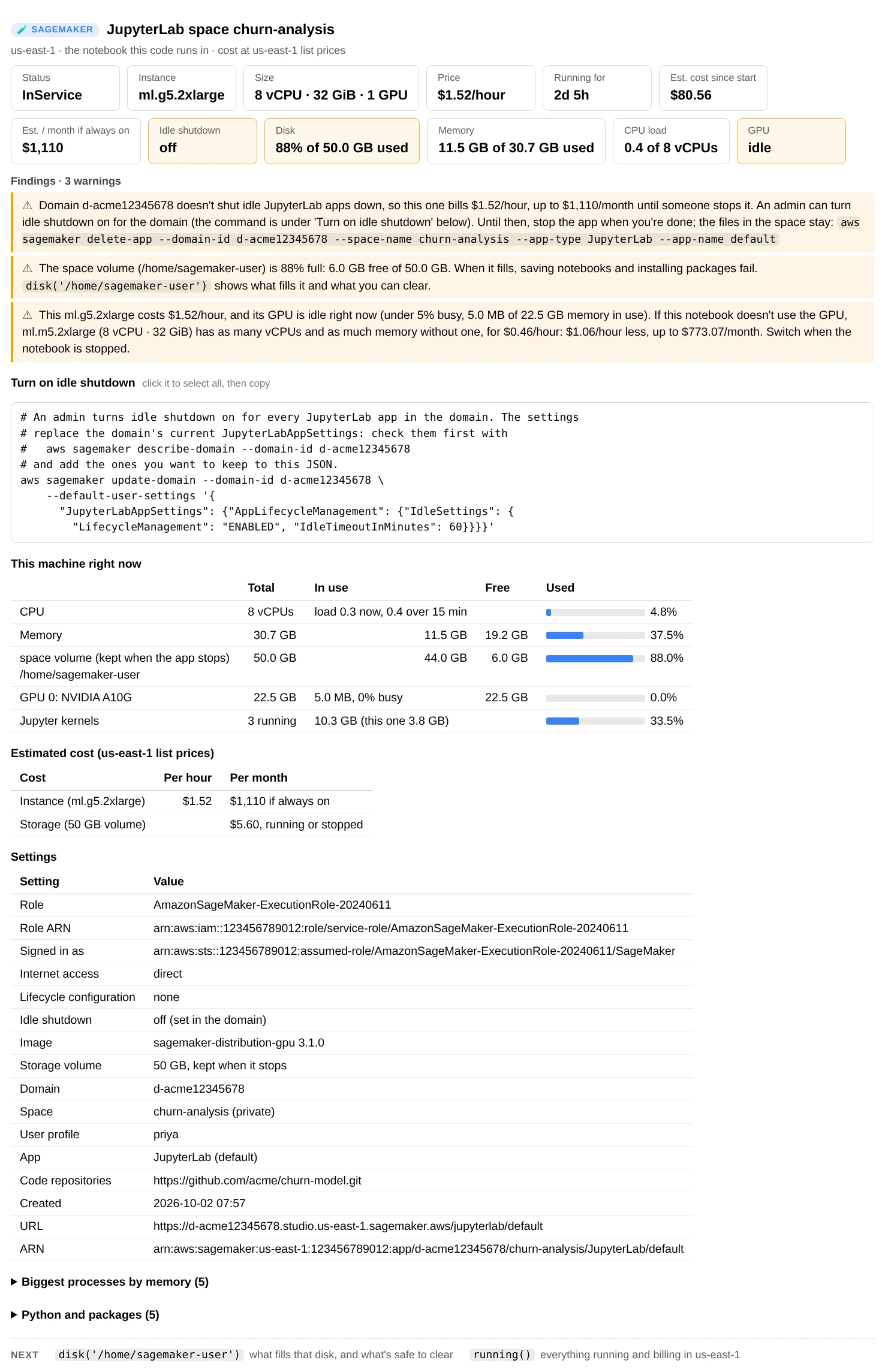
|
|
OpenSearch index 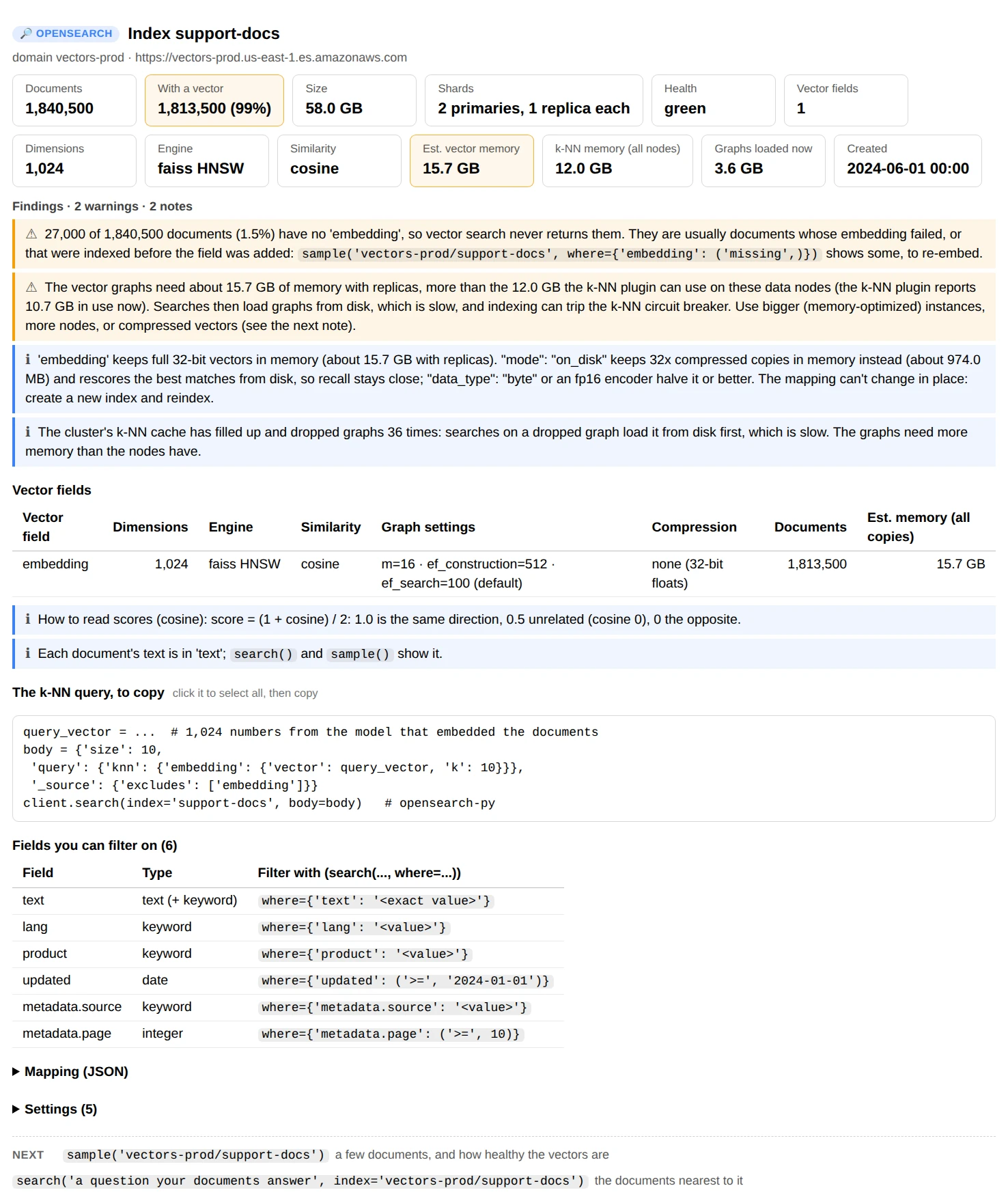
|
Lambda functions 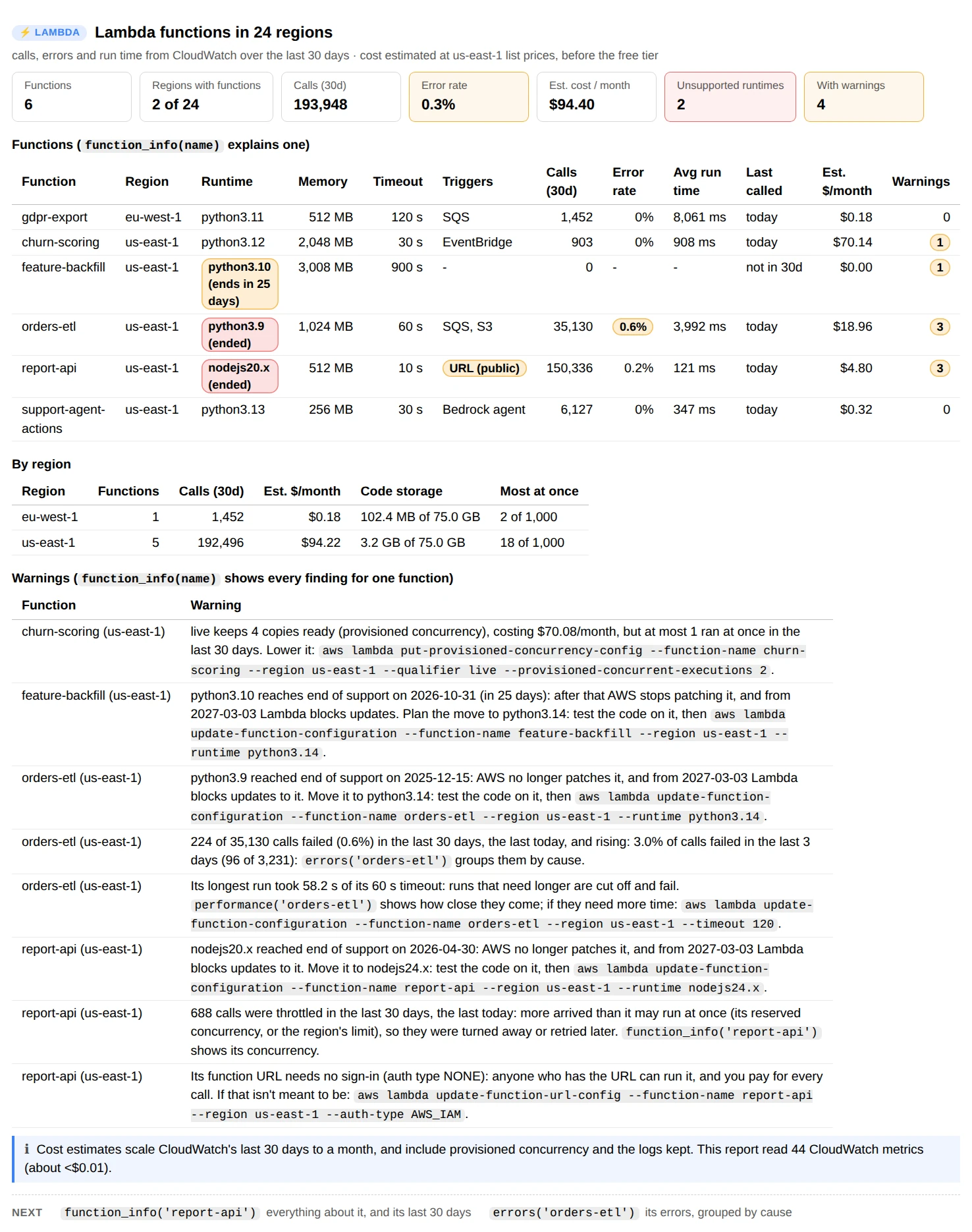
|
|
Lambda explorer 
|
Step Functions explorer 
|
|
API Gateway explorer 
|
Messaging explorer 
|
|
Agent chat 
|
Permissions
Everything is read-only, but for lambda:InvokeFunction, which only Lambda's invoke() uses. Grant what you need;
anything you can't read shows up as a note instead of an error. Each guide has a ready-made IAM policy (for example
Lambda's).
IAM permissions by service
| Service | Permissions |
|---|---|
| Amazon S3 | s3:ListAllMyBuckets, s3:GetBucketLocation, s3:ListBucket, s3:ListBucketVersions, s3:ListBucketMultipartUploads, s3:ListMultipartUploadParts, s3:GetObject, s3:GetObjectTagging, the bucket settings (s3:GetBucket*: s3:GetBucketVersioning, s3:GetBucketPolicy, s3:GetBucketPolicyStatus, s3:GetBucketPublicAccessBlock, s3:GetBucketOwnershipControls, s3:GetBucketObjectLockConfiguration, s3:GetBucketLogging, s3:GetBucketTagging, s3:GetBucketNotification, with s3:GetLifecycleConfiguration, s3:GetReplicationConfiguration, s3:GetEncryptionConfiguration, s3:GetInventoryConfiguration), s3:GetAccountPublicAccessBlock, cloudwatch:ListMetrics, cloudwatch:GetMetricData |
| Amazon DynamoDB | dynamodb:ListTables, dynamodb:DescribeTable, dynamodb:DescribeTimeToLive, dynamodb:DescribeContinuousBackups, dynamodb:ListTagsOfResource, dynamodb:Scan, dynamodb:Query, dynamodb:GetItem, dynamodb:PartiQLSelect, cloudwatch:GetMetricData; kms:Decrypt for a table encrypted with your own key |
| Bedrock Knowledge Bases and chat | bedrock:ListKnowledgeBases, bedrock:GetKnowledgeBase, bedrock:ListDataSources, bedrock:GetDataSource, bedrock:ListIngestionJobs, bedrock:GetIngestionJob, bedrock:ListKnowledgeBaseDocuments, bedrock:GetKnowledgeBaseDocuments, bedrock:ListTagsForResource, bedrock:Retrieve, bedrock:RetrieveAndGenerate, bedrock:InvokeModel (the answering model), bedrock:ListFoundationModels, bedrock:ListInferenceProfiles, s3:ListBucket and s3:GetObject on the data sources' buckets |
| Amazon SageMaker | sagemaker:DescribeNotebookInstance, sagemaker:DescribeNotebookInstanceLifecycleConfig, sagemaker:ListNotebookInstances, sagemaker:ListDomains, sagemaker:DescribeDomain, sagemaker:DescribeUserProfile, sagemaker:ListSpaces, sagemaker:DescribeSpace, sagemaker:ListApps, sagemaker:DescribeApp, sagemaker:ListEndpoints, sagemaker:DescribeEndpoint, sagemaker:DescribeEndpointConfig, sagemaker:ListTrainingJobs, sagemaker:DescribeTrainingJob, sagemaker:ListProcessingJobs, sagemaker:DescribeProcessingJob, sagemaker:ListPipelines, sagemaker:ListPipelineExecutions, sagemaker:DescribePipelineExecution, sagemaker:DescribePipelineDefinitionForExecution, sagemaker:ListPipelineExecutionSteps, cloudwatch:GetMetricData, logs:DescribeLogStreams, logs:GetLogEvents, cloudtrail:LookupEvents |
| Amazon OpenSearch | es:ListDomainNames, es:DescribeDomains, es:DescribeDomain, es:ESHttpGet, es:ESHttpPost (to _search and _count only), aoss:ListCollections, aoss:BatchGetCollection, aoss:ListSecurityPolicies, aoss:GetSecurityPolicy, aoss:GetAccountSettings, aoss:APIAccessAll with a data access policy allowing aoss:DescribeIndex and aoss:ReadDocument, cloudwatch:GetMetricData, bedrock:InvokeModel (to embed a question) |
| AWS Lambda | lambda:ListFunctions, lambda:GetFunction, lambda:GetPolicy, lambda:ListEventSourceMappings, lambda:GetFunctionUrlConfig, lambda:GetFunctionEventInvokeConfig, lambda:ListVersionsByFunction, lambda:ListAliases, lambda:ListProvisionedConcurrencyConfigs, lambda:GetRuntimeManagementConfig, lambda:GetAccountSettings, cloudwatch:GetMetricData, logs:DescribeLogGroups, logs:DescribeLogStreams, logs:FilterLogEvents, ec2:DescribeRegions (for regions="all"), sqs:GetQueueUrl, sqs:GetQueueAttributes, elasticloadbalancing:DescribeTargetGroups, elasticloadbalancing:DescribeLoadBalancerAttributes, apigateway:GET; and lambda:InvokeFunction, only for invoke() |
| AWS Step Functions | states:ListStateMachines, states:DescribeStateMachine, states:ListExecutions, states:DescribeExecution, states:GetExecutionHistory, states:DescribeStateMachineForExecution, cloudwatch:GetMetricData, logs:FilterLogEvents, lambda:GetFunction, lambda:ListVersionsByFunction, lambda:GetAccountSettings |
| Amazon API Gateway | apigateway:GET (IAM's one permission for every API Gateway read), cloudwatch:GetMetricData, logs:FilterLogEvents, lambda:GetFunction |
| Amazon Athena | athena:ListWorkGroups, athena:GetWorkGroup, athena:ListQueryExecutions, athena:BatchGetQueryExecution, athena:GetQueryExecution, athena:GetQueryRuntimeStatistics, athena:GetQueryResults, glue:GetDatabases, glue:GetDatabase, glue:GetTables, glue:GetTable, glue:GetPartitions, glue:GetCrawlers, glue:GetCrawlerMetrics, s3:ListBucket, s3:GetObject (saved results) |
| SQS, SNS and EventBridge | sqs:ListQueues, sqs:GetQueueAttributes, sqs:GetQueueUrl, sqs:ListDeadLetterSourceQueues, sns:ListTopics, sns:GetTopicAttributes, sns:ListSubscriptions, sns:ListSubscriptionsByTopic, sns:GetSubscriptionAttributes, events:ListEventBuses, events:ListRules, events:DescribeRule, events:ListTargetsByRule, events:ListRuleNamesByTarget, events:ListArchives, cloudwatch:GetMetricData, lambda:ListEventSourceMappings, lambda:GetFunctionConfiguration, lambda:GetPolicy; never sqs:ReceiveMessage |
| Ask in plain English | The permissions above for the services it reads, plus cloudwatch:ListMetrics, cloudwatch:DescribeAlarmsForMetric and cloudwatch:DescribeAlarms; with a model on Bedrock, bedrock:InvokeModel, bedrock:ListFoundationModels, bedrock:ListInferenceProfiles and bedrock:GetInferenceProfile |
sts:GetCallerIdentity needs no permission.
Development
Issues and pull requests are welcome: CONTRIBUTING.md explains the set-up and the rules the code follows, and SECURITY.md how to report a vulnerability privately.
pip install -r requirements-dev.txt    # pinned versions
python -m pytest                       # every test, against moto: no AWS account needed
ruff check .                           # lint
mkdocs serve                           # the guide site, from docs/ (pip install -r requirements-docs.txt)
License
The service icons are from AWS's Architecture Icons, unchanged. AWS and the AWS service names are trademarks of Amazon.com, Inc. or its affiliates; this project isn't made or endorsed by AWS.
1 maintainer

Metadata
1 maintainer
Release files for aws-analyzer 0.65.0
For a detailed explanation of source distributions (sdists) and built distributions (wheels), please see the package formats documentation.
Source distribution (sdist)
| File | Size | Uploaded | Provenance | Actions |
|---|---|---|---|---|
| aws_analyzer-0.65.0.tar.gz | 2.5 MB | With provenance | Details for aws_analyzer-0.65.0.tar.gz |
Built distribution (wheel)
| File | Interpreter | ABI | Platform | Actions Reset |
|---|---|---|---|---|
| aws_analyzer-0.65.0-py3-none-any.whl | Python 3 | none | any | Details for aws_analyzer-0.65.0-py3-none-any.whl |
Total release size: 4.8 MB
Release files / aws_analyzer-0.65.0.tar.gz
| Download URL | aws_analyzer-0.65.0.tar.gz |
|---|---|
| Size | 2.5 MB |
| Tags | Source |
|
SHA-256 checksum How to use checksums |
1d1c5c3e40b2e2a172f5ee428a795ec1888a3f6905d71e21f47f0f262d7f2447
|
|
BLAKE2b-256 checksum How to use checksums |
e6667c61a00ebf91099082b10eee80e54865c763d81d455056649adbd6cbb3d5
|
| Upload date | |
|
Uploaded using Trusted Publishing? What is trusted publishing? |
Yes |
| Uploaded via |
twine/7.0.0 CPython/3.13.16
|
Provenance
Provenance describes where a file came from. On PyPI, provenance is shared via attestations, which provide a verifiable record of the build or publishing details. View details, limitations and caveats.


PyPI Publish Attestation
PyPI verified that this artifact, at this checksum, originated from the publisher listed below.
Signed by GitHub Actions, verified by PyPI on Nov 26, 2026.
Transparency logRelease files / aws_analyzer-0.65.0-py3-none-any.whl
| Download URL | aws_analyzer-0.65.0-py3-none-any.whl |
|---|---|
| Size | 2.2 MB |
| Tags | Python 3 |
|
SHA-256 checksum How to use checksums |
d381db9a81d89100254ac31581364d769ec6d7938beecf188c0e2a0c22a3828a
|
|
BLAKE2b-256 checksum How to use checksums |
609e7bf82f6a97006de8524252caf98c3c106a5482f83d951a6e4cbd78c11bff
|
| Upload date | |
|
Uploaded using Trusted Publishing? What is trusted publishing? |
Yes |
| Uploaded via |
twine/7.0.0 CPython/3.13.16
|
Provenance
Provenance describes where a file came from. On PyPI, provenance is shared via attestations, which provide a verifiable record of the build or publishing details. View details, limitations and caveats.
PyPI Publish Attestation
PyPI verified that this artifact, at this checksum, originated from the publisher listed below.
Signed by GitHub Actions, verified by PyPI on Nov 26, 2026.
Transparency logSecurity for aws-analyzer 0.65.0
Provenance
Provenance describes where a file came from. On PyPI, provenance is shared via attestations, which provide a verifiable record of the build or publishing details. View details, limitations and caveats.
Full provenance
Both files in this release have been uploaded with provenance metadata.
Attestation for aws_analyzer-0.65.0.tar.gz
PyPI Publish Attestation
PyPI verified that this artifact, at this checksum, originated from the publisher listed below.
Signed by GitHub Actions, verified by PyPI on Nov 26, 2026.
Transparency logA note on package security
PyPI is a repository for distributing packages, not a service for auditing them. While third-party security researchers and our staff do their best to detect and remove malicious packages, PyPI cannot guarantee the quality, security or suitability of any given package.
To learn more about protecting yourself from malicious actors, visit our package security documentation.














