
Unified CLI tool for streamlined AWS operations
Verified details
These details have been verified by PyPIProject links
GitHub Statistics
Maintainers

Project description
aws fusion
Unified CLI tool for streamlined AWS operations, enhancing developer productivity


Installation
Install via pip install
pip install aws-fusion
Command line tool
To invoke the cli, there are 2 option
- Directly use
aws-fusioncommand - Use it via aws cli alias with
aws fusion
Usage
usage: aws-fusion [<flags>] <command> ...

Unified CLI tool for streamlined AWS operations, enhancing developer productivity

Flags:
  -h, --help    show this help message and exit
  -v, --version Display the version of this tool
  --debug       Turn on debug logging

Command:
  init [<flags>]
    Initialize fusion app with creation of aws fusion alias.

  open-browser [<flags>] [<args>]
    Open a web browser for graphical access to the AWS Console.

    -p, --profile PROFILE The AWS profile to create the pre-signed URL with
    -r, --region REGION   The AWS Region to send the request to
        --clip            Don't open the web browser, but copy the signin URL to clipboard
        --stdout          Don't open the web browser, but echo the signin URL to stdout

  iam-user-credentials [<flags>] <sub-command>
    IAM User credential helper.

  iam-user-credentials get [<flags>] [<args>]
    Retrieve IAM user credentials for AWS CLI profiles or application authentication.

        --access-key ACCESS_KEY AWS access key
        --account-id ACCOUNT_ID AWS Account ID for the name
        --username USERNAME     Username of a AWS user associated with the access key for the name
        --credential-process    Output the credential in AWS credential process syntax

  iam-user-credentials store [<flags>] [<args>]
    Store IAM user access key and secret key securely for streamlined authentication.

        --access-key ACCESS_KEY AWS access key
        --account-id ACCOUNT_ID AWS Account ID for the name
        --username USERNAME     Username of a AWS user associated with the access key for the name
        --secret-key SECRET_KEY AWS secret key

  okta [<flags>] <sub-command>
    Generate AWS session credentials from Okta.

  okta device-auth [<flags>] [<args>]
    Generate AWS session credentials using SAML assertion from Okta device authentication.

        --org-domain ORG_DOMAIN                   Full domain hostname of the Okta org e.g. example.okta.com
        --oidc-client-id OIDC_CLIENT_ID           The ID is the identifier of the client is Okta app acting as the IdP for AWS
        --aws-acct-fed-app-id AWS_ACCT_FED_APP_ID The ID for the AWS Account Federation integration app
        --aws-iam-role AWS_IAM_ROLE               The AWS IAM Role ARN to assume
        --credential-process                      Output the credential in AWS credential process syntax

  config-switch [<flags>] <sub-command>
    Switching between AWS config.

  config-switch profile [<flags>]
    Switch between available aws profile.

  config-switch region [<flags>]
    Switch between available aws region.
Use case of open-browser
This only works with assume-role and federated-login, doesn't work with IAM user or user session.
IAM assume role
Profiles that use IAM roles pull credentials from another profile, and then apply IAM role permissions.
In the following examples, iam-user is the source profile for credentials and iam-assume-role borrows the same credentials then assumes a new role.
Credentials file
[profile iam-user]
aws_access_key_id=AKIAIOSFODNN7EXAMPLE
aws_secret_access_key=wJalrXUtnFEMI/K7MDENG/bPxRfiCYEXAMPLEKEY
Config file
[profile iam-user]
region = us-east-1
output = json

[profile iam-assume-role]
source_profile = iam-user
role_arn = arn:aws:iam::777788889999:role/user-role
role_session_name = my-session
region = ap-south-1
output = json
Federated login
Using IAM Identity Center, you can log in to Active Directory, a built-in IAM Identity Center directory, or another IdP connected to IAM Identity Center. You can map these credentials to an AWS Identity and Access Management (IAM) role for you to run AWS CLI commands.
In the following examples, using aws-sso profile assumes sso-read-only-role on 111122223333 account.
Config file
[profile aws-sso]
sso_session = my-sso-session
sso_account_id = 111122223333
sso_role_name = sso-read-only-role
role_session_name = my-session
region = us-east-1
output = json

[sso-session my-sso-session]
sso_region = us-east-2
sso_start_url = https://my-sso-portal.awsapps.com/start
sso_registration_scopes = sso:account:access
Refer
The docs
- https://docs.aws.amazon.com/IAM/latest/UserGuide/id_roles_providers_enable-console-custom-url.html
- https://docs.aws.amazon.com/cli/latest/userguide/cli-configure-files.html
Usa case of iam-user-credentials store
To store IAM user credential in the system credential store for best security rather than plain text ~/.aws/credentials file.
Manually the save the credential in the store using
aws-fusion iam-user-credentials store \
    --access-key 'AKIAIOSFODNN7EXAMPLE' \
    --secret-key 'wJalrXUtnFEMI/K7MDENG/bPxRfiCYEXAMPLEKEY' \
    --account-id '123456789012' \
    --username 'my-iam-user'
Use case of iam-user-credentials get
Configure aws config file to use credential process
Config file
[profile iam-user]
region = us-east-1
output = json
credential_process = aws-fusion iam-user-credentials get --account-id 123456789012 --username 'my-iam-user' --access-key 'AKIAIOSFODNN7EXAMPLE' --credential-process
Refer
The docs
Use case of okta device-auth
Configure aws config file to use credential process
Config file
[profile iam-user]
region = us-east-1
output = json
credential_process = aws-fusion okta device-auth --org-domain my.okta.com --oidc-client-id 0pbs4fq1q2vbGoFkC1m7 --aws-acct-fed-app-id 0oa8z9xa8BS9b2AFb1t7 --aws-iam-role arn:aws:iam::123456789012:role/PowerUsers --credential-process
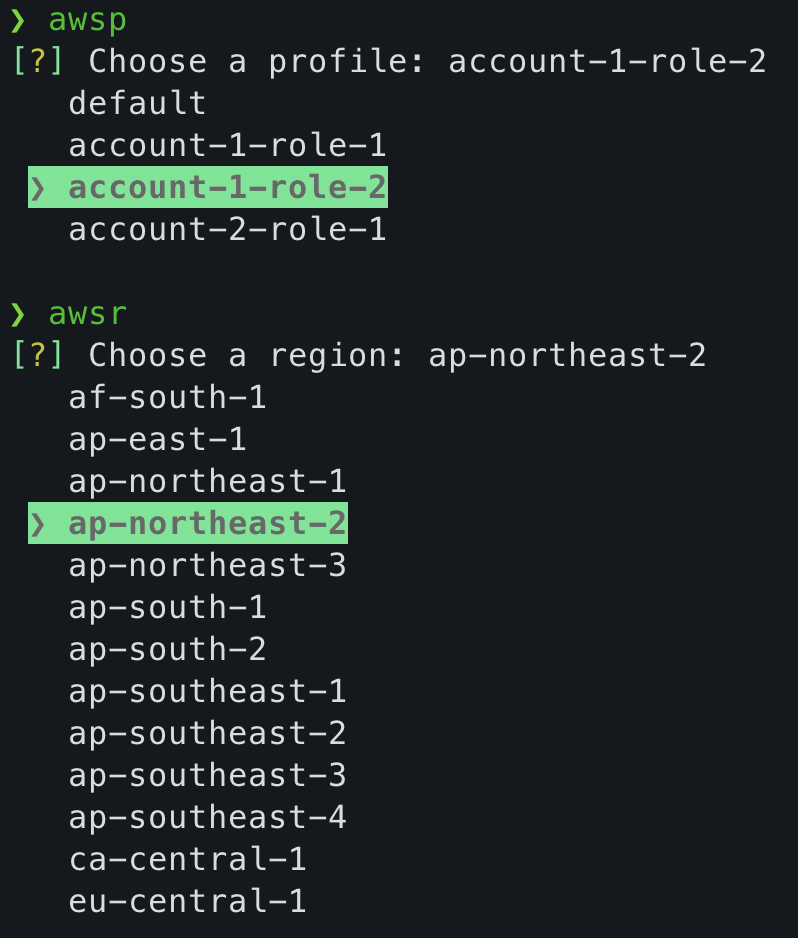
Use case of config-switch
A special of utility script to help easily switch profile and region
For Linux & Darwin (MacOS)
This works with 2 bash script, namely _awsp and _awsr
Using the command without the bash script will have no effect
Post installing the app, create 2 aliases in .bashrc or .zshrc file.
## aws fusion setup
alias awsp="source _awsp"
alias awsr="source _awsr"
For Windows
This works with 2 powershell script, namely _awsp.ps1 and _awsr.ps1
Post installing the app, create 2 aliases in $PROFILE (i.e. $HOME\Documents\PowerShell\Microsoft.PowerShell_profile.ps1) file.
## aws fusion setup
Set-Alias awsp "_awsp.ps1"
Set-Alias awsr "_awsr.ps1"
License
This project is licensed under the MIT License - see the LICENSE file for details.
Project details
Verified details
These details have been verified by PyPIProject links
GitHub Statistics
Maintainers
Release history Release notifications | RSS feed


Download files
Download the file for your platform. If you're not sure which to choose, learn more about installing packages.
Source Distribution
Built Distribution
Filter files by name, interpreter, ABI, and platform.
If you're not sure about the file name format, learn more about wheel file names.
Copy a direct link to the current filters
File details
Details for the file aws-fusion-1.7.2.tar.gz.
File metadata
- Download URL: aws-fusion-1.7.2.tar.gz
- Upload date:
- Size: 15.2 kB
- Tags: Source
- Uploaded using Trusted Publishing? Yes
- Uploaded via: twine/6.1.0 CPython/3.12.8
File hashes
| Algorithm | Hash digest | |
|---|---|---|
| SHA256 |
211111055eb99ecbce64185b6a32c2d63e4d87db27a2d5a67202aaa6160e263a
|
|
| MD5 |
e15f1182a12a0af456066bd36cabac19
|
|
| BLAKE2b-256 |
88cc2eb0c161a29e9c2b406879903399f3e0ec86e48f9d5b907033db9f8dfc8b
|
Provenance
The following attestation bundles were made for aws-fusion-1.7.2.tar.gz:
Publisher:
publish.yml on snigdhasjg/aws-fusion
-
Statement:
-
Statement type:
https://in-toto.io/Statement/v1 -
Predicate type:
https://docs.pypi.org/attestations/publish/v1 -
Subject name:
aws_fusion-1.7.2.tar.gz -
Subject digest:
211111055eb99ecbce64185b6a32c2d63e4d87db27a2d5a67202aaa6160e263a - Sigstore transparency entry: 167602828
- Sigstore integration time:
-
Permalink:
snigdhasjg/aws-fusion@bfd96b729ca9f6f38fc6e1a05207301640a1a697 -
Branch / Tag:
refs/heads/main - Owner: https://github.com/snigdhasjg
-
Access:
public
-
Token Issuer:
https://token.actions.githubusercontent.com -
Runner Environment:
github-hosted -
Publication workflow:
publish.yml@bfd96b729ca9f6f38fc6e1a05207301640a1a697 -
Trigger Event:
push
-
Statement type:
File details
Details for the file aws_fusion-1.7.2-py3-none-any.whl.
File metadata
- Download URL: aws_fusion-1.7.2-py3-none-any.whl
- Upload date:
- Size: 17.6 kB
- Tags: Python 3
- Uploaded using Trusted Publishing? Yes
- Uploaded via: twine/6.1.0 CPython/3.12.8
File hashes
| Algorithm | Hash digest | |
|---|---|---|
| SHA256 |
8771c24bbd27fc831ebd421a57614fd9c8fb9d92e9e19537c702063b468a9cf8
|
|
| MD5 |
56e3093de2b32906393c546713b07438
|
|
| BLAKE2b-256 |
23d41a77b6b82b55e4f9dd87f01cc3232195c258389b0188d97903fe197173f9
|
Provenance
The following attestation bundles were made for aws_fusion-1.7.2-py3-none-any.whl:
Publisher:
publish.yml on snigdhasjg/aws-fusion
-
Statement:
-
Statement type:
https://in-toto.io/Statement/v1 -
Predicate type:
https://docs.pypi.org/attestations/publish/v1 -
Subject name:
aws_fusion-1.7.2-py3-none-any.whl -
Subject digest:
8771c24bbd27fc831ebd421a57614fd9c8fb9d92e9e19537c702063b468a9cf8 - Sigstore transparency entry: 167602830
- Sigstore integration time:
-
Permalink:
snigdhasjg/aws-fusion@bfd96b729ca9f6f38fc6e1a05207301640a1a697 -
Branch / Tag:
refs/heads/main - Owner: https://github.com/snigdhasjg
-
Access:
public
-
Token Issuer:
https://token.actions.githubusercontent.com -
Runner Environment:
github-hosted -
Publication workflow:
publish.yml@bfd96b729ca9f6f38fc6e1a05207301640a1a697 -
Trigger Event:
push
-
Statement type:






