
A read-only TUI for browsing AWS resources
Verified details
These details have been verified by PyPIProject links
GitHub Statistics
Maintainers

Project description
awstui
A read-only terminal UI for browsing AWS resources, built with Textual and boto3.
Features
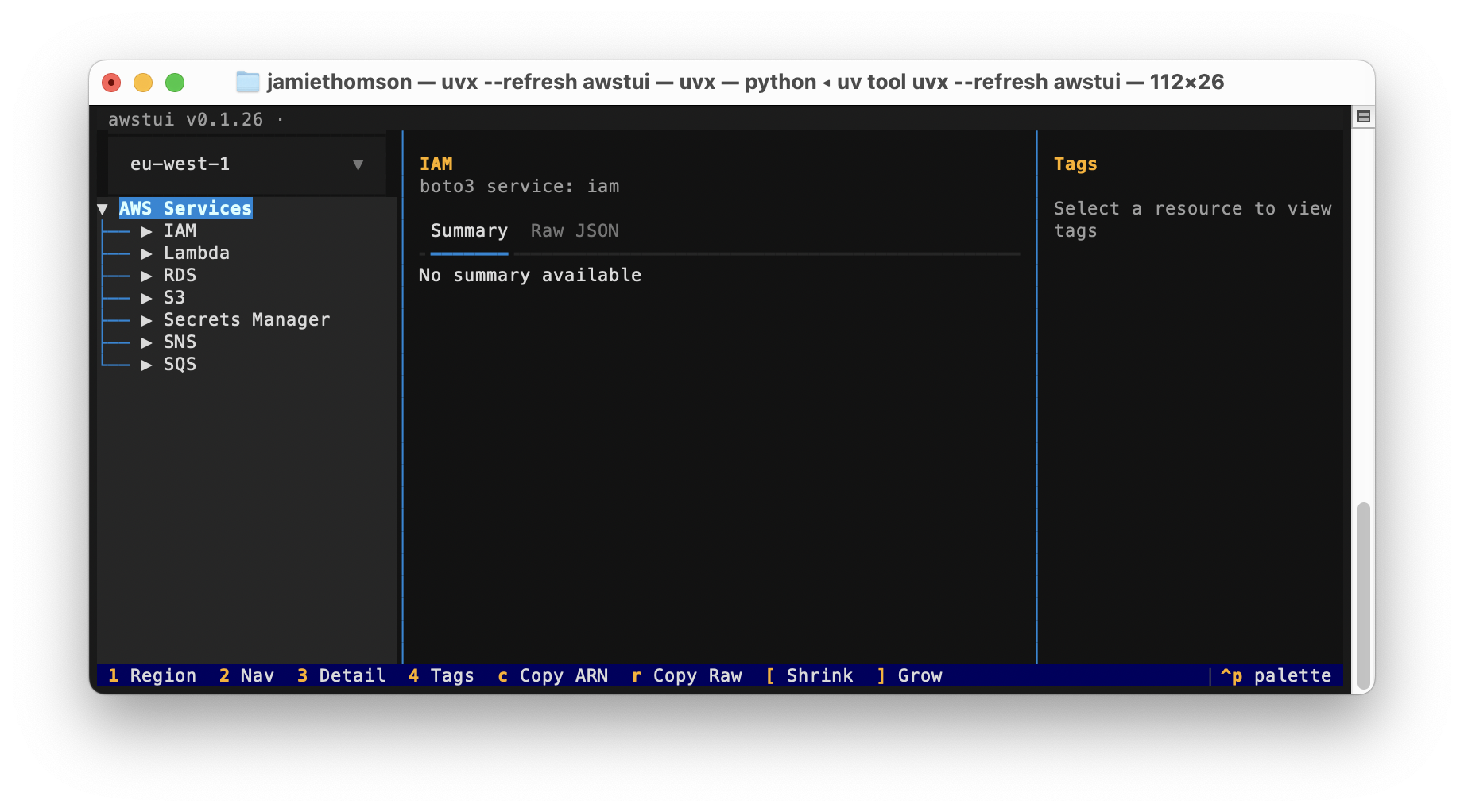
- Browse AWS resources in a tree-based navigation pane
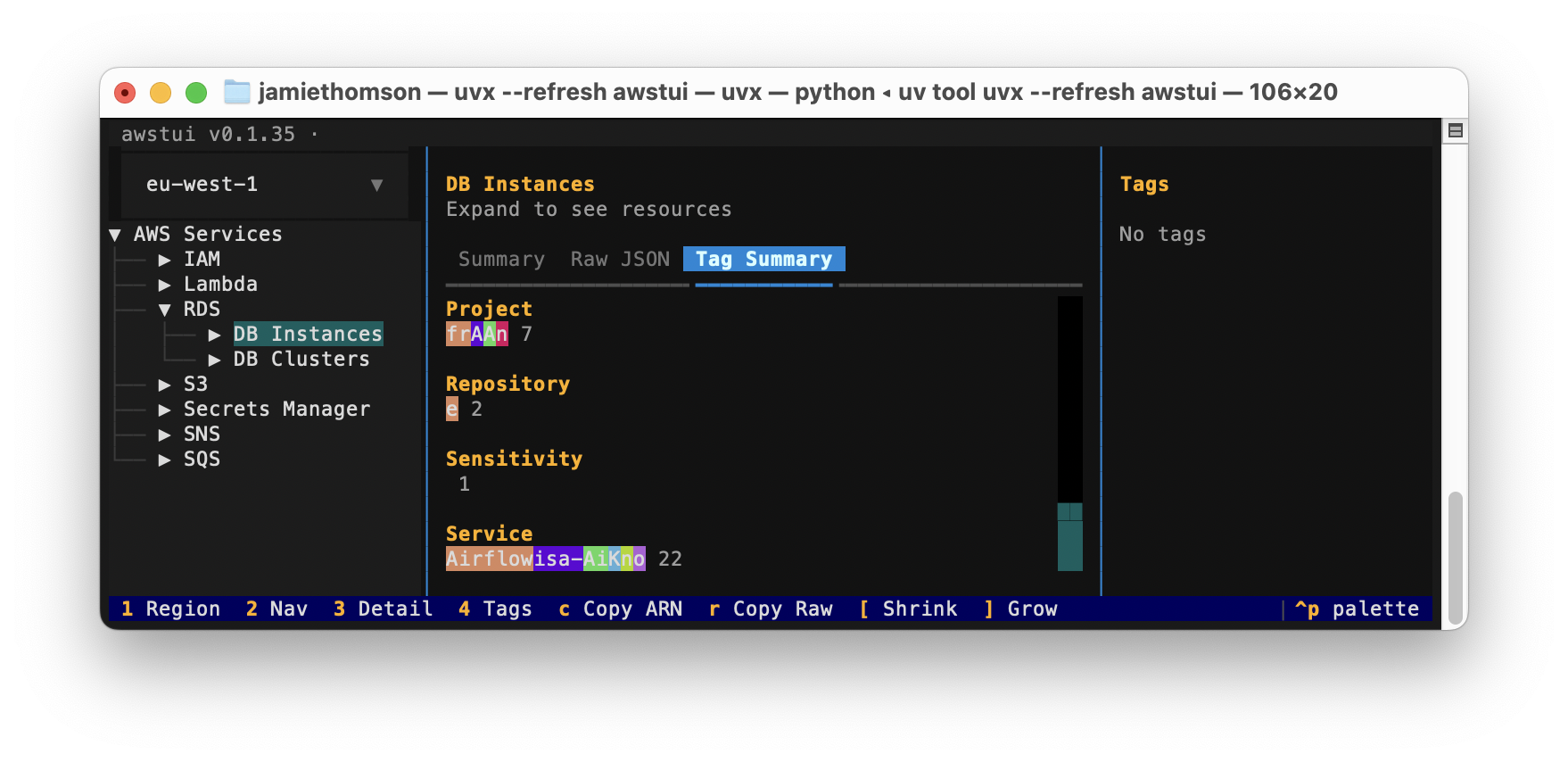
- View tags for selected resources
- View tag summary for collections of resources
- View resource details in a Summary or Raw JSON tab
- Switch regions on the fly
- Filter hotkey
- Copy URI hotkey (for S3 buckets and objects, ECR images)
- Copy ARN hotkey
Screenshots
Supported Services
S3, Lambda, RDS, IAM, SQS, SNS, Secrets Manager, ECR, Glue
Installation
Requires Python 3.12+ and uv.
uv sync
Usage
uv run awstui
uv run awstui --profile my-profile              # use a specific AWS profile
uv run awstui --service s3 --service lambda     # only show these services
Uses your existing AWS credentials (environment variables, ~/.aws/credentials, SSO — whatever boto3 resolves). Pass --profile/-p to override the profile explicitly. Pass --service/-s one or more times to restrict which services appear in the navigation tree; omit it to show all services.
Hotkeys
| Key | Action |
|---|---|
1 |
Focus the region selector |
2 |
Focus the navigation tree |
3 |
Focus the detail pane |
a |
Copy the ARN of the selected resource to the clipboard |
u |
Copy the URI of the selected resource (S3 bucket/object, ECR image) |
r |
Copy the Raw JSON of the selected resource to the clipboard |
f |
Filter children of the highlighted node by substring (empty input clears) |
w |
Toggle word wrap in the Content tab (CSVs default to no-wrap, others to wrap) |
Running Tests
uv run pytest tests/ -v
Project details
Verified details
These details have been verified by PyPIProject links
GitHub Statistics
Maintainers
Release history Release notifications | RSS feed


Download files
Download the file for your platform. If you're not sure which to choose, learn more about installing packages.
Source Distribution
Built Distribution
Filter files by name, interpreter, ABI, and platform.
If you're not sure about the file name format, learn more about wheel file names.
Copy a direct link to the current filters
File details
Details for the file awstui-0.16.100.tar.gz.
File metadata
- Download URL: awstui-0.16.100.tar.gz
- Upload date:
- Size: 1.1 MB
- Tags: Source
- Uploaded using Trusted Publishing? Yes
- Uploaded via: twine/6.1.0 CPython/3.13.12
File hashes
| Algorithm | Hash digest | |
|---|---|---|
| SHA256 |
9990aad7114eb63c96d3999ff9cb196cea813a39b4551a7a079a93c0418bcb7d
|
|
| MD5 |
36b3e9330ce1463d0469e64c39ead4e4
|
|
| BLAKE2b-256 |
af5059e3754105ee7352368420ad021bd3e17878aa77d8ec3bc1293d81259ec8
|
Provenance
The following attestation bundles were made for awstui-0.16.100.tar.gz:
Publisher:
ci.yml on jamiekt/awstui
-
Statement:
-
Statement type:
https://in-toto.io/Statement/v1 -
Predicate type:
https://docs.pypi.org/attestations/publish/v1 -
Subject name:
awstui-0.16.100.tar.gz -
Subject digest:
9990aad7114eb63c96d3999ff9cb196cea813a39b4551a7a079a93c0418bcb7d - Sigstore transparency entry: 1464128687
- Sigstore integration time:
-
Permalink:
jamiekt/awstui@f80b3cf8c6fd339a8d6fdd67e21e9753b880d078 -
Branch / Tag:
refs/heads/main - Owner: https://github.com/jamiekt
-
Access:
public
-
Token Issuer:
https://token.actions.githubusercontent.com -
Runner Environment:
github-hosted -
Publication workflow:
ci.yml@f80b3cf8c6fd339a8d6fdd67e21e9753b880d078 -
Trigger Event:
workflow_dispatch
-
Statement type:
File details
Details for the file awstui-0.16.100-py3-none-any.whl.
File metadata
- Download URL: awstui-0.16.100-py3-none-any.whl
- Upload date:
- Size: 43.5 kB
- Tags: Python 3
- Uploaded using Trusted Publishing? Yes
- Uploaded via: twine/6.1.0 CPython/3.13.12
File hashes
| Algorithm | Hash digest | |
|---|---|---|
| SHA256 |
e67b54236f9ef4b87eb108dc923398c524b6d2da48afc3d83593a0ac400b5fd2
|
|
| MD5 |
4b82c0820a0e50c085fa0e1f2866e2d8
|
|
| BLAKE2b-256 |
94b6e45bbbd888dd6a31444653b65cc1658c6bdd027690455a17223137b156ac
|
Provenance
The following attestation bundles were made for awstui-0.16.100-py3-none-any.whl:
Publisher:
ci.yml on jamiekt/awstui
-
Statement:
-
Statement type:
https://in-toto.io/Statement/v1 -
Predicate type:
https://docs.pypi.org/attestations/publish/v1 -
Subject name:
awstui-0.16.100-py3-none-any.whl -
Subject digest:
e67b54236f9ef4b87eb108dc923398c524b6d2da48afc3d83593a0ac400b5fd2 - Sigstore transparency entry: 1464128893
- Sigstore integration time:
-
Permalink:
jamiekt/awstui@f80b3cf8c6fd339a8d6fdd67e21e9753b880d078 -
Branch / Tag:
refs/heads/main - Owner: https://github.com/jamiekt
-
Access:
public
-
Token Issuer:
https://token.actions.githubusercontent.com -
Runner Environment:
github-hosted -
Publication workflow:
ci.yml@f80b3cf8c6fd339a8d6fdd67e21e9753b880d078 -
Trigger Event:
workflow_dispatch
-
Statement type:






