
AxonX Studio
English · 简体中文
AxonX Studio is the browser workspace for AxonX, an agent-native quantitative research framework. It connects task submission, execution monitoring, workspace artifacts, research charts, and an Agent assistant to the same AxonX service.
Studio is a React and TypeScript frontend. The AxonX backend executes Tasks, manages files and sessions, and exposes Job APIs; research plugins supply the algorithms. Available tasks, APIs, and results depend on the selected execution machine and its installed plugins.
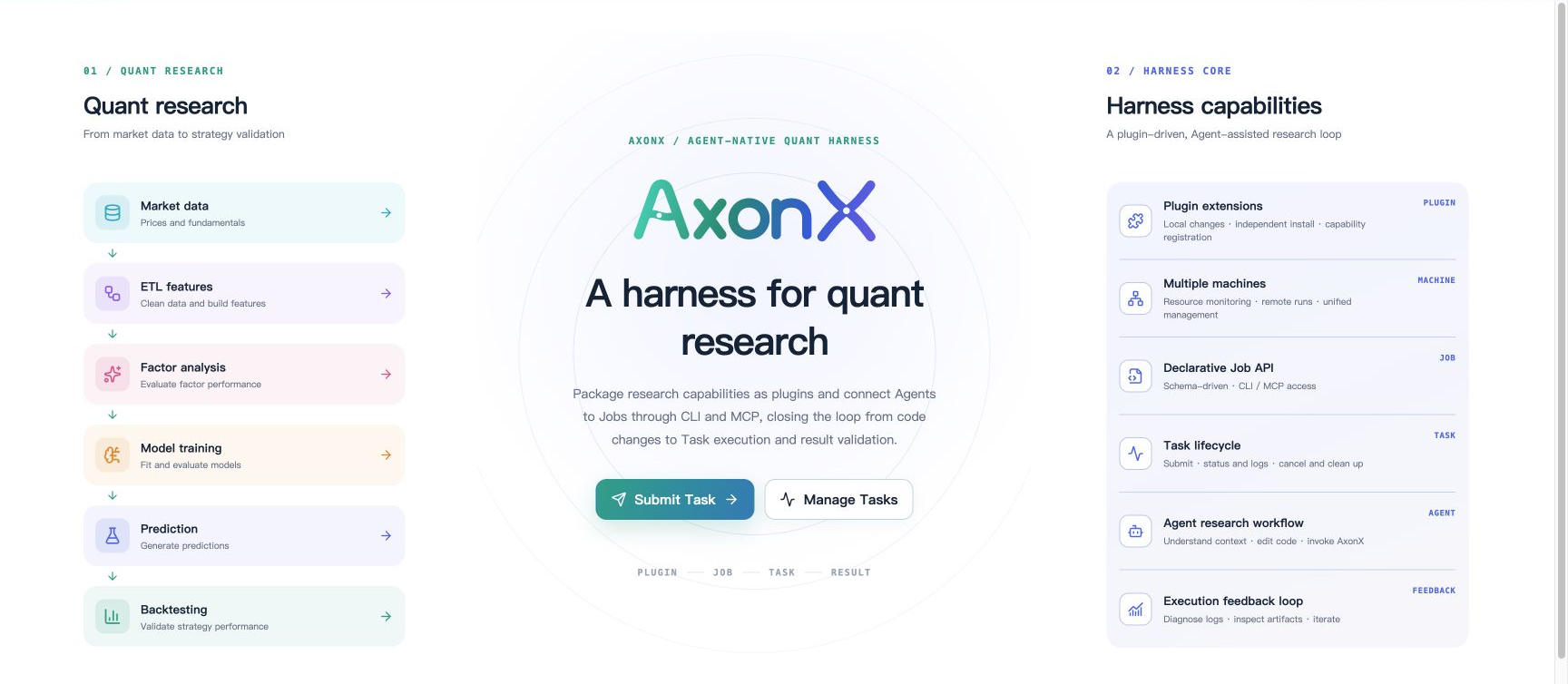
Features
| Area | Capabilities |
|---|---|
| Task submission | Browse installed Task definitions and generate configuration forms from JSON Schema, including upstream Task IDs. |
| Task management | Filter runs, inspect parameters and outputs, follow progress and logs, view upstream relationships, cancel tasks, and delete selected runs. |
| Machines | Switch between local and configured remote targets; inspect CPU, memory, GPU, and runtime information. |
| Data workspace | Browse Tushare data and preview workspace files, including paginated Parquet data. |
| Research results | Inspect ETL datasets, factor metrics, training configuration and curves, and prediction artifacts. |
| Backtests and comparison | View return curves, quality metrics, holdings, and yearly/quarterly/monthly summaries; compare two backtests over their common date window. |
| Agent | Stream responses and tool calls, resume conversations, rename/tag/fork/delete sessions, and stop the current turn. |
| API interfaces | Browse the selected machine's Job catalog and call APIs through schema-based forms. |
The interface supports English and Simplified Chinese, light/dark themes, and saved browser preferences. Hash routes preserve the selected machine and resource, for example #local/task-defs/catalog/demo.
Install and start
Use an activated Python environment with Python 3.12+. Local Task execution is supported on macOS and Linux. Prebuilt Studio packages require no Node.js or frontend build.
pip install "axonx[studio]"
export AXONX_SERVICE_TOKEN='replace-with-your-local-service-token'
axonx start --service.host 127.0.0.1
Open http://127.0.0.1:1024/. In Settings → Local service token, enter the same token and apply it. Studio saves the token in browser local storage and sends it as a Bearer token on API requests. Use the same settings form to replace or clear it.
You can also place AXONX_SERVICE_TOKEN in a .env file in the directory where you start AxonX. The CLI loads this file automatically; existing environment variables take precedence. See example.env for optional provider settings.
If AxonX is already installed, add Studio separately:
pip install axonx-studio
Restart the service after installation. AxonX loads dist/ through the package's static_dir() function and serves the UI at / when service.web_enabled is enabled.
Run your first task
- Keep the machine selector on Local, then open Submit task.
- Choose the built-in
demoTask under Native tasks. - Set
Xto2,Yto3, and leaveFailasFalse. - Click Submit run, then open Task management and select the run.
- Inspect its status, steps, logs, configuration, and final output.
Leave Task Name empty to generate a name for each experiment. Reusing a fixed name replaces the directory of a finished run. Upstream relationships record lineage; the graph does not automatically execute dependent Tasks.
Optional research and Agent setup
- Research plugins: install
axonx-alpha158oraxonx-alpha158-enhancedin the execution service's Python environment, then restart the service. Research views need completed runs with standardmetadata.jsonand artifact outputs. - Tushare downloads: configure
AXONX_TUSHARE_TOKENon the backend. OverrideAXONX_TUSHARE_BASE_URLonly when using a compatible custom endpoint. - Agent: configure the backend's
CLAUDE_CODE_API_KEY,CLAUDE_CODE_BASE_URL, andCLAUDE_CODE_MODEL_NAMEas needed for your provider. Ordinary Tasks can run without model credentials. Stopping an Agent turn does not cancel a Task it submitted. - Remote machines: configure backend service
targets, then select the target in Studio. The browser authenticates to the local service; the backend resolves remote addresses and credentials and forwards requests usingtarget.
See research setup, Agent configuration, and remote machines.
npm distribution and static hosting
The npm package distributes the built frontend assets:
npm install @flowllm-ai/axonx-studio
Serve node_modules/@flowllm-ai/axonx-studio/dist/ with your static server. An AxonX backend is still required. The frontend uses origin-relative API URLs, so configure the same origin to proxy /health, /jobs, /files, /mcp, and /proxy to that backend. Preserve Authorization headers and SSE streaming for live logs and Agent responses. Hash routing does not require server routes for individual Studio pages.
For AxonX's built-in hosting, install the Python package instead.
Develop from source
The frontend toolchain requires Node.js 22.x ≥ 22.13.0, 24.x, or 26+, as declared in package.json. Run the following from the repository root to install the backend and development dependencies:
pip install -e '.[dev]'
export AXONX_SERVICE_TOKEN='replace-with-your-local-service-token'
axonx start --service.host 127.0.0.1
In another terminal:
cd axonx_studio
npm ci
npm run dev
Open http://localhost:4173/ and configure the service token for this browser origin. Vite provides hot updates and proxies API requests to http://127.0.0.1:1024 by default.
To use a different backend:
AXONX_DEV_SERVER=http://127.0.0.1:2048 npm run dev
Vite also reads .env files from the repository root. Restart Vite after changing AXONX_DEV_SERVER. This setting controls the development proxy; it does not configure the backend URL in a production build.
Build and install local assets
# From axonx_studio/
npm run build
cd ..
pip install ./axonx_studio
build runs TypeScript checks and writes the static site to dist/. Restart AxonX to serve the installed package. After frontend changes, rebuild and reinstall to update the packaged assets.
Command (in axonx_studio/) |
Purpose |
|---|---|
npm run dev |
Start the Vite development server on port 4173 with API proxies. |
npm run build |
Type-check and produce dist/. |
npm run preview |
Preview a production build locally; backend proxying is only configured for the development server. |
npm run test |
Run the Vitest suite. |
npm run lint |
Run ESLint. |
npm run format:check |
Check formatting with Prettier. |
npm run format |
Apply Prettier formatting. |
npm pack and npm publish run the prepack build automatically. Python packaging includes existing dist/ assets; build them before creating a Python distribution.
Code organization
| Path | Responsibility |
|---|---|
src/app/ |
Hash routes, navigation, machine selection, shared application state, and lazy page loading. |
src/features/ |
Tasks, runtime, machines, Agent, workspace, research, backtests, strategy comparison, and API pages. |
src/shared/api/ |
Authenticated Job requests, response decoding, SSE parsing, and shared API types. |
src/shared/schema/ and src/shared/ui/SchemaForm/ |
JSON Schema field rendering and form value conversion. |
src/shared/hooks/ and src/shared/lib/ |
Async resources, polling, copy feedback, formatting, and error helpers. |
src/locales/ and src/i18n.ts |
English/Chinese translations and language persistence. |
src/styles/ |
Design tokens, layout, themes, and feature styles. |
src/webmcp.ts |
Optional browser tools for listing and submitting local Tasks when document.modelContext is available. |
public/, dist/ |
Source static assets and generated build output. |
__init__.py, pyproject.toml, package.json |
Python asset lookup and Python/npm packaging. |
Use axonx.invoke or feature API wrappers for Job calls. Requests use { arguments, target }; the client checks the Job response envelope and returns answer. Propagate the selected target and cancellation signals through feature APIs. Reuse the shared SSE parser for streaming calls.
To add a page, register its route in src/app/routes.ts, navigation in navigation.ts, and rendering in PageOutlet.tsx. Add user-facing strings to both locale files. See Studio development for extension guidance.
Troubleshooting
| Symptom | Check |
|---|---|
| Backend runs but Studio is unavailable | Install axonx-studio, verify dist/index.html exists for source builds, enable service.web_enabled, and restart the service. |
| Page loads but APIs return 401 | Match the browser's service token to AXONX_SERVICE_TOKEN; separate browser origins have separate saved tokens. |
| Task or API catalog is empty | Configure the backend service token, verify the selected machine, and install its plugins. Auth-required Jobs are omitted when the service has no token. |
| Development API requests fail | Check that the backend is running and AXONX_DEV_SERVER is correct; restart Vite after changes. |
| Research results or curves are missing | Inspect task status/logs and metadata.json; check output_params.artifacts, training_curve, and backtest daily/summary files as applicable. |
| Remote requests fail | Check backend targets, remote service credentials, and connectivity from the local backend. |
| Static deployment loads but APIs or streams fail | Check same-origin API proxy paths, Authorization forwarding, and SSE buffering. |
Workspace preview uses paths relative to the execution workspace. The /files API handles staged uploads and cleanup; retrieve complete artifacts from the execution machine's workspace. Deleting runs or workspace entries removes their data and does not rebuild downstream results.
Documentation and license
Released under the Apache License 2.0.
1 maintainer

Metadata
1 maintainer
Release files for axonx-studio 0.0.2
For a detailed explanation of source distributions (sdists) and built distributions (wheels), please see the package formats documentation.
Source distribution (sdist)
| File | Size | Uploaded | |
|---|---|---|---|
| axonx_studio-0.0.2.tar.gz | 433.9 kB | Details |
Built distribution (wheel)
| File | Interpreter | ABI | Platform | Reset |
|---|---|---|---|---|
| axonx_studio-0.0.2-py3-none-any.whl | Python 3 | none | any | Details |
Total release size: 882.4 kB
Release files / axonx_studio-0.0.2.tar.gz
| Download URL | axonx_studio-0.0.2.tar.gz |
|---|---|
| Size | 433.9 kB |
| Tags | Source |
|
SHA-256 checksum How to use checksums |
a8e58e75bb1968a569b68aff4c7d6a88f83da0354cc5a49f2a8e0b88fa2f4ac6
|
|
BLAKE2b-256 checksum How to use checksums |
31b9875ad3d5e082357acc2131cc4f293346c4381a2de81fb3ddc32e7ce70258
|
| Upload date | |
|
Uploaded using Trusted Publishing? What is trusted publishing? |
Yes |
| Uploaded via |
twine/7.0.0 CPython/3.13.14
|
Provenance
Provenance describes where a file came from. On PyPI, provenance is shared via attestations, which provide a verifiable record of the build or publishing details. View details, limitations and caveats.


PyPI Publish Attestation
PyPI verified that this artifact, at this checksum, originated from the publisher listed below.
Signed by GitHub Actions, verified by PyPI on Oct 3, 2026.
Transparency logRelease files / axonx_studio-0.0.2-py3-none-any.whl
| Download URL | axonx_studio-0.0.2-py3-none-any.whl |
|---|---|
| Size | 448.6 kB |
| Tags | Python 3 |
|
SHA-256 checksum How to use checksums |
2e64b87796ce4f9d81586a2e776447c1a755eb060fe1cd254e02e0676f2468a7
|
|
BLAKE2b-256 checksum How to use checksums |
7dee705ee7c198ed51355ac8ed0cae690c4f577d1df28b5ecfa045a1fac0d030
|
| Upload date | |
|
Uploaded using Trusted Publishing? What is trusted publishing? |
Yes |
| Uploaded via |
twine/7.0.0 CPython/3.13.14
|
Provenance
Provenance describes where a file came from. On PyPI, provenance is shared via attestations, which provide a verifiable record of the build or publishing details. View details, limitations and caveats.
PyPI Publish Attestation
PyPI verified that this artifact, at this checksum, originated from the publisher listed below.
Signed by GitHub Actions, verified by PyPI on Oct 3, 2026.
Transparency log













