
A Python library simplifying Azure Microsoft Graph authentication. Provides an intuitive interface for acquiring access tokens through interactive login, silent authentication, device code flow, and client credentials flow. Includes utilities for seamless token storage and refresh management.

Project description
🌟 azauthlib 🌟
Your Simplified Authentication Companion for Azure Microsoft Graph
azauthlib is a Python library that streamlines the authentication process with Azure Microsoft Graph. From interactive logins to client credentials flow, azauthlib provides an intuitive interface, robust token management, and a GUI for seamless configuration.
🔐 Whether you're building applications that interact with Microsoft Graph APIs or automating workflows, azauthlib has you covered.














✨ Features ✨
✅ Multiple Authentication Flows
- Silent Authentication
- Interactive Authentication
- Device Code Flow
- Client Credentials
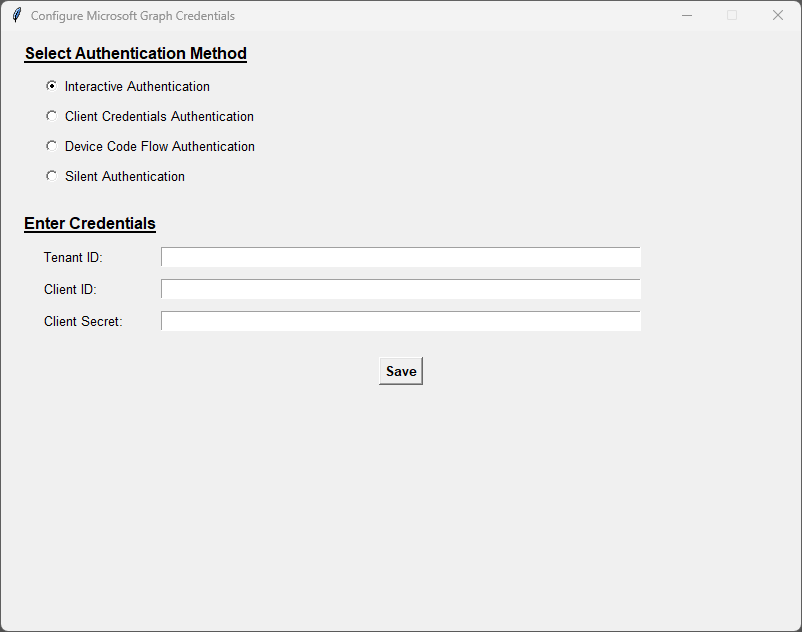
✅ Graphical User Interface (GUI)
- Configure credentials with an easy-to-use GUI.
✅ Token Management
- Automatic refresh for access tokens
- Secure token storage
✅ Flexible Environment Configuration
- Use
.envfiles, OS variables, or direct input.
✅ Customizable Permissions
- Specify Microsoft Graph API scopes effortlessly.
🚀 Installation
Install from PyPI
pip install azauthlib
Install from Source
git clone https://github.com/cedricmoorejr/azauthlib.git
cd azauthlib
pip install .
📋 Requirements
- Python 3.7+
msalportalockerpython-dotenv
Install dependencies manually if needed:
pip install -r requirements.txt
🛠 Getting Started
1️⃣ Prerequisites
-
Register an app in Azure Active Directory via the Azure Portal.
-
Collect the following:
CLIENT_IDTENANT_ID- (Optional)
CLIENT_SECRET
-
Assign the appropriate Microsoft Graph API permissions.
2️⃣ Configuration Options
🌐 Option A: GUI Mode
Launch the GUI for intuitive configuration:
python config_app.py
💡 What You Can Do in the GUI:
- Enter credentials (
CLIENT_ID,TENANT_ID, etc.).- Choose your authentication method.
- Credentials are saved securely in a
.envfile.
🛠 Option B: Non-GUI Mode
- Using Environment Variables (Recommended):
export TENANT_ID="your-tenant-id"
export CLIENT_ID="your-client-id"
export CLIENT_SECRET="your-client-secret"
- Hardcoding in Code (⚠️ Not Recommended):
from azauthlib import Authentication

auth = Authentication(scopes="Files.ReadWrite.All")
auth.Build.WithEntry(
    client_id="your-client-id",
    tenant_id="your-tenant-id",
    client_secret="your-client-secret"
)
🔑 Authentication Flows
🔒 Silent Authentication
Authenticate using cached tokens.
auth.Silent()
🌐 Interactive Authentication
Prompts user to log in via a browser.
auth.Interactive()
📱 Device Code Flow
Displays a device code for cross-device authentication.
auth.DeviceCodeFlow(webbrowser_enabled=True)
🤝 Client Credentials Flow
Authenticate server-to-server.
auth.ClientCredentials()
💼 Token Management
-
Access Token: Retrieve the active token.
token = auth.access_token
-
Token Expiry: Check token lifetime.
print("Token expires in:", auth.token_expires_in)
-
Automatic Refresh: Tokens are refreshed seamlessly.
📜 Logging
Easily track authentication flow and token operations using Python’s logging module. Customize as needed!
🤝 Contributing
We welcome contributions! 🚀 Here's how you can help:
- Fork the repo.
- Create a feature or bugfix branch.
- Submit a PR with a detailed description.
📄 License
This project is licensed under the Apache License 2.0. See the LICENSE file for more details.
ℹ️ Trademarks
- This project references Microsoft trademarks such as Azure and Microsoft Graph. Please ensure compliance with Microsoft’s Trademark Guidelines.
🔗 GitHub Repository
💬 Feedback? Issues? We’d love to hear from you!
Release history Release notifications | RSS feed


Download files
Download the file for your platform. If you're not sure which to choose, learn more about installing packages.
Source Distribution
Built Distribution
Filter files by name, interpreter, ABI, and platform.
If you're not sure about the file name format, learn more about wheel file names.
Copy a direct link to the current filters
File details
Details for the file azauthlib-1.1.2b1.tar.gz.
File metadata
- Download URL: azauthlib-1.1.2b1.tar.gz
- Upload date:
- Size: 41.4 kB
- Tags: Source
- Uploaded using Trusted Publishing? No
- Uploaded via: twine/5.1.0 CPython/3.8.5
File hashes
| Algorithm | Hash digest | |
|---|---|---|
| SHA256 |
dfab74c41ada4a88b88e292eec9c25bb4106752f20effd697f9b066632a6646c
|
|
| MD5 |
4322656a0c11f0b2ee71228e5e5117d0
|
|
| BLAKE2b-256 |
10c2873ae1cbd16f7ef1fdad73792e2ce8de98662c9a0b65ea7e1b8c135ff51e
|
File details
Details for the file azauthlib-1.1.2b1-py3-none-any.whl.
File metadata
- Download URL: azauthlib-1.1.2b1-py3-none-any.whl
- Upload date:
- Size: 39.6 kB
- Tags: Python 3
- Uploaded using Trusted Publishing? No
- Uploaded via: twine/5.1.0 CPython/3.8.5
File hashes
| Algorithm | Hash digest | |
|---|---|---|
| SHA256 |
8dde97711c650fddbf83c765bd5b0a44deb39cd8dd31f3e5dc4f880cdf46b079
|
|
| MD5 |
8c4bf2285387eecb08bff112d944951e
|
|
| BLAKE2b-256 |
c1b5c087855fa8a11f4ddb44ab173419e7b1a81d4c10db29b967de69a3e2ea26
|






