
This release is a pre-release and may not be stable for production use.
azauthlib is a Python library that streamlines the authentication process with Azure Microsoft Graph. From interactive logins to client credentials flow, azauthlib provides an intuitive interface, robust token management, and a GUI for seamless configuration.
🔐 Whether you're building applications that interact with Microsoft Graph APIs or automating workflows, azauthlib has you covered.














✨ Features ✨
✅ Multiple Authentication Flows
- Silent Authentication
- Interactive Authentication
- Device Code Flow
- Client Credentials
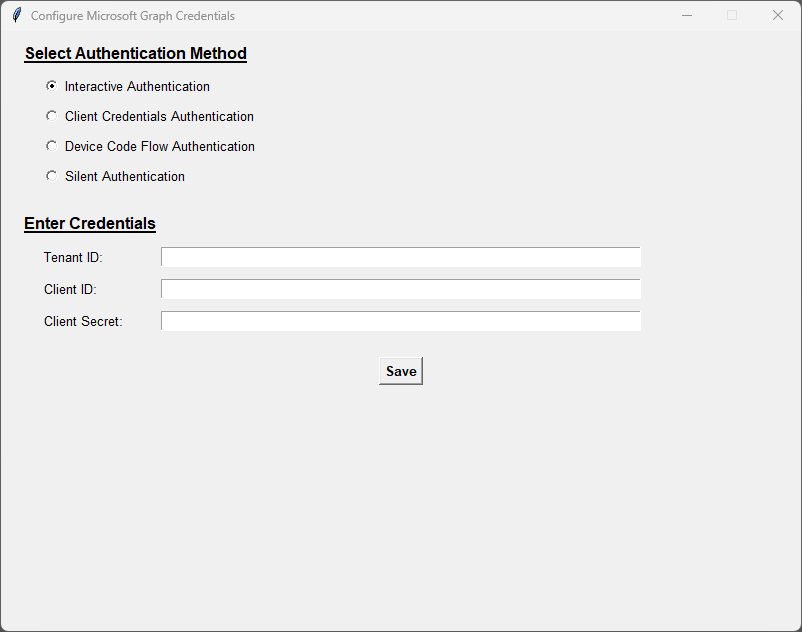
✅ Graphical User Interface (GUI)
- Configure credentials with an easy-to-use GUI.
✅ Token Management
- Automatic refresh for access tokens
- Secure token storage
✅ Flexible Environment Configuration
- Use
.envfiles, OS variables, or direct input.
✅ Customizable Permissions
- Specify Microsoft Graph API scopes effortlessly.
🚀 Installation
Install from PyPI
pip install azauthlib
Install from Source
git clone https://github.com/cedricmoorejr/azauthlib.git
cd azauthlib
pip install .
📋 Requirements
- Python 3.7+
msalportalockerpython-dotenv
Install dependencies manually if needed:
pip install -r requirements.txt
🛠 Getting Started
1️⃣ Prerequisites
-
Register an app in Azure Active Directory via the Azure Portal.
-
Collect the following:
CLIENT_IDTENANT_ID- (Optional)
CLIENT_SECRET
-
Assign the appropriate Microsoft Graph API permissions.
2️⃣ Configuration Options
🌐 Option A: GUI Mode
Launch the GUI for intuitive configuration:
python config_app.py
💡 What You Can Do in the GUI:
- Enter credentials (
CLIENT_ID,TENANT_ID, etc.).- Choose your authentication method.
- Credentials are saved securely in a
.envfile.
🛠 Option B: Non-GUI Mode
- Using Environment Variables (Recommended):
export TENANT_ID="your-tenant-id"
export CLIENT_ID="your-client-id"
export CLIENT_SECRET="your-client-secret"
- Hardcoding in Code (⚠️ Not Recommended):
from azauthlib import Authentication

auth = Authentication(scopes="Files.ReadWrite.All")
auth.Build.WithEntry(
    client_id="your-client-id",
    tenant_id="your-tenant-id",
    client_secret="your-client-secret"
)
🔑 Authentication Flows
🔒 Silent Authentication
Authenticate using cached tokens.
auth.Silent()
🌐 Interactive Authentication
Prompts user to log in via a browser.
auth.Interactive()
📱 Device Code Flow
Displays a device code for cross-device authentication.
auth.DeviceCodeFlow(webbrowser_enabled=True)
🤝 Client Credentials Flow
Authenticate server-to-server.
auth.ClientCredentials()
💼 Token Management
-
Access Token: Retrieve the active token.
token = auth.access_token
-
Token Expiry: Check token lifetime.
print("Token expires in:", auth.token_expires_in)
-
Automatic Refresh: Tokens are refreshed seamlessly.
📜 Logging
Easily track authentication flow and token operations using Python’s logging module. Customize as needed!
🤝 Contributing
We welcome contributions! 🚀 Here's how you can help:
- Fork the repo.
- Create a feature or bugfix branch.
- Submit a PR with a detailed description.
📄 License
This project is licensed under the Apache License 2.0. See the LICENSE file for more details.
ℹ️ Trademarks
- This project references Microsoft trademarks such as Azure and Microsoft Graph. Please ensure compliance with Microsoft’s Trademark Guidelines.
🔗 GitHub Repository
💬 Feedback? Issues? We’d love to hear from you!
1 maintainer

Release files for azauthlib 1.3.1b1
For a detailed explanation of source distributions (sdists) and built distributions (wheels), please see the package formats documentation.
Source distribution (sdist)
| File | Size | Uploaded | |
|---|---|---|---|
| azauthlib-1.3.1b1.tar.gz | 41.5 kB | Details |
Built distribution (wheel)
| File | Interpreter | ABI | Platform | Reset |
|---|---|---|---|---|
| azauthlib-1.3.1b1-py3-none-any.whl | Python 3 | none | any | Details |
Total release size: 81.4 kB
Release files / azauthlib-1.3.1b1.tar.gz
| Download URL | azauthlib-1.3.1b1.tar.gz |
|---|---|
| Size | 41.5 kB |
| Tags | Source |
|
SHA-256 checksum How to use checksums |
40663f3cf99947e155c0a81cabbb84d4a4b7d2814483f98cac14432b7b265425
|
|
BLAKE2b-256 checksum How to use checksums |
ae53b1ef2ef32f5d82367c35b455e119d9b883247458d3cb8bc67f052cd0a499
|
| Upload date | |
|
Uploaded using Trusted Publishing? What is trusted publishing? |
No |
| Uploaded via |
twine/5.1.0 CPython/3.8.5
|
Release files / azauthlib-1.3.1b1-py3-none-any.whl
| Download URL | azauthlib-1.3.1b1-py3-none-any.whl |
|---|---|
| Size | 40.0 kB |
| Tags | Python 3 |
|
SHA-256 checksum How to use checksums |
cf1dcdae053d5acc4376cf347f011e52c3ca7610fba1350d7ead3276aaeabdee
|
|
BLAKE2b-256 checksum How to use checksums |
da745f95aaf605b194185c277d8dbb7d4eec45c2dd34f87d58acc2f3bb4754ce
|
| Upload date | |
|
Uploaded using Trusted Publishing? What is trusted publishing? |
No |
| Uploaded via |
twine/5.1.0 CPython/3.8.5
|














