

The OSINT workspace that runs on your machine.





Install & run
pipx install azimut   # isolated app install; plain `pip install azimut` also works
azimut                # starts on http://127.0.0.1:8477 and opens a browser tab
Starting Azimut a second time opens the one already running. If another program holds port 8477, Azimut takes the next free port, and the capture extension needs that address in its options. Settings → Capture extension shows which.
No Python? Every release attaches a self-contained binary for Windows, macOS (Apple Silicon) and Linux on the Releases page. Download it, run it, and it opens in your browser.
Your cases and settings live under ~/Azimut, outside the app: upgrading or
removing Azimut leaves them alone. Install in detail covers
the binaries' first-run warnings, building from source and the development loop.
What Azimut is
A local OSINT workspace for reviewing media, building geolocation proofs and keeping case notes together. It is built for open-source investigators, journalists and researchers. Each case is a plain folder that can be reopened, archived or shared.
The name is the French word for azimuth, the compass bearing you sight along to fix a point on the map.
| Tool | What it does |
|---|---|
| Timeline | The case on a time axis, where an event is one dated line with @ mentions and the ruler reads in any zone or at a saved place. |
| Board | The case as an index of people, accounts, places and things, each with how many events name it and when, filtered by values taken from the case. |
| Graph | The same case drawn as clustered nodes and verb-labelled edges, exported with its question, period and legend as an SVG or PNG plate. |
| Sheet | The case's CSVs in a plain grid, where typed columns, worklists and declared sheets promote into entities, places and dated statements. |
| Media | Import local files or download by URL (X, Telegram, TikTok, YouTube, Instagram and more via yt-dlp and gallery-dl), each kept as a clean local file with metadata and a SHA-256. |
| Files | Every saved artifact in one Finder-style view of your folders, not just media: select several, drag them into a folder, search across the lot. |
| Reverse Search | Prepare an image or a video frame for keyless reverse-image services, which the capture extension opens with the picture already in them. |
| Inspect | Reads any photo or video closely with sharpest-frame capture, frame adjustments, editable crop and ELA hints, all kept with the file as you work. |
| Collage | Lays out frames and images from any number of files on one canvas, with per-piece warp and crop and auto-stitch for panoramas. |
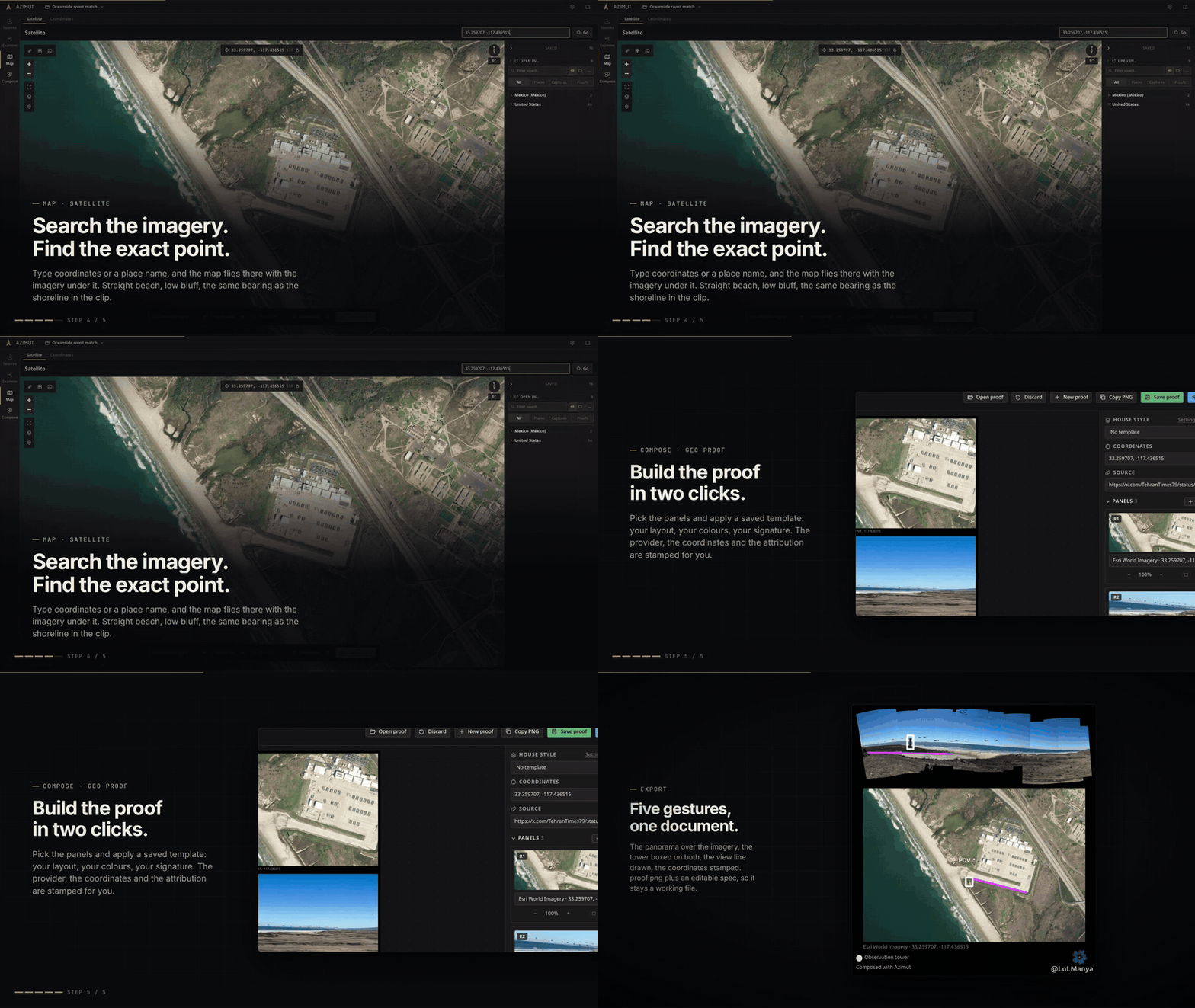
| Satellite | Coordinates or a place name become an imagery crop over Esri, OSM, the Wayback archive, Sentinel-2 or Sentinel-1 radar, with measurement tools, stacked overlays, your own KML, GeoJSON or GPX layers, and AOI grids for area review. |
| Compare | Links two dated map views for side-by-side, swipe, fade or blink, with Difference highlights and ground-anchored notes that follow both maps. |
| Detect | Sweeps drawn areas of Sentinel-2 and Sentinel-1 radar for vessels, fires, construction, burn scars, floods and other changes, and only a candidate you keep becomes a case pin. |
| Coords & Sky | Converts coordinate formats, opens map links, and reads the sun and moon at that point on a date, computed offline. |
| Geo Proof | Composes annotated case panels into a proof, from a house style or a published post, and exports proof.png plus a re-editable spec. |
| Geo Report | Turns a proof into a prepared thread for X or Bluesky, with coordinates, attribution, character counts, media and a Markdown case note. |
| Notebook | Tabbed Markdown notes with local media, Mermaid diagrams, linked case evidence, broken-reference markers, and PDF export of one note or a whole selection. |
Under the hood: reusable proof and thread templates, per-case SQLite with a bounded catalog, a durable one-worker thumbnail queue, the map-capture browser extension, and cross-platform binaries with a bundled ffmpeg.
Every tool works one-shot (a scratch session, no setup) or inside a case, a plain directory holding the whole investigation.
New in v0.3.2
No new tool this time: the tools you already have read faster, ask less and say more clearly what went wrong.
- The browser's Back and Forward walk the tools and what you opened in them, and ask before leaving unsaved work. Ctrl+K opens Go to, for a tool, a case or a document.
- An event is one line under the Timeline axis, with
@mentions, and Add event (Alt+N) opens it over any tool with that tool's view cited. - The Timeline draws each date as the instant, day, month or period it is, and every date field reads on one Clock: the place's zone, UTC or any other.
- The Board reads as an index of people, places and things. A subject's type can be corrected, and two duplicates merged with an Undo.
- The Graph proposes the links the case already implies, reviewed before they are filed.
- The Sheet opens on a home, with worklists of the files still to geolocate and of your geolocations by point.
- Files and the sidebar act on a right-click, and new work lands in the folder you are working in.
- FIRMS fires keep their size through a zoom, place names sit over the imagery, and Compare and Detect take the whole screen.
- The Detect analyzer builder works on the map, with checks made from pins and a Test button.
- A failure reads as one sentence saying what to do, and a second start opens the Azimut already running.
- Existing cases open as they are, and older bundles still import.
Cases on disk
Inside a case, Azimut owns only the azimut/ directory. README.txt explains
the boundary; anything else at the case root is yours and travels with the case
bundle.
The workspace root stays equally readable: permanent case folders sit directly
under ~/Azimut. Azimut keeps scratch sessions, bundles, settings, runtime
tools and tile caches under the hidden ~/Azimut/.azimut/ directory. Settings →
Storage moves the workspace anywhere you like, including an external drive, or
adopts one you moved yourself. The old copy is kept until you delete it.
The Case Doctor checks case integrity, including the derived Timeline index. It only changes a case after you choose a repair, and states what a database rebuild cannot recover before it starts.
Install in detail
Azimut runs in a normal browser tab (Firefox/Chrome); there is no separate window. Closing the terminal it prints its URL into stops the app.
Update with pipx upgrade azimut, remove with pipx uninstall azimut. Your
cases and settings live under ~/Azimut; upgrades and uninstalling the app do
not remove them. Delete ~/Azimut manually if you also want to remove the data.
Ready-to-run binary (no Python)
Each release attaches a self-contained binary per OS. Download it from the Releases page and run it; it opens Azimut in your browser.
| OS | Asset |
|---|---|
| Windows | azimut-windows-x86_64.exe |
| macOS (Apple Silicon) | azimut-macos-arm64 |
| macOS (Intel, 14+) | No standalone binary; install with pipx or pip |
| Linux (glibc 2.38+) | azimut-linux-x86_64 |
The Linux binary needs glibc 2.38 or newer: Ubuntu 24.04, Debian 13, Fedora 39
or later. On an older distribution (Ubuntu 22.04, Debian 12, RHEL 9), install
with pipx instead.
First run, the binaries are unsigned, so the OS warns before letting them open:
- macOS: a browser download is neither executable nor trusted yet. In
Terminal, from the folder it landed in:
chmod +x azimut-macos-arm64
xattr -d com.apple.quarantine azimut-macos-arm64
./azimut-macos-arm64
Instead ofxattr, you can open it once and allow it in System Settings → Privacy & Security → Open Anyway. - Windows: SmartScreen shows "Windows protected your PC"; click More info → Run anyway.
- Linux: mark it executable with
chmod +x azimut-linux-x86_64.
On startup, Azimut asks GitHub for a newer release and PyPI for newer
downloaders by default, and links the download. Settings can disable that check,
and Settings → System → Check for updates runs it manually. Replace the old binary with the new one. To uninstall, delete
the binary. Either way ~/Azimut stays put, so cases open unchanged.
The downloadable binaries bundle a static ffmpeg (and ffprobe), so video
thumbnails, frame scans, video enhancement, and downloads that merge separate
audio+video streams work out of the box. If you pip install azimut instead,
put ffmpeg on your PATH for those features. Everything else works without it.
The binaries carry the bundled build's license notice and texts, readable from
Settings → System; see also ffmpeg.org/legal.html.
From source
Requires Python 3.11+ and Node.js 20.19+ or 22.12+ for the frontend build.
macOS and Linux:
git clone https://github.com/OsintMeThat/azimut && cd azimut
python3 -m venv .venv && .venv/bin/pip install -e ".[dev]"
cd frontend && npm ci && npm run build && cd ..
.venv/bin/azimut
Windows PowerShell:
git clone https://github.com/OsintMeThat/azimut
Set-Location azimut
py -3.11 -m venv .venv
.venv\Scripts\python -m pip install -e ".[dev]"
Set-Location frontend
npm ci
npm run build
Set-Location ..
.venv\Scripts\azimut.exe
Rebuild and relaunch the local app with the cross-platform helper:
python3 scripts/relaunch.py       # macOS / Linux
py scripts\relaunch.py            # Windows
The tool rebuilds the frontend, stops the previous Azimut instance started
through the same tool, and launches the fresh build. It never kills unrelated
processes by name. Use --no-browser to keep it from opening a new tab, and
--ext to bring the capture extension along (see below).
Working on the extension:
python3 scripts/devext.py             # load it into a dev Chrome and Firefox
python3 scripts/devext.py --watch     # and reload it on every save
python3 scripts/relaunch.py --ext     # app + extension in one command
It opens a Chrome and a Firefox of its own, loads extension/ from disk and
writes the pairing token into it, so an edit needs no reinstall and no paste.
Each dev browser keeps its profile between runs, and the everyday browsers are
left alone. Every pass reports when the extension's background restarted, which
is how you see the new code was taken. --fresh starts from an empty profile,
python3 scripts/devext.py chrome (or firefox) drives just one.
Frontend development (hot reload, proxied API):
.venv/bin/azimut --no-browser &     # backend on :8477
cd frontend && npm run dev          # UI on :5173
Checks (CI fails a pull request on any of these). A fresh clone runs
uv sync --extra dev first, which installs pytest, ruff and mypy:
uv run pytest -q -n auto                         # backend tests
cd frontend && npx vitest run                    # frontend tests
cd frontend && npm run check                     # svelte-check
uv run ruff check src tests scripts packaging    # lint
uv run mypy                                      # type-check
cd frontend && npm run test:e2e                  # Playwright, for changes seen in the browser
Capture extension (optional)
A browser extension (Chrome/Edge and Firefox) captures external map sites straight into a case: Google Maps & Earth, Bing, Yandex, OSM, Apple Maps, Zoom Earth, Copernicus Browser and Satellites.pro, one screenshot per click with coordinates parsed from the URL. It also powers the Capture button on the Google (Maps JS) basemap, fills a composer with a thread Geo Report prepared, and opens a reverse-image engine with a picture from the case.
On a 2D map it can draw Azimut's own tools over the site: measure, the case's saved points, sun and moon, a search grid that opens in the app afterwards, and reference windows holding the case's own images and videos beside the imagery. The scale is measured off the map rather than assumed, so the tools switch themselves off on a view they cannot compute on, and say why.
On Chrome, Edge and Brave, install it from Settings → Capture extension: the app writes the extension into a folder it owns, you load that folder unpacked once and paste the pairing token. Because the app owns the folder, later updates are one button: it rewrites the files and the extension restarts itself.
Firefox refuses an unsigned extension and forgets an unpacked one on exit, so it
installs the signed azimut-capture-<version>.xpi instead. Settings → Capture
extension links that exact file, which rides on the release that last changed
the extension rather than on the newest one. That copy is sealed, so the update
button does not apply to it: Firefox reads Azimut's own update manifest and
replaces the add-on itself. Full instructions in
extension/README.md.
Building & releasing
The Svelte frontend builds into src/azimut/static/ (git-ignored) and is
bundled into the Python wheel via hatchling artifacts. So npm run build
must run before building the package, or the shipped UI is stale.
cd frontend && npm run build && cd ..    # refresh the bundled UI
uv sync --frozen --no-dev --group release --no-install-project
uv sync --frozen --no-dev --group release --no-build-isolation --no-editable
uv run --no-sync python -m build --no-isolation
uv run --no-sync pyinstaller packaging/azimut.spec
Versions
The app version lives in src/azimut/__init__.py alone; pyproject.toml reads
it back, and the release tag must match it.
The capture extension keeps its own version: the app release that last
changed a shipped file, so it lags whenever the extension is left alone.
tests/test_updates.py digests what the extension ships and fails either way:
a change without a bump, or a bump without a change. When you do change the
extension, set extension/manifest.json to the current app version and record
the digest the failing test prints.
Within a development cycle that version cannot move: it is already the app's own.
So the update button compares the digest instead, which the installed folder
records in its install.json, so any edit under extension/ shows up as
an available update immediately, with no bump and no restart. That is also the
loop for testing the updater: Settings → Capture extension → Install, load
the extension from the folder it shows, edit a file under extension/, then
reopen Settings. Update lights up, and pressing it
rewrites the folder and reloads the extension.
Signing the extension for Firefox
Firefox Release enforces extension signing with no override, so the Firefox copy
is an XPI signed by Mozilla and served from the release. Signing is decoupled
from publishing: --channel unlisted runs automated validation, puts no listing
on addons.mozilla.org, and hands the file back.
Run it after the release carrying that version exists, from a checkout of the tag, with credentials from the AMO developer hub kept in a file outside the repo. Never type the secret at a prompt or pass it as an argument, where the shell history keeps it.
source ~/.config/azimut/amo.env   # AMO_JWT_ISSUER + AMO_JWT_SECRET, 0600 file outside the repo
python3 scripts/sign_extension.py                    # signs, writes packaging/updates.json
gh release upload v0.3.2 dist-xpi/azimut-capture-0.3.2.xpi
Then commit packaging/updates.json. That file is what
browser_specific_settings.gecko.update_url points at, served raw from main,
and Firefox re-reads it about once a day, so a release that changed the
extension is not delivered to Firefox users until it lands on the branch.
After that manifest PR is merged, verify the public manifest, asset URL and
signed bytes together:
python3 scripts/sign_extension.py --verify-release
Two rules the script enforces rather than trusts:
- It signs what the extension ships, not the
extension/directory (extinstall.shipped_files()), so the XPI, the .zip and the folder the app owns are the same bytes. - A version is signed once. AMO refuses a second copy of one it already has, and the extension's version deliberately stays put across releases that leave it alone, so the script stops with that reason instead of failing mid-upload.
The add-on id in extension/manifest.json is permanent: AMO reserves it at the
first signature, and changing it later is a different add-on that loses every
pairing. tests/test_extension_signing.py gates the id, the update URL and the
manifest's shape.
Nothing about this touches development. scripts/devext.py still loads
extension/ straight into a dev Firefox as a temporary add-on, which needs no
signature.
Dependencies
pyproject.toml declares ranges (the contract for pip install azimut
users); uv.lock pins the exact set, and is what CI and the release
builds install. The wheel only declares its dependencies, but the binary
contains them, so building it outside the lock ships whatever the resolver
happened to pick that day.
uv lock --check                  # CI does this: is the lock in sync with pyproject?
uv lock --upgrade                # refresh everything, then run the suite
uv lock --upgrade-package yt-dlp # refresh one
Raising an upper bound is a deliberate act: bump it in pyproject.toml, run
uv lock, and make sure the suite passes before it lands. The weekly
"latest deps" CI job re-resolves past the lock, so upstream breakage shows up
as a red run of ours rather than a broken install for someone else.
The map's offline city list is data, not a dependency:
src/azimut/engine/data/cities.tsv.gz, about 770 KiB, trimmed from GeoNames
(CC BY 4.0) by python scripts/build_cities.py. Rebuild it when it goes stale;
nothing else reads it.
yt-dlp and gallery-dl are deliberately unbounded: they track sites that change, so pinning them just schedules a breakage. They can also be updated from inside the app (Settings → System → Downloaders), which is what keeps a months-old binary working.
Releases are automated: push a semver tag and GitHub Actions
(.github/workflows/release.yml) builds the
wheel + Windows/Linux/macOS binaries, attaches them to a GitHub release, and
publishes to PyPI. Don't publish by hand.
git tag v0.3.2 && git push origin v0.3.2
One-time setup: register the repo as a
PyPI Trusted Publisher for the
azimut project (no API token to store).
Principles
- No account, telemetry or automatic upload. The server binds to
127.0.0.1, and Azimut never posts on your behalf. - A case contains the investigation's files and SQLite graph. A closed case folder is complete and portable; bundle export carries both Azimut's files and anything kept beside them.
- Azimut integrates specialized services instead of recreating them.
- The analyst decides; tools do not produce automated verdicts.
- Every artifact records how it was produced.
- Free and open source. No paid key is ever required; bring your own for more basemaps.
Full spec: docs/SPEC.md.
License
AGPL-3.0-only: free and open source; hosted or modified versions must share their source.
1 maintainer

Metadata
1 maintainer
Release files for azimut 0.3.2
For a detailed explanation of source distributions (sdists) and built distributions (wheels), please see the package formats documentation.
Source distribution (sdist)
| File | Size | Uploaded | |
|---|---|---|---|
| azimut-0.3.2.tar.gz | 19.9 MB | Details |
Built distribution (wheel)
| File | Interpreter | ABI | Platform | Reset |
|---|---|---|---|---|
| azimut-0.3.2-py3-none-any.whl | Python 3 | none | any | Details |
Total release size: 31.3 MB
Release files / azimut-0.3.2.tar.gz
| Download URL | azimut-0.3.2.tar.gz |
|---|---|
| Size | 19.9 MB |
| Tags | Source |
|
SHA-256 checksum How to use checksums |
3bc92b4ebcbbfd6e8c2832873c2c716ef0f8e69316ac86daaa5c90fa68d4a328
|
|
BLAKE2b-256 checksum How to use checksums |
3de69aa3a3b9789f37551e0ab91c92bca65a3a46591af353d03c258fe456557a
|
| Upload date | |
|
Uploaded using Trusted Publishing? What is trusted publishing? |
Yes |
| Uploaded via |
twine/7.0.0 CPython/3.13.14
|
Provenance
Provenance describes where a file came from. On PyPI, provenance is shared via attestations, which provide a verifiable record of the build or publishing details. View details, limitations and caveats.


PyPI Publish Attestation
PyPI verified that this artifact, at this checksum, originated from the publisher listed below.
Signed by GitHub Actions, verified by PyPI on Oct 7, 2026.
Transparency logRelease files / azimut-0.3.2-py3-none-any.whl
| Download URL | azimut-0.3.2-py3-none-any.whl |
|---|---|
| Size | 11.4 MB |
| Tags | Python 3 |
|
SHA-256 checksum How to use checksums |
ac2779ec077bfd3c91f80b9e49c1e7d6b28820aff0244ae0879656faa99afc6f
|
|
BLAKE2b-256 checksum How to use checksums |
615d8ed24015a914d47d8688027338cd3a3ab1300cad2198a07564117681421d
|
| Upload date | |
|
Uploaded using Trusted Publishing? What is trusted publishing? |
Yes |
| Uploaded via |
twine/7.0.0 CPython/3.13.14
|
Provenance
Provenance describes where a file came from. On PyPI, provenance is shared via attestations, which provide a verifiable record of the build or publishing details. View details, limitations and caveats.
PyPI Publish Attestation
PyPI verified that this artifact, at this checksum, originated from the publisher listed below.
Signed by GitHub Actions, verified by PyPI on Oct 7, 2026.
Transparency log













