
aztree
Where did my Azure money go? aztree reads your Azure costs and draws them as a treemap: big box, big cost. It's a port of awstree by Branko Petric, which took the idea from disktree by Tobi Lütke. Same idea again, pointed at an Azure subscription.
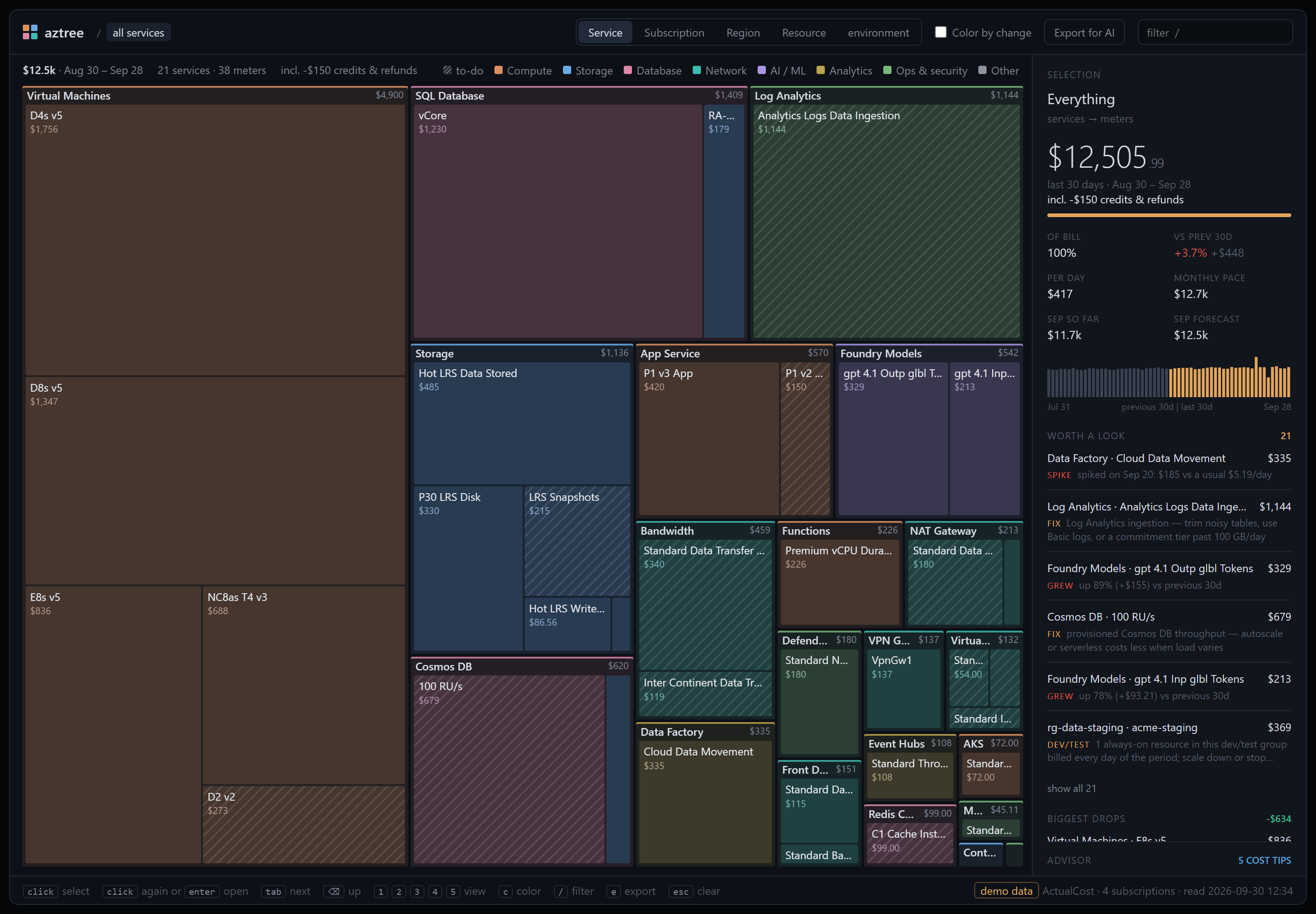
It's one small Python package with no dependencies, and it produces a single HTML page that works offline.
Quick start
pipx install aztree         # or: pip install aztree
aztree --demo               # try it with fake data, no Azure needed
az login
aztree                      # your current subscription
aztree --all                # every subscription you can see
Before the first PyPI release, install from GitHub instead: pipx install git+https://github.com/milanm/aztree. From a clone, run python -m aztree without installing anything.
The page opens in your browser. It shows the last 30 days, compared with the 30 days before. The last day is the day before yesterday, because Azure is still posting yesterday's usage.
What you get
- Treemap of spend by service → meter. Press
2to group by subscription,3by region and4by resource group → resource. - Color by change (
c): red where spend grew, green where it shrank. - Selection panel: cost, share of the bill, change vs the previous period, monthly pace and a daily chart.
- Worth a look: the fastest-growing costs, plus known Azure money pits (Log Analytics ingestion, data transfer out, NAT and Firewall data processing, Basic and static public IPs, disk snapshots, previous-generation VM sizes, Premium v2 App Service plans and Extended Security Updates).
- Biggest drops: what fell since the previous period, including anything that went to zero, so you can see a saving land.
- Advisor: Azure Advisor's cost recommendations (reservations, savings plans, right-sizing), one per resource and SKU. Click one to jump to the resource or subscription it's about.
- Export for AI: a JSON summary to hand to any AI agent (see below).
Click to select, double-click to zoom in, ⌫ to go back up, / to filter. Add #resource, #subscription or #region to the page's URL to open that view.
Requirements
- Python 3.9+ and the Azure CLI, logged in with
az login. Without the CLI, put a token forhttps://management.azure.com/inAZURE_ACCESS_TOKENand name the subscriptions with--subscriptionor--all. A bare token only sees its own tenant; through the CLI, aztree sees every tenant you're logged in to and gets a token for each. - The Cost Management Reader role (or Reader) on each subscription. Advisor tips need Reader; without it you still get the page.
- Tested on a CSP subscription. On CSP, Azure shows costs at retail prices without your partner's discounts, and reserved usage as $0 even with
--metric AmortizedCost, so the totals won't match your partner's invoice. Pay-as-you-go and Visual Studio subscriptions use the same API. - EA and MCA billing scopes should work through
--scope, but nobody has tried yet. At such a scope the subscription view shows the whole scope as one box, and Advisor is skipped.
Cost: Cost Management queries are free. Azure throttles them per subscription and per tenant, so a run makes about 8–10 requests per subscription and may wait 30–60 seconds when Azure asks it to. aztree saves the data in ~/.aztree/, so reopening the page is instant:
aztree --from
Ask an AI about your bill
aztree --from --export
This writes ~/.aztree/aztree-export.json, a compact summary that includes instructions for the agent. It has totals, breakdowns by service, subscription, region and resource group, and every meter with its change vs the previous period. It also lists the top growers and drops, credits and refunds, the flagged money pits and the Advisor tips. Give it to an AI agent and ask "where can I save money?". The Export for AI button in the page (or e) downloads the same file.
Options
| Flag | What it does |
|---|---|
--demo |
Fake data, no Azure access needed |
--subscription ID_OR_NAME |
Subscription to read; repeat for more. Default: the Azure CLI's current one |
--all |
Every enabled subscription you can see, in every tenant you're logged in to |
--scope SCOPE |
Any Cost Management scope, e.g. /providers/Microsoft.Billing/billingAccounts/ID (untested) |
--days N |
Period length, default 30. It's always compared with the period before it. |
--metric M |
ActualCost (default) or AmortizedCost |
--no-advisor |
Skip Azure Advisor |
--from [FILE] |
Reopen saved data without calling Azure (default: the last run) |
--export [FILE] |
Write the AI summary JSON instead of the page (default ~/.aztree/aztree-export.json) |
--out FILE |
Where to write the page (default ~/.aztree/aztree.html) |
--no-open |
Don't open the browser |
--verbose |
Print pages, rows and query units per request |
--version |
Print the version |
Good to know
ActualCostbooks a reservation or savings plan purchase as one lump on the day you bought it.--metric AmortizedCostspreads it over the term.- Credits and refunds count in the totals, but negative amounts can't be drawn as boxes. The header says how much of the total they are.
- Subscriptions that bill in different currencies are drawn in USD.
- If a subscription has so many resources that a daily breakdown takes more than ten pages of results, the resource view still lists every resource but with one total per period and no daily chart.
- Marketplace charges keep their publisher's meter names and get no special handling.
- Runs save to
~/.aztree/; setAZTREE_HOMEto move it. Older versions run from a clone saved toout/, andaztree --from out/aztree-data.jsonstill opens those runs.
Checking against the portal
In the Azure portal, open Cost Management → Cost analysis, choose the cost type you ran with (Actual cost by default), daily granularity and the dates in aztree's header. The totals should match to the cent. Azure can still add a little to the last day after aztree reads it, so compare soon after a run.
Privacy
aztree only reads cost data and Advisor recommendations, and never changes anything in your subscriptions. Everything it writes goes to ~/.aztree/ (or AZTREE_HOME), outside any git repo, because it contains your subscription IDs and costs. The page loads nothing from the internet. Share the HTML or export file only with people who should see your bill.
Development
python -m unittest discover -s tests
python -m aztree --demo
The tests need no Azure access. The viewer tests run the page's script in Node and are skipped without it.
Credits
aztree is a port of awstree by Branko Petric (MIT). It keeps awstree's viewer and its JSON contract and replaces the AWS parts. awstree, in turn, is inspired by disktree by Tobi Lütke.
aztree is not affiliated with or endorsed by Microsoft.
License
1 maintainer

Metadata
1 maintainer
Release files for aztree 0.2.0
For a detailed explanation of source distributions (sdists) and built distributions (wheels), please see the package formats documentation.
Source distribution (sdist)
| File | Size | Uploaded | |
|---|---|---|---|
| aztree-0.2.0.tar.gz | 49.1 kB | Details |
Built distribution (wheel)
| File | Interpreter | ABI | Platform | Reset |
|---|---|---|---|---|
| aztree-0.2.0-py3-none-any.whl | Python 3 | none | any | Details |
Total release size: 82.5 kB
Release files / aztree-0.2.0.tar.gz
| Download URL | aztree-0.2.0.tar.gz |
|---|---|
| Size | 49.1 kB |
| Tags | Source |
|
SHA-256 checksum How to use checksums |
5441f3a365f7f76db8fbfab3ca1bb7f3dfb8aa4f6f624c739aa4a75259ae9a6c
|
|
BLAKE2b-256 checksum How to use checksums |
9c958c3aa0ae58e66e822d41fcc7b0d1fe531cc8ac9ccd77bdb2cd9956c4c400
|
| Upload date | |
|
Uploaded using Trusted Publishing? What is trusted publishing? |
Yes |
| Uploaded via |
twine/7.0.0 CPython/3.13.14
|
Provenance
Provenance describes where a file came from. On PyPI, provenance is shared via attestations, which provide a verifiable record of the build or publishing details. View details, limitations and caveats.


PyPI Publish Attestation
PyPI verified that this artifact, at this checksum, originated from the publisher listed below.
Signed by GitHub Actions, verified by PyPI on Sep 28, 2026.
Transparency logRelease files / aztree-0.2.0-py3-none-any.whl
| Download URL | aztree-0.2.0-py3-none-any.whl |
|---|---|
| Size | 33.4 kB |
| Tags | Python 3 |
|
SHA-256 checksum How to use checksums |
c6fee255387dd96a196937382d92bdb13af27bb20285b15f72cdcfde901753c3
|
|
BLAKE2b-256 checksum How to use checksums |
f73a2157a25dde3565e5598fffb4c085e164d9d829561fe41700d378906b0761
|
| Upload date | |
|
Uploaded using Trusted Publishing? What is trusted publishing? |
Yes |
| Uploaded via |
twine/7.0.0 CPython/3.13.14
|
Provenance
Provenance describes where a file came from. On PyPI, provenance is shared via attestations, which provide a verifiable record of the build or publishing details. View details, limitations and caveats.
PyPI Publish Attestation
PyPI verified that this artifact, at this checksum, originated from the publisher listed below.
Signed by GitHub Actions, verified by PyPI on Sep 28, 2026.
Transparency log













