
Generate a self-hosted backlog snapshot and dashboard for maintainers.
Verified details
These details have been verified by PyPIProject links
GitHub Statistics
Maintainers

Project description
Backlog Atlas




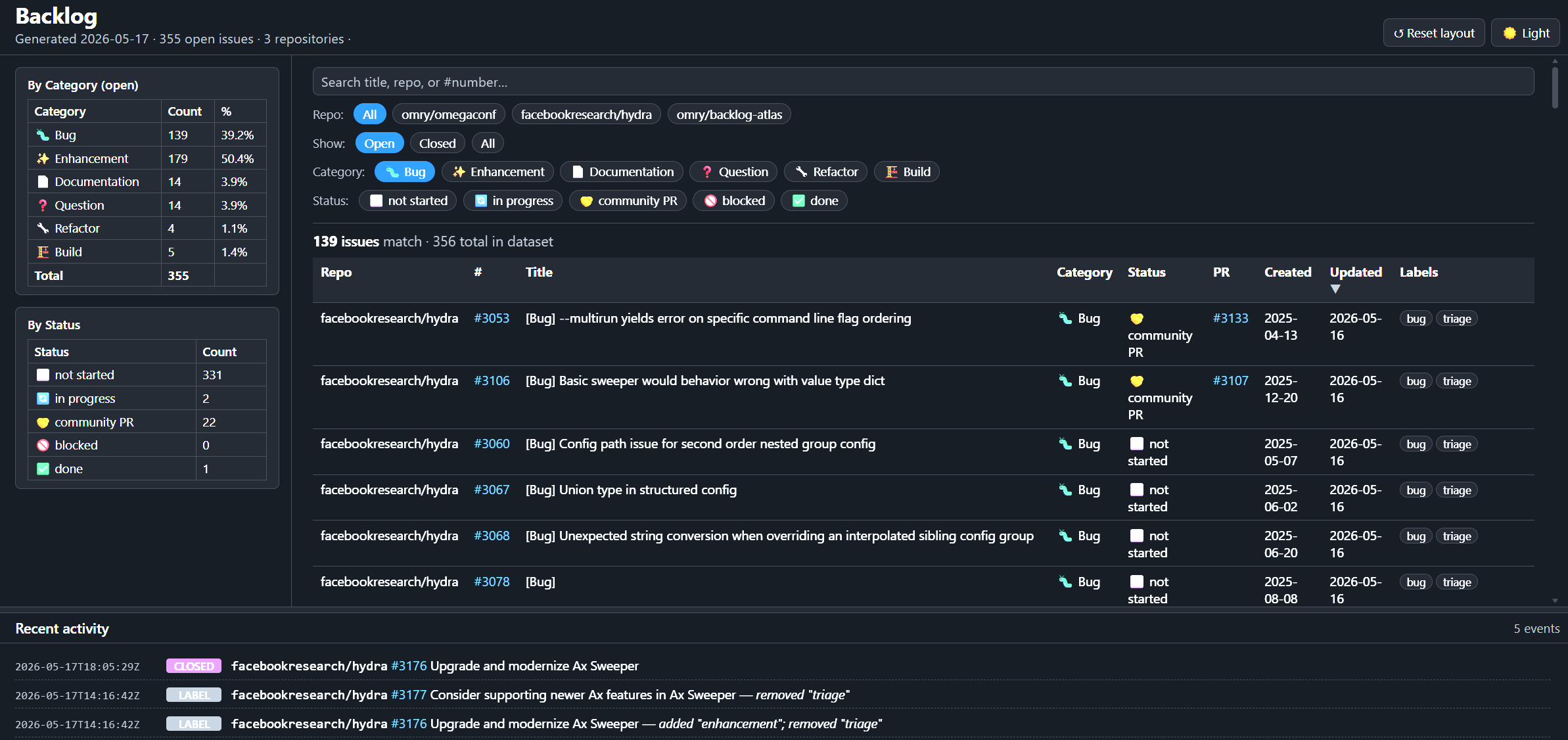
Backlog Atlas generates a self-hosted backlog snapshot and static dashboard for GitHub repository maintainers.
It keeps GitHub Issues as the source of truth, derives backlog state from open
issues and linked pull requests, and publishes the result to a dedicated
backlog-atlas branch. The generated branch is machine-owned and can be served
directly with GitHub Pages.
This repo's backlog dashboard: https://omry.github.io/backlog-atlas/
Documentation
- User Guide — install Backlog Atlas on a repository, enable the web UI, run updates, and uninstall.
- Maintainer Guide — local development, testing, packaging, and release prep for this package.
- Design Note — how snapshots, diffs, and the update log fit together.
- Changelog — user-facing release notes.
What It Produces
The backlog-atlas branch contains:
backlog.json— structured backlog data plus the recent activity tail used by the web UI.updates.jsonl— append-only structured activity history.last_snapshot.json— internal diff state for the next run.index.html— the static dashboard.favicon.svg— the dashboard icon.
The dashboard can also load a generated atlas.json manifest next to
index.html and federate multiple public backlog.json files in the browser.
Author the multi-repo source as YAML, then compile it to the browser manifest.
The default branch only needs the installed workflow, manifest, and config:
.github/workflows/update-backlog-atlas.yml.github/backlog-atlas/manifest.json.github/backlog-atlas/config.yaml— editable repository configuration
Quick Start
pip install backlog-atlas
cd /path/to/target-repo
backlog-atlas install --dry-run
backlog-atlas install
The dry run previews the files and install source before anything is written.
Install is safe to rerun: it first removes old Backlog Atlas hooks/manifests and
preserves config and generated dashboard history. When the previous install
manifest lists bundled wheels, it writes a temporary cleanup workflow that
removes those old wheels only after the new install lands.
The manifest is the cleanup source of truth: it records installed files and
which ones are removed only by clean uninstall. Review and push the install
commit that Backlog Atlas creates, then enable GitHub Pages from the
backlog-atlas branch. See the
User Guide for
the full local and remote install flows.
CLI
# install the workflow and manifest in a repository
backlog-atlas install [flags]

# remove installed hooks/manifests; --clean also removes config and branch
backlog-atlas uninstall [flags]

# write the static web UI files for preview or packaging
backlog-atlas dump-web --output PATH

# compile YAML multi-repo config into atlas.json for the browser UI
backlog-atlas dump-atlas --config atlas.yaml --output PATH

# manage repos tracked by .github/backlog-atlas/atlas.yaml
backlog-atlas atlas list
backlog-atlas atlas add owner/name [--backlog-url URL]
backlog-atlas atlas remove owner/name
backlog-atlas atlas install --delivery pr|push
backlog-atlas atlas install --local --checkout-root PATH

# refresh backlog data; normally run by the installed GitHub Action
backlog-atlas update [flags]

# explain how one issue is classified by the active config
backlog-atlas classify ISSUE_NUMBER [--repo URL]
Development Checks
Maintainers can install local check tools with:
python -m pip install -e ".[dev]"
python -m black --check backlog_atlas tests tools
python -m pyflakes backlog_atlas tests tools
python -m mypy
python -m pytest
See the Maintainer Guide for the full development workflow.
License
MIT.
Project details
Verified details
These details have been verified by PyPIProject links
GitHub Statistics
Maintainers


Download files
Download the file for your platform. If you're not sure which to choose, learn more about installing packages.
Source Distribution
Built Distribution
Filter files by name, interpreter, ABI, and platform.
If you're not sure about the file name format, learn more about wheel file names.
Copy a direct link to the current filters
File details
Details for the file backlog_atlas-0.16.tar.gz.
File metadata
- Download URL: backlog_atlas-0.16.tar.gz
- Upload date:
- Size: 69.5 kB
- Tags: Source
- Uploaded using Trusted Publishing? Yes
- Uploaded via: twine/6.1.0 CPython/3.13.12
File hashes
| Algorithm | Hash digest | |
|---|---|---|
| SHA256 |
c6628cb4eac4cdeb8d629791073c5c99d10b4608d98ae2bcdeb2ac8b51c1e398
|
|
| MD5 |
52aaa4a829f7949877e172a6bbca631a
|
|
| BLAKE2b-256 |
42b87c8774701743d3e63a0a91a26e8ba9690b7596d61e44a386e1ba5d7966ab
|
Provenance
The following attestation bundles were made for backlog_atlas-0.16.tar.gz:
Publisher:
publish.yml on omry/backlog-atlas
-
Statement:
-
Statement type:
https://in-toto.io/Statement/v1 -
Predicate type:
https://docs.pypi.org/attestations/publish/v1 -
Subject name:
backlog_atlas-0.16.tar.gz -
Subject digest:
c6628cb4eac4cdeb8d629791073c5c99d10b4608d98ae2bcdeb2ac8b51c1e398 - Sigstore transparency entry: 1566642570
- Sigstore integration time:
-
Permalink:
omry/backlog-atlas@dc70ceac4bf0d798a302c7e27af4b37a8b275adc -
Branch / Tag:
refs/tags/v0.16 - Owner: https://github.com/omry
-
Access:
public
-
Token Issuer:
https://token.actions.githubusercontent.com -
Runner Environment:
github-hosted -
Publication workflow:
publish.yml@dc70ceac4bf0d798a302c7e27af4b37a8b275adc -
Trigger Event:
release
-
Statement type:
File details
Details for the file backlog_atlas-0.16-py3-none-any.whl.
File metadata
- Download URL: backlog_atlas-0.16-py3-none-any.whl
- Upload date:
- Size: 56.6 kB
- Tags: Python 3
- Uploaded using Trusted Publishing? Yes
- Uploaded via: twine/6.1.0 CPython/3.13.12
File hashes
| Algorithm | Hash digest | |
|---|---|---|
| SHA256 |
2dcd67682bda5f431f6f384d7d281d949a57d8e573aac4b072665cc7deb426b6
|
|
| MD5 |
3abcfd8850d7a98a9ab087da327452dd
|
|
| BLAKE2b-256 |
e65c88a2882e6551118f284422d9361e405990c66187ae0636a531c5e6828797
|
Provenance
The following attestation bundles were made for backlog_atlas-0.16-py3-none-any.whl:
Publisher:
publish.yml on omry/backlog-atlas
-
Statement:
-
Statement type:
https://in-toto.io/Statement/v1 -
Predicate type:
https://docs.pypi.org/attestations/publish/v1 -
Subject name:
backlog_atlas-0.16-py3-none-any.whl -
Subject digest:
2dcd67682bda5f431f6f384d7d281d949a57d8e573aac4b072665cc7deb426b6 - Sigstore transparency entry: 1566642594
- Sigstore integration time:
-
Permalink:
omry/backlog-atlas@dc70ceac4bf0d798a302c7e27af4b37a8b275adc -
Branch / Tag:
refs/tags/v0.16 - Owner: https://github.com/omry
-
Access:
public
-
Token Issuer:
https://token.actions.githubusercontent.com -
Runner Environment:
github-hosted -
Publication workflow:
publish.yml@dc70ceac4bf0d798a302c7e27af4b37a8b275adc -
Trigger Event:
release
-
Statement type:






