
Live Trading and backtesting platform in Python

Project description
backtrader-next




Live Trading and backtesting platform written in Python.
Installation
pip install backtrader-next
History
Package is based on backtrader
Changes:
- Added new Chart plotting using bn-lightweight-charts-python.
- Improved testing performance by using the
PandasDatafeed inrunonce=Truemode. - Added performance statistics in both text format (similar to Backtesting.py) and HTML format (similar to Quantstats).
- Improved support for switching between futures (for testing, etc.).
- Added new indicators implemented with Numba.
- Improved performance — now it runs about 2–3× slower than Backtesting.py in
runonce=Truemode withPandasData. - Detailed results
- Interactive visualizations
Performance
Performance comparison using the perf_compare benchmark.
- Backtrader-next using an optimized PandasData feed
- Backtrader with PandasData feed
- Backtesting.py
| Framework | Execution Time | Relative Speed |
|---|---|---|
| Backtesting | 2.95 sec | 14.3x faster than Backtrader |
| Backtrader-next | 12.33 sec | 3.4x faster than Backtrader |
| Backtrader | 42.25 sec | Baseline |
Here a snippet of a Simple Moving Average CrossOver.
import pandas as pd
import backtrader_next as bt
from backtrader_next.feeds import PandasData


class SimpleSizer(bt.Sizer):
    params = (
        ('percents', 99),
    )

    def _getsizing(self, comminfo, cash, data, isbuy):
        value = self.broker.getvalue()
        price = data.close[0]+comminfo.p.commission
        size = value / price * (self.p.percents / 100)
        return int(size)


class SmaCross(bt.Strategy):
    params = (
        ('MA1', 20),
        ('MA2', 50),
    )

    def __init__(self):
        self.Order = None
        self.ma1 = bt.nind.SMA(self.data.close, period=self.p.MA1)
        self.ma2 = bt.nind.SMA(self.data.close, period=self.p.MA2)


    def notify_order(self, order):
        if order.status in [order.Submitted, order.Accepted]:  # Order is submitted/accepted
            return  # Do nothing until the order is completed

        # if order.status in [order.Completed]:  # Order is completed
        #     if order.isbuy():  # Buy order
        #         pass
        #     elif order.issell():  # Sell order
        #         pass

        elif order.status in [order.Canceled]:  # Canceled, Margin, Rejected
            print('Order was Canceled', self.data.datetime.datetime(0))

        elif order.status in [order.Margin]:  # Canceled, Margin, Rejected
            print('Order was Margin ', self.data.datetime.datetime(0))

        elif order.status in [order.Rejected]:  # Canceled, Margin, Rejected
            print('Order was Rejected', self.data.datetime.datetime(0))

        self.Order = None  # Reset order


    def next(self):
        # Use ONLY Long Positions
        if self.crossover(self.ma1, self.ma2):
            pos = self.getposition()
            if pos:
                self.close(size=pos.size)
            self.Order = self.buy()
        elif self.crossover(self.ma2, self.ma1):
            pos = self.getposition()
            if pos:
                self.close(size=pos.size)
            # self.Order = self.sell()

    def crossover(self, ma1, ma2):
        try:
            return ma1[-1] <= ma2[-1] and ma1[0] > ma2[0]
        except IndexError:
            return False


if __name__ == '__main__':
    cerebro = bt.Cerebro()
    cerebro.broker.setcash(1_000_000.0)
    cerebro.broker.set_shortcash(False)
    cerebro.broker.setcommission(commission=0, margin=False)
    cerebro.addsizer(SimpleSizer, percents=90)

    df = pd.read_csv(f"AAPL_1d.csv.zip", sep=";")
    df['Datetime'] = pd.to_datetime(df['Date'].astype(str) , format='%Y-%m-%d')
    df.set_index('Datetime', inplace=True)

    data = PandasData(dataframe=df, timeframe=bt.TimeFrame.Days, compression=1)
    cerebro.adddata(data, name='AAPL')

    cerebro.addstrategy(SmaCross, )

    print(f'Starting Portfolio Value: {cerebro.broker.getvalue():.2f}\n')
    results = cerebro.run()
    print(f'\nFinal Portfolio Value: {cerebro.broker.getvalue():.2f}\n')

    rc = cerebro.statistics
    print(rc)

    # old plot required matplotlib
    # cerebro.old_plot(style='candle')

    cerebro.plot(filename="smacross.html")
    cerebro.show_report(filename="smacross_stats.html")
    print("end")
Output log
Starting Portfolio Value: 1000000.00


Final Portfolio Value: 29343500.38

Strategy                             SmaCross
MA1                                        20
MA2                                        50
Start                     2000-01-03 00:00:00
End                       2024-12-31 00:00:00
Duration                   9129 days 00:00:00
Equity Start [$]                    1000000.0
Equity Final [$]              29343500.384917
Equity Peak [$]               30253994.128875
Commissions [$]                           0.0
Cum Return [%]                        2834.35
Return (Ann.) [%]                     14.5018
Volatility (Ann.) [%]                 25.7613
CAGR [%]                                 9.78
Sharpe Ratio                           0.6617
Skew                                   -3.199
Kurtosis                             102.0707
Smart Sharpe Ratio                    -0.8039
Sortino Ratio                          0.9247
VWR Ratio                              4.8799
Calmar Ratio                           0.2017
Recovery factor [%]                    5.9154
Max. Drawdown [%]                    -71.9018
Avg. Drawdown [%]                     -4.7983
Max. Drawdown Duration     1666 days 00:00:00
Avg. Drawdown Duration       59 days 00:00:00
Drawdown Peak             2001-07-25 00:00:00
# Trades                                   66
Win Rate [%]                          56.0606
Best Trade [%]                       104.0816
Worst Trade [%]                      -63.5437
Avg. Trade [%]                         5.5053
Max. Trade Duration         276 days 00:00:00
Avg. Trade Duration          89 days 00:00:00
Profit Factor                          1.1704
Expectancy [%]                         0.0676
SQN                                    2.4064
Kelly Criterion [%]                   39.2016
dtype: object
end
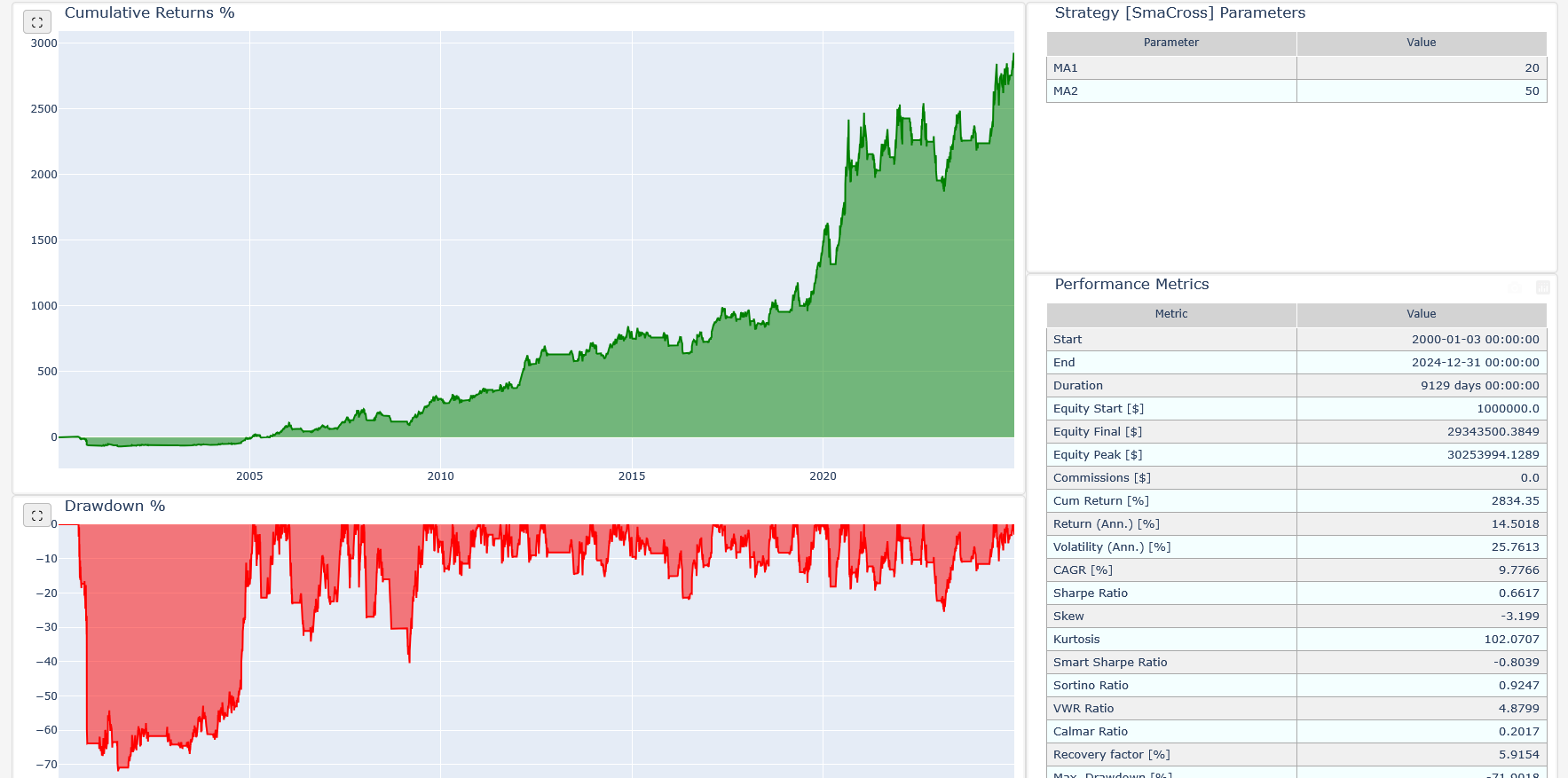
It will create two HTML files and open it in your current browser.
- smacross.html - charts and trade stats
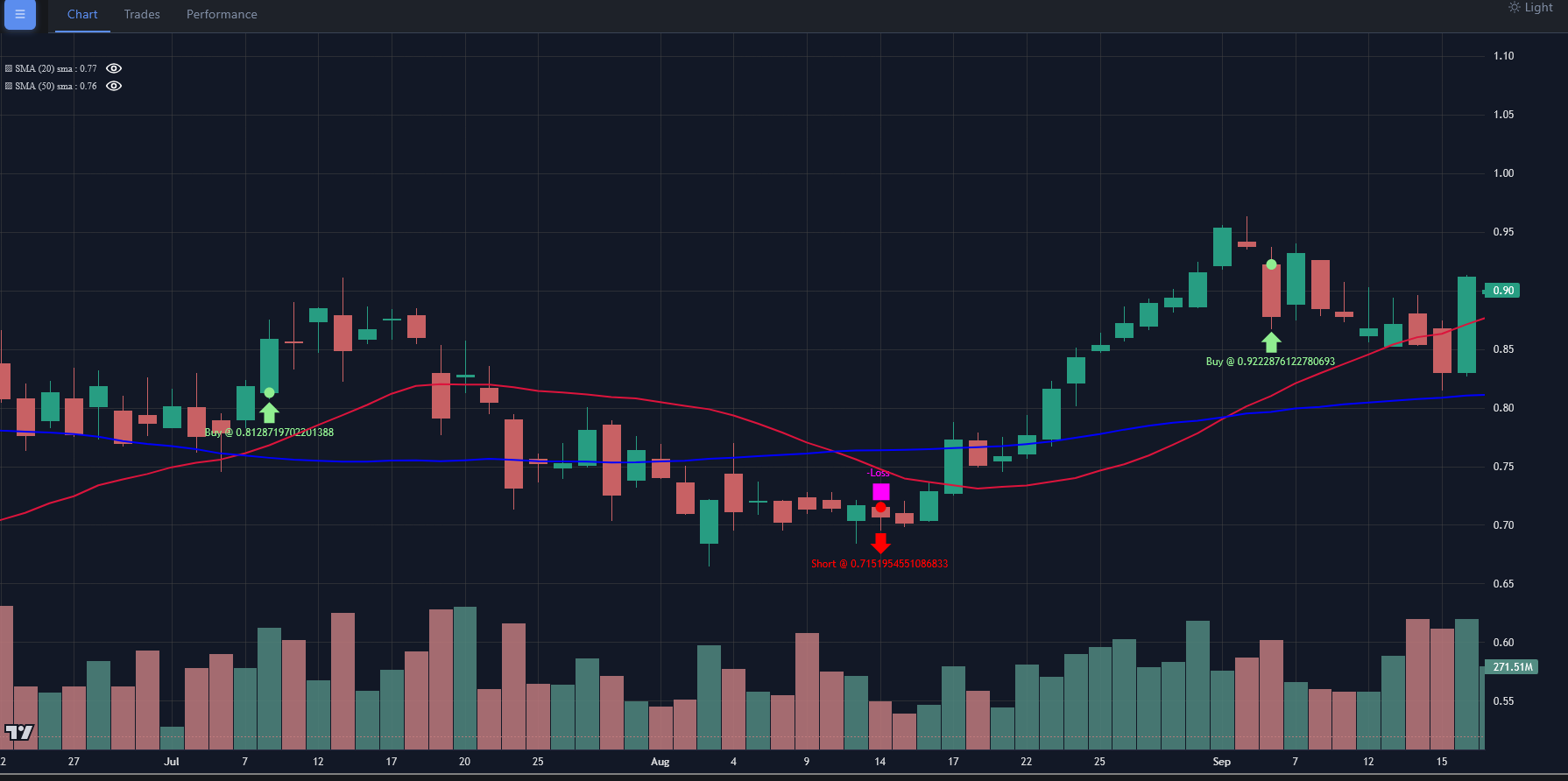
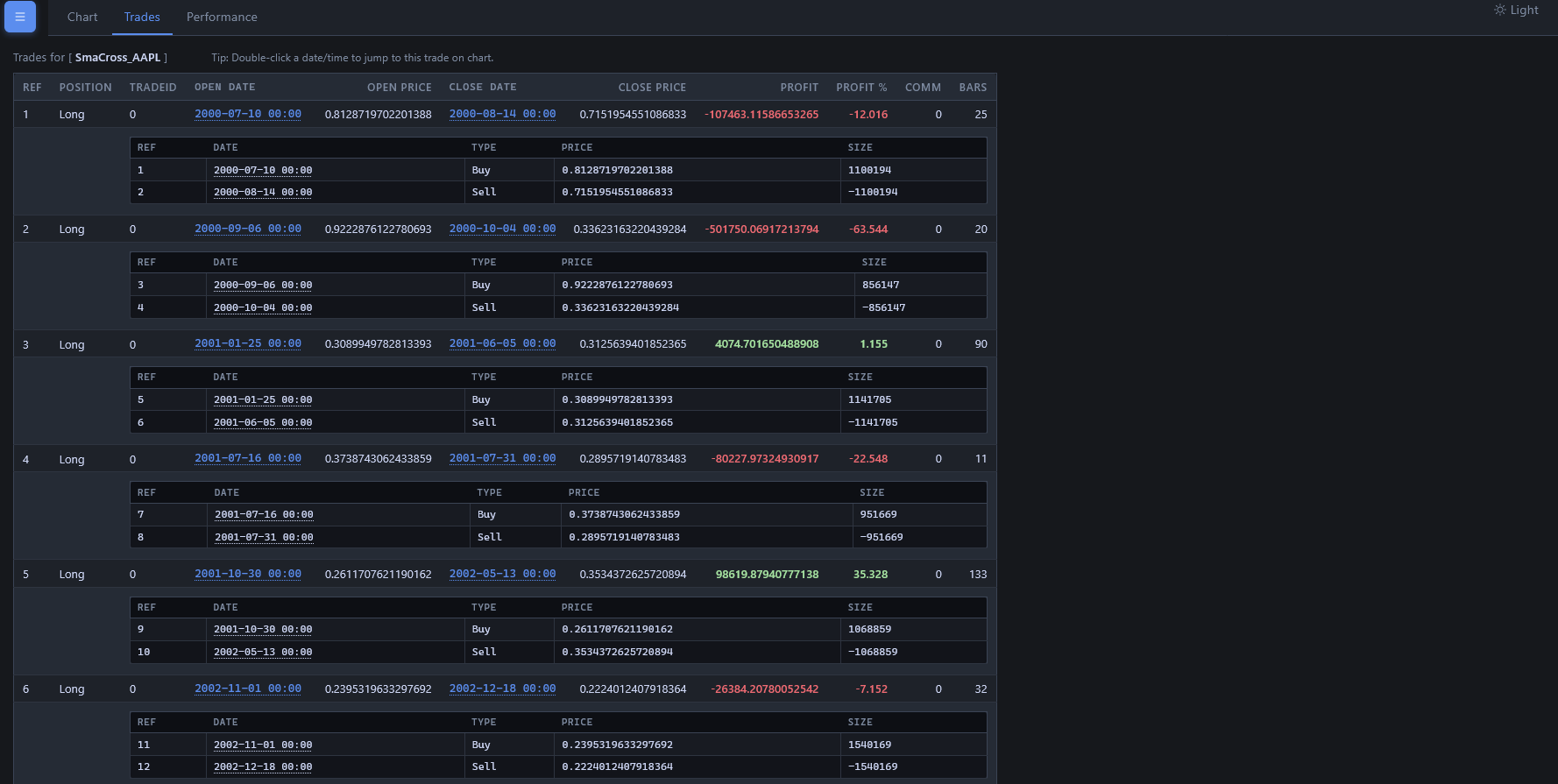
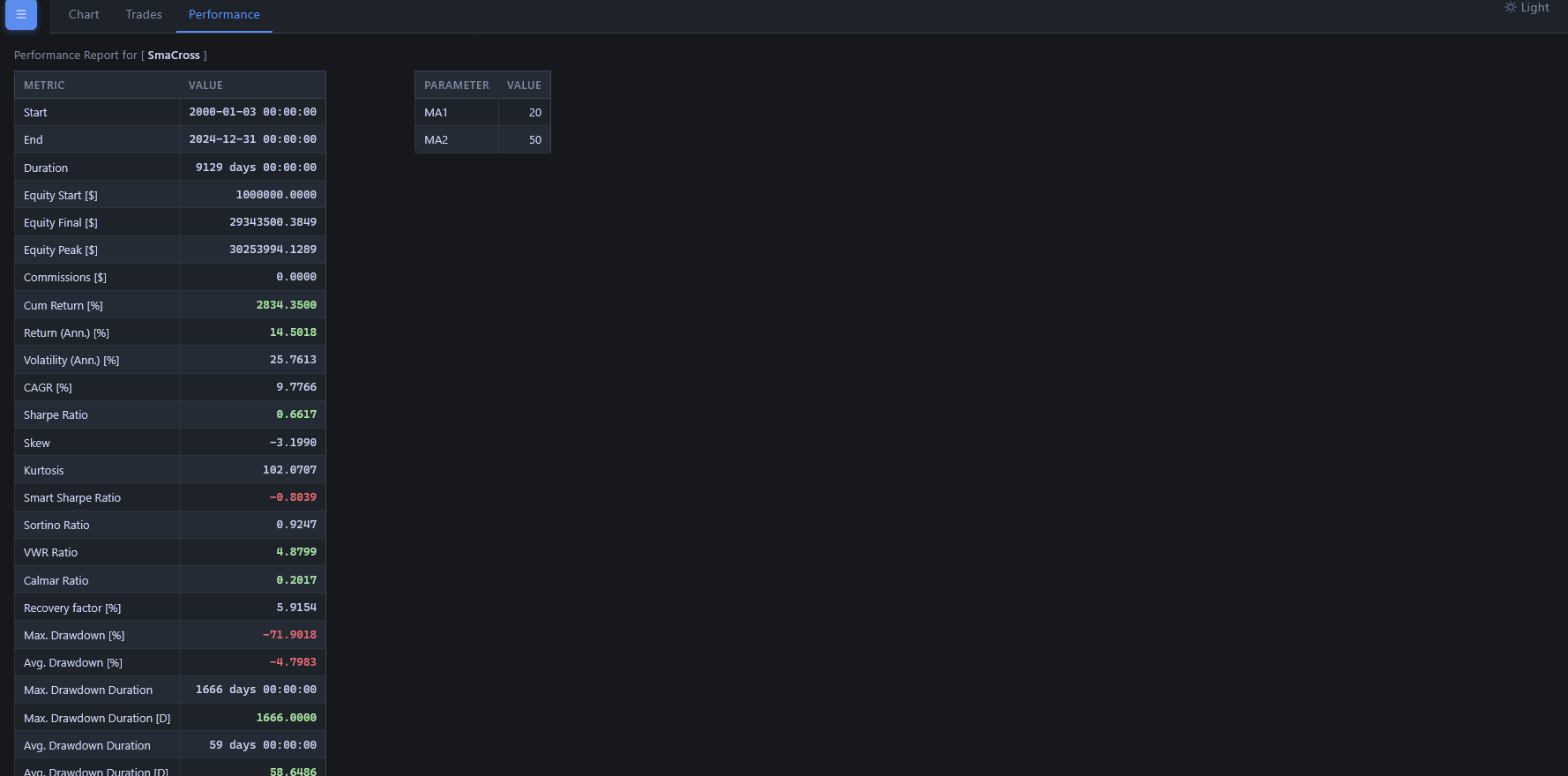
- smacross_stats.html - quantstats like strategy report
Features:
Live Trading and backtesting platform written in Python.
-
Live Data Feed and Trading with
- Interactive Brokers (needs
IbPyand benefits greatly from an installedpytz) - Visual Chart (needs a fork of
comtypesuntil a pull request is integrated in the release and benefits frompytz) - Oanda (needs
oandapy) (REST API Only - v20 did not support streaming when implemented)
- Interactive Brokers (needs
-
Data feeds from csv/files, online sources or from pandas and blaze
-
Filters for datas, like breaking a daily bar into chunks to simulate intraday or working with Renko bricks
-
Multiple data feeds and multiple strategies supported
-
Multiple timeframes at once
-
Integrated Resampling and Replaying
-
Step by Step backtesting or at once (except in the evaluation of the Strategy)
-
Integrated battery of indicators
-
TA-Lib indicator support (needs python ta-lib / check the docs)
-
Easy development of custom indicators
-
Analyzers (for example: TimeReturn, Sharpe Ratio, SQN) and
pyfoliointegration (deprecated) -
Flexible definition of commission schemes
-
Integrated broker simulation with Market, Close, Limit, Stop, StopLimit, StopTrail, StopTrailLimitand OCO orders, bracket order, slippage, volume filling strategies and continuous cash adjustmet for future-like instruments
-
Sizers for automated staking
-
Cheat-on-Close and Cheat-on-Open modes
-
Schedulers
-
Trading Calendars
-
Plotting (requires matplotlib)
Documentation
The old blog for backtrader:
Blog <http://www.backtrader.com/blog>_
Read the full old documentation at:
Documentation <http://www.backtrader.com/docu>_
List of built-in Indicators (122)
Indicators Reference <http://www.backtrader.com/docu/indautoref.html>_
An example for IB Data Feeds/Trading:
-
IbPydoesn't seem to be in PyPi. Do either::pip install git+https://github.com/blampe/IbPy.git
or (if
gitis not available in your system)::pip install https://github.com/blampe/IbPy/archive/master.zip
For other functionalities like: Visual Chart, Oanda, TA-Lib, check
the dependencies in the documentation.
From source:
- Place the backtrader_next directory found in the sources inside your project
Version numbering
X.Y.Z
- X: Major version number. Should stay stable unless something big is changed
like an overhaul to use
numpy - Y: Minor version number. To be changed upon adding a complete new feature or (god forbids) an incompatible API change.
- Z: Revision version number. To be changed for documentation updates, small changes, small bug fixes
Release history Release notifications | RSS feed


Download files
Download the file for your platform. If you're not sure which to choose, learn more about installing packages.
Source Distribution
Built Distribution
Filter files by name, interpreter, ABI, and platform.
If you're not sure about the file name format, learn more about wheel file names.
Copy a direct link to the current filters
File details
Details for the file backtrader_next-2.3.2.tar.gz.
File metadata
- Download URL: backtrader_next-2.3.2.tar.gz
- Upload date:
- Size: 11.1 MB
- Tags: Source
- Uploaded using Trusted Publishing? No
- Uploaded via: twine/6.2.0 CPython/3.10.12
File hashes
| Algorithm | Hash digest | |
|---|---|---|
| SHA256 |
27040a94c843ce4fc74cd1bd7d0d325757886857d409426731fab41412b4ed34
|
|
| MD5 |
4c6c61792cfb827059f34aff050c6336
|
|
| BLAKE2b-256 |
16a77652bc9c70b94a425f3214496377809d5f9e4809bdd6523fc69968667ada
|
File details
Details for the file backtrader_next-2.3.2-py3-none-any.whl.
File metadata
- Download URL: backtrader_next-2.3.2-py3-none-any.whl
- Upload date:
- Size: 471.9 kB
- Tags: Python 3
- Uploaded using Trusted Publishing? No
- Uploaded via: twine/6.2.0 CPython/3.10.12
File hashes
| Algorithm | Hash digest | |
|---|---|---|
| SHA256 |
6f6505c0cb2ac563d2a4e17b7e821e621f8aa368d5cb6bd95f1b9ff403fb69ed
|
|
| MD5 |
bf6e8ca135270445b89efaf9504cfb19
|
|
| BLAKE2b-256 |
8795e532c55982d436e00da584b2a0853016591d3627713a0333c170067e8563
|






