
baudolo – Deterministic Backup & Restore for Docker Volumes 📦🔄







baudolo is a backup and restore system for Docker volumes with
mandatory file backups and explicit, deterministic database dumps.
It is designed for environments with many Docker services where:
- file-level backups must always exist
- database dumps must be intentional, predictable, and auditable
✨ Key Features
- 📦 Incremental Docker volume backups using
rsync --link-dest - 🗄 Optional SQL dumps for:
- PostgreSQL
- MariaDB / MySQL
- 🌱 Explicit database definition for SQL backups (no auto-discovery)
- 🧾 Backup integrity stamping via
dirval(Python API) - ⏸ Automatic container stop/start when required for consistency
- 🚫 Whitelisting of containers that do not require stopping
- ♻️ Modular, maintainable Python architecture
🧠 Core Concept (Important!)
baudolo separates file backups from database dumps.
- Docker volumes are always backed up at file level
- SQL dumps are created only for explicitly defined databases
This results in the following behavior:
| Database defined | File backup | SQL dump |
|---|---|---|
| No | ✔ yes | ✘ no |
| Yes | ✔ yes | ✔ yes |
📁 Backup Layout
Backups are stored in a deterministic, fully nested structure:
<backups-dir>/
└── <machine-hash>/
    └── <repo-name>/
        └── <timestamp>/
            └── <volume-name>/
                ├── files/
                └── sql/
                    └── <database>.backup.sql
Meaning of each level
-
<machine-hash>SHA256 hash of/etc/machine-id(host separation) -
<repo-name>Logical backup namespace (project / stack) -
<timestamp>Backup generation (YYYYMMDDHHMMSS) -
<volume-name>Docker volume name -
files/Incremental file backup (rsync) -
sql/Optional SQL dumps (only for defined databases)
🚀 Installation
Local (editable install)
python3 -m venv .venv
source .venv/bin/activate
pip install -e .
🌱 Database Definition (SQL Backup Scope)
How SQL backups are defined
baudolo creates SQL dumps only for databases that are explicitly defined
via configuration (e.g. a databases definition file or seeding step).
If a database is not defined:
- its Docker volume is still backed up (files)
- no SQL dump is created
No database definition → file backup only Database definition present → file backup + SQL dump
Why explicit definition?
baudolo does not inspect running containers to guess databases.
Databases must be explicitly defined to guarantee:
- deterministic backups
- predictable restore behavior
- reproducible environments
- zero accidental production data exposure
Required database metadata
Each database definition provides:
- database instance (container or logical instance)
- database name
- database user
- database password
This information is used by baudolo to execute
pg_dump, pg_dumpall, or mariadb-dump.
💾 Running a Backup
baudolo \
  --compose-dir /srv/docker \
  --backups-dir /Backups \
  --repo-name my-repo \
  --databases-csv /etc/baudolo/databases.csv \
  --database-containers central-postgres central-mariadb \
  --images-no-stop-required alpine postgres mariadb mysql \
  --images-no-backup-required redis busybox
Common Backup Flags
| Flag | Description |
|---|---|
--only-sql |
Skip file backups only for DB volumes when dumps succeed; non-DB volumes are still backed up; fallback to files if no dump. |
--only-files |
Take no dumps at all; every volume is backed up as files. Needs no --databases-csv. Mutually exclusive with --only-sql. |
--shutdown |
Do not restart containers after backup |
--backups-dir |
Backup root directory (required) |
--repo-name |
Backup namespace under machine hash (required) |
--databases-csv |
Path to databases.csv (required) |
♻️ Restore Operations
Restore Volume Files
baudolo-restore files \
  my-volume \
  <machine-hash> \
  <version> \
  --backups-dir /Backups \
  --repo-name my-repo
Restore into a different target volume:
baudolo-restore files \
  target-volume \
  <machine-hash> \
  <version> \
  --source-volume source-volume
Restore PostgreSQL
baudolo-restore postgres \
  my-volume \
  <machine-hash> \
  <version> \
  --container postgres \
  --db-name appdb \
  --db-password secret \
  --empty
Restore MariaDB / MySQL
baudolo-restore mariadb \
  my-volume \
  <machine-hash> \
  <version> \
  --container mariadb \
  --db-name shopdb \
  --db-password secret \
  --empty
baudoloautomatically detects whethermariadbormysqlis available inside the container
🔍 Backup Scheme
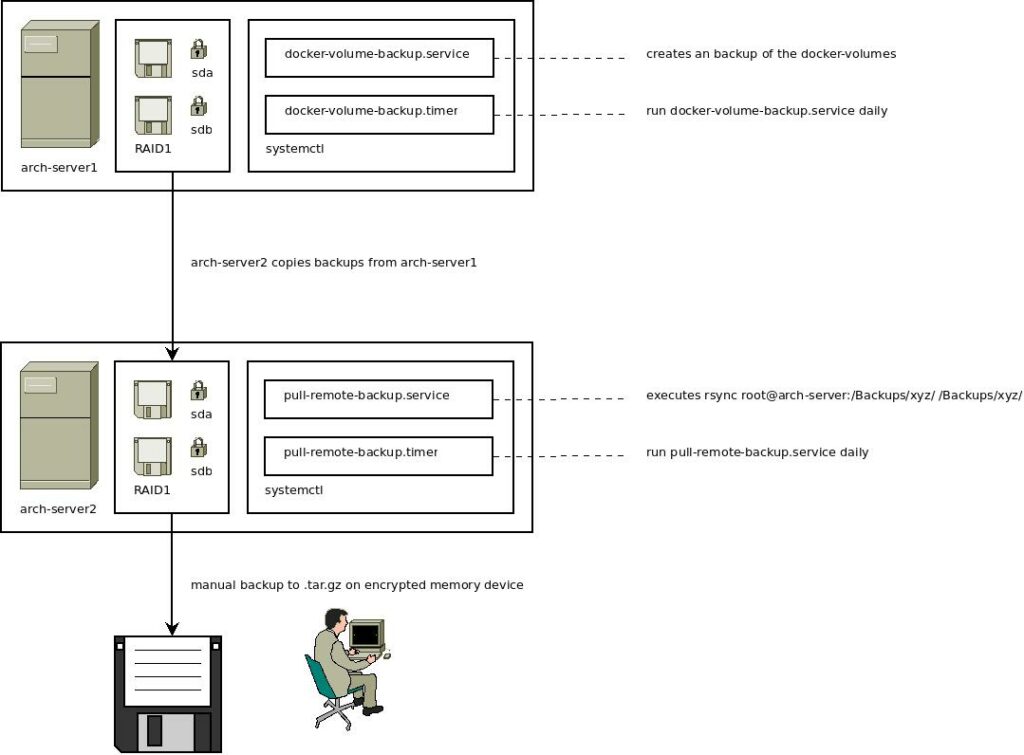
The backup mechanism uses incremental backups with rsync and stamps directories with a unique hash. For more details on the backup scheme, check out this blog post.
👨💻 Author
Kevin Veen-Birkenbach
📜 License
This project is licensed under the GNU Affero General Public License v3.0. See the LICENSE file for details.
🔗 More Information
Happy Backing Up! 🚀🔐
1 maintainer

Metadata
1 maintainer
Release files for backup-docker-to-local 7.1.1
For a detailed explanation of source distributions (sdists) and built distributions (wheels), please see the package formats documentation.
Source distribution (sdist)
| File | Size | Uploaded | Provenance | Actions |
|---|---|---|---|---|
| backup_docker_to_local-7.1.1.tar.gz | 44.3 kB | Without provenance | Details for backup_docker_to_local-7.1.1.tar.gz |
Built distribution (wheel)
| File | Interpreter | ABI | Platform | Actions Reset |
|---|---|---|---|---|
| backup_docker_to_local-7.1.1-py3-none-any.whl | Python 3 | none | any | Details for backup_docker_to_local-7.1.1-py3-none-any.whl |
Total release size: 98.2 kB
Release files / backup_docker_to_local-7.1.1.tar.gz
| Download URL | backup_docker_to_local-7.1.1.tar.gz |
|---|---|
| Size | 44.3 kB |
| Tags | Source |
|
SHA-256 checksum How to use checksums |
9eaed2a26aa9181805fdcce7a0ad85182a95dacf32879f1a1a6cedc477e6bdb4
|
|
BLAKE2b-256 checksum How to use checksums |
e08f4186598255bfa42f824fc40e8f0df1faf330fa40217d47b67efd71a311ae
|
| Upload date | |
|
Uploaded using Trusted Publishing? What is trusted publishing? |
No |
| Uploaded via |
twine/7.0.0 CPython/3.14.7
|
Release files / backup_docker_to_local-7.1.1-py3-none-any.whl
| Download URL | backup_docker_to_local-7.1.1-py3-none-any.whl |
|---|---|
| Size | 53.8 kB |
| Tags | Python 3 |
|
SHA-256 checksum How to use checksums |
eb833a6b12b6fcfd5a6b638705b9f2c99e662a577dd522ef9f1e2a13c36ac851
|
|
BLAKE2b-256 checksum How to use checksums |
491abfd5a518daa2ef13957cc0fd3665d225c743626de42ee29164880cc75027
|
| Upload date | |
|
Uploaded using Trusted Publishing? What is trusted publishing? |
No |
| Uploaded via |
twine/7.0.0 CPython/3.14.7
|
Security for backup-docker-to-local 7.1.1
Provenance
Provenance describes where a file came from. On PyPI, provenance is shared via attestations, which provide a verifiable record of the build or publishing details. View details, limitations and caveats.
No provenance found
None of the files in this release were uploaded with provenance metadata.
A note on package security
PyPI is a repository for distributing packages, not a service for auditing them. While third-party security researchers and our staff do their best to detect and remove malicious packages, PyPI cannot guarantee the quality, security or suitability of any given package.
To learn more about protecting yourself from malicious actors, visit our package security documentation.














