
bakauditor - Backup Auditor
What is this
bakauditor is an automatic backup auditor robot.
All of us have backups. Every day something is backing up on background of our desktops and somewhere on our servers. But what if backup has been failed and you haven't even received an alert about it? Probably you'll find you miss important backups only when your system is crashed and you need them.
People, who faced this problem at least once in a life, usually manually audit their backups from time to time. That's why I've decided to automate this boring stuff once and forever and created bakauditor.
What can it do
Currently, bakauditor supports backup audit via plugins:
-
file check backup, stored in file (modification time, min. size etc.)
-
dir get most recent file in directory and check it like file does
-
zfs check if ZFS snapshots exists on local or remote system
-
borg borg backup repositories, local or remote
How to use
Just run
bakauditor
and it will show you list of all your backups and their status.
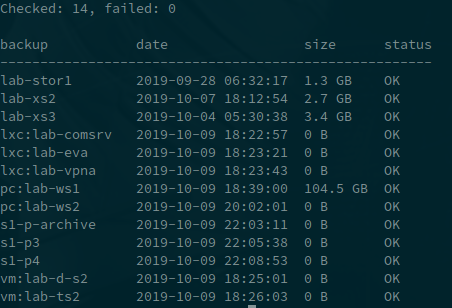
You may also run
bakauditor -x
In this case, only failed backups are printed, otherwise you get a message:
Checked: 14, failed: 0

All backups are fine
bakauditor process exits with code 0 when everything is fine, and with error codes when something is wrong. So you may just get its output and send via e-mail or what you prefer when something is wrong. And e.g. weekly receive output even if everything is fine, to check bakauditor is running and all your backups are safe.
Installation
pip3 install bakauditor
Configuration
Put configuration file to /usr/local/etc/bakauditor.yml. This is YAML file and it has the following sections.
default section
default:
    time: 2d
    min-size: 10000000
Options in this section apply to all backup configurations, unless overriden.
The size may be specified in bytes, you may also use suffix "K" for Kbytes (kilobytes, not kibitytes, 1K = 1000 bytes), "M" for MBytes, "G" for Gbytes, "T" for TBytes.
file
Example:
server1:
    type: file
    path: /export/backups/server1/server1.dump.gz
    time: 3d
    min-size: 10000000
In the above example, we ask bakauditor to check backup stored in the specified file, the file should not be older than 3 days and have a minimal size of 10 megabytes to be considered as good backup.
Options time and min-size are optional if specified in default section.
directory
Example:
server1:
    type: dir
    path: /export/backups/server1
    time: 3d
    min-size: 10000000
This example will to the same as previous, but automatically get the most recent file in the specified directory and check it. Good, when you do e.g. incremental backups.
directory of directories
Example:
server1:
    type: dod
    path: /export/backups/somebackup
    time: 3d
    min-size:
This example considers backups are stored in separate directories inside "somebackup" directory. The program will find most recently created directory and calculate its total size.
zfs
Example:
server1:
    type: zfs
    time-fmt: "snapshot-%Y-%m%-%d-%H:%M:%S"
    fs: bakpool/server1
Option time-fmt optionally decodes the snapshot creation time from its name. If omitted, the native ZFS creation timestamp is used. Only snapshots belonging to the exact configured file system are considered.
Option fs specifies file system, where snapshots are located.
Optionally, you may ask bakauditor to analyze ZFS snapshot on remote server via ssh, specifying ssh option:
server1:
    type: zfs
    time-fmt: "snapshot-%Y-%m%-%d-%H:%M:%S"
    fs: bakpool/server1
    ssh: root@192.168.1.77
This option is just converted to command ssh <option_value> zfs list ... so you may specify any options for ssh program you like.
Note: min-size option for zfs snapshots is ignored.
borg
Example:
borg-local:
  type: borg
  repo: /bak
  password: 123
To check repo on remote system, add "ssh" option.
Note: plugin requires borg >= 1.1.0, for older version use borg0 instead (doesn't check backup size).
TODO
plugins for
- bacula
- HP Data Protector
- VMWare DP
- Acronis
- etc.
Python and failure handling
Requires Python 3.10 or newer. Install from a checkout with python -m pip install ..
Run tests with python -m unittest discover -s tests -v.
Each backup needs a positive time limit (possibly inherited from default).
An empty configuration is an error, not a successful audit. Exit codes are:
0 all configured checks passed, 1 one or more failed, 2 invalid configuration.
Malformed backend output, failed commands and timeouts fail the affected check;
other checks continue. Backend error output is not echoed, to avoid disclosing
credentials. timeout sets the per-command timeout in seconds (default: 60).
SSH uses batch mode and a 10-second connection timeout. Existing ssh option
strings (including ports and identity options) are supported.
Borg freshness now uses the archive start time instead of repository modification
time. ZFS uses native snapshot creation timestamps if time-fmt is omitted;
explicit snapshot-name formats remain supported. dod measures regular-file
bytes recursively without following directory symlinks (not allocated disk blocks).
restic
The restic executable must be installed locally, or on the SSH execution host.
Native restic repository URLs support SFTP, REST, S3 and other restic backends;
the optional ssh setting instead executes restic on a remote machine.
restic-server1:
  type: restic
  repo: sftp:backup@backup-host:/srv/restic/server1
  time: 2d
  min-size: 1G
  host: server1
  tag: daily
  # path: /srv/data
  # password-file: /secure/restic-password
  timeout: 120
host, path and tag are optional restic snapshot filters; each accepts a
string or a list. Filter semantics are restic's (e.g. comma-separated tags for
AND, repeated tags for OR). The newest matching snapshot is chosen by its timestamp,
not output order. No matching snapshot fails the check.
Password options: inherit RESTIC_PASSWORD / RESTIC_PASSWORD_FILE from the
execution environment, set password-file, or set password in the configuration.
Prefer an environment or a protected password file; protect YAML containing secrets.
A configured password is passed through the environment locally and stdin over SSH,
not embedded in process arguments. Remote password-file paths refer to the remote
machine; other backend credentials must already be configured there. Single-line
passwords are supported when specified in YAML.
If min-size is set, the auditor runs restic stats --mode restore-size against
the exact chosen snapshot ID and compares its logical restore size, not the
compressed/deduplicated repository size. Without min-size, size is displayed as
- and the extra stats traversal is skipped.
This is a freshness/size audit, not proof of recoverability or integrity.
Schedule restic check and restoration exercises separately. See the official
restic scripting documentation
for JSON and credential environment variables.
For an integration test that initializes and backs up to a disposable temporary
repository, set RESTIC_TEST_BIN=/absolute/path/to/restic before running the
unit tests. This never uses your configured production repositories. CI runs
both unit and real-repository tests on Python 3.10, 3.12 and 3.14.
1 maintainer

Metadata
1 maintainer
Release files for bakauditor 0.1.0
For a detailed explanation of source distributions (sdists) and built distributions (wheels), please see the package formats documentation.
Source distribution (sdist)
| File | Size | Uploaded | Provenance | Actions |
|---|---|---|---|---|
| bakauditor-0.1.0.tar.gz | 17.3 kB | Without provenance | Details for bakauditor-0.1.0.tar.gz |
Release files / bakauditor-0.1.0.tar.gz
| Download URL | bakauditor-0.1.0.tar.gz |
|---|---|
| Size | 17.3 kB |
| Tags | Source |
|
SHA-256 checksum How to use checksums |
430663cd88386eb62e9c4b8ee004e8b69f2cc5429f92a8279b7ea830368bedb3
|
|
BLAKE2b-256 checksum How to use checksums |
26b2e1c0b0d8d5aee5422e49a08059670df3cf13cd0bcd4514830e1025b2d5e3
|
| Upload date | |
|
Uploaded using Trusted Publishing? What is trusted publishing? |
No |
| Uploaded via |
twine/6.2.0 CPython/3.13.11
|
Security for bakauditor 0.1.0
Provenance
Provenance describes where a file came from. On PyPI, provenance is shared via attestations, which provide a verifiable record of the build or publishing details. View details, limitations and caveats.
No provenance found
None of the files in this release were uploaded with provenance metadata.
A note on package security
PyPI is a repository for distributing packages, not a service for auditing them. While third-party security researchers and our staff do their best to detect and remove malicious packages, PyPI cannot guarantee the quality, security or suitability of any given package.
To learn more about protecting yourself from malicious actors, visit our package security documentation.














