
A Python package for generating payment transactions compliant with the Bakong KHQR standard. (Unofficial NBC)
Verified details
These details have been verified by PyPIProject links
GitHub Statistics
Maintainers

Project description
Bakong-KHQR (Unofficial NBC)
A Python package for generating payment transactions compliant with the Bakong KHQR standard.





📱 Download Mobile App
-
Bakong App
|
-
Bakong Tourists

📋 Requirement
- Python3
- A Bakong account with full KYC verification
- A Bakong developer token (register here: https://api-bakong.nbc.gov.kh/register/ or RBK Token: https://bakongrelay.com/)
- A VPS or hosting service located in Cambodia or use RBK Token.
📦 Installation
pip3 install bakong-khqr
or Update Last Version
pip3 install --upgrade bakong-khqr
🚀 Usage
The bakong-khqr package provides the KHQR class for generating QR code, Deeplink, Check Payment, Get Payment transaction for Bakong KHQR.
Importing the package
You can import the KHQR class from the package as follows:
from bakong_khqr import KHQR
Creating Payment Transaction
To generate QR code data for a transaction, create an instance of the KHQR() class with Bakong Token and call the:
- create_qr() method with the required parameters.
- generate_deeplink() method with the required parameters.
- generate_md5() method with the required parameters.
- check_payment() method with the required parameters.
- get_payment() method with the required parameters.
- check_bulk_payments() method with the required parameters.
- create_webcheckout() method to initialize a hosted web checkout session (RBK Token required).
- get_webcheckout() method to retrieve the status of a web checkout session (RBK Token required).
Example:
from bakong_khqr import KHQR

# Create an instance of KHQR with Bakong Developer Token:
khqr = KHQR("eyJhbGciOiJIUzI1NiIsI...nMhgG87BWeDg9Lu-_CKe1SMqC0")

# Generate QR code data for a transaction:
qr_string = khqr.create_qr(
    account_id='user_name@bank', # Check your user_name@bank under Bakong profile (Mobile App)
    merchant_name='Your Name',
    merchant_city='Phnom Penh',
    amount=9800, #9800 Riel
    currency='KHR', # USD or KHR
    store_label='Phsar Thmei',
    phone_number='012345678',
    bill_number='TRX012345',
    terminal_label='POS-01',
    static=False, # Static or Dynamic QR code (default: False)
    expiration=1 # Expiration time in 1 day for the QR code (default: 1 day). This is used to calculate the expiration time for the QR code.
)
print(qr_string)
# String Result: 00020101021229180014your_name@bank520459995303116540498005802KH5909Your Name6010Phnom Penh62510109TRX01234502090123456780311Phsar Thmei0706POS-01993400131773894603019011317738947758196304A5A3

# Generate Deeplink:
deeplink = khqr.generate_deeplink(
    qr=qr_string,
    appDeepLinkCallback="https://your_website.com/shop/details?q=ABC", # Or your app's custom scheme (e.g., mshop://purchase/39482)
    appIconUrl="https://your_website.com/images/logo.png", # Your logo image .png or .svg
    appName="MyAppName" # (e.g., MSHOP)
)
print(deeplink)
# String Result: https://bakong.page.link/CgXb....ks6az9a38

# Get Hash MD5
md5 = khqr.generate_md5(qr_string)
print(md5)
# String Result: dfcabf4598d1c405a75540a3d4ca099d

# Check Transaction paid or unpaid:
payment_status = khqr.check_payment(md5)
print(payment_status)
# String Result: "UNPAID"
# Indicates that this transaction has not yet been paid.

# Retrieve the payment information:
#e.g. In case static QR code (static=True) is used for payment, and the amount is not known from the user's input.
payment_info = khqr.get_payment(md5)
print(payment_info)
# Object Result:
# {
#     "hash": "a7121ca103c.....eb3671b9601a6",
#     "fromAccountId": "bankkhppxxx@bank",
#     "toAccountId": "your_name@bank",
#     "currency": "KHR",
#     "amount": 9800,
#     "description": "Cashier-01",
#     "createdDateMs": 1739###953000,
#     "acknowledgedDateMs": 1739###954000,
#     "trackingStatus": null,
#     "receiverBank": null,
#     "receiverBankAccount": null,
#     "instructionRef": null,
#     "externalRef": "100FT3###6550298"
# }
# You can retrieve information such as the amount to integrate into your system.

# Check Bulk Transactions:
md5_list = [
    "dfcabf4598d1c405a75540a3d4ca099d",
    "5154e4f795634ff1a0ae4b48e53a6d9c",
    "a57d9bb85f52f12a20cf7beecb03d11d",
    "495fdaec0be5d94c89bc1283c7283d3d",
    "31bca02094ad576588e42b60db57bc98"
]

bulk_payments_status = khqr.check_bulk_payments(md5_list)
print(bulk_payments_status)
# List Result: ["5154e4f795634ff1a0ae4b48e53a6d9c", "495fdaec0be5d94c89bc1283c7283d3d"]
# Returns a list containing only the MD5 hashes that correspond to successful (paid) transactions.


# ⚠️ Bulk Transaction Check Limit
# The Bakong API allows a maximum of 50 MD5 hashes per request when using the check_bulk_payments() method.
#If you pass more than 50 hashes, the function will raise a ValueError to prevent unexpected API errors.

md5_list = [md5_1, md5_2, ..., md5_51]  # 51 hashes

# This will raise:
# ValueError: The md5_list exceeds the allowed limit of 50 hashes per request.
result = khqr.check_bulk_payments(md5_list)

# ✅ If you need to check more than 50 transactions, you must handle chunking manually:
def chunked(iterable, size=50):
    for i in range(0, len(iterable), size):
        yield iterable[i:i + size]

all_md5 = [...]  # more than 50 md5 hashes
paid_md5 = []

for batch in chunked(all_md5):
    paid_md5.extend(khqr.check_bulk_payments(batch))

print(paid_md5)
# List Result: ["5154e4f795634ff1a0ae4b48e53a6d9c", "495fdaec0be5d94c89bc1283c7283d3d"]
# Returns a list containing only the MD5 hashes that correspond to successful (paid) transactions.
Web Checkout Integration (Requires Relay Token)
You can easily generate a hosted checkout page or iframe snippet using a Bakong Relay Token (rbk...).
⚠️ IMPORTANT: Your return_url and webhook_url domains MUST be whitelisted. Use the Bakong Relay Telegram Bot to whitelist your domains before creating a checkout session.
Example:
# 1. Create a Web Checkout Session
checkout_session = khqr.create_webcheckout(
    trans_id="TRX12345678",
    account_id="your_name@bank",
    merchant_name="Your Name",
    merchant_city="Phnom Penh",
    amount=3000,
    currency="KHR",
    return_url="https://your_site.com/store/", # MUST BE WHITELISTED
    webhook_url="https://your_site.com/api/webhooks", # MUST BE WHITELISTED
    lang="km", # Optional: 'km', 'en', 'zh'
    ttl=5      # Optional: Session timeout in minutes
)
print(checkout_session)
# Result:
# {
#   "responseCode": 0,
#   "responseMessage": "Web checkout session created.",
#   "data": {
#     "checkout_url": "[https://checkout.bakongrelay.com/pQOjrGGv1Xkr](https://checkout.bakongrelay.com/pQOjrGGv1Xkr)",
#     "session_id": "pQOjrGGv1Xkr",
#     "iframe_snippet": "<iframe ...></iframe>",
#     "id": "e3298cb2-ede4-...",
#     "trans_id": "TRX12345678"
#   }
# }

print("Web Checkout URL:", web_checkout_url["data"]["checkout_url"])
# Result:
# Web Checkout URL: https://checkout.bakongrelay.com/pQOjrGGv1Xkr

print("Web Checkout URL:", web_checkout_url["data"]["session_id"])
# Result:
# Web Checkout URL: pQOjrGGv1Xkr

# 2. Check the Status of a Web Checkout Session
checkout_status = khqr.get_webcheckout(session_id="pQOjrGGv1Xkr")
print(checkout_status)
# Result:
# {
#   "responseCode": 0,
#   "responseMessage": "Checkout session retrieved successfully.",
#   "data": {
#       "status": "PAID", # UNPAID, PAID, or EXPIRED
#       "trans_id": "TRX12345678",
#       "data": { "hash": "...", "fromAccountId": "...", "amount": 3000 },
#       ...
#   }
# }
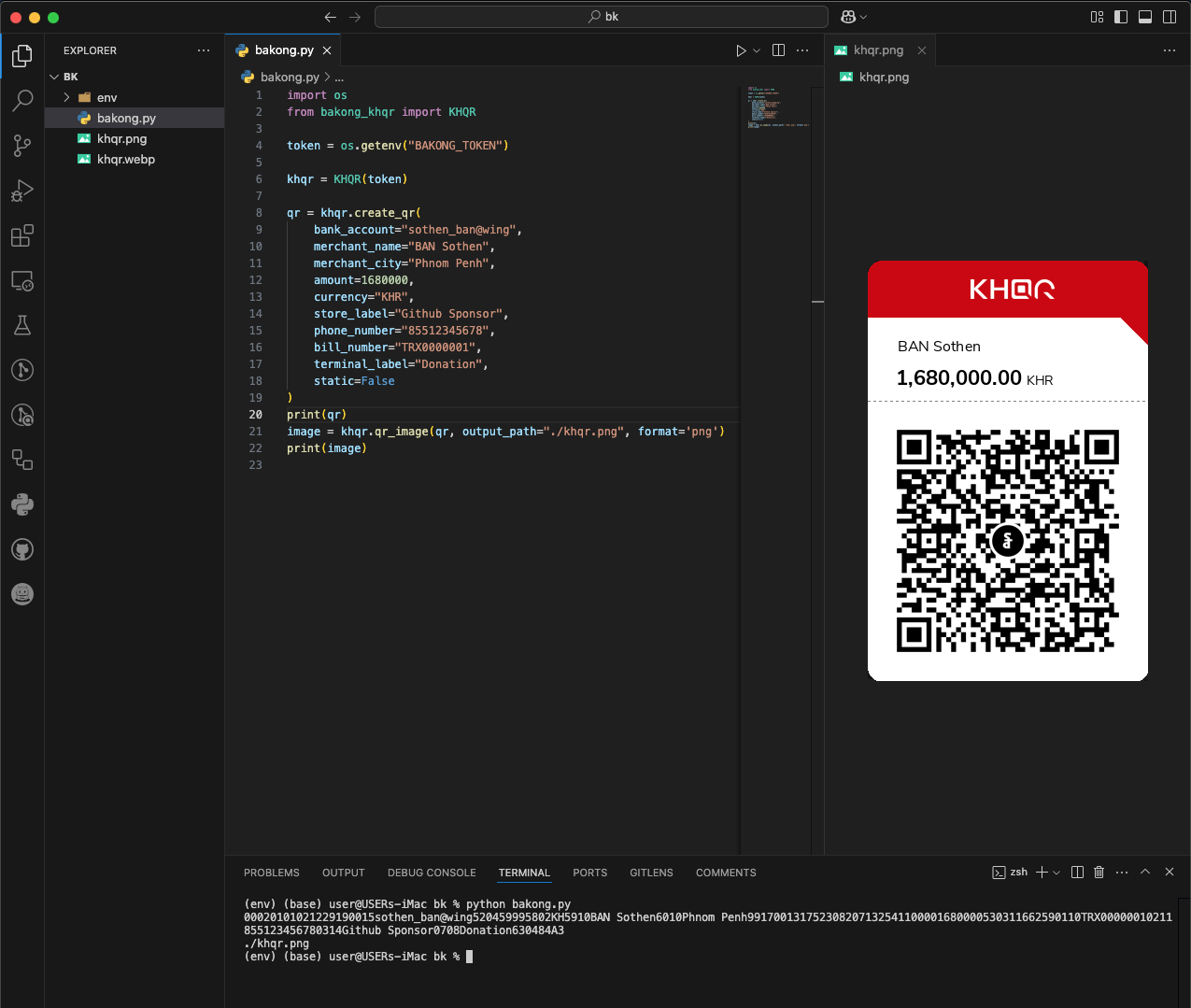
Generate QR Image
The qr_image() method generates a QR code image from a QR string.
Make sure you install the optional [image] extras to get dependencies like Pillow and qrcode:
pip3 install "bakong-khqr[image]"
Example:
from bakong_khqr import KHQR

khqr = KHQR("your_bakong_token")

qr = khqr.create_qr(
    account_id='user_name@bank',
    merchant_name='Your Name',
    merchant_city='Phnom Penh',
    amount=100.00,
    currency='USD',
    store_label='MShop',
    phone_number='85512345678',
    bill_number='TRX123456',
    terminal_label='Cashier-01',
    static=False,
    expiration=1
)

# Generate QR image as PNG file path
png_path = khqr.qr_image(qr)
print("QR image saved at:", png_path)
Parameters for create_qr() Method
account_id: The Bakong Account ID associated with the transaction.merchant_name: Name of the merchant.merchant_city: City where the merchant is located.amount: Amount to be transacted.currency: Currency of the transaction (e.g., 'USD', 'KHR').store_label(optional): Label or name of the store.phone_number(optional): Contact phone number.bill_number(optional): Reference number for the bill.terminal_label(optional): Label for the terminal.static(optional): Static or Dynamic QR code (default: static = False).expiration(optional): Expiration time in days for the QR code (default: 1 day).
Note: Using static mode will create a Static QR Code for payment, allowing unlimited transactions, usage, and a zero amount included.
Parameters for create_webcheckout() Method
trans_id: Your platform's unique transaction or tracking identifier.account_id: The recipient Bakong Account ID (e.g., merchant@bank).merchant_name: The display name of the merchant.merchant_city: The merchant operating city (e.g., 'Phnom Penh').amount: Total transaction value to collect.currency: The target currency ('USD' or 'KHR').return_url: Web destination to send the user after payment (Domain must be whitelisted).webhook_url: Server-to-server callback endpoint to push status events (Domain must be whitelisted).lang: (optional): Interface language ('km', 'en', 'zh'). Defaults to 'km'.ttl: (optional): Time-To-Live for the session in minutes. Defaults to 5.
Parameters for get_webcheckout() Method
session_id: The unique alphanumeric web session identifier generated during checkout creation.
Parameters for generate_deeplink() Method
-
qr: Valid QR Code data as string that generate from create_qr() method. -
appDeepLinkCallback: Deeplink URL for opening your app after payment is completed. -
appIconUrl: Your App Icon URL. -
appName: Your App Name.Deprecation Note: The parameter
callbackhas been renamed toappDeepLinkCallbackto align with the Bakong standard. Whilecallbackstill works in the current version for backward compatibility, it will be removed in future releases. Please update your implementation.
Parameters for generate_md5() Method
qr: Valid QR Code data as string that generate from create_qr() method.
Parameters for check_payment() Method
md5: Valid hash md5 from generate_md5() method of the correct transaction.
Parameters for check_bulk_payments() Method
md5_list: md5 list of all transacrions generate from generate_md5() method.
Parameters for get_payment() Method
md5: Valid hash md5 from generate_md5() method of the correct transaction.
Parameters for qr_image() Method
qr: QR string to convert into an image from create_qr().output_path: Optional path to save the image. If not provided, returns a temp file path.format: Image format to export ('png', 'jpeg','webp', 'bytes', 'base64' or 'base64_uri'). Default: 'png'.
✨ Bakong Relay API Support (New in v0.5.*)
Why Use Bakong Relay? (Optional)
Many developers face HTTP 403 errors when accessing Bakong APIs from servers outside Cambodia.
This service allows you to use RBK tokens directly in bakong-khqr (Python SDK), so your application can reliably check transactions, accounts, and references without restrictions.
Important: Only bakong-khqr (Python SDK) supports RBK tokens.
Using Bakong Relay is optional.
If your server is in Cambodia or you have no access issues, you can continue using official Bakong tokens — no changes are needed.
For more information, token creation, pricing, and full documentation, visit:
👉 bakongrelay.com or Telegram Bot
📄 Bakong Official
KHQR SDK Documentation:
- https://api-bakong.nbc.gov.kh/document
- KHQR Content Guideline v1.4.pdf
- QR Payment Integration.pdf
- KHQR SDK Document.pdf
Development API: https://sit-api-bakong.nbc.gov.kh/
Production API: https://api-bakong.nbc.gov.kh/
📜 License
This project is licensed under the MIT License. See the LICENSE file for details.
🤝 Contributing
If you would like to contribute to this project, please fork the repository and submit a pull request.
📬 Contact
For any questions or feedback, you can contact me via Mail, Telegram or Buy Me A Coffee ☕️


❤️ Sponsors
This project is supported by the community.
👉 List Sponsors & Donors
Project details
Verified details
These details have been verified by PyPIProject links
GitHub Statistics
Maintainers
Release history Release notifications | RSS feed


Download files
Download the file for your platform. If you're not sure which to choose, learn more about installing packages.
Source Distribution
Built Distribution
Filter files by name, interpreter, ABI, and platform.
If you're not sure about the file name format, learn more about wheel file names.
Copy a direct link to the current filters
File details
Details for the file bakong_khqr-0.5.9.tar.gz.
File metadata
- Download URL: bakong_khqr-0.5.9.tar.gz
- Upload date:
- Size: 215.8 kB
- Tags: Source
- Uploaded using Trusted Publishing? Yes
- Uploaded via: twine/6.1.0 CPython/3.13.12
File hashes
| Algorithm | Hash digest | |
|---|---|---|
| SHA256 |
7427147cd88c856d55aa4a1039b25b5b421bc2a784dbac024084db8d76b2ee32
|
|
| MD5 |
b4493d554203ebe14301b99e586c1691
|
|
| BLAKE2b-256 |
8a76a94141a36261ccf9c704179d0135f4d681840f7caff19cc6caa45f555422
|
Provenance
The following attestation bundles were made for bakong_khqr-0.5.9.tar.gz:
Publisher:
workflow.yml on bsthen/bakong-khqr
-
Statement:
-
Statement type:
https://in-toto.io/Statement/v1 -
Predicate type:
https://docs.pypi.org/attestations/publish/v1 -
Subject name:
bakong_khqr-0.5.9.tar.gz -
Subject digest:
7427147cd88c856d55aa4a1039b25b5b421bc2a784dbac024084db8d76b2ee32 - Sigstore transparency entry: 1801207019
- Sigstore integration time:
-
Permalink:
bsthen/bakong-khqr@15f1ab2001bbbed15eb2a4ba3565bf2a94df38ae -
Branch / Tag:
refs/tags/v0.5.9 - Owner: https://github.com/bsthen
-
Access:
public
-
Token Issuer:
https://token.actions.githubusercontent.com -
Runner Environment:
github-hosted -
Publication workflow:
workflow.yml@15f1ab2001bbbed15eb2a4ba3565bf2a94df38ae -
Trigger Event:
push
-
Statement type:
File details
Details for the file bakong_khqr-0.5.9-py3-none-any.whl.
File metadata
- Download URL: bakong_khqr-0.5.9-py3-none-any.whl
- Upload date:
- Size: 213.6 kB
- Tags: Python 3
- Uploaded using Trusted Publishing? Yes
- Uploaded via: twine/6.1.0 CPython/3.13.12
File hashes
| Algorithm | Hash digest | |
|---|---|---|
| SHA256 |
6b61744081be505d6b177decc61045402f7592b57c589b4ed0519b4d53454144
|
|
| MD5 |
98f5927ac27fd4ef262399da3bb5a7c6
|
|
| BLAKE2b-256 |
2f4f24b7d852e0cb2ceee33018feef0b2eeff2a3226c9685db3057cef3d2ee39
|
Provenance
The following attestation bundles were made for bakong_khqr-0.5.9-py3-none-any.whl:
Publisher:
workflow.yml on bsthen/bakong-khqr
-
Statement:
-
Statement type:
https://in-toto.io/Statement/v1 -
Predicate type:
https://docs.pypi.org/attestations/publish/v1 -
Subject name:
bakong_khqr-0.5.9-py3-none-any.whl -
Subject digest:
6b61744081be505d6b177decc61045402f7592b57c589b4ed0519b4d53454144 - Sigstore transparency entry: 1801207226
- Sigstore integration time:
-
Permalink:
bsthen/bakong-khqr@15f1ab2001bbbed15eb2a4ba3565bf2a94df38ae -
Branch / Tag:
refs/tags/v0.5.9 - Owner: https://github.com/bsthen
-
Access:
public
-
Token Issuer:
https://token.actions.githubusercontent.com -
Runner Environment:
github-hosted -
Publication workflow:
workflow.yml@15f1ab2001bbbed15eb2a4ba3565bf2a94df38ae -
Trigger Event:
push
-
Statement type:






