
Bakong-KHQR (Unofficial NBC)
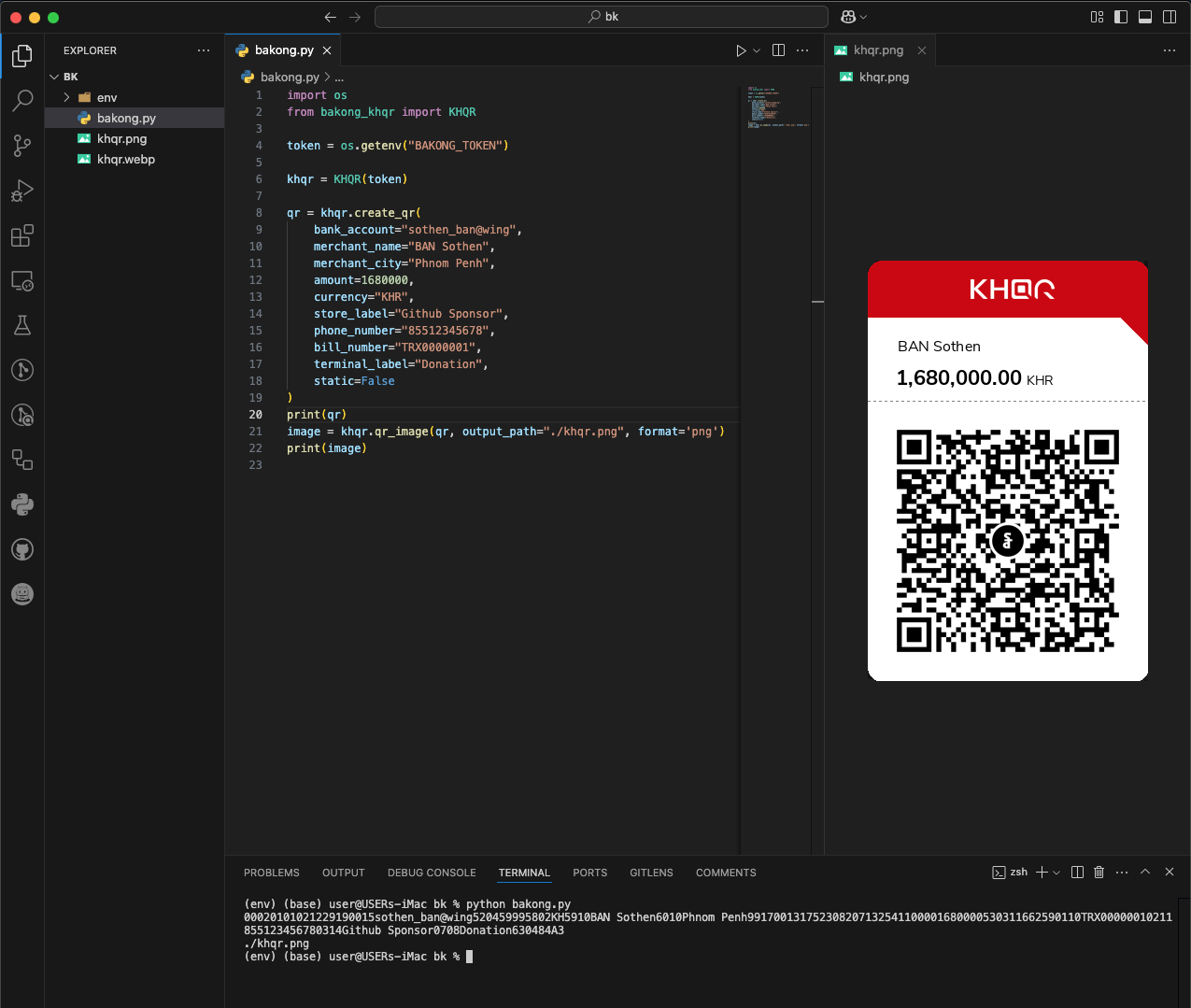
A Python package for generating payment transactions compliant with the Bakong KHQR standard.





📱 Download Mobile App
-
Bakong App
|
-
Bakong Tourists


📋 Requirement
- Python 3.8+
- A Bakong account with full KYC verification
- An NBC Bakong Developer Token or a KHQR.dev Token (
rbk...)
(Sign up and generate your token at dash.khqr.dev)
📦 Installation
pip3 install bakong-khqr
or Update to the Latest Version:
pip3 install --upgrade bakong-khqr
🚀 Key Differences: KHQR.dev vs. NBC Official API
| Feature / Behavior | KHQR.dev (rbk... token) |
Bakong NBC (Developer Token / Offline) |
|---|---|---|
| API Endpoint | https://api.khqr.dev/v1 |
https://api-bakong.nbc.gov.kh/v1 |
| Hosting & IP Restriction | Global Access (No Cambodia IP restrictions) | Restricted to Cambodia IP addresses |
create_qr() Requirements |
Only amount is strictly required; merchant and currency details are auto-resolved from your RBK Token. |
Requires account_id, merchant_name, merchant_city, amount, and currency. |
| Amount Validation | Handled directly by Relay Backend (Min USD $0.01 / Min KHR 100). | Static or Dynamic offline EMVCo generation. |
| Web Checkout Support | Integrated directly into create_qr(return_url=..., success_url=...). |
Not supported. |
| Transaction States | 4 States: PAID, SCANNED, UNPAID, EXPIRED |
2 States: PAID, UNPAID |
| Polling Optimization | SCANNED = 3s delay; PAID/EXPIRED = 0s (exit loop). |
PAID = 0s; UNPAID = 5s–300s window matrix. |
| Gateway Error Handling | Detailed errors (Token expired/over-limit, Maintenance, Rate limit, Store config). | Standard NBC error messages. |
💻 Usage Guide
1. Using KHQR.dev (rbk... Token) — Recommended
When using an rbk... token, create_qr() only requires amount. All merchant and currency details are automatically retrieved from your Store Link configured in the KHQR.dev dashboard.
The returned res object inherits directly from str (acting as the raw KHQR string) while also providing access to metadata attributes (.qr, .md5, .tran_id, .checkout_url):
import time
from bakong_khqr import KHQR

# Initialize with your KHQR.dev Store Token
khqr = KHQR("rbk_xxxxxxxxxxxxxxxxxxxx")

# 1. Generate Dynamic KHQR (amount only; backend auto-detects currency & merchant info)
res = khqr.create_qr(amount=1.50)
print("KHQR String :", str(res))       # or res.qr
print("Transaction MD5:", res.md5)     # MD5 hash for status verification
print("Bill Number    :", res.tran_id) # Unique bill/transaction reference

# Optional: Generate with Hosted Web Checkout
checkout_res = khqr.create_qr(
    amount=1.50,
    return_url="https://yourstore.com/checkout/return",
    success_url="https://yourstore.com/checkout/success",
    cancel_url="https://yourstore.com/checkout/cancel"
)
print("Web Checkout URL:", checkout_res.checkout_url)

# 2. Smart Polling Loop (Handles PAID, SCANNED, UNPAID, and EXPIRED)
start_time = time.time()
timeout_seconds = 10 * 60  # 10 minutes

while True:
    status, next_delay = khqr.check_payment(res.md5, start_time=start_time)
    print(f"Current Status: {status} | Next check in: {next_delay}s")

    if status == "PAID":
        print("🎉 Payment Successful!")
        payment_info = khqr.get_payment(res.md5)
        print("Transaction Details:", payment_info)
        break

    elif status == "EXPIRED":
        print("❌ Transaction has expired!")
        break

    elif status == "SCANNED":
        print("📱 Customer has scanned the QR. Awaiting PIN/confirmation...")

    # Stop polling if client timeout is reached
    if time.time() - start_time >= timeout_seconds:
        print("🛑 Local polling timeout reached.")
        break

    time.sleep(next_delay)
2. Using Official NBC Token or Offline KHQR Generation
If initialized without a token or with an official NBC Developer Token, the SDK uses the standard EMVCo offline engine:
from bakong_khqr import KHQR

# Without token (Offline EMVCo Generator) or with NBC Token
khqr = KHQR("your_nbc_developer_token_here")

# Full EMVCo parameters are required
qr_string = khqr.create_qr(
    account_id="user_name@bank",
    merchant_name="My Store",
    merchant_city="Phnom Penh",
    amount=10.00,
    currency="USD",
    store_label="Cashier-01",
    phone_number="012345678",
    bill_number="TRX012345",
    terminal_label="POS-01",
    static=False,
    expiration=1
)

md5 = khqr.generate_md5(qr_string)

# Check status via official NBC API (Returns either PAID or UNPAID)
status = khqr.check_payment(md5)
print("Status:", status)
3. Generate Mobile Banking Deeplink
Generate a direct link to open the mobile banking app:
deeplink = khqr.generate_deeplink(
    qr=qr_string,
    appDeepLinkCallback="https://your_website.com/checkout/success",
    appIconUrl="https://your_website.com/images/logo.png",
    appName="MyStore"
)
print("Deeplink URL:", deeplink)
4. Batch Transaction Verification (check_bulk_payments)
Check multiple transactions in a single API call (Maximum 50 hashes per request):
md5_list = [
    "dfcabf4598d1c405a75540a3d4ca099d",
    "5154e4f795634ff1a0ae4b48e53a6d9c",
    "a57d9bb85f52f12a20cf7beecb03d11d"
]

# Returns a list of MD5 hashes that are confirmed as PAID
paid_hashes = khqr.check_bulk_payments(md5_list)
print("Paid transactions:", paid_hashes)
5. Generate Styled QR Code Image
Install optional dependencies with pip install "bakong-khqr[image]":
# Generate styled KHQR PNG image
image_path = khqr.qr_image(qr_string, format="png")
print("Saved to:", image_path)

# Or export as Base64 Data URI for web embedding
base64_uri = khqr.qr_image(qr_string, format="base64_uri")
print('<img src="' + base64_uri + '" />')
🧠 Smart Polling Guide for check_payment()
The check_payment() method dynamically adjusts next_delay when start_time is supplied, preserving API quotas and adapting to customer actions:
| Transaction State | Token Type | Recommended Delay | Explanation |
|---|---|---|---|
SCANNED |
KHQR.dev (rbk...) |
3 seconds |
Customer has scanned the QR code. Tight polling for instant confirmation. |
PAID |
Both | 0 seconds |
Terminal state. Payment confirmed; break out of the loop immediately. |
EXPIRED |
KHQR.dev (rbk...) |
0 seconds |
Terminal state. Session timed out; break out of the loop immediately. |
UNPAID (0 – 5 min) |
Both | 5 seconds |
Active transaction window. High likelihood of scanning. |
UNPAID (5 – 15 min) |
Both | 10 seconds |
Customer might be delayed; reduces request frequency. |
UNPAID (15 – 60 min) |
Both | 15 seconds |
Extended transaction window. |
UNPAID (> 60 min) |
Both | 300 seconds (5 min) |
Dormant or forgotten session; maximum token preservation. |
🛠️ Method Reference
create_qr(...) -> KHQRResponse: Creates an EMVCo-compliant KHQR string. Forrbktokens, requestsapi.khqr.dev; for NBC tokens or offline use, compiles locally. Returns aKHQRResponseobject that acts as a string and exposes.qr,.md5,.tran_id, and.checkout_url.generate_md5(qr: str) -> str: Computes the 32-character hexadecimal MD5 hash for the QR code.generate_deeplink(...) -> str | None: Generates a mobile banking deep link.check_payment(md5: str, start_time: float | None = None) -> str | tuple[str, int]:- Without
start_time: Returns status string (PAID,SCANNED,UNPAID,EXPIRED). - With
start_time: Returns(status, next_delay)tuple.
- Without
get_payment(md5: str) -> dict | None: Returns transaction details if confirmedPAID. ReturnsNoneifSCANNED,UNPAID, orEXPIRED.check_bulk_payments(md5_list: list[str]) -> list[str]: Verifies an array of MD5 hashes (Max 50) and returns a list of paid hashes.qr_image(qr: str, format: str = "png", output_path: str | None = None) -> str | bytes: Exports styled KHQR image in PNG, JPEG, WebP, raw bytes, Base64, or Data URI format.create_webcheckout(...) [DEPRECATED]: Deprecated in v0.6.4. Usecreate_qr(amount=..., return_url=..., success_url=...)instead.get_webcheckout(...) [DEPRECATED]: Deprecated in v0.6.4. Usecheck_payment(md5)orget_payment(md5)instead.
🌐 Web Checkout Integration (v0.6.4+)
res = khqr.create_qr(
    amount=10.0,
    return_url="https://yourstore.com/checkout/return",
    success_url="https://yourstore.com/checkout/success"
)
print("Checkout URL:", res.checkout_url)
📜 License
This project is licensed under the MIT License. See the LICENSE file for details.
📬 Contact & Support
- Telegram Support: @bakongRelaySupport
- Buy Me a Coffee: buymeacoffee.com/bsthen


❤️ Sponsors
This project is supported by the community.
👉 List Sponsors & Donors
1 maintainer

Metadata
1 maintainer
Release files for bakong-khqr 0.6.5
For a detailed explanation of source distributions (sdists) and built distributions (wheels), please see the package formats documentation.
Source distribution (sdist)
| File | Size | Uploaded | Provenance | |
|---|---|---|---|---|
| bakong_khqr-0.6.5.tar.gz | 216.4 kB | With provenance | Details |
Built distribution (wheel)
| File | Interpreter | ABI | Platform | Reset |
|---|---|---|---|---|
| bakong_khqr-0.6.5-py3-none-any.whl | Python 3 | none | any | Details |
Total release size: 431.0 kB
Release files / bakong_khqr-0.6.5.tar.gz
| Download URL | bakong_khqr-0.6.5.tar.gz |
|---|---|
| Size | 216.4 kB |
| Tags | Source |
|
SHA-256 checksum How to use checksums |
115add00fd089a634a5c258138a754d100b4fcb19de66e624c9cefe02b5418d2
|
|
BLAKE2b-256 checksum How to use checksums |
c4fe69cbaf067a93a18b24b86502aa01420b659af714adb283fe1b625b6ecd21
|
| Upload date | |
|
Uploaded using Trusted Publishing? What is trusted publishing? |
Yes |
| Uploaded via |
twine/7.0.0 CPython/3.13.14
|
Provenance
Provenance describes where a file came from. On PyPI, provenance is shared via attestations, which provide a verifiable record of the build or publishing details. View details, limitations and caveats.


PyPI Publish Attestation
PyPI verified that this artifact, at this checksum, originated from the publisher listed below.
Signed by GitHub Actions, verified by PyPI on Sep 30, 2026.
Transparency logRelease files / bakong_khqr-0.6.5-py3-none-any.whl
| Download URL | bakong_khqr-0.6.5-py3-none-any.whl |
|---|---|
| Size | 214.5 kB |
| Tags | Python 3 |
|
SHA-256 checksum How to use checksums |
7677b4ee6c774e36b4620d6ffcafa3702417d478bd30b925326c9a82ee06fcab
|
|
BLAKE2b-256 checksum How to use checksums |
0427f7c5e819294d188877d1eaff96128faa178f1f2bd0e54eb4491e7cad80c4
|
| Upload date | |
|
Uploaded using Trusted Publishing? What is trusted publishing? |
Yes |
| Uploaded via |
twine/7.0.0 CPython/3.13.14
|
Provenance
Provenance describes where a file came from. On PyPI, provenance is shared via attestations, which provide a verifiable record of the build or publishing details. View details, limitations and caveats.
PyPI Publish Attestation
PyPI verified that this artifact, at this checksum, originated from the publisher listed below.
Signed by GitHub Actions, verified by PyPI on Sep 30, 2026.
Transparency logSecurity for bakong-khqr 0.6.5
Provenance
Provenance describes where a file came from. On PyPI, provenance is shared via attestations, which provide a verifiable record of the build or publishing details. View details, limitations and caveats.
Full provenance
All 2 files in this release have been uploaded with provenance metadata.
Attestation for bakong_khqr-0.6.5.tar.gz
PyPI Publish Attestation
PyPI verified that this artifact, at this checksum, originated from the publisher listed below.
Signed by GitHub Actions, verified by PyPI on Sep 30, 2026.
Transparency logA note on package security
PyPI is a repository for distributing packages, not a service for auditing them. While third-party security researchers and our staff do their best to detect and remove malicious packages, PyPI cannot guarantee the quality, security or suitability of any given package.
To learn more about protecting yourself from malicious actors, visit our package security documentation.














