
Bakong-KHQR (Unofficial NBC)
[!TIP] Bakong Relay (bakongrelay.com) is Fully Active & Supported!
You can integrate Bakong KHQR using either an official NBC Bakong Developer Token or a Bakong Relay Token (rbk...).
Register an account, generate store tokens, and manage subscriptions directly via the Client Portal: 👉 https://dash.bakongrelay.com
A Python package for generating payment transactions compliant with the Bakong KHQR standard.





📱 Download Mobile App
-
Bakong App
|
-
Bakong Tourists

📋 Requirement
- Python 3.8+
- A Bakong account with full KYC verification
- An NBC Bakong Developer Token or a Bakong Relay Token (
rbk...)
(Sign up and generate your token at dash.bakongrelay.com)
📦 Installation
pip3 install bakong-khqr
or Update Last Version
pip3 install --upgrade bakong-khqr
🚀 Usage
The bakong-khqr package provides the KHQR class for generating QR codes, Deeplinks, MD5 hashes, and verifying Bakong KHQR transactions across a 4-state lifecycle (PAID, SCANNED, UNPAID, EXPIRED).
Importing the package
You can import the KHQR class from the package as follows:
from bakong_khqr import KHQR
Creating Payment Transaction
To generate QR code data for a transaction, create an instance of the KHQR() class with your official Bakong Token:
create_qr(): Generates EMVCo-compliant KHQR string.generate_deeplink(): Generates deep link for banking apps.generate_md5(): Computes unique 32-character checksum hash.check_payment(): Verifies transaction status (PAID,SCANNED,UNPAID,EXPIRED).get_payment(): Retrieves transaction details upon payment completion.check_bulk_payments(): Batch verification for multiple MD5 hashes.
🔄 Parameter Update Notice (bank_account ➡️ account_id)
To align with official documentation, bank_account has been renamed to account_id.
- Backward Compatibility: If legacy code uses
bank_account, it will continue to function normally with aDeprecationWarning. Updating toaccount_idis recommended.
Example:
from bakong_khqr import KHQR

# Initialize KHQR with your Relay Token from [https://dash.bakongrelay.com](https://dash.bakongrelay.com):
khqr = KHQR("rbk_your_token_here")

# Generate QR code data for a transaction:
qr_string = khqr.create_qr(
    account_id='user_name@bank', # Check your user_name@bank under Bakong profile (Mobile App)
    merchant_name='Your Name',
    merchant_city='Phnom Penh',
    amount=9800, # 9800 Riel
    currency='KHR', # USD or KHR
    store_label='Phsar Thmei',
    phone_number='012345678',
    bill_number='TRX012345',
    terminal_label='POS-01',
    static=False, # Static or Dynamic QR code (default: False)
    expiration=1 # Expiration time in 1 day for the QR code (default: 1 day).
)
print(qr_string)
# String Result: 00020101021229180014your_name@bank520459995303116540498005802KH5909Your Name6010Phnom Penh62510109TRX01234502090123456780311Phsar Thmei0706POS-01993400131773894603019011317738947758196304A5A3

# Generate Deeplink:
deeplink = khqr.generate_deeplink(
    qr=qr_string,
    appDeepLinkCallback="https://your_website.com/shop/details?q=ABC", # Or your app's custom scheme (e.g., mshop://purchase/39482)
    appIconUrl="https://your_website.com/images/logo.png", # Your logo image .png or .svg
    appName="MyAppName" # (e.g., MSHOP)
)
print(deeplink)
# String Result: https://bakong.page.link/CgXb....ks6az9a38

# Get Hash MD5
md5 = khqr.generate_md5(qr_string)
print(md5)
# String Result: dfcabf4598d1c405a75540a3d4ca099d

# Check Transaction paid or unpaid:
payment_status = khqr.check_payment(md5)
print(payment_status)
# String Result: "UNPAID"
# Indicates that this transaction has not yet been paid.

# Retrieve the payment information:
# e.g. In case static QR code (static=True) is used for payment, and the amount is not known from the user's input.
payment_info = khqr.get_payment(md5)
print(payment_info)
# Object Result:
# {
#     "hash": "a7121ca103c.....eb3671b9601a6",
#     "fromAccountId": "bankkhppxxx@bank",
#     "toAccountId": "your_name@bank",
#     "currency": "KHR",
#     "amount": 9800,
#     "description": "Cashier-01",
#     "createdDateMs": 1739###953000,
#     "acknowledgedDateMs": 1739###954000,
#     "trackingStatus": null,
#     "receiverBank": null,
#     "receiverBankAccount": null,
#     "instructionRef": null,
#     "externalRef": "100FT3###6550298"
# }

# Check Bulk Transactions:
md5_list = [
    "dfcabf4598d1c405a75540a3d4ca099d",
    "5154e4f795634ff1a0ae4b48e53a6d9c",
    "a57d9bb85f52f12a20cf7beecb03d11d",
    "495fdaec0be5d94c89bc1283c7283d3d",
    "31bca02094ad576588e42b60db57bc98"
]

bulk_payments_status = khqr.check_bulk_payments(md5_list)
print(bulk_payments_status)
# List Result: ["5154e4f795634ff1a0ae4b48e53a6d9c", "495fdaec0be5d94c89bc1283c7283d3d"]
# Returns a list containing only the MD5 hashes that correspond to successful (paid) transactions.


# ⚠️ Bulk Transaction Check Limit
# The Bakong API allows a maximum of 50 MD5 hashes per request when using the check_bulk_payments() method.
# If you pass more than 50 hashes, the function will raise a ValueError to prevent unexpected API errors.

# ✅ If you need to check more than 50 transactions, handle chunking manually:
def chunked(iterable, size=50):
    for i in range(0, len(iterable), size):
        yield iterable[i:i + size]

all_md5 = [...]  # more than 50 md5 hashes
paid_md5 = []

for batch in chunked(all_md5):
    paid_md5.extend(khqr.check_bulk_payments(batch))

print(paid_md5)
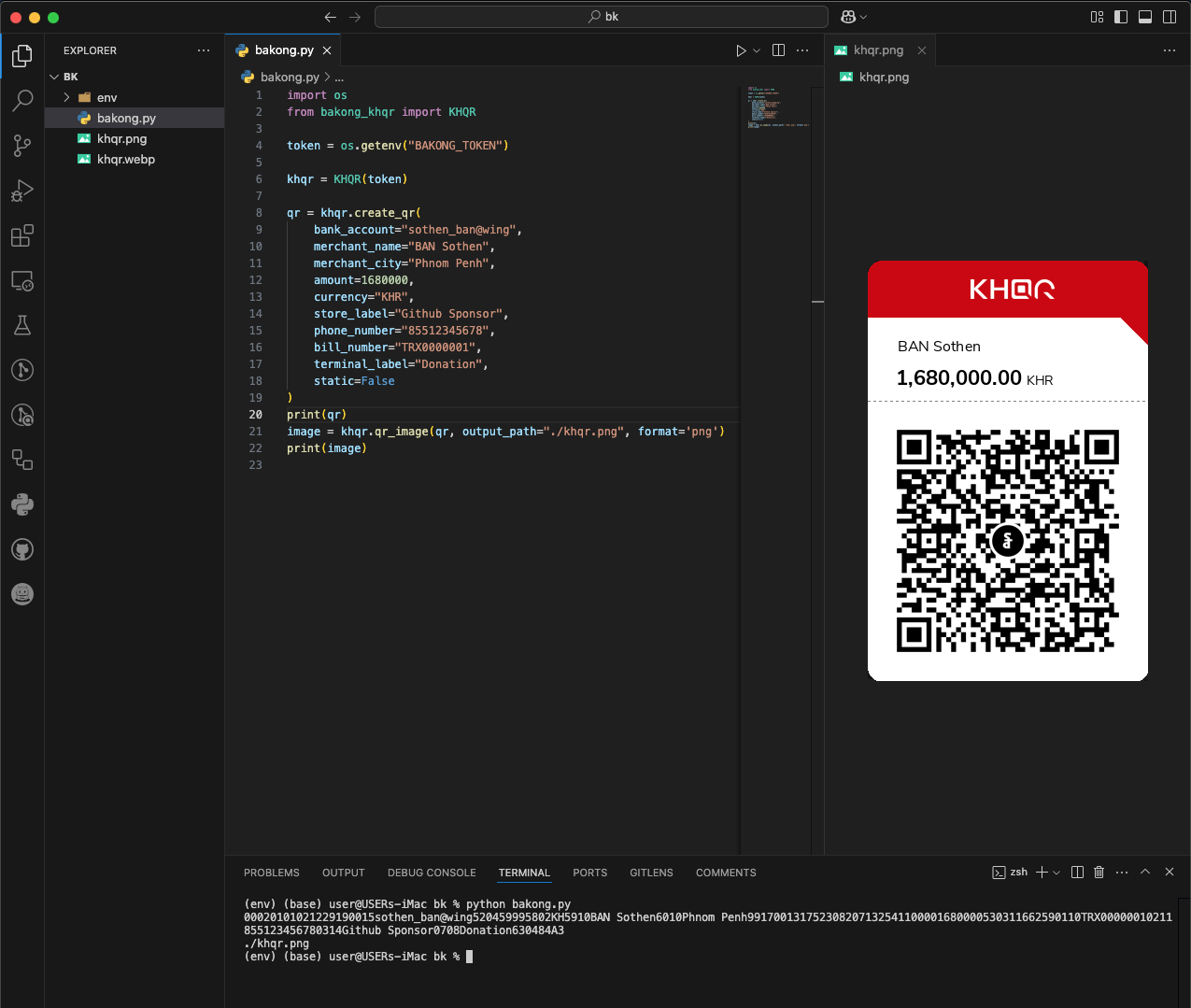
🖼️ Generate QR Image
The qr_image() method generates a QR code image from a QR string.
Make sure you install the optional [image] extras to get dependencies like Pillow and qrcode:
pip3 install "bakong-khqr[image]"
Example:
from bakong_khqr import KHQR

khqr = KHQR("your_bakong_token")

qr = khqr.create_qr(
    account_id='user_name@bank',
    merchant_name='Your Name',
    merchant_city='Phnom Penh',
    amount=100.00,
    currency='USD',
    store_label='MShop',
    phone_number='85512345678',
    bill_number='TRX123456',
    terminal_label='Cashier-01',
    static=False,
    expiration=1
)

# Generate QR image as PNG file path
png_path = khqr.qr_image(qr)
print("QR image saved at:", png_path)
⚠️ Web Checkout Integration (Discontinued)
[!IMPORTANT] Web Checkout Requirements & Domain Whitelisting
Hosted Web Checkout features (create_webcheckout()andget_webcheckout()) require an active Bakong Relay Token (rbk...).
Note: To prevent unauthorized redirects, the domains for yourreturn_urlandwebhook_urlmust be whitelisted before creating sessions. You can whitelist your domains instantly via the Telegram Bot: 👉 @bakong_relay_bot.
Parameters for create_qr() Method
account_id: The Bakong Account ID associated with the transaction.merchant_name: Name of the merchant.merchant_city: City where the merchant is located.amount: Amount to be transacted.currency: Currency of the transaction (e.g., 'USD', 'KHR').store_label(optional): Label or name of the store.phone_number(optional): Contact phone number.bill_number(optional): Reference number for the bill.terminal_label(optional): Label for the terminal.static(optional): Static or Dynamic QR code (default: static = False).expiration(optional): Expiration time in days for the QR code (default: 1 day).
Note: Using static mode will create a Static QR Code for payment, allowing unlimited transactions, usage, and a zero amount included.
Parameters for generate_deeplink() Method
-
qr: Valid QR Code data as string that generate from create_qr() method. -
appDeepLinkCallback: Deeplink URL for opening your app after payment is completed. -
appIconUrl: Your App Icon URL. -
appName: Your App Name.Deprecation Note: The parameter
callbackhas been renamed toappDeepLinkCallbackto align with the Bakong standard. Whilecallbackstill works for backward compatibility, it will be removed in future releases.
Parameters for generate_md5() Method
qr: Valid QR Code data as string that generate from create_qr() method.
Parameters for check_payment() Method
md5: Valid hash md5 from generate_md5() method of the correct transaction.start_time: (float, optional): The timestamp (time.time()) when the transaction or QR code was created. If provided, returns a tuple containing thestatusand the suggestednext delay.
Parameters for check_bulk_payments() Method
md5_list: md5 list of all transactions generate from generate_md5() method.
Parameters for get_payment() Method
md5: Valid hash md5 from generate_md5() method of the correct transaction.
Parameters for qr_image() Method
qr: QR string to convert into an image from create_qr().output_path: Optional path to save the image. If not provided, returns a temp file path.format: Image format to export ('png', 'jpeg','webp', 'bytes', 'base64' or 'base64_uri'). Default: 'png'.
✨ What's New?
1. ⚡ Bakong Relay API (Global Access)
[!TIP] Global Access via Bakong Relay API
The hosted service at bakongrelay.com is fully active and supported! Developers can use a Bakong Relay Token (rbk...) to generate KHQR, query transactions, and handle webhooks from any server worldwide without being blocked by Cambodia IP restrictions.
2. 🧠 Smart Polling Guide for check_payment()
Starting from version 0.6.0+, the check_payment() method supports a smart Dynamic Polling Delays Matrix. This optimizes API token consumption and prevents server overload, while remaining 100% non-blocking and safe for Single-Threaded systems (like standard Telegram Bots).
1. How it works (The Concept)
-
Legacy Flow (Backward Compatible): If you call
check_payment(md5)without any extra parameters, it behaves exactly like the old version. It makes one API request and immediately returns a string ("PAID"or"UNPAID"). -
Smart Polling Flow: If you provide the
start_timeparameter, the SDK will not block or loop internally. Instead, it will instantly check the status and suggest a recommended wait time (next_delayin seconds) based on how long the QR code has been open.
2. 💻 Code Implementation (How Merchants Should Write the Loop)
Below are practical examples of how developers can implement the check loop in their applications.
❌ The Bad Way (Legacy Loop - High Token Consumption):
Previously, developers used a fixed loop interval. This bursts API endpoints and burns tokens rapidly, especially if a customer leaves the QR screen open for hours.
import time
from bakong_khqr import KHQR

khqr = KHQR("your_token")
md5 = "your_transaction_md5"

# 1. Mark the starting time and set a 10-minute timeout (600 seconds)
start_time = time.time()
timeout_seconds = 10 * 60

print("Polling started with a 10-minute timeout...")

while True:
    status = khqr.check_payment(md5)

    if status == "PAID":
        print("Success!")
        break

    # Calculate how much time has passed
    elapsed_time = time.time() - start_time

    # 2. Force break the loop once 10 minutes have passed
    if elapsed_time >= timeout_seconds:
        print("Timeout reached. Transaction expired!")
        break

    time.sleep(1)

# ❌ BAD: Hardcoded 1-second interval will waste up to 600 API calls in 10 minutes!
✅ The Best Way (Smart Polling with Timeout Control):
This approach tells the SDK exactly when the QR code session started. The SDK returns a recommended delay matching your platform's dynamic windows matrix, while the loop cleanly handles its own expiration timeout.
import time
from bakong_khqr import KHQR

khqr = KHQR("your_token")
md5 = "your_transaction_md5"

# 1. Mark the starting time of the transaction session
start_time = time.time()

# 2. Set your custom expiration timeout (e.g., 10 minutes)
timeout_minutes = 10
timeout_seconds = timeout_minutes * 60

print(f"Polling started. Expiration set to {timeout_minutes} minutes.")

# 3. Non-blocking smart loop
while True:
    # Pass start_time to get the status alongside a recommended dynamic delay
    status, next_delay = khqr.check_payment(md5, start_time=start_time)

    # Condition A: Payment is successful -> Break out immediately
    if status == "PAID":
        print("🎉 Payment Successful! Processing order...")
        break

    # Calculate total seconds elapsed since the QR was created
    elapsed_time = time.time() - start_time

    # Condition B: Reached maximum expiration limit -> Stop polling safely
    if elapsed_time >= timeout_seconds:
        print("🛑 Timeout reached. Transaction expired.")
        break

    # Condition C: Still UNPAID -> Wait exactly as suggested by the SDK matrix
    print(f"Status: UNPAID. Sleeping for {next_delay}s...")
    time.sleep(next_delay)

# ✅ GOOD: Smart dynamic delay will only use up to 90 API calls in 10 minutes!
📊 Understanding the Response Matrix
When start_time is passed, the SDK dynamically adjusts next_delay according to this timeline to balance swift notifications with API efficiency:
| Time Elapsed since Start | SDK Recommended Delay | Total Calls Made (if Unpaid) | Why? |
|---|---|---|---|
| 0 to 5 minutes | 5 seconds |
Up to 60 calls | High chance of instant scanning. Keeps it snappy. |
| 5 to 15 minutes | 10 seconds |
Up to 60 calls | Customer might be delayed. Ease up on the requests. |
| 15 minutes to 1 hour | 15 seconds |
Up to 180 calls | Extended window. Further reduces token consumption. |
| Over 1 hour | 300 seconds (5 mins) |
12 calls / hour | Dormant or forgotten QR session. Maximum preservation. |
🛠️ Method Signature Breakdown
def check_payment(self, md5: str, start_time: float = None) -> str | tuple[str, int]:
-
Parameters:
md5(str): Valid hash MD5 fromgenerate_md5().start_time(float, optional): The Unix timestamp generated bytime.time()when the QR code transaction was initialized.
-
Return Values:
- Returns
str(e.g.,"UNPAID") ifstart_timeis omitted. - Returns
tuple(e.g.,("UNPAID", 5)) ifstart_timeis supplied.
- Returns
📄 Bakong Official
KHQR SDK Documentation:
- https://api-bakong.nbc.gov.kh/document
- KHQR Content Guideline v1.4.pdf
- QR Payment Integration.pdf
- KHQR SDK Document.pdf
Development API: https://sit-api-bakong.nbc.gov.kh/
Production API: https://api-bakong.nbc.gov.kh/
📜 License
This project is licensed under the MIT License. See the LICENSE file for details.
🤝 Contributing
If you would like to contribute to this project, please fork the repository and submit a pull request.
📬 Contact
For any questions or feedback, you can contact me via Mail, Telegram or Buy Me A Coffee ☕️


❤️ Sponsors
This project is supported by the community.
👉 List Sponsors & Donors
1 maintainer

Metadata
1 maintainer
Release files for bakong-khqr 0.6.2
For a detailed explanation of source distributions (sdists) and built distributions (wheels), please see the package formats documentation.
Source distribution (sdist)
| File | Size | Uploaded | |
|---|---|---|---|
| bakong_khqr-0.6.2.tar.gz | 218.6 kB | Details |
Built distribution (wheel)
| File | Interpreter | ABI | Platform | Reset |
|---|---|---|---|---|
| bakong_khqr-0.6.2-py3-none-any.whl | Python 3 | none | any | Details |
Total release size: 433.3 kB
Release files / bakong_khqr-0.6.2.tar.gz
| Download URL | bakong_khqr-0.6.2.tar.gz |
|---|---|
| Size | 218.6 kB |
| Tags | Source |
|
SHA-256 checksum How to use checksums |
03df5ee23f093a2dead944d3af6d7cc26c5aa83d0dd7b9be482b86406227bfb1
|
|
BLAKE2b-256 checksum How to use checksums |
3a492dca4f3ad6d7c341ab9004c3091838c73a0eb2958d317fc05d70f2c43b0a
|
| Upload date | |
|
Uploaded using Trusted Publishing? What is trusted publishing? |
Yes |
| Uploaded via |
twine/7.0.0 CPython/3.13.14
|
Provenance
Provenance describes where a file came from. On PyPI, provenance is shared via attestations, which provide a verifiable record of the build or publishing details. View details, limitations and caveats.


PyPI Publish Attestation
PyPI verified that this artifact, at this checksum, originated from the publisher listed below.
Signed by GitHub Actions, verified by PyPI on Sep 13, 2026.
Transparency logRelease files / bakong_khqr-0.6.2-py3-none-any.whl
| Download URL | bakong_khqr-0.6.2-py3-none-any.whl |
|---|---|
| Size | 214.7 kB |
| Tags | Python 3 |
|
SHA-256 checksum How to use checksums |
5fd285508826182389b8c479f765fc841d9818c77375622fd4e6c65dbb400ffc
|
|
BLAKE2b-256 checksum How to use checksums |
11cc3feea37310c8c90d9f77cbd493c92d526d15400409dcac17f92c9c5b2ca0
|
| Upload date | |
|
Uploaded using Trusted Publishing? What is trusted publishing? |
Yes |
| Uploaded via |
twine/7.0.0 CPython/3.13.14
|
Provenance
Provenance describes where a file came from. On PyPI, provenance is shared via attestations, which provide a verifiable record of the build or publishing details. View details, limitations and caveats.
PyPI Publish Attestation
PyPI verified that this artifact, at this checksum, originated from the publisher listed below.
Signed by GitHub Actions, verified by PyPI on Sep 13, 2026.
Transparency log













