
This release is a pre-release and may not be stable for production use.
Band-Aider

Small models. Scoped edits. Fewer repo fires.
Band-Aider is a local-first software-engineering system for running bounded coding work through small or local OpenAI-compatible models.
It is focused on solving software problems inside a healthy repository. It is not a general-purpose harness for repairing package managers, reconstructing broken environments, modernizing abandoned test infrastructure, or making an invalid baseline look green.
Band-Aider follows its own software-development lifecycle: discover the relevant code, scope the change, separate source work from test work, stabilize the affected graph, route failures by ownership, close the dependency frontier, and run the full suite before completion.
It moves workflow ownership out of the model and into a symbolic Python harness. Repository state, graph traversal, work ordering, retries, test routing, role permissions, checkpoints, and completion checks stay in ordinary deterministic code. The model is used where fuzzy judgement is useful: locating intent, selecting evidence, proposing a bounded patch, and interpreting failure evidence.
Its strongest use cases are refactoring and classical software-engineering bookkeeping: tracing ripple effects, preserving interfaces, finding dependent tests, separating implementation work from test repair, and proving that a bounded change closes cleanly.
As of July 2026, the supported production target is Python libraries and isolatable pure-Python modules or packages. More language and repository shapes are planned.
Repository contract
Band-Aider works best when the repository gives it reliable evidence. Its current operating contract is:
- The target is a supported Python library or an isolatable pure-Python module or package.
- Git is clean before the run starts.
- The baseline test suite passes before the requested change.
- Tests use standard
pytestconventions, are cheap to run individually, and provide useful coverage of the changed behavior. - Source and tests are separate, non-overlapping roots. Tests are not shipped inside the source tree.
- The code follows ordinary Python idioms and avoids monkey patching, hidden runtime mutation, generated test magic, and other behavior that cannot be recovered reliably from static structure.
- Dependencies and the normal test command are current and reproducible.
These are not cosmetic preferences. Test ownership, graph closure, and completion judgement are only meaningful when the baseline and test graph are trustworthy. Band-Aider is designed to preserve and change a working architecture, not infer one from a checkout that was already on fire.
Environment preparation remains the caller's responsibility. Band-Aider may report an environmental or baseline failure, but it does not treat arbitrary environment repair as part of the requested software change.
Its software-development lifecycle
A normal run follows a constrained SDLC rather than one open-ended agent conversation:
- Inventory the repository and build source, test, and dependency metadata.
- Search and scope the requested change.
- Let Alpha make bounded source edits.
- Run traceable tests and collect ownership-aware failure evidence.
- Let Beta repair tests only when the failure belongs to tests.
- Expand and stabilize the reachable dependency frontier.
- Detect cycles, escalate models, or request human guidance when progress stalls.
- Run the full configured suite before completion.
This is deliberately closer to disciplined maintenance work than to a general autonomous shell session.
How Band-Aider makes smaller models useful
- Symbolic SDLC: the harness, not the model, owns discovery, work ordering, role transitions, retries, graph traversal, stabilization, checkpoints, and completion criteria.
- Hybrid search: lexical anchors and a local semantic encoder narrow the repository first; a generative model selects richer evidence; symbolic dependency traversal expands the reachable code graph.
- Role-specific patches: Alpha owns source changes, Beta owns test changes, and stabilization owns validation and failure routing.
- Progressive evidence: large files are rendered as identified structural beats, then broadened on repeated exposure and eventually rendered whole. Small files or small combined scopes are shown whole immediately.
- Graph-based ordering and closure: work ordering, dependency expansion, and completion checks use the repository graph rather than relying on free-form model memory.
- Feature bootstrap: new feature work can invert the query, starting from expected usage or interface and walking backward to the source and tests that must exist.
- Testing contract: every test traceable to changed code is run during stabilization, and the full suite is run before completion.
- Long-run continuity: checkpoints preserve the original job, workflow state, graph frontier, file metadata, and accumulated change history so a multi-hour refactor can be interrupted and resumed without treating the final file as an unrelated fresh prompt.
- Recovery and control: automatic cycle detection, visible model escalation, operator interruption, human guidance, and resumable checkpoints keep a stuck model from quietly declaring victory.
- Economic targeting: search, structural rendering, role-scoped edits, and traceable tests aim to spend work on the smallest useful edit surface rather than repeatedly rereading and retesting the whole repository.
- Layered observability: role- and file-scoped logs can be inspected separately or viewed through the aggregate hierarchy; the terminal UI can filter by text, severity, and logger namespace.
- Token observability: prompt usage is reported and binned by time, model, endpoint, and escalation level so context growth and escalation are visible.
- Local first, larger when necessary: local OpenAI-compatible models are the default. Repetition or larger context can advance through configured tiers, including a larger cloud model exposed through an OpenAI-compatible endpoint.
See the FAQ for repository fit, smaller-model architecture, testing assumptions, and the current SWE-bench position.
License
Band-Aider is available under the GNU Affero General Public License v3.0.
The AGPL license permits personal, open-source, and commercial use under its terms, including its source-disclosure requirements. Organizations that need to use, modify, distribute, or operate Band-Aider under different terms can purchase a commercial license.
Copyright © 2026 Art Sea LLC. All rights reserved except as granted under the applicable license.
Install
Install the alpha release from PyPI:
pip install --pre band-aider
To install from source for development:
git clone <your-band-aider-repo-url>
cd band-aider
pip install -e .
model2vec==0.8.* is a required Band-Aider dependency and is installed automatically by both commands above. It is part of the normal hybrid search path, not an optional accelerator or extras group.
The configured embedding model is cached under ${XDG_CACHE_HOME:-~/.cache}/band-aider/model2vec unless BAND_AIDER_MODEL2VEC_CACHE_DIR is set. The launcher may ask before downloading a missing model cache during an interactive run.
Quick start
The current CLI entry point is band_aider/cli.py. Run Band-Aider from the harness directory and point it at a target repo.
band-aider \
  --repo-root . \
  --src-root band_aider \
  --tests-root tests \
  --task "Describe the change you want"
Run with the terminal operator view:
band-aider \
  --terminal-ui \
  --repo-root . \
  --src-root band_aider \
  --tests-root tests \
  --task "Describe the change you want"
Resume the latest saved run:
band-aider --resume --repo-root .
Preview configuration and startup state without running the job:
band-aider \
  --dry-run \
  --repo-root . \
  --src-root band_aider \
  --tests-root tests \
  --task "Describe the change you want"
Repository, source, and test roots
Band-Aider keeps the checkout boundary separate from the files it inventories:
--repo-rootis the authoritative repository or checkout root. It may be a host path or, in container mode, an absolute path inside the container.--src-rootis a proper relative path under--repo-rootidentifying the source workflow root. The default isband_aider.--tests-rootis a proper relative path under--repo-rootidentifying the test workflow root. The default istests.
--src-root and --tests-root are repository-relative coordinates, not independent filesystem roots. They must not be absolute, must not contain .., must not be ., and must not overlap.
For a conventional checkout:
repo-root/       --repo-root
├── src/         --src-root src
└── tests/       --tests-root tests
Host and container runs use the same coordinate rules. In container mode only --repo-root and runtime paths such as --repo-python-bin are absolute container paths; source and test roots remain relative to the checkout.
Startup behavior:
- startup performs a model health check
- startup uses the required local Model2Vec gate as the first semantic narrowing layer
- when the configured embedding-model cache is missing,
scripts/band-aidercan ask before downloading it during an interactive run --resumerestores checkpointed workflow state--dry-runshould show resolved roots, model configuration, and escalation config count--terminal-uiruns the workflow with a live operator view- editing and model configuration are resolved before edit loops begin
- runtime config should come from the invocation directory, not the resumed target repo
At startup, Band-Aider asks the configured model to reply with:
BAND_AIDER_READY
If the model check fails, Band-Aider exits before inventory, backlog creation, or file edits.
Experimental SWE-bench support
Band-Aider does not currently promise full SWE-bench compatibility. The adapter and scripts/band-aider-swe-bench helper are useful for experiments and public comparison, but many historical benchmark checkouts violate the repository contract above through stale environments, baseline failures, nonstandard test semantics, optional dependencies, expensive tests, or source/test layouts that cannot be isolated cleanly.
The primary target is maintained production code: a short change with a potentially large dependency ripple, a clean passing baseline, standard reproducible tests, and inexpensive unit tests. That is nearly the inverse of many SWE-bench cases. See FAQ.md for the longer answer.
Isolated container execution
Band-Aider can perform repository discovery, parsing, code edits, git operations, and tests inside an isolated, persistent container. Band-Aider edits the checkout on that running instance directly.
The caller must prepare and start the container first. It must already contain:
- the repository checkout;
- the required Python interpreter and environment;
- installed project and test dependencies;
- the project's normal test runner;
- any compilers, generated artifacts, services, or future runtime expected by the code.
Band-Aider is not the container builder or environment repair layer. It attaches to the runtime you provide and performs the software-development lifecycle inside it.
Use these flags:
--repo-container <name-or-id>selects the already-running container.--repo-root <container-path>identifies the checkout inside the container and is required on every container invocation.--src-root <repo-relative-path>identifies the non-overlapping source root under--repo-root.--tests-root <repo-relative-path>identifies the non-overlapping test root under--repo-root.--repo-python-bin <container-path>optionally selects the Python interpreter inside the container when its defaultpythonis not the intended runtime.--task <text>supplies the requested software change.--resumecontinues checkpointed work against the same persistent checkout.
Example:
scripts/band-aider \
  --repo-container project-runtime \
  --repo-root /workspace/project \
  --src-root src \
  --tests-root tests \
  --repo-python-bin /opt/venv/bin/python \
  --task "Describe the change you want"
The launcher environment variable can supply the container name for scripted runs:
export BAND_AIDER_REPO_CONTAINER=project-runtime
scripts/band-aider \
  --repo-root /workspace/project \
  --src-root src \
  --tests-root tests \
  --repo-python-bin /opt/venv/bin/python \
  --task "..."
Notes:
- Band-Aider uses
docker execagainst the supplied running container. It does not create the container, choose an image, or bind-mount a host checkout. --repo-rootand--repo-python-binare container paths, not host paths.--src-rootand--tests-rootremain relative to--repo-root.- The caller owns container creation, dependency installation, runtime preparation, lifecycle, and cleanup.
- The container must remain persistent if the run will be resumed.
- Code edits, test execution, checkpoints, logs, and git state belong to the checkout on that instance.
- Empty-file cleanup is adapter-backed in both modes and only considers untracked, non-hidden generated files after explicit confirmation.
Terminal UX
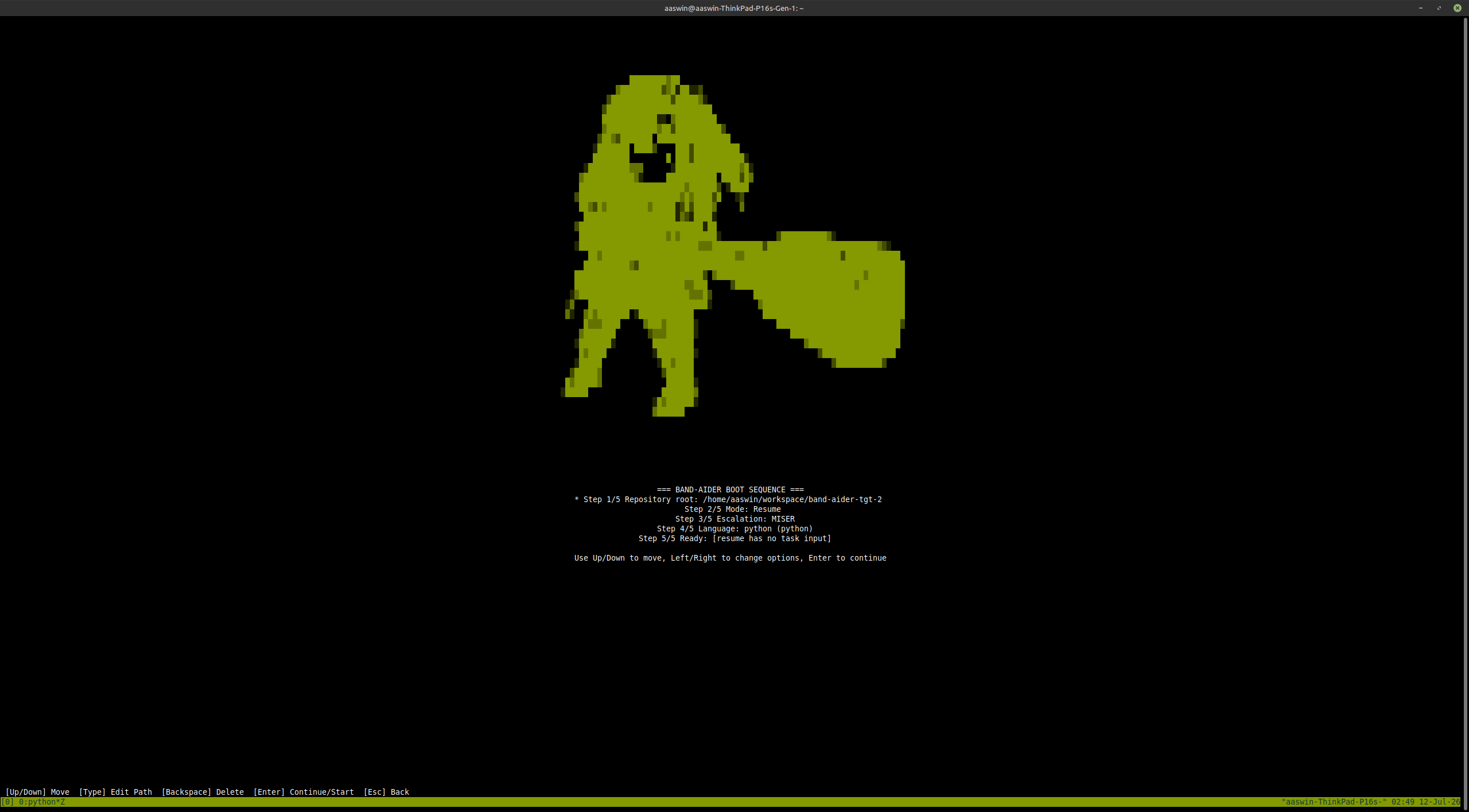
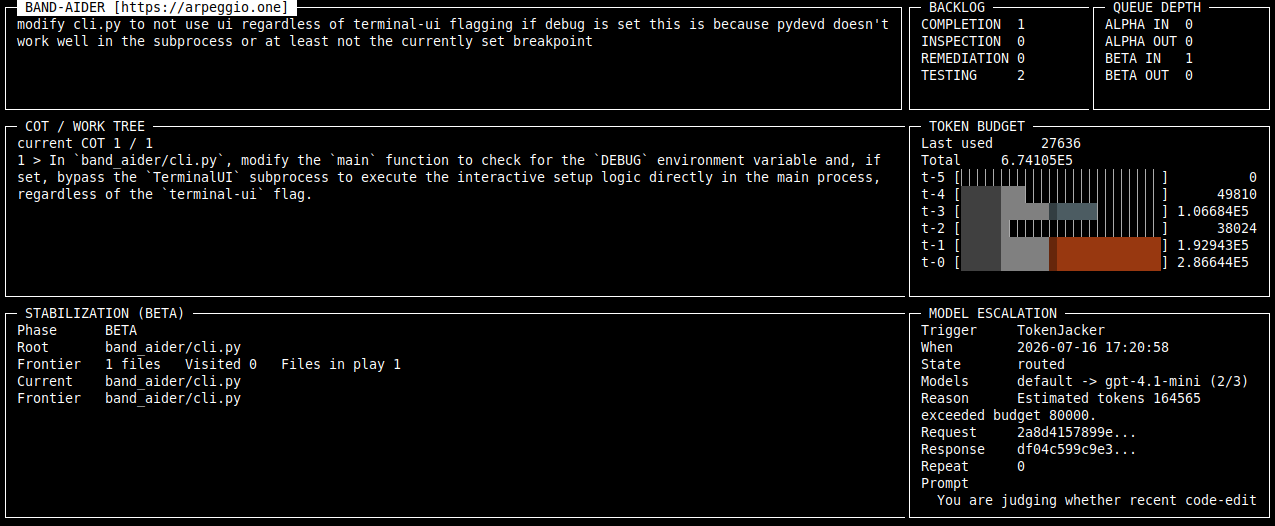
The terminal UI is the recommended way to watch longer runs. Use --terminal-ui for refactors that may touch several files or run for hours. The interface keeps the original task, current COT item, backlog, stabilization frontier, active loop, recent logs, token activity, and model escalation visible while the workflow advances.
The main panes and the completion report are scrollable. Move focus with Tab or Shift-Tab, then use Up and Down to inspect long backlogs, COT plans, reports, or log history instead of sacrificing earlier evidence merely because the terminal ran out of rows. A revolutionary concession to documents longer than one screen.
The view answers the questions that matter during a run:
- which original task and COT item are active
- what file or graph frontier is being stabilized
- how much backlog remains for inspection, tests, remediation, QA, and deferred work
- which loop and model tier are currently active
- whether and where model escalation occurred
- what just happened in the recent role-scoped logs
- whether the run is waiting for human guidance
The operator does not have to wait for automatic cycle detection. Press F5 to request an interruption before the next AI call, add guidance, then press F8 to send it and resume. Escape resumes without adding guidance. This makes intervention part of the SDLC rather than an emergency Ctrl-C followed by collective amnesia.
When the model repeats the same answer, Band-Aider first tries the configured escalation models and reports the escalation in the UI. If escalation also repeats, the terminal UI opens the same human-guidance flow.
Example guidance:
The stale import is in judgement/search_replace_token_generator.py.
Do not add a package-level compatibility export.
Leave the guidance blank to defer the run. Use Ctrl-C if you want to abort from the terminal.
The terminal UI does not replace reviewing diffs and tests. It keeps the run observable and interruptible while Band-Aider works.
A long run can be stopped and resumed from its repository checkpoint:
band-aider --resume --repo-root /path/to/repo
In interactive terminal mode, Band-Aider detects existing save points and can offer to resume them. Resume restores workflow state instead of flattening the remaining work into a new context-free request.
Reports and layered logs
At completion, Band-Aider writes a Markdown change report and can display it in the scrollable terminal report view.
A successful report begins with an auditable summary rather than a model-authored victory speech:
Final summary: SUCCESS: Created report_ui.py, integrated it into TerminalUI
with navigation options, and added corresponding tests.

| Metric | Value |
| --- | ---: |
| Total tokens spent | 75,841,752 |
| Baseline tokens | 52,377,824 (69.1%) |
| Escalated tokens | 23,463,928 (30.9%) |
| LLM calls | 2,826 |
| Total operation time | 4h 50m 22s |
| Files modified | 4 |
| Files added | 2 |
The same report preserves the original job and its decomposed COT tasks, then groups the resulting work by directory and file. Each entry can show whether the file was created or changed, its summary, the relevant symbols that justified touching it, and its CDC history.
For example:
band_aider/ui/report_ui.py
Kind: source
Effect: created

CDC:
- Bootstrap preflight created a planned blank source.
- Bootstrap preflight registered temporary participant relevance.
- Implemented ReportUI and ReportUIState.
- Recorded the completed interactive report-view integration.
The final report contains:
- final result and original job
- LLM calls, elapsed time, wait time, COT count, and files changed
- time-bucketed activity
- baseline and escalated token use, including model and endpoint subtotals
- the persisted COT task breakdown
- changes grouped by directory
- file kind and effect
- relevant symbols
- CDC history showing how the file entered and moved through the workflow
The report is an audit, not a ceremonial certificate of efficiency. It can document both success and expensive failure. The architecture favors targeted edits; the report shows whether a particular run actually achieved that.
Logs follow the role and work hierarchy. Supreme, stabilization, Alpha, Beta, files, and child operations can write to focused namespaces, while the aggregate hierarchy provides one broad view. Once an operator recognizes where a failure usually originates, the UI's text, level, and logger filters make it possible to narrow directly to that layer instead of searching one undifferentiated transcript.
Hotkeys
The terminal UI supports the following keyboard shortcuts:
General Navigation
- Tab / Shift-Tab: Cycle focus between UI panels (Header, Backlog, COT, Logs) and log controls.
- Up / Down: Scroll the content of the currently focused panel.
- F1: Show a brief help message in the status bar.
- Ctrl-C: Terminate the current run and exit.
Loop Control
- F5: Interrupt the next AI call. This requests human intervention before the next cycle begins, allowing you to provide guidance even if the model hasn't repeated itself yet.
Log Filtering & Search
- F3: Jump focus directly to the log Filter field (search logs by text).
- F4: Jump focus directly to the Logger namespace field.
- F6 or Ctrl-R: Reset all log filters and search text to defaults.
- Enter: When focused on a filter field, apply the filter or cycle through options (for Level and Logger).
- Escape: When focused on an input field, clear the current text.
- Backspace: Delete characters in the focused input field.
Human Intervention Mode
- F8: Send your guidance and resume the run.
- Enter: Add a new line to your guidance message.
- Escape: Resume the run without sending any additional guidance.
- Ctrl-C: Abort the intervention and the run.
Model and environment configuration
Band-Aider expects an OpenAI-compatible model endpoint.
For a local Iona-style endpoint:
export IONA_BASE_URL="https://your-local-openai-compatible-endpoint/api"
export IONA_API_KEY="<your-local-api-key>"
export IONA_MODEL="default"
For direct OpenAI-compatible configuration:
export OPENAI_API_BASE="https://api.openai.com/v1"
export OPENAI_API_KEY="<your-openai-api-key>"
export OPENAI_MODEL="gpt-4.1-mini"
For Band-Aider-specific overrides:
export BAND_AIDER_MODEL="openai/default"
export BAND_AIDER_API_BASE="https://your-local-openai-compatible-endpoint/api"
export BAND_AIDER_API_KEY="<your-api-key>"
Band-Aider supports the following model endpoint configuration families.
Model
BAND_AIDER_MODEL
OPENAI_MODEL
IONA_MODEL
BAND_AIDER_MODEL selects the primary model used by Band-Aider.
OPENAI_MODEL selects an OpenAI-compatible model, including models used for escalation.
IONA_MODEL selects the model exposed by a local Iona-style endpoint. The usual local default is default.
API base
BAND_AIDER_API_BASE
OPENAI_API_BASE
OPENAI_BASE_URL
IONA_BASE_URL
API key
BAND_AIDER_API_KEY
OPENAI_API_KEY
IONA_API_KEY
WEBUI_KEY
The key is passed only to the configured model endpoint. Logs should redact it.
Editing protocol
Band-Aider does not delegate edits to an external editing CLI. It uses its own editing protocol and patching routine to request bounded changes, apply them to the selected files, and validate the resulting patch.
Legacy Aider integration is deprecated and is no longer the supported editing path. Obsolete Aider command, wrapper, edit-format, and extra-argument settings should be removed from existing runtime configuration.
Escalation configs
Band-Aider starts local when configured that way. Repeated cycles, repeatedly revisited evidence, or prompt-context pressure can advance through stronger OpenAI-compatible tiers, including a larger cloud model. Escalation remains optional, visible, and interruptible.
Band-Aider can load numeric escalation configs from the directory where you launch the command or one of its ancestors up to your home directory.
For example, if you run Band-Aider from:
~/workspace/band-aider/subdir
then Band-Aider checks these directories in order:
~/workspace/band-aider/subdir
~/workspace/band-aider
~/workspace
~/
For each numeric tier, it looks for band-aider.N.env in those directories and uses the nearest matching ancestor. band-aider.1.env is resolved independently from band-aider.2.env, so different tiers can come from different ancestors within that home-bounded search.
These files are not discovered from the target repo merely because the run resumes against that target. The invocation path owns runtime config. The target repo owns edits. Mixing those two is how tools become haunted.
By default, an escalation config uses the completion client. Set CLIENT=response in that env file when the tier should be instantiated through the Responses client instead.
Example band-aider.1.env:
CLIENT=response
OPENAI_MODEL=gpt-5
OPENAI_API_BASE=https://api.openai.com/v1
OPENAI_API_KEY=<your-openai-api-key>
Example band-aider.2.env:
OPENAI_MODEL=gpt-4o
OPENAI_API_BASE=https://api.openai.com/v1
OPENAI_API_KEY=<your-openai-api-key>
The default config is used first. Numeric configs are used only when escalation is triggered.
Project layout
band_aider/
  ai_client/      OpenAI-compatible client code, logging, prompt helpers
  context/        persistent workflow state, checkpoints, metadata records
  judgement/      file metadata, graph logic, test execution, editing protocol
  loop/           Supreme, stabilization, Alpha, and Beta orchestration
  cli.py          argparse entry point and runtime wiring
Development notes
Run tests with:
pytest
Run a targeted test file:
pytest tests/band_aider/test_some_file.py
When changing workflow code, prefer small changes with clear ownership. Avoid broad rewrites unless the current abstraction is actively misleading the loop.
Philosophy
Band-Aider assumes small models can be useful if the harness does the adult supervision.
Do not ask the model to understand the whole repo at once. Do not let it edit everything. Do not treat one failed test as proof that the source is wrong. Do not confuse motion with progress.
Give the model a narrow task, relevant files, failure evidence, and a way to recover.
Small model. Scoped work. Smaller collateral.
1 maintainer

Release files for band-aider 1.15.0b1
For a detailed explanation of source distributions (sdists) and built distributions (wheels), please see the package formats documentation.
Source distribution (sdist)
| File | Size | Uploaded | |
|---|---|---|---|
| band_aider-1.15.0b1.tar.gz | 342.9 kB | Details |
Built distribution (wheel)
| File | Interpreter | ABI | Platform | Reset |
|---|---|---|---|---|
| band_aider-1.15.0b1-py3-none-any.whl | Python 3 | none | any | Details |
Total release size:761.5 kB
Release files / band_aider-1.15.0b1.tar.gz
| Download URL | band_aider-1.15.0b1.tar.gz |
|---|---|
| Size | 342.9 kB |
| Tags | Source |
|
SHA-256 checksum How to use checksums |
a0d8c1258988511d8ad41720b23a1c88fdfa5df9d66b2048a0e8cf0e612aed9e
|
|
BLAKE2b-256 checksum How to use checksums |
4a66d587c2ea4d92b02e2680133fb42bdfca7608435c04f8aa2a8796402963d1
|
| Upload date | |
|
Uploaded using Trusted Publishing? What is trusted publishing? |
No |
| Uploaded via |
twine/6.2.0 CPython/3.13.14
|
Release files / band_aider-1.15.0b1-py3-none-any.whl
| Download URL | band_aider-1.15.0b1-py3-none-any.whl |
|---|---|
| Size | 418.5 kB |
| Tags | Python 3 |
|
SHA-256 checksum How to use checksums |
c48c49d5f4c82023fd8969004076a26263ba821cfa83d9e1aa12dc35c8c1ac61
|
|
BLAKE2b-256 checksum How to use checksums |
7c5893937f0cc52bd04bf7fa628c72b79c0f02339e5c7758e8f7887ceba38a55
|
| Upload date | |
|
Uploaded using Trusted Publishing? What is trusted publishing? |
No |
| Uploaded via |
twine/6.2.0 CPython/3.13.14
|














