
bard is a text to speech tool based on existing open-source models (local install) and APIs to install on your desktop
Verified details
These details have been verified by PyPIProject links
GitHub Statistics
Maintainers

Project description


Bard 
Bard is a text to speech client that integrates on the desktop
Install
Install libraries or system-specific dependencies:
sudo apt-get install portaudio19-dev xclip #  portaudio19-dev becomes portaudio with Homebrew
sudo apt install libcairo-dev libgirepository1.0-dev gir1.2-appindicator3-0.1  # Ubuntu ONLY (not needed on MacOS)
pip install PyGObject # Ubuntu ONLY (not needed on MacOS)
Install the main app
pip install bard-cli
Install optional dependencies
pip install openai
(at the moment openai is the only backend so you better have it installed ;))
GNOME
On GNOME desktop you can subsequently run:
scribe-install [...] --openai-api-key $OPENAI_API_KEY
to produce a .desktop file for GNOME's quick-launch
(the [...] indicates any argument that bard takes)
Usage
In a terminal:
bard
which defaults to:
bard --backend openaiapi --voice allow --model tts-1
(this assumes the environment variable OPENAI_API_KEY is defined)
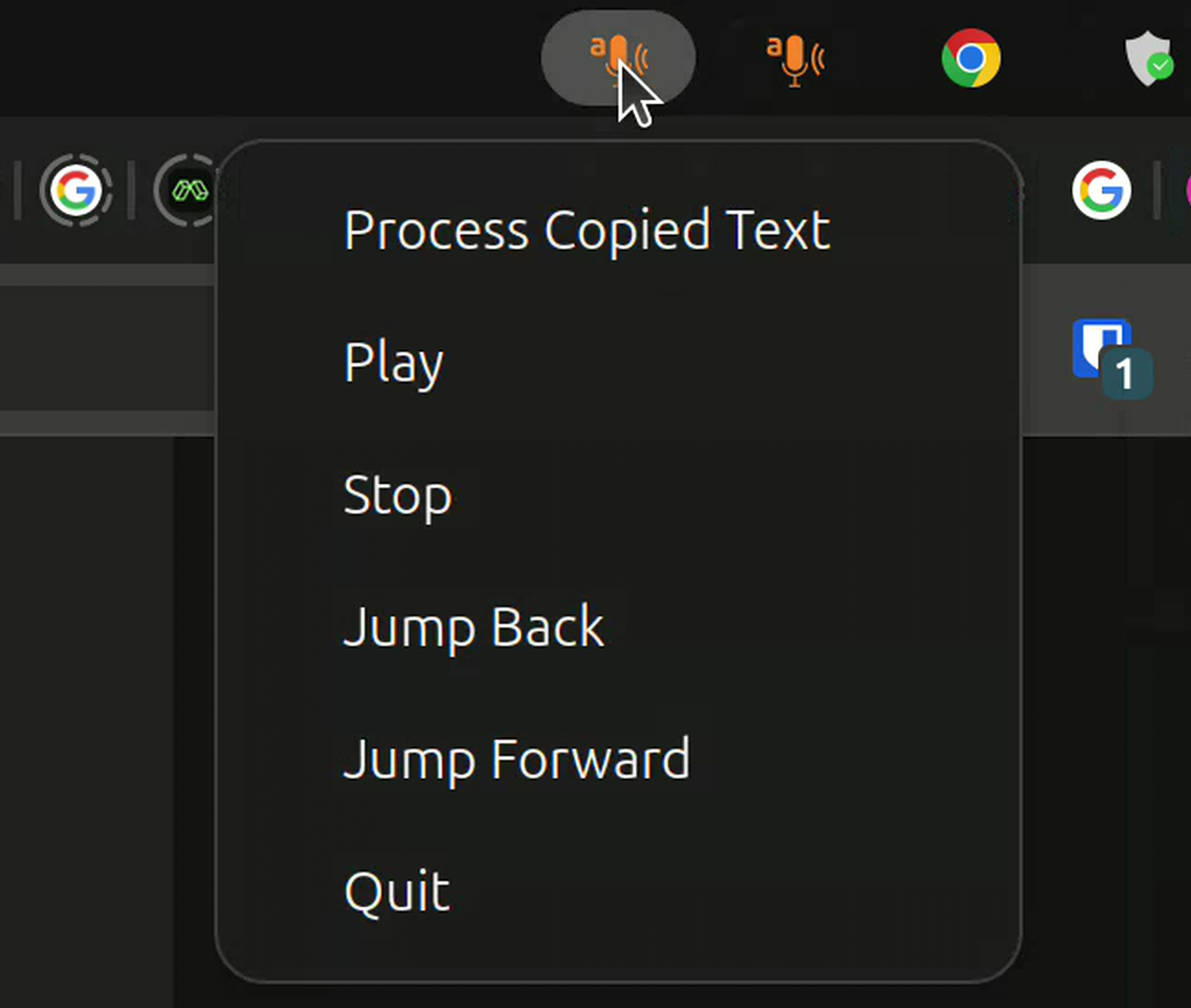
An icon should show up almost immediately in the system tray, with options to copy the content of the clipboard (the last thing you copy-pasted) and send that to the AI model for reading aloud.
For testing you can also start the app with
bard --default-file /path/to/audio.mp3
Or resume the previous recording:
bard --resume
Unless you removed your (local) traces:
bard --clean-cache-on-exit
Player
The player was devised in conversation with Mistral's Le Chat and Open AI's Chat GPT, and my own experience with pystray on scribe. It works.
I'm open for suggestion for other, platform-independent integrations to the OS.
Roadmap
Include more backends including local ones.
Project details
Verified details
These details have been verified by PyPIProject links
GitHub Statistics
Maintainers
Release history Release notifications | RSS feed


Download files
Download the file for your platform. If you're not sure which to choose, learn more about installing packages.
Source Distribution
Built Distribution
Filter files by name, interpreter, ABI, and platform.
If you're not sure about the file name format, learn more about wheel file names.
Copy a direct link to the current filters
File details
Details for the file bard_cli-0.2.0.tar.gz.
File metadata
- Download URL: bard_cli-0.2.0.tar.gz
- Upload date:
- Size: 17.3 kB
- Tags: Source
- Uploaded using Trusted Publishing? Yes
- Uploaded via: twine/6.1.0 CPython/3.12.9
File hashes
| Algorithm | Hash digest | |
|---|---|---|
| SHA256 |
aa5ec4c6f93bfd7dac10f7c765ecff75ca6a84b27101f07aa24f8e3eadd0ab1e
|
|
| MD5 |
0fb51402be494142e8dcfdc103428a18
|
|
| BLAKE2b-256 |
ee39d5afe4c3cedaf20cf16532eb816db850f8080472479766855573e46e8994
|
Provenance
The following attestation bundles were made for bard_cli-0.2.0.tar.gz:
Publisher:
pypi.yml on perrette/bard
-
Statement:
-
Statement type:
https://in-toto.io/Statement/v1 -
Predicate type:
https://docs.pypi.org/attestations/publish/v1 -
Subject name:
bard_cli-0.2.0.tar.gz -
Subject digest:
aa5ec4c6f93bfd7dac10f7c765ecff75ca6a84b27101f07aa24f8e3eadd0ab1e - Sigstore transparency entry: 173436479
- Sigstore integration time:
-
Permalink:
perrette/bard@432d2dafe5410dffa2ac5868336423da9496fed1 -
Branch / Tag:
refs/tags/v0.2.0 - Owner: https://github.com/perrette
-
Access:
public
-
Token Issuer:
https://token.actions.githubusercontent.com -
Runner Environment:
github-hosted -
Publication workflow:
pypi.yml@432d2dafe5410dffa2ac5868336423da9496fed1 -
Trigger Event:
push
-
Statement type:
File details
Details for the file bard_cli-0.2.0-py3-none-any.whl.
File metadata
- Download URL: bard_cli-0.2.0-py3-none-any.whl
- Upload date:
- Size: 16.4 kB
- Tags: Python 3
- Uploaded using Trusted Publishing? Yes
- Uploaded via: twine/6.1.0 CPython/3.12.9
File hashes
| Algorithm | Hash digest | |
|---|---|---|
| SHA256 |
cf8ccd083f929577e63cb2a68ff786c9d3d6d33b4904e9f55d381351704deb61
|
|
| MD5 |
03a89bd2bcc2e46dc533a007a749e011
|
|
| BLAKE2b-256 |
a530a2fb61b363bc08fc8ebb9f93283bf5b0850b45cfda9302b297bf2c5669ff
|
Provenance
The following attestation bundles were made for bard_cli-0.2.0-py3-none-any.whl:
Publisher:
pypi.yml on perrette/bard
-
Statement:
-
Statement type:
https://in-toto.io/Statement/v1 -
Predicate type:
https://docs.pypi.org/attestations/publish/v1 -
Subject name:
bard_cli-0.2.0-py3-none-any.whl -
Subject digest:
cf8ccd083f929577e63cb2a68ff786c9d3d6d33b4904e9f55d381351704deb61 - Sigstore transparency entry: 173436480
- Sigstore integration time:
-
Permalink:
perrette/bard@432d2dafe5410dffa2ac5868336423da9496fed1 -
Branch / Tag:
refs/tags/v0.2.0 - Owner: https://github.com/perrette
-
Access:
public
-
Token Issuer:
https://token.actions.githubusercontent.com -
Runner Environment:
github-hosted -
Publication workflow:
pypi.yml@432d2dafe5410dffa2ac5868336423da9496fed1 -
Trigger Event:
push
-
Statement type:






