
The free agentic AI course. 12 lessons, 12 concepts, real models. Read the framework — it's the textbook.

Project description
The free agentic AI course.
12 lessons. 12 concepts. Real models. No magic. Read the framework — it's the textbook.





Three doors
For students — Try Lesson 1 in Colab. Your first real LLM call in 60 seconds. No card, no install.
For teachers — See the syllabus. A free, drop-in 12-week module on agentic AI for A-level CS, AP CS, IB CS, intro university CS, and bootcamps. The instructor guide covers classroom setup, pacing, and assessment.
For engineers — Read the framework. The whole thing is ~1,500 lines of Python. No magic, no DSLs, no metaprogramming. Open it.
Why barebear exists
In 2026, every CS department on earth is scrambling to teach AI, and the curriculum doesn't yet exist. Teachers are improvising slide decks the night before. Students are reading 50,000 lines of magic in popular agent frameworks, getting confused, and giving up — or worse, not getting confused, and shipping things they don't understand.
Most agent frameworks were written to demo well. BareBear was written to be read. It is small enough that a sixth-form student can read every line of it in one sitting, and end up understanding what an "agent" actually is.
It runs against real LLMs from lesson one — no fake models, no toy mocks. The default backend is OpenRouter (free tier, no card required). Everything you build with barebear, you build against the same LLMs you'd use in production.
The framework is also genuinely useful for shipping production agents — the same primitives that let a student understand the agent loop in twenty minutes let an engineer ship an auditable agent in an afternoon. But the audience this release is built for is the student and the teacher.
The 12-lesson syllabus
| # | Concept | What you'll build |
|---|---|---|
| 1 | What an LLM is | A single chat-completion call. See tokens go in and out. |
| 2 | The agent loop | A one-tool agent. Watch perceive → think → act → observe. |
| 3 | Tool design | A multi-tool agent. Schemas, descriptions, when the model picks each. |
| 4 | State & memory | Short-term (messages) vs long-term (State dict). Persist across runs. |
| 5 | Budgets | Add a runaway-loop bug; watch the budget save you. |
| 6 | Policy & guardrails | Block a tool, classify side-effects, declare risk. |
| 7 | Checkpoints | An email-send agent that pauses for human approval. |
| 8 | Planning | bear.plan() before bear.run(). When each is the right move. |
| 9 | Reflection | Self-critique loop with Reflect — agent reviews its own work. |
| 10 | Multi-agent | A Bear that hires another Bear. Multi-agent in <40 lines. |
| 11 | Evaluation | Read a Report. Write tests for an agent. |
| 12 | Honest uncertainty | Make the agent flag what it does not know. |
Lessons 1–12 ship as Jupyter notebooks. Lessons 7–12 also ship as plain Python scripts. Browse the full syllabus →
For teachers: classroom setup, per-lesson pacing notes, common student pitfalls, suggested assessments, and 3-/6-/12-week subset paths are all in the instructor guide.
Setup
OpenRouter (recommended — free, no install)
pip install barebear[openai]
export OPENROUTER_API_KEY="sk-or-..."   # grab a free key at https://openrouter.ai
Ollama (offline, local)
pip install barebear[openai]
# from https://ollama.com — install the binary, then:
ollama pull qwen2.5:3b
ollama serve
Quickstart for engineers
from barebear import Bear, Task, Tool, Policy, OpenRouterModel

def greet(name: str) -> str:
    return f"Hello, {name}!"

bear = Bear(
    model=OpenRouterModel(),
    tools=[Tool(name="greet", fn=greet, description="Greet someone by name")],
    policy=Policy(max_steps=5, max_cost_usd=0.05),
)

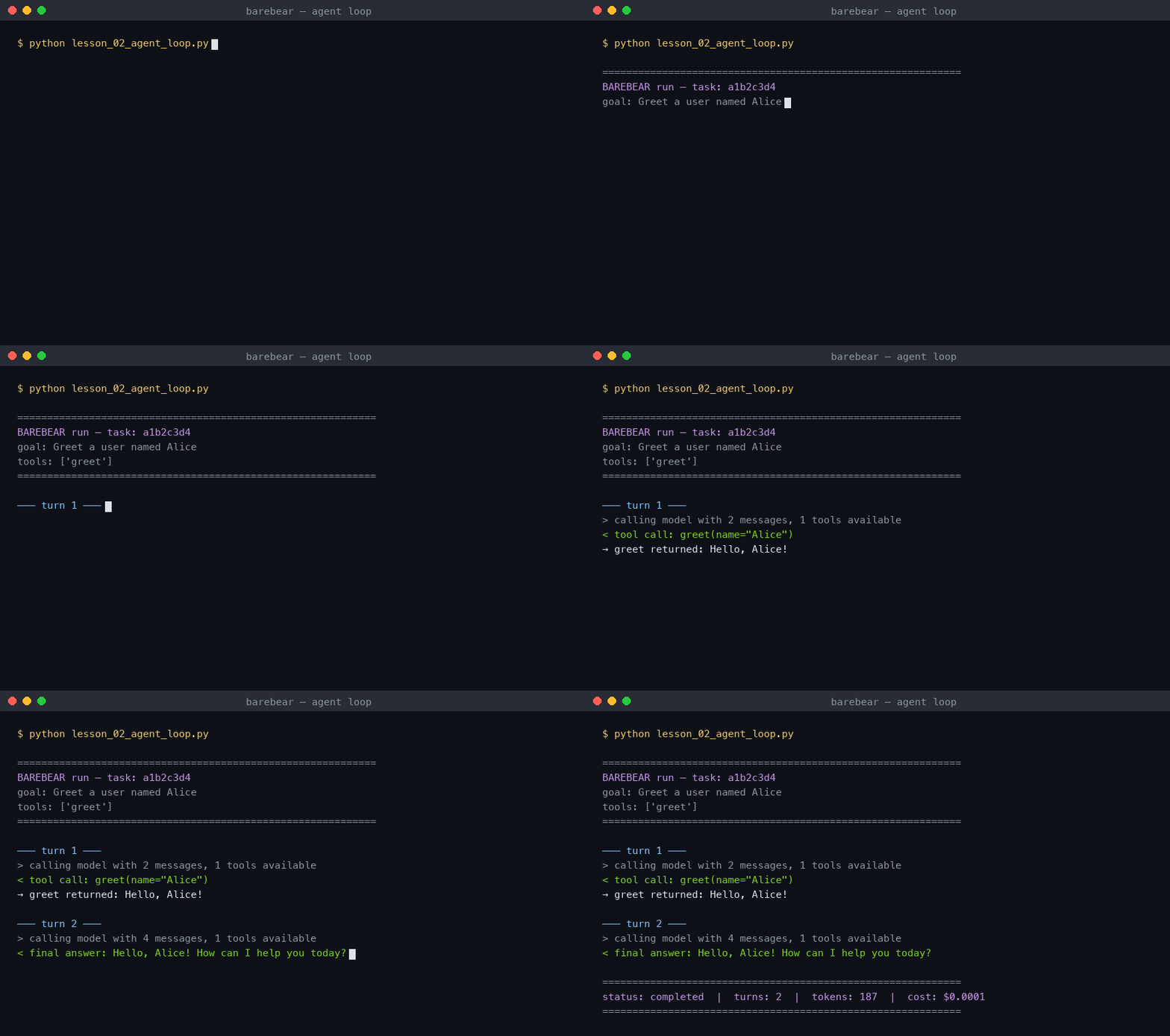
result = bear.run(Task(goal="Greet a user named Alice"), trace=True)
print(result.summary())
trace=True streams every loop turn to stdout — for a live narration of
the agent's thinking. Drop it in production.
─── turn 1 ───
> calling model with 2 messages, 1 tools available
< tool call: greet(name="Alice")
→ greet returned: Hello, Alice!
─── turn 2 ───
< final answer: Hello, Alice! How can I help you today?

============================================================
status: completed  |  turns: 2  |  tokens: 187  |  cost: $0.0001
============================================================
Full quickstart with policy, custom system prompts, reflection, and multi-agent: docs/quickstart.md.
The 7 primitives
| Primitive | What it does |
|---|---|
| Bear | The agent. Holds model, tools, policy, state. Runs tasks. |
| Task | A unit of work: a goal string, input dict, optional context, optional system prompt. |
| State | Explicit key-value store with snapshot history and change tracking. |
| Tool | A callable with declared risk, side effects, and approval requirements. |
| Policy | Constraints: step limits, cost caps, blocked tools, approval lists. |
| Checkpoint | A saved pause-point for human approval before high-risk actions. |
| Report | The run receipt: every step, token count, cost, assumptions, uncertainties. |
Plus two helpers for advanced lessons:
| Helper | What it does |
|---|---|
| Reflect | Three-method self-critique: critique, revise, run. |
bear.as_tool(...) |
Wraps a Bear so another Bear can call it. Multi-agent in one line. |
That's it. No chains, no graphs, no planners, no routers. Just the bones.
Features
Policy-first tool execution
Every tool call passes through policy before it runs. Block tools, require approval, or reject external side effects — all in one declaration.
policy = Policy(
    max_steps=10,
    blocked_tools=["delete_account"],
    require_approval_for=["send_email"],
    allow_external_side_effects=False,
)
Budget tracking
Step counts, tool calls, token usage, and dollar cost — all tracked against
limits you set. If a run hits its budget, it stops cleanly with a
budget_exceeded status.
policy = Policy(max_steps=8, max_cost_usd=0.10, max_tokens=50000)
Checkpoint / approval gates
High-risk tools pause the run and create a Checkpoint. You approve or
reject, then resume.
bear = Bear(
    model=model,
    tools=[
        Tool("send_email", fn=send_email, risk="high",
             side_effects="external", requires_approval=True),
    ],
    policy=Policy(require_approval_for=["send_email"]),
)

result = bear.run(task)

if result.status == "paused":
    checkpoint = bear.checkpoints.get(result.checkpoint_id)
    result = bear.resume(checkpoint, approved=True)
Side-effect staging
Tools declare side_effects="none", "internal", or "external". Policy
can block external side effects entirely, so your agent can propose
actions without executing them.
Tool("propose_patch", fn=propose, description="Suggest a code change",
     side_effects="none")
Tool("apply_patch", fn=apply, description="Apply the change",
     side_effects="external")
Run receipts
Every bear.run() returns a Report — a full trace you can print,
serialise to JSON, or store for auditing.
result = bear.run(task)

print(result.summary())       # human-readable receipt
print(result.to_json())       # full JSON trace
print(result.total_cost_usd)  # what it cost
print(result.steps)           # list of every step taken
Honest uncertainty
Bears track what they don't know. Assumptions and missing information are first-class data in the report, not buried in log noise.
result = bear.run(task)
print(result.assumptions)     # ["Customer tier assumed from email domain"]
print(result.uncertainties)   # ["Could not verify account status"]
Multi-agent in one line
researcher = Bear(model=OpenRouterModel(), tools=[search_tool])
writer = Bear(
    model=OpenRouterModel(),
    tools=[researcher.as_tool(name="research", description="Research a topic")],
)
writer.run(Task(goal="Write a brief on UK A-level CS reform."))
Reflection in three calls
from barebear import Reflect, OpenRouterModel

reflect = Reflect(model=OpenRouterModel())
out = reflect.run(goal="Define an LLM for a teen", answer="It's an AI thing.")
print(out.critique, out.revised, sep="\n---\n")
Examples (full case studies)
Each example is a complete, runnable agent. Default backend is OpenRouter.
Pass --provider ollama to run locally instead.
export PYTHONPATH=src
export OPENROUTER_API_KEY="sk-or-..."
| Example | What it shows | Run it |
|---|---|---|
| Research Assistant | Tool use, multi-step reasoning, report generation | python examples/research_assistant/run.py |
| Email Approval | requires_approval, checkpoint gates, side-effect policy |
python examples/email_approval/run.py |
| File Patcher | Side-effect staging (propose allowed, apply blocked) | python examples/file_patcher/run.py |
| Ticket Triage | Multi-step classification, budget tracking across calls | python examples/ticket_triage/run.py |
Architecture
┌─────────────────────────────────────────────────┐
│                   bear.run(task)                │
├─────────────────────────────────────────────────┤
│                                                 │
│   Task ──► System Prompt + User Message         │
│                     │                           │
│                     ▼                           │
│              ┌─────────────┐                    │
│              │  Run Loop   │◄── Budget check    │
│              └──────┬──────┘    each step       │
│                     │                           │
│          ┌──────────┴──────────┐                │
│          ▼                     ▼                │
│     Text response         Tool calls            │
│     ──► Report            ──► Policy check      │
│                               │                 │
│                    ┌──────────┼──────────┐      │
│                    ▼          ▼          ▼      │
│                 Allowed    Blocked    Approval  │
│                 ──► Execute ──► Skip  ──► Pause │
│                     │                    │      │
│                     ▼                    ▼      │
│                Tool result          Checkpoint  │
│                ──► Loop              (resume)   │
│                                                 │
├─────────────────────────────────────────────────┤
│  State (explicit, snapshotable, diffable)       │
│  Budget (steps, tokens, cost — all tracked)     │
│  Report (full receipt of everything)            │
└─────────────────────────────────────────────────┘
See docs/architecture.md for the full breakdown.
Philosophy
Most frameworks optimise for demos. BareBear optimises for understanding.
Read the manifesto.
Teaching with barebear
If you teach a course or club using barebear, we'd love to know. Two ways to tell us:
- Star the repo so other teachers can find it.
- Open an issue with
the tag
taught-with.
Lesson contributions are welcomed — see CONTRIBUTING.md.
Contributing
PRs, bug reports, lesson contributions, and honest feedback all welcome. See CONTRIBUTING.md.
Licence
MIT — Richey Malhotra, 2026.
Release history Release notifications | RSS feed


Download files
Download the file for your platform. If you're not sure which to choose, learn more about installing packages.
Source Distribution
Built Distribution
Filter files by name, interpreter, ABI, and platform.
If you're not sure about the file name format, learn more about wheel file names.
Copy a direct link to the current filters
File details
Details for the file barebear-0.2.1.tar.gz.
File metadata
- Download URL: barebear-0.2.1.tar.gz
- Upload date:
- Size: 23.6 kB
- Tags: Source
- Uploaded using Trusted Publishing? No
- Uploaded via: twine/6.2.0 CPython/3.9.6
File hashes
| Algorithm | Hash digest | |
|---|---|---|
| SHA256 |
884b395ec8b58a173cc1b0c387c0fd41b80d9ae16a93a062c29de87803e74b6c
|
|
| MD5 |
6ee7740c829d76bd2c8e0c4c9f0a6a25
|
|
| BLAKE2b-256 |
9970ab84def189be14283278c8744967838dac1d5660bfa361a7363181889bfb
|
File details
Details for the file barebear-0.2.1-py3-none-any.whl.
File metadata
- Download URL: barebear-0.2.1-py3-none-any.whl
- Upload date:
- Size: 28.5 kB
- Tags: Python 3
- Uploaded using Trusted Publishing? No
- Uploaded via: twine/6.2.0 CPython/3.9.6
File hashes
| Algorithm | Hash digest | |
|---|---|---|
| SHA256 |
95e24fbb78f66110e00120d94a892c977c8b53df856084d45f9d1cd8c0ec48d3
|
|
| MD5 |
97ee1004bb6e359fce837e5984cbe76d
|
|
| BLAKE2b-256 |
d64080bbc92936be96d38e305adae0602839f1cc3ce89c8f54fd1470b1f96d9a
|






