
Generate a cool bar in bar chart

Project description
barinbar
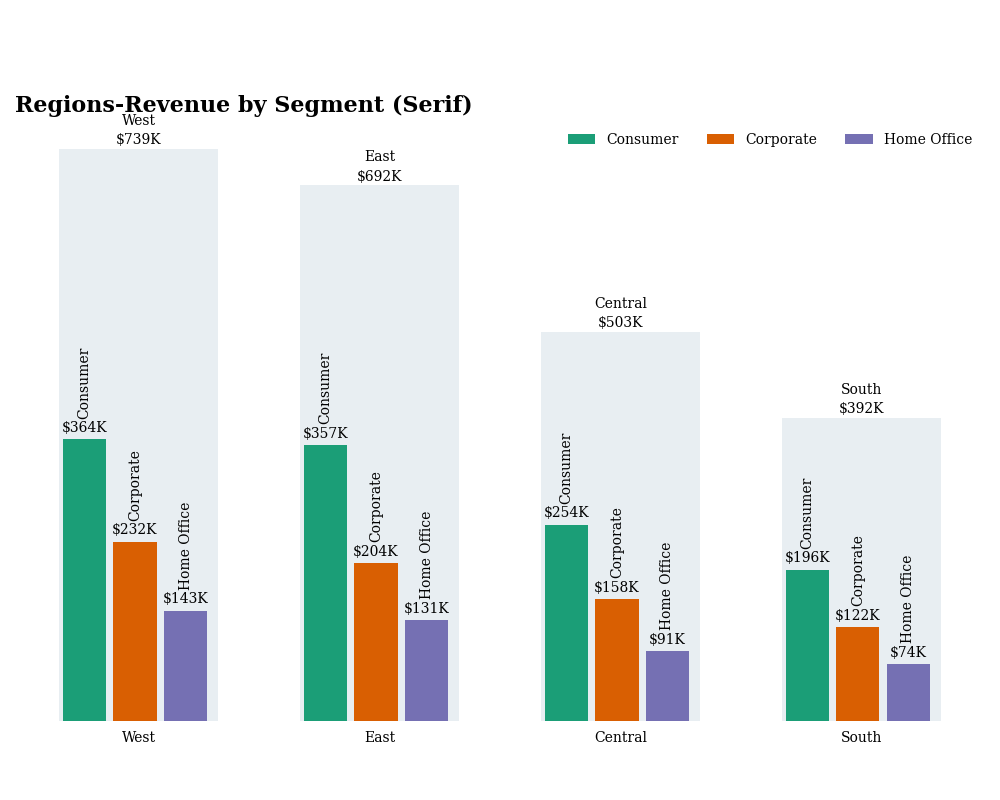



A Python package for creating bar-in-bar charts using Matplotlib.
Inspiration
This package was created in response to discussions and implementations of bar-in-bar charts across different platforms:
- Original LinkedIn Post by Colin Tomb: Link
- Tableau Implementation (Kevin Flerlage, Sebastine Amede, Darragh Murray, Brittany Rosenau): Blog Post
- R Implementation (Brian Julius): Post
- Deneb Implementation (Daniel Marsh-Patrick): Blog Post
This package aims to provide a straightforward Python (Matplotlib) alternative.
Installation
pip install barinbar
(Note: This assumes the package is published on PyPI.)
Development Setup (using Poetry)
If you want to contribute or run the code locally:
- Install Poetry: Follow the instructions on the official Poetry website.
- Clone the repository:
git clone <your-repo-url>
cd barinbar
- Install dependencies: This command creates a virtual environment and installs all dependencies (including development tools).
poetry install --all-extras
- Activate the virtual environment:
poetry shell - Now you can run scripts or linters, e.g.,
python barinbar/plot.py(adjust path if needed).
Requirements
- Python >= 3.10
matplotlibpandas
Usage
The main function is plot_bar_in_bar. It requires a pandas DataFrame structured with columns for the main category, sub-category, segment value, and total category value.
import pandas as pd
from barinbar.plot import plot_bar_in_bar, BarinbarStyle
from matplotlib.cm import get_cmap

# 1. Prepare your data
data = {
    "Region": ["West"]*3 + ["East"]*3 + ["Central"]*3 + ["South"]*3,
    "Segment": ["Consumer", "Corporate", "Home Office"] * 4,
    "Revenue": [364, 232, 143, 357, 204, 131, 254, 158, 91, 196, 122, 74],
}
revenues = pd.DataFrame(data)

# Calculate totals per main category
region_totals = revenues.groupby("Region")["Revenue"].sum().reset_index()
region_totals = region_totals.rename(columns={"Revenue": "TotalRevenue"})

# Merge totals back into the main DataFrame
revenues = pd.merge(revenues, region_totals, on="Region")

# Define category orders (optional but recommended for consistent plotting)
region_order = ["West", "East", "Central", "South"]
segment_order = ["Consumer", "Corporate", "Home Office"]
revenues["Region"] = pd.Categorical(revenues["Region"], categories=region_order, ordered=True)
revenues["Segment"] = pd.Categorical(revenues["Segment"], categories=segment_order, ordered=True)
revenues = revenues.sort_values(by=["Region", "Segment"])

# 2. Define Styling (Optional)
# Use default colors or specify your own
default_color_palette = get_cmap("Dark2")
custom_colors = {
    "Consumer": default_color_palette(0),
    "Corporate": default_color_palette(1),
    "Home Office": default_color_palette(2),
}
my_style = BarinbarStyle(
    fontname='serif', # Example: Use a serif font
    colors=custom_colors,
    figsize=(12, 7) # Example: Adjust figure size
)

# 3. Plot the chart
plot_bar_in_bar(
    df=revenues,
    category_col="Region",
    subcategory_col="Segment",
    value_col="Revenue",
    total_col="TotalRevenue",
    title="Revenue by Region and Segment",
    style=my_style, # Pass the style object
)
This will generate and display the bar-in-bar chart.
Customization
You can customize the appearance of the chart by creating an instance of the BarinbarStyle dataclass and modifying its attributes (e.g., figsize, colors, fontname, fontsize, background_color). Pass this style object to the plot_bar_in_bar function.
from barinbar.plot import BarinbarStyle

custom_style = BarinbarStyle(
    background_color="#F0F0F0",
    figsize=(10, 6),
    fontsize=18,
    small_fontsize=11,
    fontname="Arial",
    colors={"Consumer": "blue", "Corporate": "green", "Home Office": "red"}
)

# ... then pass `style=custom_style` to the plot function
License
This project is licensed under the MIT License - see the LICENSE file for details.
Author
- Daniel Vecera - daniel.vecera@outlook.com
Release history Release notifications | RSS feed


Download files
Download the file for your platform. If you're not sure which to choose, learn more about installing packages.
Source Distribution
Built Distribution
Filter files by name, interpreter, ABI, and platform.
If you're not sure about the file name format, learn more about wheel file names.
Copy a direct link to the current filters
File details
Details for the file barinbar-0.1.0.tar.gz.
File metadata
- Download URL: barinbar-0.1.0.tar.gz
- Upload date:
- Size: 8.7 kB
- Tags: Source
- Uploaded using Trusted Publishing? No
- Uploaded via: poetry/2.0.0 CPython/3.13.1 Windows/11
File hashes
| Algorithm | Hash digest | |
|---|---|---|
| SHA256 |
89164c103895ad4b9bf1ef075f6524172b9c234d684d4275a2d38be414661a26
|
|
| MD5 |
9a65af116f83f4c0a517af5e72539f4b
|
|
| BLAKE2b-256 |
47fb8ad8af3dda9564688ca6978c55cc687c7d65dd35914c6920bbbbf80fa821
|
File details
Details for the file barinbar-0.1.0-py3-none-any.whl.
File metadata
- Download URL: barinbar-0.1.0-py3-none-any.whl
- Upload date:
- Size: 7.5 kB
- Tags: Python 3
- Uploaded using Trusted Publishing? No
- Uploaded via: poetry/2.0.0 CPython/3.13.1 Windows/11
File hashes
| Algorithm | Hash digest | |
|---|---|---|
| SHA256 |
483acdb54f8f5ccc142236ca7940bf73be8503aeef8bf40cb23b89efe69129e6
|
|
| MD5 |
771d82e0d0882b21ff0f96d119d995ab
|
|
| BLAKE2b-256 |
04a4c4d56b4038f5167e24178a2cd1e500f23a527b52b0e23ed78abefb8fab5d
|






