
High performance client for Baseten.co
This library provides a high-performance Python client for Baseten.co endpoints including embeddings, reranking, and classification. It was built for massive concurrent post requests to any URL, also outside of baseten.co. PerformanceClient releases the GIL while performing requests in the Rust, and supports simultaneous sync and async usage. It was benchmarked with >1200 rps per client in our blog. PerformanceClient is built on top of pyo3, reqwest and tokio and is MIT licensed.
Installation
pip install baseten_performance_client
Usage
import os
import asyncio
from baseten_performance_client import PerformanceClient, OpenAIEmbeddingsResponse, RerankResponse, ClassificationResponse

api_key = os.environ.get("BASETEN_API_KEY")
base_url_embed = "https://model-yqv4yjjq.api.baseten.co/environments/production/sync"
# Also works with OpenAI or Mixedbread.
# base_url_embed = "https://api.openai.com" or "https://api.mixedbread.com"

# Basic client setup
client = PerformanceClient(base_url=base_url_embed, api_key=api_key)

# Advanced setup with HTTP version selection and connection pooling
from baseten_performance_client import HttpClientWrapper
http_wrapper = HttpClientWrapper(http_version=1)  # HTTP/1.1 (default)
advanced_client = PerformanceClient(
    base_url=base_url_embed,
    api_key=api_key,
    http_version=1,  # HTTP/1.1
    client_wrapper=http_wrapper  # Share connection pool
)
Embeddings
Synchronous Embedding
from baseten_performance_client import RequestProcessingPreference

texts = ["Hello world", "Example text", "Another sample"]
preference = RequestProcessingPreference(
    batch_size=16,
    max_concurrent_requests=32,
    timeout_s=360,
    max_chars_per_request=256000,  # Character limit per request
    hedge_delay=0.5,  # Enable hedging with 0.5s delay
    total_timeout_s=360  # Total operation timeout
)
response = client.embed(
    input=texts,
    model="my_model",
    preference=preference
)

# Accessing embedding data
print(f"Model used: {response.model}")
print(f"Total tokens used: {response.usage.total_tokens}")
print(f"Total time: {response.total_time:.4f}s")
if response.individual_batch_request_times:
    for i, batch_time in enumerate(response.individual_batch_request_times):
        print(f"  Time for batch {i}: {batch_time:.4f}s")

for i, embedding_data in enumerate(response.data):
    print(f"Embedding for text {i} (original input index {embedding_data.index}):")
    # embedding_data.embedding can be List[float] or str (base64)
    if isinstance(embedding_data.embedding, list):
        print(f"  First 3 dimensions: {embedding_data.embedding[:3]}")
        print(f"  Length: {len(embedding_data.embedding)}")

# Using the numpy() method (requires numpy to be installed)
import numpy as np
numpy_array = response.numpy()
print("\nEmbeddings as NumPy array:")
print(f"  Shape: {numpy_array.shape}")
print(f"  Data type: {numpy_array.dtype}")
if numpy_array.shape[0] > 0:
    print(f"  First 3 dimensions of the first embedding: {numpy_array[0][:3]}")
Note: The embed method is versatile and can be used with any embeddings service, e.g. OpenAI API embeddings, not just for Baseten deployments.
Asynchronous Embedding
async def async_embed():
    from baseten_performance_client import RequestProcessingPreference

    texts = ["Async hello", "Async example"]
    preference = RequestProcessingPreference(
        batch_size=16,
        max_concurrent_requests=32,
        timeout_s=360,
        max_chars_per_request=256000,  # Character limit per request
        hedge_delay=0.5,  # Enable hedging with 0.5s delay
        total_timeout_s=360  # Total operation timeout
    )
    response = await client.async_embed(
        input=texts,
        model="my_model",
        preference=preference
    )
    print("Async embedding response:", response.data)

# To run:
# asyncio.run(async_embed())
Embedding Benchmarks
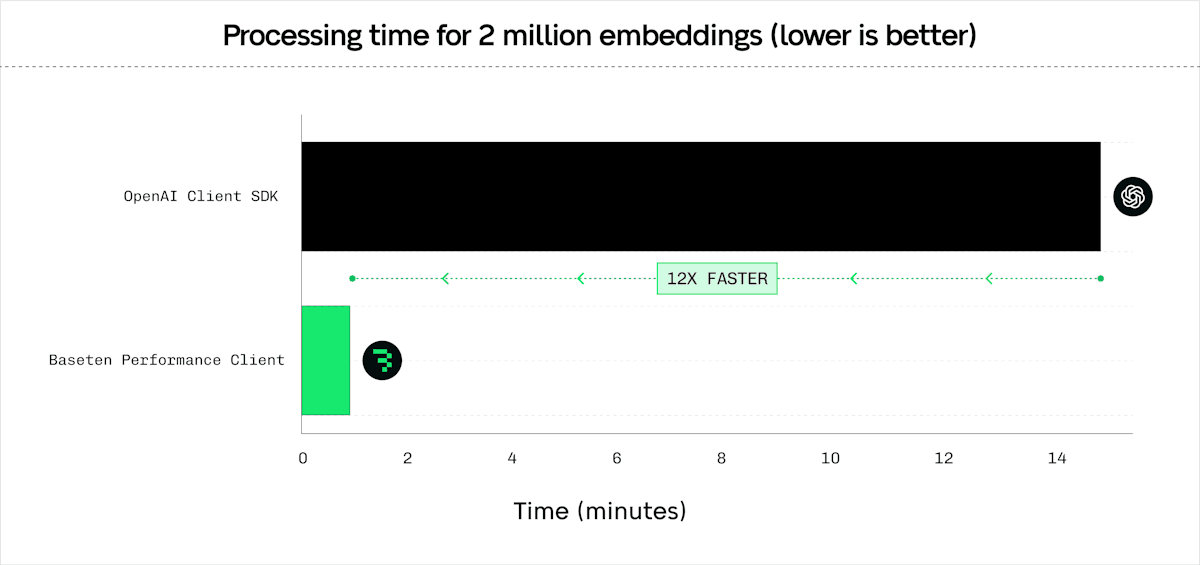
Comparison against pip install openai for /v1/embeddings. Tested with the ./scripts/compare_latency_openai.py with mini_batch_size of 128, and 4 server-side replicas. Results with OpenAI similar, OpenAI allows a max mini_batch_size of 2048.
| Number of inputs / embeddings | Number of Tasks | PerformanceClient (s) | AsyncOpenAI (s) | Speedup |
|---|---|---|---|---|
| 128 | 1 | 0.12 | 0.13 | 1.08× |
| 512 | 4 | 0.14 | 0.21 | 1.50× |
| 8 192 | 64 | 0.83 | 1.95 | 2.35× |
| 131 072 | 1 024 | 4.63 | 39.07 | 8.44× |
| 2 097 152 | 16 384 | 70.92 | 903.68 | 12.74× |
General Batch POST
The batch_post method is generic. It can be used to send POST requests to any URL, not limited to Baseten endpoints. The input and output can be any JSON item.
Synchronous Batch POST
from baseten_performance_client import RequestProcessingPreference

payload1 = {"model": "my_model", "input": ["Batch request sample 1"]}
payload2 = {"model": "my_model", "input": ["Batch request sample 2"]}
preference = RequestProcessingPreference(
    max_concurrent_requests=32,
    timeout_s=360,
    hedge_delay=0.5,  # Enable hedging with 0.5s delay
    total_timeout_s=360,  # Total operation timeout
    extra_headers={"x-custom-header": "value"}  # Custom headers
)
response_obj = client.batch_post(
    url_path="/v1/embeddings", # Example path, adjust to your needs
    payloads=[payload1, payload2],
    preference=preference
)
print(f"Total time for batch POST: {response_obj.total_time:.4f}s")
for i, (resp_data, headers, time_taken) in enumerate(zip(response_obj.data, response_obj.response_headers, response_obj.individual_request_times)):
    print(f"Response {i+1}:")
    print(f"  Data: {resp_data}")
    print(f"  Headers: {headers}")
    print(f"  Time taken: {time_taken:.4f}s")
Asynchronous Batch POST
async def async_batch_post_example():
    from baseten_performance_client import RequestProcessingPreference

    payload1 = {"model": "my_model", "input": ["Async batch sample 1"]}
    payload2 = {"model": "my_model", "input": ["Async batch sample 2"]}
preference = RequestProcessingPreference(
    max_concurrent_requests=32,
    timeout_s=360,
    hedge_delay=0.5,  # Enable hedging with 0.5s delay
    total_timeout_s=360,  # Total operation timeout
    extra_headers={"x-custom-header": "value"}  # Custom headers
)
    response_obj = await client.async_batch_post(
        url_path="/v1/embeddings",
        payloads=[payload1, payload2],
        preference=preference
    )
    print(f"Async total time for batch POST: {response_obj.total_time:.4f}s")
    for i, (resp_data, headers, time_taken) in enumerate(zip(response_obj.data, response_obj.response_headers, response_obj.individual_request_times)):
        print(f"Async Response {i+1}:")
        print(f"  Data: {resp_data}")
        print(f"  Headers: {headers}")
        print(f"  Time taken: {time_taken:.4f}s")

# To run:
# asyncio.run(async_batch_post_example())
Reranking
Reranking compatible with BEI or text-embeddings-inference.
Synchronous Reranking
from baseten_performance_client import RequestProcessingPreference

query = "What is the best framework?"
documents = ["Doc 1 text", "Doc 2 text", "Doc 3 text"]
preference = RequestProcessingPreference(
    batch_size=16,
    max_concurrent_requests=32,
    timeout_s=360,
    max_chars_per_request=256000,  # Character limit per request
    hedge_delay=0.5,  # Enable hedging with 0.5s delay
    total_timeout_s=360  # Total operation timeout
)
rerank_response = client.rerank(
    query=query,
    texts=documents,
    model="rerank-model",  # Optional model specification
    return_text=True,
    preference=preference
)
for res in rerank_response.data:
    print(f"Index: {res.index} Score: {res.score}")
Asynchronous Reranking
async def async_rerank():
    from baseten_performance_client import RequestProcessingPreference

    query = "Async query sample"
    docs = ["Async doc1", "Async doc2"]
    preference = RequestProcessingPreference(
        batch_size=16,
        max_concurrent_requests=32,
        timeout_s=360,
        max_chars_per_request=256000,  # Character limit per request
        hedge_delay=0.5,  # Enable hedging with 0.5s delay
        total_timeout_s=360  # Total operation timeout
    )
    response = await client.async_rerank(
        query=query,
        texts=docs,
        model="rerank-model",  # Optional model specification
        return_text=True,
        preference=preference
    )
    for res in response.data:
        print(f"Async Index: {res.index} Score: {res.score}")

# To run:
# asyncio.run(async_rerank())
Classification
Predict (classification endpoint) compatible with BEI or text-embeddings-inference.
Synchronous Classification
from baseten_performance_client import RequestProcessingPreference

texts_to_classify = [
    "This is great!",
    "I did not like it.",
    "Neutral experience."
]
preference = RequestProcessingPreference(
    batch_size=16,
    max_concurrent_requests=32,
    timeout_s=360,
    max_chars_per_request=256000,  # Character limit per request
    hedge_delay=0.5,  # Enable hedging with 0.5s delay
    total_timeout_s=360  # Total operation timeout
)
classify_response = client.classify(
    inputs=texts_to_classify,
    model="classification-model",  # Optional model specification
    preference=preference
)
for group in classify_response.data:
    for result in group:
        print(f"Label: {result.label}, Score: {result.score}")
Asynchronous Classification
async def async_classify():
    from baseten_performance_client import RequestProcessingPreference

    texts = ["Async positive", "Async negative"]
    preference = RequestProcessingPreference(
        batch_size=16,
        max_concurrent_requests=32,
        timeout_s=360,
        max_chars_per_request=256000,  # Character limit per request
        hedge_delay=0.5,  # Enable hedging with 0.5s delay
        total_timeout_s=360  # Total operation timeout
    )
    response = await client.async_classify(
        inputs=texts,
        model="classification-model",  # Optional model specification
        preference=preference
    )
    for group in response.data:
        for res in group:
            print(f"Async Label: {res.label}, Score: {res.score}")

# To run:
# asyncio.run(async_classify())
Advanced Features
RequestProcessingPreference
The RequestProcessingPreference class provides a unified way to configure all request processing parameters. This is the recommended approach for advanced configuration as it provides better type safety and clearer intent.
The framework defaults are 256 concurrent requests, a batch size of 8, and 8,000 characters per request. max_chars_per_request accepts values from 50 through 1,048,576.
from baseten_performance_client import RequestProcessingPreference

# Create a preference with custom settings
preference = RequestProcessingPreference(
    max_concurrent_requests=64,        # Parallel requests (default: 256)
    batch_size=32,                     # Items per batch (default: 8)
    timeout_s=30.0,                   # Per-request timeout (default: 3600.0)
    hedge_delay=0.5,                  # Hedging delay (default: None)
    hedge_budget_pct=0.15,            # Hedge budget percentage (default: 0.10)
    retry_budget_pct=0.08,            # Retry budget percentage (default: 0.05)
    max_retries=5,                    # Maximum HTTP retries (default: 5)
    initial_backoff_ms=250,           # Initial backoff in milliseconds (default: 125)
    total_timeout_s=300.0              # Total operation timeout (default: None)
)

# Use with any method
response = client.embed(
    input=["text1", "text2"],
    model="my_model",
    preference=preference
)

# Also works with async methods
response = await client.async_embed(
    input=["text1", "text2"],
    model="my_model",
    preference=preference
)
Property-based Configuration: You can also modify preferences after creation using property setters:
# Create preference and modify properties
preference = RequestProcessingPreference()
preference.max_concurrent_requests = 64        # Set parallel requests
preference.batch_size = 32                     # Set batch size
preference.timeout_s = 30.0                    # Set timeout
preference.hedge_delay = 0.5                   # Enable hedging
preference.hedge_budget_pct = 0.15            # Set hedge budget
preference.retry_budget_pct = 0.08            # Set retry budget
preference.max_retries = 3                     # Set max retries
preference.initial_backoff_ms = 250            # Set backoff

# Use with any method
response = client.embed(
    input=["text1", "text2"],
    model="my_model",
    preference=preference
)
Budget Percentages:
hedge_budget_pct: Percentage of total requests allocated for hedging (default: 10%)retry_budget_pct: Percentage of total requests allocated for retries (default: 5%)- Maximum allowed: 300% for both budgets
Retry Configuration:
- HTTP status-code retries are controlled by
max_retries, not byretry_budget_pct. - Retryable status codes by default:
408,409,429, and500through599. - Use
non_retryable_status_codes={529}to opt specific statuses out of the default retry policy. max_retries: Maximum HTTP status-code retries per request (default: 5, max: 6). Set to 0 to disable these retries.retry_budget_pct: Budget for timeout and network-error retry paths (default: 5%, max: 300%).initial_backoff_ms: Initial backoff duration in milliseconds (default: 125, range: 50-45000).- Backoff multiplies by 4 after each retry, caps at 45000ms, and adds 0-99ms jitter. With defaults, the retry sleeps are about 125ms, 500ms, 2000ms, 8000ms, and 32000ms; a sixth retry sleeps about 45000ms.
Request Hedging
The client supports request hedging for improved latency by sending duplicate requests after a specified delay:
# Enable hedging with 0.5 second delay
preference = RequestProcessingPreference(
    hedge_delay=0.5,  # Send hedge request after 0.5s
    max_chars_per_request=256000,
    total_timeout_s=360
)
response = client.embed(
    input=texts,
    model="my_model",
    preference=preference
)
Custom Headers
Use custom headers with batch_post:
preference = RequestProcessingPreference(
    extra_headers={
        "x-custom-header": "value",
        "authorization": "Bearer token"
    }
)
response = client.batch_post(
    url_path="/v1/embeddings",
    payloads=payloads,
    preference=preference
)
HTTP Version Selection
Choose between HTTP/1.1 and HTTP/2:
# HTTP/1.1 (default, better for high concurrency)
client_http1 = PerformanceClient(base_url, api_key, http_version=1)

# HTTP/2 (better for single requests)
client_http2 = PerformanceClient(base_url, api_key, http_version=2)
Connection Pooling
Share connection pools across multiple clients:
from baseten_performance_client import HttpClientWrapper

# Create shared wrapper
wrapper = HttpClientWrapper(http_version=1)

# Reuse across multiple clients
client1 = PerformanceClient(base_url="https://api1.example.com", client_wrapper=wrapper)
client2 = PerformanceClient(base_url="https://api2.example.com", client_wrapper=wrapper)
HTTP Proxy Support
Route all HTTP requests through a proxy (e.g., for connection pooling with Envoy):
from baseten_performance_client import HttpClientWrapper

# Create wrapper with HTTP proxy
wrapper = HttpClientWrapper(
    http_version=1,
    proxy="http://envoy-proxy.local:8080"
)

# Share the wrapper across multiple clients
client1 = PerformanceClient(
    base_url="https://api1.example.com",
    api_key="your_key",
    client_wrapper=wrapper
)
client2 = PerformanceClient(
    base_url="https://api2.example.com",
    api_key="your_key",
    client_wrapper=wrapper
)
# Both clients will use the same connection pool and proxy
You can also specify the proxy directly when creating a client:
client = PerformanceClient(
    base_url="https://api.example.com",
    api_key="your_key",
    proxy="http://envoy-proxy.local:8080"
)
Endpoint Pool and Health Checks
Route traffic across reusable endpoints with deterministic weighted routing. Each Endpoint
owns its own health worker, so the same endpoint object can be shared across many pools
without duplicate probes:
from baseten_performance_client import Endpoint, EndpointPool, HttpClientWrapper, PerformanceClient

health_wrapper = HttpClientWrapper(http_version=1)
endpoint_a = Endpoint(
    base_url="https://model-AAAA.api.baseten.co/environments/production/sync",
    api_key="your_key",
    client_wrapper=health_wrapper,
    deployment_health_path="/health",
    deployment_timeout_is_no_vote=False,
)
endpoint_b = Endpoint(
    base_url="https://model-BBBB.api.baseten.co/environments/production/sync",
    api_key="your_key",
    client_wrapper=health_wrapper,
    deployment_health_path="/health",
    deployment_timeout_is_no_vote=False,
)

endpoint_pool = EndpointPool(
    endpoints=[endpoint_a, endpoint_b],
    endpoint_weights=[0.8, 0.2],  # deterministic weighted routing
)

client = PerformanceClient(
    base_url="https://model-AAAA.api.baseten.co/environments/production/sync",
    api_key="your_key",
    endpoint_pool=endpoint_pool,
)
Health semantics:
- Weights are deterministic weighted routing, not weighted round robin.
- Each configured health check is retried up to
health_check_retries, and one successful retry is enough for that check. - If an endpoint has
deep_health_urlconfigured, both the shallow deployment health path and the deep health URL are evaluated. health_fail_on_first=Trueshort-circuits on the first hard failing check within an endpoint refresh cycle.
Error Handling
The client can raise several types of errors. Here's how to handle common ones:
requests.exceptions.HTTPError: This error is raised for HTTP issues, such as authentication failures (e.g., 403 Forbidden if the API key is wrong), server errors (e.g., 5xx), or if the endpoint is not found (404). You can inspecte.response.status_codeande.response.text(ore.response.json()if the body is JSON) for more details.ValueError: This error can occur due to invalid input parameters (e.g., an emptyinputlist forembed, invalidbatch_sizeormax_concurrent_requestsvalues). It can also be raised byresponse.numpy()if embeddings are not float vectors or have inconsistent dimensions.
Here's an example demonstrating how to catch these errors for the embed method:
import requests
from baseten_performance_client import RequestProcessingPreference

# client = PerformanceClient(base_url="your_baseten_url", api_key="your_baseten_api_key")

texts_to_embed = ["Hello world", "Another text example"]
try:
    preference = RequestProcessingPreference(
        batch_size=2,
        max_concurrent_requests=4,
        timeout_s=60 # Timeout in seconds
    )
    response = client.embed(
        input=texts_to_embed,
        model="your_embedding_model", # Replace with your actual model name
        preference=preference
    )
    # Process successful response
    print(f"Model used: {response.model}")
    print(f"Total tokens: {response.usage.total_tokens}")
    for item in response.data:
        embedding_preview = item.embedding[:3] if isinstance(item.embedding, list) else "Base64 Data"
        print(f"Index {item.index}, Embedding (first 3 dims or type): {embedding_preview}")

except requests.exceptions.HTTPError as e:
    print(f"An HTTP error occurred: {e}, code {e.args[0]}")
For asynchronous methods (async_embed, async_rerank, async_classify, async_batch_post), the same exceptions will be raised by the await call and can be caught using a try...except block within an async def function.
Development
# Install prerequisites
sudo apt-get install patchelf
# Install cargo if not already installed.

# Set up a Python virtual environment
python -m venv .venv
source .venv/bin/activate

# Install development dependencies
pip install maturin[patchelf] pytest requests numpy

# Build and install the Rust extension in development mode
maturin develop
cargo fmt
# Run tests
pytest tests
Contributions
Feel free to contribute to this repo, tag @michaelfeil for review.
License
MIT License
3 maintainers


Metadata
3 maintainers
Release files for baseten-performance-client 0.1.15.post1
For a detailed explanation of source distributions (sdists) and built distributions (wheels), please see the package formats documentation.
Source distribution (sdist)
| File | Size | Uploaded | |
|---|---|---|---|
| baseten_performance_client-0.1.15.post1.tar.gz | 119.4 kB | Details |
Built distributions (wheels)
Total release size: 118.2 MB
Release files / baseten_performance_client-0.1.15.post1.tar.gz
| Download URL | baseten_performance_client-0.1.15.post1.tar.gz |
|---|---|
| Size | 119.4 kB |
| Tags | Source |
|
SHA-256 checksum How to use checksums |
eecde3823cb85636491adbe003af4f115f5cdbdfaf4696588443f78663a3156d
|
|
BLAKE2b-256 checksum How to use checksums |
42763026ee95e1467e449e6051d920fbaac5ab589e9f673a3e54d5512d2daf06
|
| Upload date | |
|
Uploaded using Trusted Publishing? What is trusted publishing? |
No |
| Uploaded via |
maturin/1.15.0
|
Release files / baseten_performance_client-0.1.15.post1-cp313-cp313t-musllinux_1_2_x86_64.whl
| Download URL | baseten_performance_client-0.1.15.post1-cp313-cp313t-musllinux_1_2_x86_64.whl |
|---|---|
| Size | 6.3 MB |
| Tags | CPython 3.13 CPython 3.13 free-threading Linux musl 1.2+ x86-64 |
|
SHA-256 checksum How to use checksums |
e3c6213ec944567722f2d0cacdcfd0b00bad200225cb24cd076d6c667335e0ab
|
|
BLAKE2b-256 checksum How to use checksums |
77ac63b367cf0e3fd0fcbfe210566efa6c99d0d8a045aadc59d62662dd2b2345
|
| Upload date | |
|
Uploaded using Trusted Publishing? What is trusted publishing? |
No |
| Uploaded via |
maturin/1.15.0
|
Release files / baseten_performance_client-0.1.15.post1-cp313-cp313t-musllinux_1_2_i686.whl
| Download URL | baseten_performance_client-0.1.15.post1-cp313-cp313t-musllinux_1_2_i686.whl |
|---|---|
| Size | 6.1 MB |
| Tags | CPython 3.13 CPython 3.13 free-threading Linux musl 1.2+ x86-32 |
|
SHA-256 checksum How to use checksums |
b8efd0a344ac62a4804c46b9c8caf0a9c140d054438ddd4dcc9502a41d2dce0a
|
|
BLAKE2b-256 checksum How to use checksums |
3e5ae239be0c3030053d03abc215241851be81a350a0341bd854e71598e0b3ae
|
| Upload date | |
|
Uploaded using Trusted Publishing? What is trusted publishing? |
No |
| Uploaded via |
maturin/1.15.0
|
Release files / baseten_performance_client-0.1.15.post1-cp313-cp313t-musllinux_1_2_armv7l.whl
| Download URL | baseten_performance_client-0.1.15.post1-cp313-cp313t-musllinux_1_2_armv7l.whl |
|---|---|
| Size | 5.6 MB |
| Tags | CPython 3.13 CPython 3.13 free-threading Linux musl 1.2+ ARMv7l |
|
SHA-256 checksum How to use checksums |
5ce140780966e71a260817452958ec1c9d049afe49c23bf7513ba57a67f28c17
|
|
BLAKE2b-256 checksum How to use checksums |
5fdc3c44ff5998df5efba2fcfb0d0e4ad0aa753f6e51b2f11ab45b5b512188d4
|
| Upload date | |
|
Uploaded using Trusted Publishing? What is trusted publishing? |
No |
| Uploaded via |
maturin/1.15.0
|
Release files / baseten_performance_client-0.1.15.post1-cp313-cp313t-musllinux_1_2_aarch64.whl
| Download URL | baseten_performance_client-0.1.15.post1-cp313-cp313t-musllinux_1_2_aarch64.whl |
|---|---|
| Size | 6.6 MB |
| Tags | CPython 3.13 CPython 3.13 free-threading Linux musl 1.2+ ARM64 |
|
SHA-256 checksum How to use checksums |
3b8a3bd2ee8c4e2fbfdebe3a282be6dcd2200db6856237732dc52069cccf8385
|
|
BLAKE2b-256 checksum How to use checksums |
efbdb0cce84877a8e5419c83fc57a7212f254d006de61c674531d5f27e016c0e
|
| Upload date | |
|
Uploaded using Trusted Publishing? What is trusted publishing? |
No |
| Uploaded via |
maturin/1.15.0
|
Release files / baseten_performance_client-0.1.15.post1-cp313-cp313t-manylinux_2_17_x86_64.manylinux2014_x86_64.whl
| Download URL | baseten_performance_client-0.1.15.post1-cp313-cp313t-manylinux_2_17_x86_64.manylinux2014_x86_64.whl |
|---|---|
| Size | 5.9 MB |
| Tags | CPython 3.13 CPython 3.13 free-threading Linux glibc 2.17+ x86-64 |
|
SHA-256 checksum How to use checksums |
41fb12797bffc55e408092d7226456b5e82c647a684ceebcb8a0b48917f6a45f
|
|
BLAKE2b-256 checksum How to use checksums |
8efd4c730946c664fd713f645bedd55767c296cdd7419cac51f8e96f8027ee61
|
| Upload date | |
|
Uploaded using Trusted Publishing? What is trusted publishing? |
No |
| Uploaded via |
maturin/1.15.0
|
Release files / baseten_performance_client-0.1.15.post1-cp313-cp313t-manylinux_2_17_ppc64le.manylinux2014_ppc64le.whl
| Download URL | baseten_performance_client-0.1.15.post1-cp313-cp313t-manylinux_2_17_ppc64le.manylinux2014_ppc64le.whl |
|---|---|
| Size | 6.6 MB |
| Tags | CPython 3.13 CPython 3.13 free-threading Linux glibc 2.17+ PowerPC 64-le |
|
SHA-256 checksum How to use checksums |
04eb4dd6d6836fefa734f33f30beaa83fc5f6bc9c44ea919ca7b5aff8fc5388c
|
|
BLAKE2b-256 checksum How to use checksums |
be8ec66a59edf4ea07fcf1f9c63fee14e6d45d2ef35f9851f79231655ab51c97
|
| Upload date | |
|
Uploaded using Trusted Publishing? What is trusted publishing? |
No |
| Uploaded via |
maturin/1.15.0
|
Release files / baseten_performance_client-0.1.15.post1-cp313-cp313t-manylinux_2_17_i686.manylinux2014_i686.whl
| Download URL | baseten_performance_client-0.1.15.post1-cp313-cp313t-manylinux_2_17_i686.manylinux2014_i686.whl |
|---|---|
| Size | 6.2 MB |
| Tags | CPython 3.13 CPython 3.13 free-threading Linux glibc 2.17+ x86-32 |
|
SHA-256 checksum How to use checksums |
fde945b4bf4e4beb1dfccc6510e8c6660509ce7e5c5364e6a8b9a5b7fae48580
|
|
BLAKE2b-256 checksum How to use checksums |
fda6c210dfecc38a00f7eb58254c2deae23eab927d2326d0fef5495fb5e6462d
|
| Upload date | |
|
Uploaded using Trusted Publishing? What is trusted publishing? |
No |
| Uploaded via |
maturin/1.15.0
|
Release files / baseten_performance_client-0.1.15.post1-cp313-cp313t-macosx_11_0_arm64.whl
| Download URL | baseten_performance_client-0.1.15.post1-cp313-cp313t-macosx_11_0_arm64.whl |
|---|---|
| Size | 3.5 MB |
| Tags | CPython 3.13 CPython 3.13 free-threading macOS 11.0+ ARM64 |
|
SHA-256 checksum How to use checksums |
543bc05828162f092c9ebe644306be5ff1ed60198fca5f26afb764f54933237e
|
|
BLAKE2b-256 checksum How to use checksums |
69df8aa4f09a4b8faf29b2d90d2109a8a42619d91fab2a20d4ca4768f1ea9608
|
| Upload date | |
|
Uploaded using Trusted Publishing? What is trusted publishing? |
No |
| Uploaded via |
maturin/1.15.0
|
Release files / baseten_performance_client-0.1.15.post1-cp313-cp313t-macosx_10_12_x86_64.whl
| Download URL | baseten_performance_client-0.1.15.post1-cp313-cp313t-macosx_10_12_x86_64.whl |
|---|---|
| Size | 3.6 MB |
| Tags | CPython 3.13 CPython 3.13 free-threading macOS 10.12+ x86-64 |
|
SHA-256 checksum How to use checksums |
142595a897f3a23a529e7a2e9982b310539de819bc158537c0eac165dbdfea53
|
|
BLAKE2b-256 checksum How to use checksums |
e3427a80a7684ec363ca53f80070c8d17abb6b286623fcb076a64b61fcaa1073
|
| Upload date | |
|
Uploaded using Trusted Publishing? What is trusted publishing? |
No |
| Uploaded via |
maturin/1.15.0
|
Release files / baseten_performance_client-0.1.15.post1-cp38-abi3-win_amd64.whl
| Download URL | baseten_performance_client-0.1.15.post1-cp38-abi3-win_amd64.whl |
|---|---|
| Size | 3.5 MB |
| Tags | CPython 3.8 Windows x86-64 abi3 |
|
SHA-256 checksum How to use checksums |
cc7bd53870d522b0fddaeed7b5a7b0322d0c7b4932e49f8fb7dd16577bb338c8
|
|
BLAKE2b-256 checksum How to use checksums |
f2a5365a7b423600299e79e6830acdd16be4c94e1673fbed0c0a00a9bb4c8ceb
|
| Upload date | |
|
Uploaded using Trusted Publishing? What is trusted publishing? |
No |
| Uploaded via |
maturin/1.15.0
|
Release files / baseten_performance_client-0.1.15.post1-cp38-abi3-musllinux_1_2_x86_64.whl
| Download URL | baseten_performance_client-0.1.15.post1-cp38-abi3-musllinux_1_2_x86_64.whl |
|---|---|
| Size | 6.5 MB |
| Tags | CPython 3.8 Linux musl 1.2+ x86-64 abi3 |
|
SHA-256 checksum How to use checksums |
d28e7539cd4347db50123bd5ee6439662c24522203a54566b07b9f46c2a7cbd7
|
|
BLAKE2b-256 checksum How to use checksums |
cfa0c4d4d596cda067b0a49d645d4b6fa4d0837e764e416fd2b72976c9b9a34f
|
| Upload date | |
|
Uploaded using Trusted Publishing? What is trusted publishing? |
No |
| Uploaded via |
maturin/1.15.0
|
Release files / baseten_performance_client-0.1.15.post1-cp38-abi3-musllinux_1_2_i686.whl
| Download URL | baseten_performance_client-0.1.15.post1-cp38-abi3-musllinux_1_2_i686.whl |
|---|---|
| Size | 6.3 MB |
| Tags | CPython 3.8 Linux musl 1.2+ x86-32 abi3 |
|
SHA-256 checksum How to use checksums |
d051a200a00b2214021732d6ab575b53b3bb04bab840c90d0cf2649ed5098140
|
|
BLAKE2b-256 checksum How to use checksums |
c210aa1777069fb9b09f7e533449e0d80e0d1a96d2080c2ca889629a48209bb5
|
| Upload date | |
|
Uploaded using Trusted Publishing? What is trusted publishing? |
No |
| Uploaded via |
maturin/1.15.0
|
Release files / baseten_performance_client-0.1.15.post1-cp38-abi3-musllinux_1_2_armv7l.whl
| Download URL | baseten_performance_client-0.1.15.post1-cp38-abi3-musllinux_1_2_armv7l.whl |
|---|---|
| Size | 5.8 MB |
| Tags | CPython 3.8 Linux musl 1.2+ ARMv7l abi3 |
|
SHA-256 checksum How to use checksums |
51891821ea0ca93f5f9fc7a4227018989d32379164ff18c9388b8164225f9328
|
|
BLAKE2b-256 checksum How to use checksums |
32dabd7d48ad56ba6d46d30a9c2aa56a6700c918a21ed506215580ca3e7c6f6e
|
| Upload date | |
|
Uploaded using Trusted Publishing? What is trusted publishing? |
No |
| Uploaded via |
maturin/1.15.0
|
Release files / baseten_performance_client-0.1.15.post1-cp38-abi3-musllinux_1_2_aarch64.whl
| Download URL | baseten_performance_client-0.1.15.post1-cp38-abi3-musllinux_1_2_aarch64.whl |
|---|---|
| Size | 6.8 MB |
| Tags | CPython 3.8 Linux musl 1.2+ ARM64 abi3 |
|
SHA-256 checksum How to use checksums |
09d86da39464b679c22478571062c48b468902bdc14891fe7450596481b07f8f
|
|
BLAKE2b-256 checksum How to use checksums |
997e8c965d1ce052ad2213007c87be16d31d2efd1bc4981953a6f7f1e165d98a
|
| Upload date | |
|
Uploaded using Trusted Publishing? What is trusted publishing? |
No |
| Uploaded via |
maturin/1.15.0
|
Release files / baseten_performance_client-0.1.15.post1-cp38-abi3-manylinux_2_28_armv7l.whl
| Download URL | baseten_performance_client-0.1.15.post1-cp38-abi3-manylinux_2_28_armv7l.whl |
|---|---|
| Size | 5.6 MB |
| Tags | CPython 3.8 Linux glibc 2.28+ ARMv7l abi3 |
|
SHA-256 checksum How to use checksums |
8338a113121728666d70df62cea0e46c5ea98a2dc610c6655e85cced22149aba
|
|
BLAKE2b-256 checksum How to use checksums |
539432413ec4f9020884d50760116ca709887866dfa3194618e05eab51d82e48
|
| Upload date | |
|
Uploaded using Trusted Publishing? What is trusted publishing? |
No |
| Uploaded via |
maturin/1.15.0
|
Release files / baseten_performance_client-0.1.15.post1-cp38-abi3-manylinux_2_28_aarch64.whl
| Download URL | baseten_performance_client-0.1.15.post1-cp38-abi3-manylinux_2_28_aarch64.whl |
|---|---|
| Size | 6.5 MB |
| Tags | CPython 3.8 Linux glibc 2.28+ ARM64 abi3 |
|
SHA-256 checksum How to use checksums |
becfc60355d357d1401c9724413ade5a0580752174df6625dd4f2c17dad523d8
|
|
BLAKE2b-256 checksum How to use checksums |
00ef4d0ee4d2779b52849cbf447ef48d8d98277fb382c7d4a6d7ad0e8d982acf
|
| Upload date | |
|
Uploaded using Trusted Publishing? What is trusted publishing? |
No |
| Uploaded via |
maturin/1.15.0
|
Release files / baseten_performance_client-0.1.15.post1-cp38-abi3-manylinux_2_17_x86_64.manylinux2014_x86_64.whl
| Download URL | baseten_performance_client-0.1.15.post1-cp38-abi3-manylinux_2_17_x86_64.manylinux2014_x86_64.whl |
|---|---|
| Size | 6.1 MB |
| Tags | CPython 3.8 Linux glibc 2.17+ x86-64 abi3 |
|
SHA-256 checksum How to use checksums |
7ea17c9c6f3674969774600fcc54dcb3e867cd2333f2f6f55b53fe5afa5e2d9e
|
|
BLAKE2b-256 checksum How to use checksums |
679199d1f3f7d98814b0ac23f1efb9ef349ebe075b2fe501c3fc382ec33d8a1f
|
| Upload date | |
|
Uploaded using Trusted Publishing? What is trusted publishing? |
No |
| Uploaded via |
maturin/1.15.0
|
Release files / baseten_performance_client-0.1.15.post1-cp38-abi3-manylinux_2_17_ppc64le.manylinux2014_ppc64le.whl
| Download URL | baseten_performance_client-0.1.15.post1-cp38-abi3-manylinux_2_17_ppc64le.manylinux2014_ppc64le.whl |
|---|---|
| Size | 6.8 MB |
| Tags | CPython 3.8 Linux glibc 2.17+ PowerPC 64-le abi3 |
|
SHA-256 checksum How to use checksums |
4dc593cd6869bec248330d1b8506193d30889b28bd3bb5eeaa634ccd4808385b
|
|
BLAKE2b-256 checksum How to use checksums |
9aea95a7bd79742f7548a8e16225362fc416753c77a22cf1a6aa0c1df2ba823b
|
| Upload date | |
|
Uploaded using Trusted Publishing? What is trusted publishing? |
No |
| Uploaded via |
maturin/1.15.0
|
Release files / baseten_performance_client-0.1.15.post1-cp38-abi3-manylinux_2_17_i686.manylinux2014_i686.whl
| Download URL | baseten_performance_client-0.1.15.post1-cp38-abi3-manylinux_2_17_i686.manylinux2014_i686.whl |
|---|---|
| Size | 6.4 MB |
| Tags | CPython 3.8 Linux glibc 2.17+ x86-32 abi3 |
|
SHA-256 checksum How to use checksums |
69eb35db333fb4396c4b0cf5f1aea0f160fc982d980468b0bff9dcd5ee02bf2e
|
|
BLAKE2b-256 checksum How to use checksums |
ec56454cc5ddd8f62000fa9e4f23a957298a2c81d619f28cbd3ce9b61e87b7ab
|
| Upload date | |
|
Uploaded using Trusted Publishing? What is trusted publishing? |
No |
| Uploaded via |
maturin/1.15.0
|
Release files / baseten_performance_client-0.1.15.post1-cp38-abi3-macosx_11_0_arm64.whl
| Download URL | baseten_performance_client-0.1.15.post1-cp38-abi3-macosx_11_0_arm64.whl |
|---|---|
| Size | 3.6 MB |
| Tags | CPython 3.8 abi3 macOS 11.0+ ARM64 |
|
SHA-256 checksum How to use checksums |
f3c0e97863b17d9669337f913e479fd80c252ddacb3810ea7f2b6c648a164115
|
|
BLAKE2b-256 checksum How to use checksums |
459d4bdffbb58572e3fb9edffba05582b790771f97e7255dd3cdc0de8dc2c2ac
|
| Upload date | |
|
Uploaded using Trusted Publishing? What is trusted publishing? |
No |
| Uploaded via |
maturin/1.15.0
|
Release files / baseten_performance_client-0.1.15.post1-cp38-abi3-macosx_10_12_x86_64.whl
| Download URL | baseten_performance_client-0.1.15.post1-cp38-abi3-macosx_10_12_x86_64.whl |
|---|---|
| Size | 3.7 MB |
| Tags | CPython 3.8 abi3 macOS 10.12+ x86-64 |
|
SHA-256 checksum How to use checksums |
e4def0a6e0561eacca7120bf99491ccf196c36fa1f7fc2a6e02db64a12ec5577
|
|
BLAKE2b-256 checksum How to use checksums |
ef501b5cfa21f683960edec6478239dd1ff96c980279c751cb236c83b9b5b81f
|
| Upload date | |
|
Uploaded using Trusted Publishing? What is trusted publishing? |
No |
| Uploaded via |
maturin/1.15.0
|














