
This release is a pre-release and may not be stable for production use.

Bashhub saves every terminal command entered across all sessions and systems and provides powerful querying across all commands.


Features
- Super command search by using context about how commands are executed.
- e.g. the directory, session, system, exit status, etc.
- Unlimited detailed terminal history stored in the cloud.
- Support across systems. Access your terminal history from anywhere!
- Support for Bash and Zsh with a sweet cli for everything.
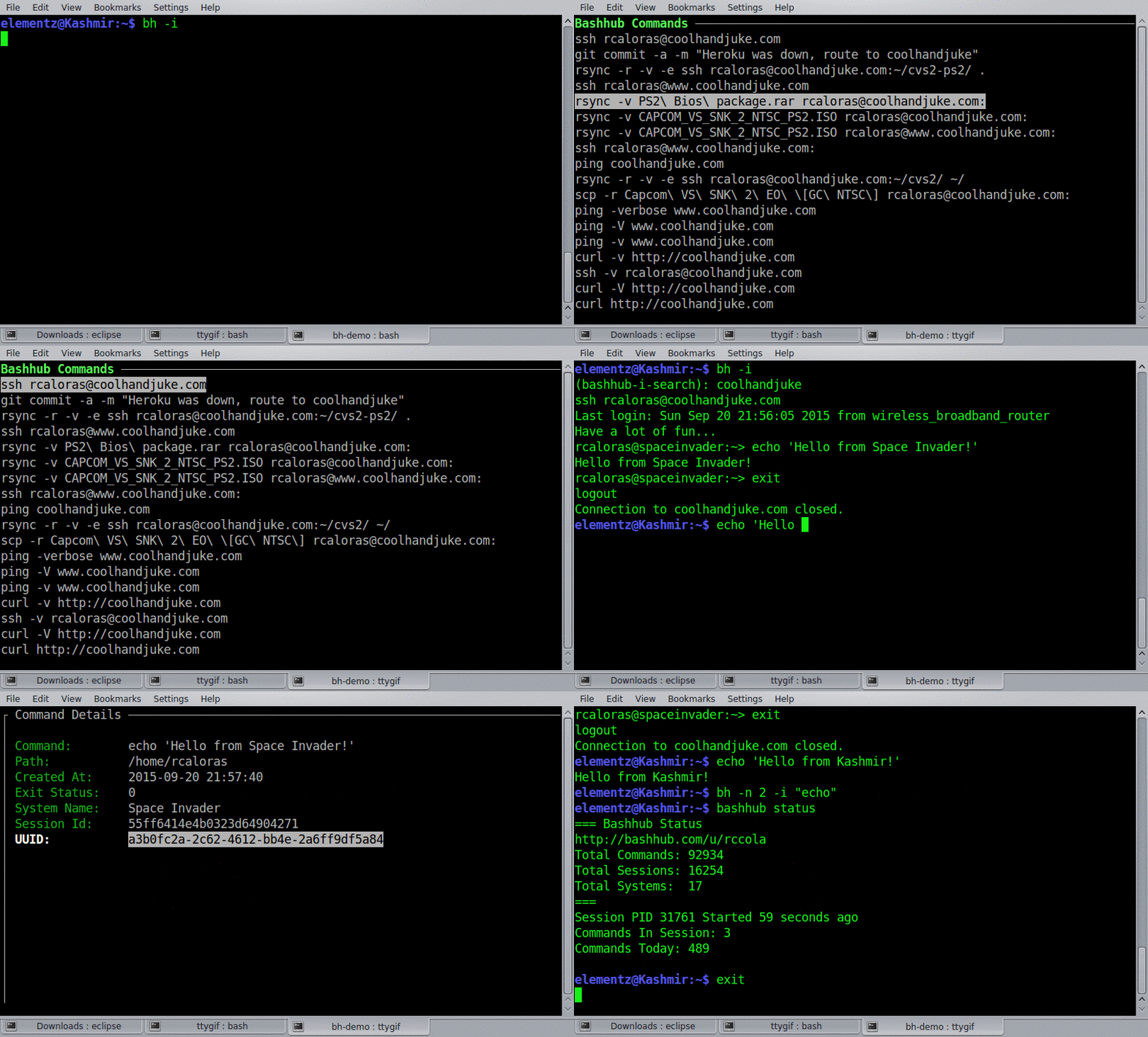
Quick Install
curl -OL https://bashhub.com/setup && $SHELL setup
For non default login shells, just specify the shell e.g. (bash setup, zsh setup, fish setup)
Detailed installation instructions can be found at https://github.com/rcaloras/bashhub-client/wiki/Install
Usage
Bashhub can be accessed from the command line in a couple ways:
bhfor searchingbashhubfor everything else
It also provides a key binding of ctrl + b for quickly dropping into interactive search.
Search
You can search through your commands in a lot of different ways. Check bh --help for more specifics. By default bh will output the most recently used unique commands to standard out. Adding the -i argument to any bh search will make it interactive. There are also several arguments to pass to filter, query, and get more specific about your searches!
Examples
The last 100 commands you executed anywhere. (100 is default limit without -n)
$ bh
The last 20 files I've grep'd.
$ bh -n 20 "grep"
Find that wget command with interactive search to execute it again :P
$ bh -i "wget github"
Directory-specific Searching
The last commands you executed in this directory.
$ bh -d
The last 10 things you vim'd in this directory
$ bh -d -n 10 "vim"
System-specific Searching
The last 10 curl commands you produced on this system
$ bh -sys -n 10 "curl"
How Search Results are Ordered
By default results are sorted by most recently used, and are unique. This means frequent commands like git status or ls will only appear once in the position they were most recently invoked.
This can be altered by using the -dups command to include duplicates
Your git commands including duplicates.
$ bh -dups "git"
Interactive Search
One of the most useful features is interactive search which is accessed via bh -i or ctrl + b. This is similar to reverse search i.e. ctrl + r. Interactive search drops you into a small menu where you can select a command to run on the command line.
Enter interactive search for all the rsync commands executed in this directory
$ bh -i -d
(bashhub-i-search): rsync
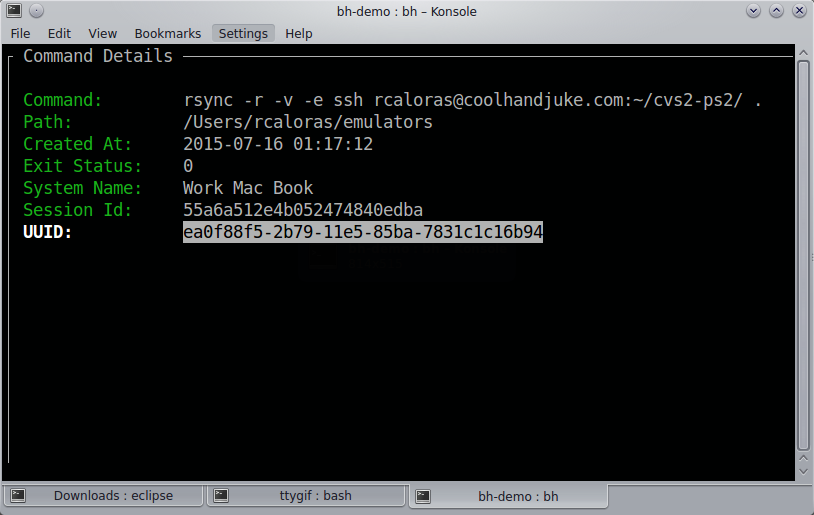
Command Details
From interactive search you can also access detailed information on each command by hitting i or space on any listed command.
Bashhub Status
You can get a summary of your user's stats/status by using the status command.
bashhub status
Most of this information is also displayed on the user profile page.
=== Bashhub Status
http://bashhub.com/u/rccola
Total Commands: 94965
Total Sessions: 16400
Total Systems:  18
===
Session PID 15311 Started 9 days ago
Commands In Session: 3
Commands Today: 47
Search with Fuzzy Finder
An efficient way of searching is using bashhub in combination with fzf. Put this in your .bashrc.
function my_alias {
  eval $(bh | fzf)
}
This will make the function available globally in your terminal.
Filtering Commands
You can filter commands from being recorded to Bashhub via a regex set to the environment variable BH_FILTER. These commands will be ignored and omittted from Bashhub.
# Filter out any commands for postgres or ssh
export BH_FILTER="(psql|ssh)"
ssh rcaloras@some-ip-address # will not be saved
You can check the configuration of this command via the bashhub filter subcommand.
# Check if a command is filtered by my regex
export BH_FILTER="(-p)"
bashhub filter "mysql -u root -p plain-text-password"
BH_FILTER=(-p)
mysql -u root -p plain-text-password
Is Filtered. Matched ['-p']
Disabling Recording Commands
You can turn on/off recording to Bashhub via bashhub on and bashhub off. By default this only affects the current bash session.
$ bashhub off
$ echo "Recording is now disabled for this session. This command won't be saved."
....
$ bashhub on
$ echo "Recording commands is now re-enabled"
You can disable for all sessions by setting bashhub off --global this sets save_commands = False in your bashhub config.
Ignoring Commands
#ignore added to any command will omit it from being saved. Simply add it to the end of any command and it won't be recorded in Bashhub.
$ echo "this command won't be saved" #ignore
Deleting Commands
You can delete commands from Bashhub through interactive search by pressing Delete or Backspace while a command is highlighted. A small dialog box will open to confirm the commands deletion. If a command is deleted, it is permanently removed from Bashhub.

Feature Requests, Bugs, and Issues
Feel free to post in: https://github.com/rcaloras/bashhub-client/issues
You can also get support and follow updates @Bashhub on Twitter.
1 maintainer

Metadata
1 maintainer
Release files for bashhub 3.1.0rc3
For a detailed explanation of source distributions (sdists) and built distributions (wheels), please see the package formats documentation.
Source distribution (sdist)
| File | Size | Uploaded | |
|---|---|---|---|
| bashhub-3.1.0rc3.tar.gz | 43.2 kB | Details |
Built distribution (wheel)
| File | Interpreter | ABI | Platform | Reset |
|---|---|---|---|---|
| bashhub-3.1.0rc3-py3-none-any.whl | Python 3 | none | any | Details |
Total release size: 82.9 kB
Release files / bashhub-3.1.0rc3.tar.gz
| Download URL | bashhub-3.1.0rc3.tar.gz |
|---|---|
| Size | 43.2 kB |
| Tags | Source |
|
SHA-256 checksum How to use checksums |
3ae707d999e0fdc9d5054eaa8b741e6d4409d3abde32391d6b8c57a56a9f577e
|
|
BLAKE2b-256 checksum How to use checksums |
adfec5fe41add708c68057f5e41da2aac4780ed7c1745b62f3f425cbb2375915
|
| Upload date | |
|
Uploaded using Trusted Publishing? What is trusted publishing? |
Yes |
| Uploaded via |
twine/7.0.0 CPython/3.13.14
|
Provenance
Provenance describes where a file came from. On PyPI, provenance is shared via attestations, which provide a verifiable record of the build or publishing details. View details, limitations and caveats.


PyPI Publish Attestation
PyPI verified that this artifact, at this checksum, originated from the publisher listed below.
Signed by GitHub Actions, verified by PyPI on Aug 27, 2026.
Transparency logRelease files / bashhub-3.1.0rc3-py3-none-any.whl
| Download URL | bashhub-3.1.0rc3-py3-none-any.whl |
|---|---|
| Size | 39.7 kB |
| Tags | Python 3 |
|
SHA-256 checksum How to use checksums |
8b55fd2100dde0d03636eb69becc8be80e51561e1540b4c0c6d806ebf0f848d7
|
|
BLAKE2b-256 checksum How to use checksums |
7eb72b755672ecedcd6f476630ed58a43bb66a8640c2ee46cf15575509d8d6d8
|
| Upload date | |
|
Uploaded using Trusted Publishing? What is trusted publishing? |
Yes |
| Uploaded via |
twine/7.0.0 CPython/3.13.14
|
Provenance
Provenance describes where a file came from. On PyPI, provenance is shared via attestations, which provide a verifiable record of the build or publishing details. View details, limitations and caveats.
PyPI Publish Attestation
PyPI verified that this artifact, at this checksum, originated from the publisher listed below.
Signed by GitHub Actions, verified by PyPI on Aug 27, 2026.
Transparency log













