
Bazarr Bulk Sync
An optimized command-line tool for bulk syncing media subtitles in Bazarr.
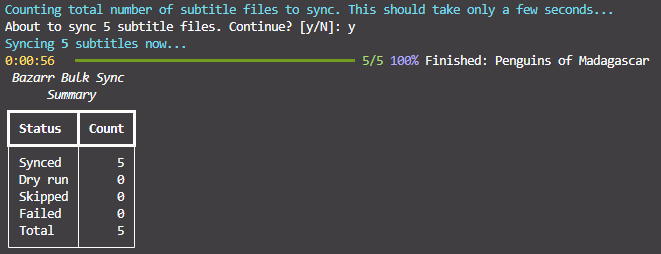
Features
- Bulk syncing
- Bulk patching (translate|remove_HI|remove_tags|OCR_fixes|common|fix_uppercase|reverse_rtl)
- Bulk deleting
- Skip processing previously processed subtitles
- Fine-grained control over which subtitles to process
- API request chunking
TL;DR Sync Everything
You should have a config file in your current working directory. Set base_url and api_key to your Bazarr instance.
Docker
# Sync all subtitles interactively.
docker run --rm -it -v ./bazarrbulksync_config.yml:/app/bazarrbulksync/bazarrbulksync_config.yml wayhowma/bazarrbulksync:0.3.0 sync all

# Sync all subtitles detached.
docker run --rm -d -v ./bazarrbulksync_config.yml:/app/bazarrbulksync/bazarrbulksync_config.yml wayhowma/bazarrbulksync:0.3.0 sync all
Local Python
# Sync all subtitles interactively.
pip install bazarrbulksync==0.3.0
bazarrbulksync sync all --config ./bazarrbulksync_config.yml
More Information
CLI Usage
The CLI was created using Rich. You can view the descriptions of different commands/options by chaining commands with --help:
# Get the CLI help page.
docker run --rm -it wayhowma/bazarrbulksync:0.3.0 --help

# Get the sync command help page.
docker run --rm -it wayhowma/bazarrbulksync:0.3.0 sync --help

# Get the sync all command help page.
docker run --rm -it wayhowma/bazarrbulksync:0.3.0 sync all --help

# Get the sync before command help page.
docker run --rm -it wayhowma/bazarrbulksync:0.3.0 sync before --help
Some --help snippets:
 Usage: bazarrbulksync [OPTIONS] COMMAND [ARGS]...

 Bulk sync and patch subtitles through Bazarr.

╭─ Options ─────────────────────────────────────────────────────────────────────────────────────────────────────────────────────────────────╮
│ --install-completion          Install completion for the current shell.                                                                   │
│ --show-completion             Show completion for the current shell, to copy it or customize the installation.                            │
│ --help                        Show this message and exit.                                                                                 │
╰───────────────────────────────────────────────────────────────────────────────────────────────────────────────────────────────────────────╯
╭─ Commands ────────────────────────────────────────────────────────────────────────────────────────────────────────────────────────────────╮
│ sync    Run bulk subtitle synchronization.                                                                                                │
│ patch   Run bulk subtitle patch actions (non-sync).                                                                                       │
│ delete  Run bulk subtitle deletion of external subtitle files.                                                                            │
╰───────────────────────────────────────────────────────────────────────────────────────────────────────────────────────────────────────────╯
 Usage: bazarrbulksync sync all [OPTIONS]

 Sync without date/datetime restriction.

╭─ Options ────────────────────────────────────────────────────────────────────────────────────────────────────────────────────────────────────────────────────────────────────────────╮
│ --config               -c                     PATH                  Path to config file.                                                                                             │
│ --series-chunk-size                           INTEGER RANGE [x>=1]  Series fetched per Bazarr list API call.                                                                         │
│ --movies-chunk-size                           INTEGER RANGE [x>=1]  Movies fetched per Bazarr list API call.                                                                         │
│ --episodes-chunk-size                         INTEGER RANGE [x>=1]  Approximate episodes fetched per API call (approximate because we fetch all the episodes in an entire series at  │
│                                                                     a time).                                                                                                         │
│ --series-ids                                  TEXT                  Comma-separated Sonarr series IDs to process (all episodes from each series given will be processed).            │
│ --movie-ids                                   TEXT                  Comma-separated Radarr movie IDs to process.                                                                     │
│ --episode-ids                                 TEXT                  Comma-separated Sonarr episode IDs to process.                                                                   │
│ --media-type                                  [series|movies|all]   Which type of media to process. [default: all]                                                                   │
│ --language                                    TEXT                  Only process subtitles with this code2 language.                                                                 │
│ --forced                   --no-forced                              Override forced flag.                                                                                            │
│ --hi                       --no-hi                                  Override hearing-impaired flag.                                                                                  │
│ --max-offset-seconds                          INTEGER RANGE [x>=1]  Maximum sync offset seconds.                                                                                     │
│ --no-fix-framerate         --fix-framerate                          Toggle framerate fixing.                                                                                         │
│ --gss                      --no-gss                                 Toggle usage of Golden-Section Search algorithm during syncing.                                                  │
│ --reference                                   TEXT                  Sync reference track or subtitle path.                                                                           │
│ --dry-run                                                           Simulate work without calling the API.                                                                           │
│ --yes                  -y                                           Skip confirmation prompts.                                                                                       │
│ --log                      --no-log                                 Turn file logging on or off for this run.                                                                        │
│ --log-file                                    PATH                  Log file path for this run (implies logging on).                                                                 │
│ --log-debug                --no-log-debug                           Verbose file log when a log file is used.                                                                        │
│ --help                                                              Show this message and exit.                                                                                      │
╰──────────────────────────────────────────────────────────────────────────────────────────────────────────────────────────────────────────────────────────────────────────────────────╯
Configuration
Bazarr Bulk Sync reads a YAML config—see the sample layout. If you omit --config, it looks for ./bazarrbulksync/bazarrbulksync_config.yml first; if that file does not exist, it uses ./bazarrbulksync_config.yml in the current working directory. With the usual Docker volume layout, the nested path inside the container is /app/bazarrbulksync/bazarrbulksync_config.yml. Use --config to point anywhere else.
The defaults in that file are sensible starting points. The options that most affect sync behaviour are max_offset_seconds, no_fix_framerate, and gss, depending on your media and subtitles.
Actual Examples
Docker
# Syncs all episodes for the series with IDs 10, 20, and 50, and syncs the movie with an ID of 5.
docker run --rm -it -v ./bazarrbulksync_config.yml:/app/bazarrbulksync/bazarrbulksync_config.yml wayhowma/bazarrbulksync:0.3.0 sync all --series-ids 10,20,50 --movie-ids 5
# Syncs all movies whose latest sync is before 2026-03-01.
docker run --rm -it -v ./bazarrbulksync_config.yml:/app/bazarrbulksync/bazarrbulksync_config.yml wayhowma/bazarrbulksync:0.3.0 sync before 2026-03-01 --media-type movies
# Syncs all subtitles with debug logging to the local ./bazarrbulksync.log file.
# Create an empty host file first so Docker bind-mounts a file, not a directory.
touch ./bazarrbulksync.log
docker run --rm -it -v ./bazarrbulksync_config.yml:/app/bazarrbulksync/bazarrbulksync_config.yml -v ./bazarrbulksync.log:/app/bazarrbulksync/bazarrbulksync.log wayhowma/bazarrbulksync:0.3.0 sync all --log --log-debug
# Preview deleting all external subtitles for a specific movie (dry-run, no files are deleted).
docker run --rm -it -v ./bazarrbulksync_config.yml:/app/bazarrbulksync/bazarrbulksync_config.yml wayhowma/bazarrbulksync:0.3.0 delete all --dry-run --movie-ids 5
Local Python
# Syncs all episodes for the series with IDs 10, 20, and 50, and syncs the movie with an ID of 5.
bazarrbulksync sync all --config ./bazarrbulksync_config.yml --series-ids 10,20,50 --movie-ids 5
# Syncs all movies whose latest sync is before 2026-03-01.
bazarrbulksync sync before 2026-03-01 --config ./bazarrbulksync_config.yml --media-type movies
# Syncs all subtitles with debug logging to the local ./bazarrbulksync.log file.
bazarrbulksync sync all --config ./bazarrbulksync_config.yml --log-file ./bazarrbulksync.log --log-debug
# Preview deleting all external subtitles for a specific movie (dry-run, no files are deleted).
bazarrbulksync delete all --config ./bazarrbulksync_config.yml --movie-ids 5 --dry-run
Contributing
If you find any bugs, or think that another feature would be worth adding, please don't hesitate to open an issue or a pull request.
1 maintainer

Metadata
1 maintainer
Release files for bazarrbulksync 0.3.0
For a detailed explanation of source distributions (sdists) and built distributions (wheels), please see the package formats documentation.
Source distribution (sdist)
| File | Size | Uploaded | |
|---|---|---|---|
| bazarrbulksync-0.3.0.tar.gz | 63.8 kB | Details |
Built distribution (wheel)
| File | Interpreter | ABI | Platform | Reset |
|---|---|---|---|---|
| bazarrbulksync-0.3.0-py3-none-any.whl | Python 3 | none | any | Details |
Total release size: 87.6 kB
Release files / bazarrbulksync-0.3.0.tar.gz
| Download URL | bazarrbulksync-0.3.0.tar.gz |
|---|---|
| Size | 63.8 kB |
| Tags | Source |
|
SHA-256 checksum How to use checksums |
1af29c83312630b9b395066b0315eb7d6478d0d774de4321d64cfaa7007b1add
|
|
BLAKE2b-256 checksum How to use checksums |
aff8c942c025e99d733a4003dfbb6175723e9c75bf394ed5d9a7db5a5b98dec4
|
| Upload date | |
|
Uploaded using Trusted Publishing? What is trusted publishing? |
No |
| Uploaded via |
uv/0.11.23 {"installer":{"name":"uv","version":"0.11.23","subcommand":["publish"]},"python":null,"implementation":{"name":null,"version":null},"distro":{"name":"Ubuntu","version":"24.04","id":"noble","libc":null},"system":{"name":null,"release":null},"cpu":null,"openssl_version":null,"setuptools_version":null,"rustc_version":null,"ci":null}
|
Release files / bazarrbulksync-0.3.0-py3-none-any.whl
| Download URL | bazarrbulksync-0.3.0-py3-none-any.whl |
|---|---|
| Size | 23.7 kB |
| Tags | Python 3 |
|
SHA-256 checksum How to use checksums |
6b2c4812bd55ea1c74bbb980c991e8bae63145bda1e6118d3f43c722ece0e1a1
|
|
BLAKE2b-256 checksum How to use checksums |
7c557b744e2e3fe858e358530564f99ceb5127b8844c7d2e5feb6e930acf5b74
|
| Upload date | |
|
Uploaded using Trusted Publishing? What is trusted publishing? |
No |
| Uploaded via |
uv/0.11.23 {"installer":{"name":"uv","version":"0.11.23","subcommand":["publish"]},"python":null,"implementation":{"name":null,"version":null},"distro":{"name":"Ubuntu","version":"24.04","id":"noble","libc":null},"system":{"name":null,"release":null},"cpu":null,"openssl_version":null,"setuptools_version":null,"rustc_version":null,"ci":null}
|














