
Bulk subtitle synchronization for Bazarr

Project description
Bazarr Bulk Sync
An optimized command-line tool for bulk syncing media subtitles in Bazarr.
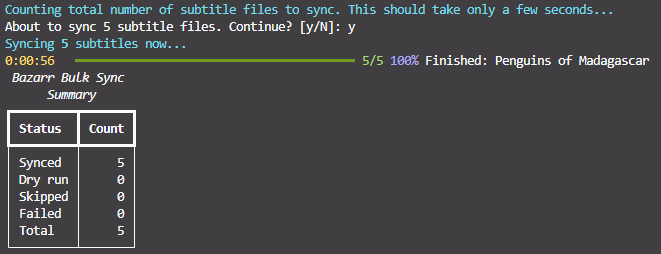
TLDR Sync Everything
You should have a config file in your current working directory. Set base_url and api_key to your Bazarr instance.
Docker
# Sync all subtitles interactively.
docker run --rm -it -v ./bazarrbulksync_config.yml:/app/bazarrbulksync/bazarrbulksync_config.yml wayhowma/bazarrbulksync:0.2.0 sync all

# Sync all subtitles detached.
docker run --rm -d -v ./bazarrbulksync_config.yml:/app/bazarrbulksync/bazarrbulksync_config.yml wayhowma/bazarrbulksync:0.2.0 sync all
Local Python
# Sync all subtitles interactively.
pip install bazarrbulksync==0.2.0
bazarrbulksync sync all --config ./bazarrbulksync_config.yml
More Information
CLI Usage
The CLI was created using Rich. You can view the descriptions of different commands/options by chaining commands with --help.
 Usage: bazarrbulksync sync all [OPTIONS]

 Sync without date/datetime restriction.

╭─ Options ──────────────────────────────────────────────────────────────────────────────────────────────────────────────────────────────────────────────────────────────────╮
│ --config               -c                     PATH                  Path to config file.                                                                                   │
│ --series-chunk-size                           INTEGER RANGE [x>=1]  Series fetched per Bazarr list API call.                                                               │
│ --movies-chunk-size                           INTEGER RANGE [x>=1]  Movies fetched per Bazarr list API call.                                                               │
│ --episodes-chunk-size                         INTEGER RANGE [x>=1]  Approximate episodes fetched per API call (approximate because we fetch all the episodes in an entire  │
│                                                                     series at a time).                                                                                     │
│ --series-ids                                  TEXT                  Comma-separated Sonarr series IDs to sync (all episodes from each series given will be synced).        │
│ --movie-ids                                   TEXT                  Comma-separated Radarr movie IDs to sync.                                                              │
│ --episode-ids                                 TEXT                  Comma-separated Sonarr episode IDs to sync.                                                            │
│ --media-type                                  [series|movies|all]   Which type of media to sync. [default: all]                                                            │
│ --language                                    TEXT                  Only sync subtitles with this code2 language.                                                          │
│ --forced                   --no-forced                              Override forced flag.                                                                                  │
│ --hi                       --no-hi                                  Override hearing-impaired flag.                                                                        │
│ --max-offset-seconds                          INTEGER RANGE [x>=1]  Maximum sync offset seconds.                                                                           │
│ --no-fix-framerate         --fix-framerate                          Toggle framerate fixing.                                                                               │
│ --gss                      --no-gss                                 Toggle usage of Golden-Section Search algorithm during syncing.                                        │
│ --reference                                   TEXT                  Sync reference track or subtitle path.                                                                 │
│ --dry-run                                                           Simulate work without calling sync.                                                                    │
│ --yes                  -y                                           Skip confirmation prompts.                                                                             │
│ --log                      --no-log                                 Turn file logging on or off for this run.                                                              │
│ --log-file                                    PATH                  Log file path for this run (implies logging on).                                                       │
│ --log-debug                --no-log-debug                           Verbose file log when a log file is used.                                                              │
│ --help                                                              Show this message and exit.                                                                            │
╰────────────────────────────────────────────────────────────────────────────────────────────────────────────────────────────────────────────────────────────────────────────╯
Examples
# Get the CLI help page.
docker run --rm -it wayhowma/bazarrbulksync:0.2.0 --help

# Get the sync command help page.
docker run --rm -it wayhowma/bazarrbulksync:0.2.0 sync --help

# Get the sync all command help page.
docker run --rm -it wayhowma/bazarrbulksync:0.2.0 sync all --help

# Get the sync before command help page.
docker run --rm -it wayhowma/bazarrbulksync:0.2.0 sync before --help
Configuration
Bazarr Bulk Sync reads a YAML config—see the sample layout. If you omit --config, it looks for ./bazarrbulksync/bazarrbulksync_config.yml first; if that file does not exist, it uses ./bazarrbulksync_config.yml in the current working directory. With the usual Docker volume layout, the nested path inside the container is /app/bazarrbulksync/bazarrbulksync_config.yml. Use --config to point anywhere else.
The defaults in that file are sensible starting points. The options that most affect sync behaviour are max_offset_seconds, no_fix_framerate, and gss, depending on your media and subtitles.
More Examples
Docker
# Syncs all episodes for the series with IDs 10, 20, and 50, and syncs the movie with an ID of 5.
docker run --rm -it -v ./bazarrbulksync_config.yml:/app/bazarrbulksync/bazarrbulksync_config.yml wayhowma/bazarrbulksync:0.2.0 sync all --series-ids 10,20,50 --movie-ids 5
# Syncs all movies whose latest sync is before 2026-03-01.
docker run --rm -it -v ./bazarrbulksync_config.yml:/app/bazarrbulksync/bazarrbulksync_config.yml wayhowma/bazarrbulksync:0.2.0 sync before 2026-03-01 --media-type movies
# Syncs all subtitles with debug logging to the local ./bazarrbulksync.log file.
# Create an empty host file first so Docker bind-mounts a file, not a directory.
touch ./bazarrbulksync.log
docker run --rm -it -v ./bazarrbulksync_config.yml:/app/bazarrbulksync/bazarrbulksync_config.yml -v ./bazarrbulksync.log:/app/bazarrbulksync/bazarrbulksync.log wayhowma/bazarrbulksync:0.2.0 sync all --log --log-debug
Local Python
# Syncs all episodes for the series with IDs 10, 20, and 50, and syncs the movie with an ID of 5.
bazarrbulksync sync all --config ./bazarrbulksync_config.yml --series-ids 10,20,50 --movie-ids 5
# Syncs all movies whose latest sync is before 2026-03-01.
bazarrbulksync sync before 2026-03-01 --config ./bazarrbulksync_config.yml --media-type movies
# Syncs all subtitles with debug logging to the local ./bazarrbulksync.log file.
bazarrbulksync sync all --config ./bazarrbulksync_config.yml --log-file ./bazarrbulksync.log --log-debug
Contributing
If you find any bugs, or think that another feature would be worth adding, please don't hesitate to open an issue or a pull request.


Download files
Download the file for your platform. If you're not sure which to choose, learn more about installing packages.
Source Distribution
Built Distribution
Filter files by name, interpreter, ABI, and platform.
If you're not sure about the file name format, learn more about wheel file names.
Copy a direct link to the current filters
File details
Details for the file bazarrbulksync-0.2.0.tar.gz.
File metadata
- Download URL: bazarrbulksync-0.2.0.tar.gz
- Upload date:
- Size: 46.0 kB
- Tags: Source
- Uploaded using Trusted Publishing? No
- Uploaded via: twine/6.2.0 CPython/3.12.3
File hashes
| Algorithm | Hash digest | |
|---|---|---|
| SHA256 |
aa2233fba2551d07722a9280296bfba5a43d84e2dcd31d001dec3b00601be9f6
|
|
| MD5 |
da88c4aa6ffe0bc291a2484c21d00846
|
|
| BLAKE2b-256 |
4d30a580685e5e3e59404fd0e3ae1fd825995fa40290fda37b0767a703af45be
|
File details
Details for the file bazarrbulksync-0.2.0-py3-none-any.whl.
File metadata
- Download URL: bazarrbulksync-0.2.0-py3-none-any.whl
- Upload date:
- Size: 20.0 kB
- Tags: Python 3
- Uploaded using Trusted Publishing? No
- Uploaded via: twine/6.2.0 CPython/3.12.3
File hashes
| Algorithm | Hash digest | |
|---|---|---|
| SHA256 |
8b8a17c18e5338c6c3581c02adc01c7dbcc2a1038f57142dd1b8230db013e7e3
|
|
| MD5 |
ee1ef7221ab857cf36e0c426de539c71
|
|
| BLAKE2b-256 |
b8f01cac37da9af917ad4b100da28bf5d97552a89b97c3ad7ac8a811679e2003
|






