

Table of Contents
About The Project
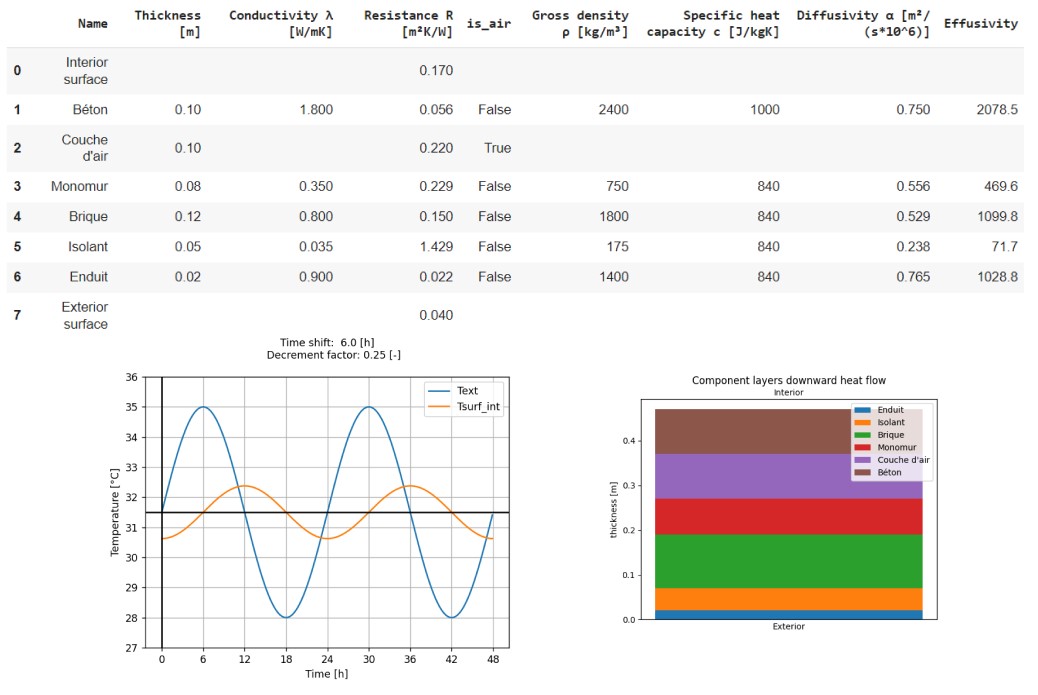
BECALIB is a tool designed to run thermal analysis of building envelope components such as walls, roofs, and floors.
With this tool, you can define the materials and air gaps in a multi-layer component, run thermal analysis, and generate diagrams.
Currently, BECALIB focuses on analyzing summer performance. Specifically, it can compute time-shift and decrement factors. These values allow designers to evaluate and quantify a component's ability to break heat flow and reduce cooling loads.
Static values like u-value and thermal resistance are also available.
BECALIB provides threshold values and performance scores to help designers enhance their components.
The calculations in BECALIB have been developed in accordance with ISO standards, including ISO 13786 and ISO 6946.
Built With
Love and:
Getting Started
BECALIB python package is available on PyPI repository.
If you have some experience with python programming and you want a Stand-alone installation, all you need is install python on your machine.
If you are not familiar with python installations you can use/copy BECALIB notebook from google Colab Notebook DEMO.
Prerequisites
Dependencies of BECALIB are available in requirements.txt file but you do not need to install anything because everything have been wrapped in BECALIB package available on PyPI
Demo
Google colab notebooks are available. If you want to try BECALIB and create your own components you can start here and duplicate the file.
Installation
Stand-alone installation:
- Activate your virtual environnement
- Install becalib with pip:
pip install becalib
Google colab notebook installation:
!pip install becalib
Usage
You can use BECALIB in a python file or a notebook (jupyter/google colab)
0. import classes and methods from BECALIB library
from becalib import MaterialLayer, AirLayer
from becalib import Component
1. Materials layers setup
Instantiate a layer objet for each component layer
Example of concrete layer setup:
concrete  =  MaterialLayer(
            name="Concrete",
            thickness=0.1, # m
            thermal_conductivity=1.8, # lambda W/mK
            specific_heat_capacity=1000, #  c J/kgK
            gross_density=2400, # ro kg/mc
Example of air gap layer setup:
air_gap  =  AirLayer(
    name="air_gap",
    thickness=0.1, # m
    heat_flow_direction="Do"
)
2. Components setup:
Instantiate a component objet and set:
- List of layers (interior to exterior)
- Heat flow direction:
"Ho": Horizontal (example: wall) or
"Up": Upwards (example Roof) or
"Do": Downwards (example floor) - language (en, fr, etc..)
wall = Component(name="Wall",
                layers=[
                concrete,
                air_gap,
                concrete ],
                heat_flow_direction="Do",
                language="en"
                )
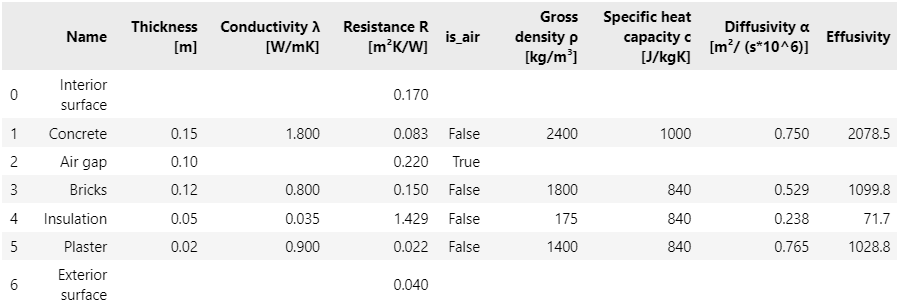
3. Get component table (Pandas DataFrame)
wall.get_layers_dataframe(data_type="st")
4. Print values
print(wall.get_summer_performance_key_values())
#######################################
Component: wall

Time period: 24 [h]

Thickness: 0.440 [m]
Resistance: 2.114 [m²K/W] Rsi and Rse included
Transmittance: 0.473 [W/m²K]

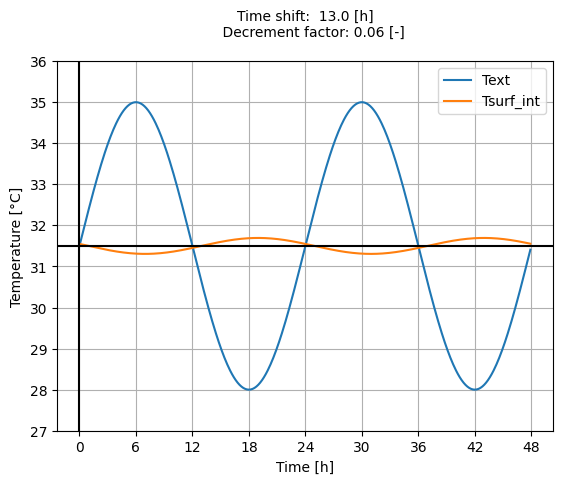
Decrement factor: 0.055 [-]
Time shift: 13.0 [h]

Interior areal heat capacity: 67.185 [kJ/m²K]

Summer performance: Excellent 5/5 (in accordance with italian DM 26/06/2009)
Surface mass: 612.8 [kg/m²]

#######################################
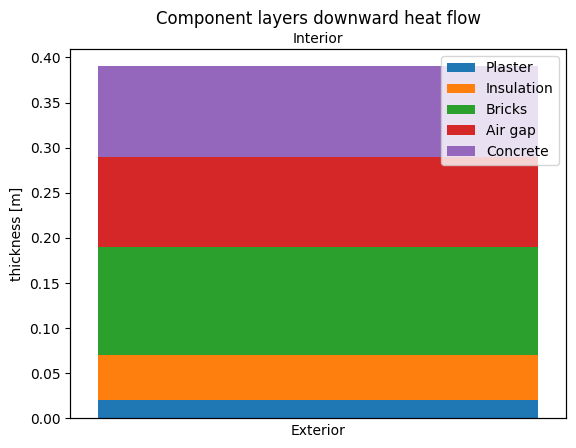
5. Plot diagrams
wall.get_component_layers_chart().show()
paroi.get_component_sinusoidal_wave_chart().show()
Roadmap
- Material and air layers classes
- Components classes
- Air resistances computations (ISO 6946:2007)
- Summer Analysis values (ISO 13786)
- Summer Analysis charts (ISO 13786)
- Add docs with Sphinx
- set Sphinx docs
- deploy docs static pages
- Add materials database
- Define standard materials database
- Component setup from material database
- Add Condensation risk analysis
- Computations
- Glaser diagram
- Add Comparator tools
- Materials comparator table
- Materials comparator charts
- Components comparator table
- Components comparator charts
- Multi-language (gettext)
- French
- Italian
- Spanish
See the open issues for a full list of proposed features (and known issues).
Contributing
Contributions are what make the open source community such an amazing place to learn, inspire, and create. Any contributions you make are greatly appreciated.
If you have a suggestion that would make this better, please fork the repo and create a pull request. You can also simply open an issue with the tag "enhancement". Don't forget to give the project a star! Thanks again!
- Fork the Project
- Create your Feature Branch (
git checkout -b feature/AmazingFeature) - Commit your Changes (
git commit -m 'Add some AmazingFeature') - Push to the Branch (
git push origin feature/AmazingFeature) - Open a Pull Request
License
Distributed under the MIT License. See LICENSE for more information.
Contact
Simone ARAGNO - aragno.simone@gmail.com
Project Link: https://github.com/SimoneAragno/becalib
Acknowledgments
1 maintainer

Metadata
1 maintainer
Release files for becalib 0.0.1
For a detailed explanation of source distributions (sdists) and built distributions (wheels), please see the package formats documentation.
Source distribution (sdist)
| File | Size | Uploaded | |
|---|---|---|---|
| becalib-0.0.1.tar.gz | 374.7 kB | Details |
Built distribution (wheel)
| File | Interpreter | ABI | Platform | Reset |
|---|---|---|---|---|
| becalib-0.0.1-py3-none-any.whl | Python 3 | none | any | Details |
Total release size: 399.3 kB
Release files / becalib-0.0.1.tar.gz
| Download URL | becalib-0.0.1.tar.gz |
|---|---|
| Size | 374.7 kB |
| Tags | Source |
|
SHA-256 checksum How to use checksums |
bdfe01d21ea335dbbc6c3ab68519659deb83837b9f252885770830436e2af3ef
|
|
BLAKE2b-256 checksum How to use checksums |
2cea0a34334f313756b82b11e73cd92253f32ae537de3ec887eb58f48a0360dd
|
| Upload date | |
|
Uploaded using Trusted Publishing? What is trusted publishing? |
No |
| Uploaded via |
twine/5.0.0 CPython/3.10.11
|
Release files / becalib-0.0.1-py3-none-any.whl
| Download URL | becalib-0.0.1-py3-none-any.whl |
|---|---|
| Size | 24.6 kB |
| Tags | Python 3 |
|
SHA-256 checksum How to use checksums |
1834872d24a398916fce2ba0294e7ea094e9b6407dcef17fc1c925ab6875b0a7
|
|
BLAKE2b-256 checksum How to use checksums |
d9cea84acf518c1222ba73d573267ff0f91c68e0dbbb825c82180336ed1a5ca7
|
| Upload date | |
|
Uploaded using Trusted Publishing? What is trusted publishing? |
No |
| Uploaded via |
twine/5.0.0 CPython/3.10.11
|













