
BehaviorGPT
The foundation model for behavior.
BehaviorGPT is Unbox AI's Large Behavioral Model. It is trained on long sequences of things people actually did (viewed this, added that, bought the other) and predicts what comes next, so search, recommendations and personalization are the same call with different histories. BehaviorGPT-v4 is a single 12.5B-parameter model pretrained on 150 billion user actions across retail, engagement and payments, and it ranks catalogs it has never seen with no training.
Website · Live demo · Research · Notebook
This repository holds the Python SDK for the Unbox AI API and a notebook that walks through the model step by step.
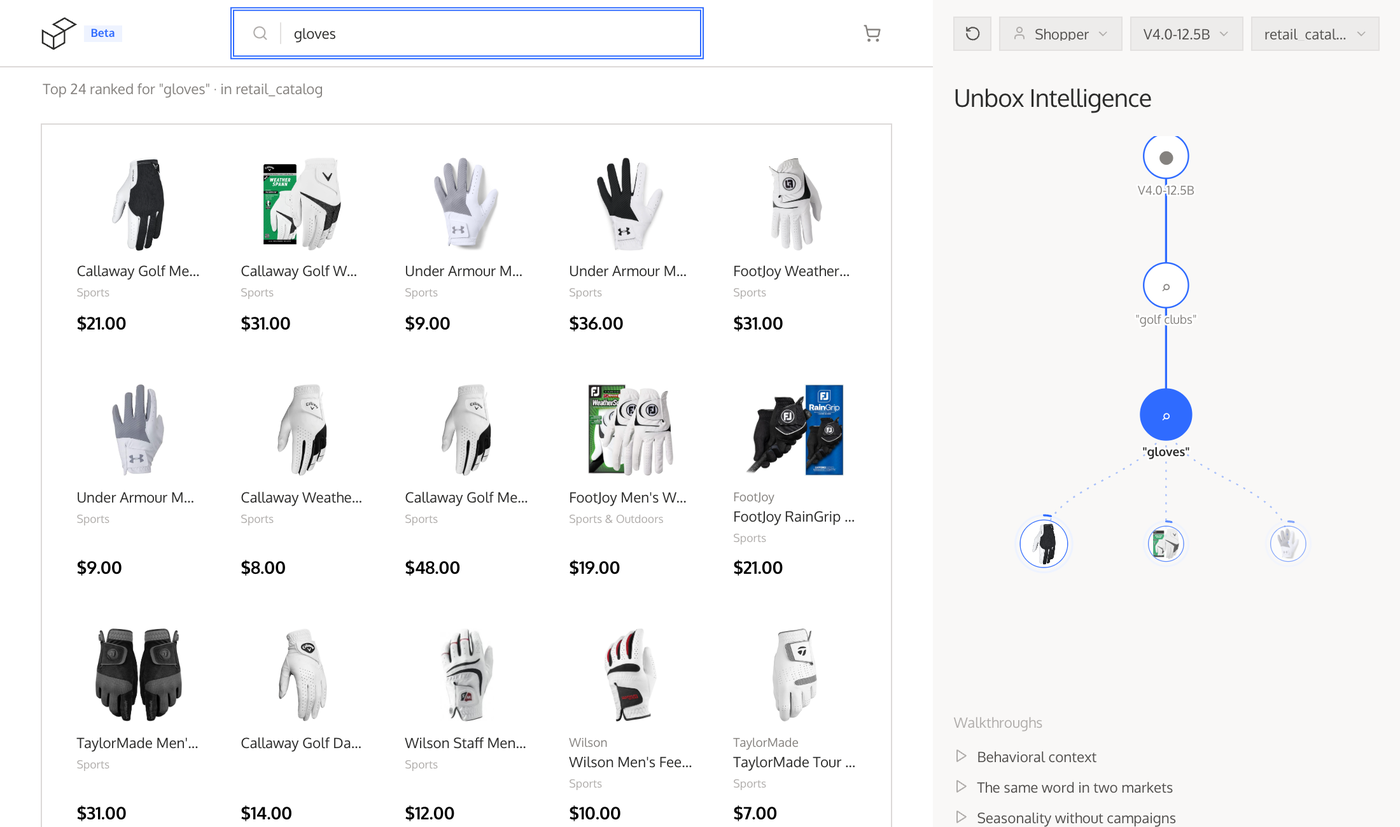
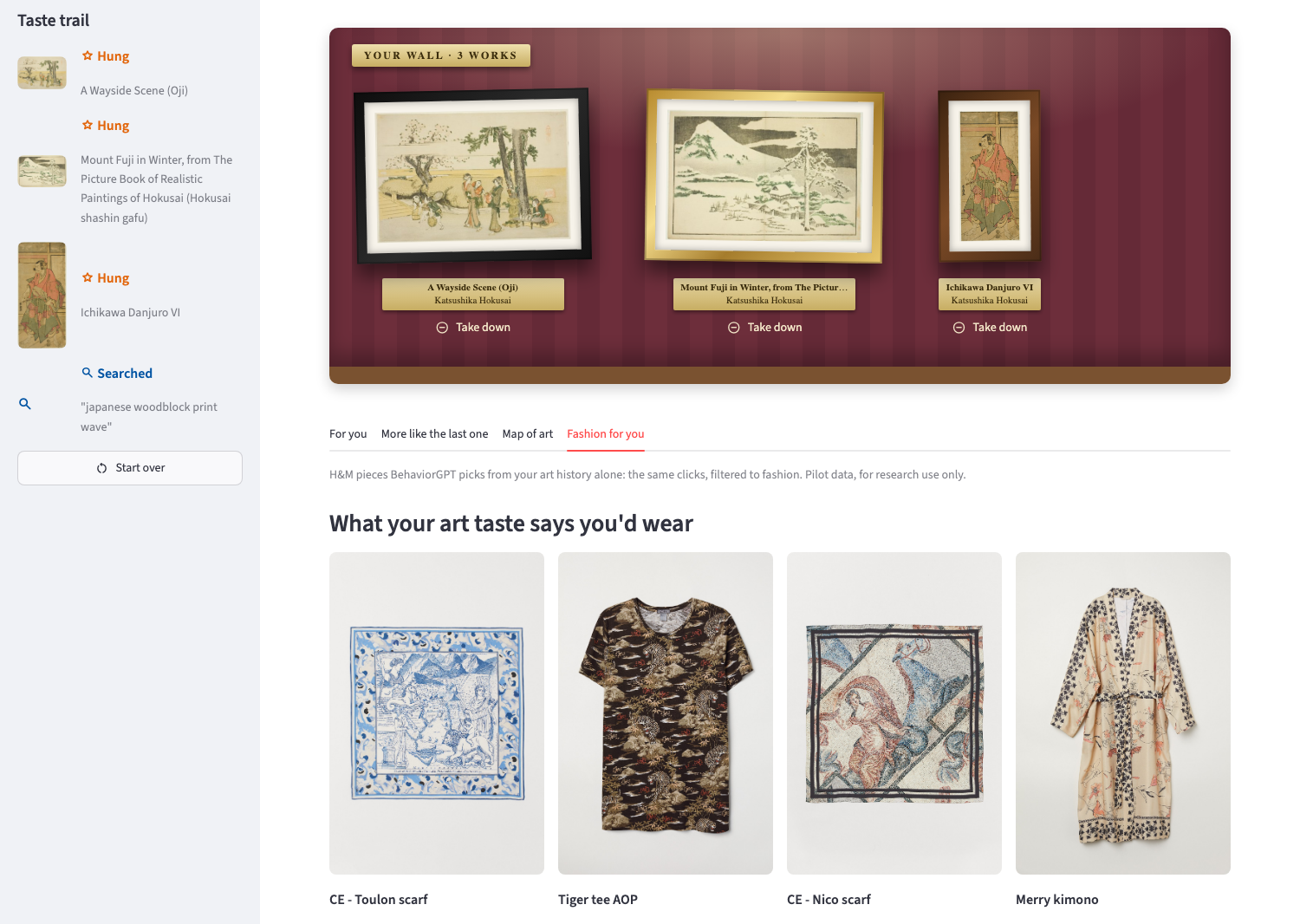
Three apps built on this SDK: two that recommend, on a store's catalog and a museum's, and one that reads the same rankings as a fraud detector.
 |
 |
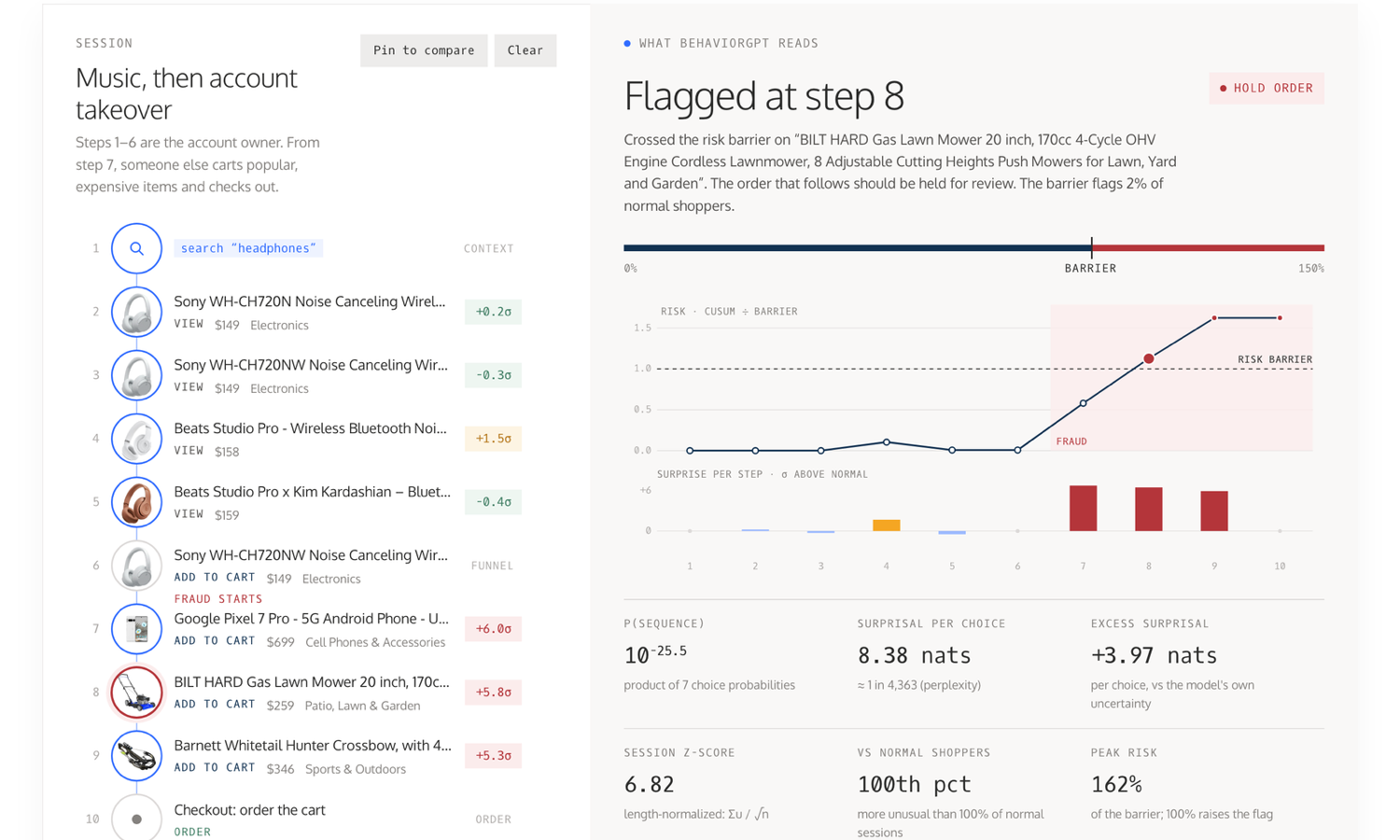 |
| Storefront (live demo). Search results and recommendations change with what the shopper did before, and a panel shows the history the model read. | Curate my wall (live app, source). 19,000 public-domain artworks from the Art Institute of Chicago. Hang three Hokusai prints, and the "Fashion for you" tab suggests scarves and kimonos from those art clicks alone. | Anomaly detection (source). An account takeover: after the owner's headphone views, someone carts a phone and then a lawn mower, and the session is flagged at the mower. No fraud labels, rules or training. |
Requirements
- An Unbox AI API key. Create and copy the key at unboxai.com/behaviorgpt; the key also arrives by email.
- Python 3.11 or newer.
Quick start
pip install behaviorgpt
export UNBOXAI_API_KEY=...   # or pass api_key= to UnboxAIClient
from behaviorgpt import Search, UnboxAIClient, View

client = UnboxAIClient(market="us")

# a history of one search
res = client.complete([Search("running shoes")], limit=5)
print(res.names)

# the same call, personalized: a viewed item (Nike pants), then a query
res = client.complete([View("paB08NYK61PJ"), Search("shoes")], limit=5)
print(res.names)

# items close to one another in the model's space
print(client.similar_items(res.items[0].id).names)
complete takes the history and returns the items most likely to come next. Each result in res.items has an id, a score and the catalog row in data; res.to_pandas() gives a DataFrame if pandas is installed.
How it works
- One call, many features. Every request asks the same question: given what this person did, which items are they most likely to act on next? The history picks the feature. End it with a
Searchfor search results, with aViewfor "more like this", with anOrderfor what they want after buying; leave it empty for a cold start. - The whole sequence counts. The model reads the history in order, so the same query means different things after different actions: "gloves" after "golf clubs" returns golf gloves. Who the person is and when they act count too (who the shopper is), which helps most when the history is short.
- Items are read from their content, not their ids. Each item is embedded from its name, brand, categories, image and price. That is why the model can rank a catalog it has never seen as soon as it is uploaded, with no interaction data and no training, and why those columns decide how well it does (catalog format).
- One pass per request. Item vectors are computed once when the catalog is embedded, so ranking the whole catalog costs one forward pass over the history rather than one per item: the model itself takes under a millisecond per query, and most of an API call's time is the network.
Events
A history is a list of three kinds of event:
Search("running shoes"): a query.View(item_id): the person looked at an item. Any sign of interest counts as a view: a click, a like, a save, an item added to a cart.Order([item_id, ...]): a finished purchase of those items. Only which items were bought matters; quantities do not change results.
The names come from a store, but they work for any catalog: map your users' actions by meaning. In Curate my wall, "look closer" is a view and "hang it on the wall" is an order, since hanging a work means choosing it. To leave something out, such as an item the person removed, leave it out of the list: taking a work down drops it from the history the app sends.
complete predicts what the person looks at next. With predict="purchase" it predicts what else goes in the same purchase as the current session's items instead; that needs a history that does not end in a search.
client.complete([View(shoe)])                      # others also viewed
client.complete([View(shoe)], predict="purchase")  # bought together
client.complete([View(shoe), Order([shoe])])       # what they want after buying it
Who the shopper is
Besides what the person did, BehaviorGPT reads who they are and when they act. Everything here is optional: what you leave out is unknown, and the model works without it.
| What | Values | Where it comes from |
|---|---|---|
| Market | a two-letter country code, such as SE |
UnboxAIClient(market=...), or User(market=...) per call |
| Gender | "female", "male" |
User(gender=...) |
| Age group | "<18", "18-25", "26-35", "36-45", "46-55", "56-65", "66-75", "76-85", ">85" |
User(age_group=...), or User(age=34), which is sent as its group |
| Local time | the year, month, day, weekday and hour of each event, in the person's time zone | UnboxAIClient(timezone=...), or User(timezone=...) per call |
from behaviorgpt import UnboxAIClient, User, View

client = UnboxAIClient(market="SE", timezone="Europe/Stockholm")
shopper = User(gender="female", age=34)
res = client.complete([View("paB08NYK61PJ")], user=shopper)
user= works with complete and sections, on the async client too, and applies to the prediction and to every event of the history. Set the time zone: the default is UTC, and the hour and weekday the model reads are then UTC's, not the shopper's. Values outside the lists above raise an error rather than being sent. A raw age never leaves your server, only its group, and postal codes are not sent.
If your site already sends events (the portal's browser script, or POST /events), pass the person's id instead of a history: client.complete(user_id=uid, user=shopper). The API ranks on the events it has stored for that id, so pass no history, or only the Search(...) to run: client.complete([Search("sofa")], user_id=uid). With the browser script, the id is in the unbox_uid cookie.
A call with a user_id is recorded for that person, so it shows in their events in the portal. Its search is stored as their event, marked via="search" (or "sections") so it isn't mistaken for one your site sent; the same search sent by your site within a minute is kept once. The call itself, what it was for and the items it showed, is kept apart and never becomes part of their history: client.events.calls(user_id=uid) lists them. Pass register_event=False to record nothing, for example for a ranking your own staff look at.
From your server, record events with client.events.track, and read back what your account has stored with client.events.list, newest first:
client.events.track(uid, View(shoe), user=shopper)
client.events.track(uid, Order([shoe]), timestamp=paid_at)  # sent later than it happened

client.events.list(user_id=uid, limit=20)
client.events.list(stream="api", types=["order"])  # what your server sent; a stream is also a publishable key or an import
An event's catalog is catalog_id=, else the one an Item of a response names, else the client's default. Pass timestamp= whenever you send an event after it happened, so the history stays in order.
Search suggestions
autocomplete suggests searches as the person types. BehaviorGPT ranks the items they most likely want given their history and the text so far, and each top item offers the first of its keywords that continues the text, allowing for a typo. So the same letters give different suggestions to different people:
client.autocomplete("coffee m").texts
# ['coffee maker', 'ninja coffee maker', 'coffee', 'keurig coffee machine', ...]

client.autocomplete("gl", [Search("winter jacket")]).texts
# ['gloves', 'mens gloves', 'winter gloves', ...]
Each suggestion has its text, the item it came from, and its source: "keyword", or "name" for an item without keywords, which offers its name instead (add_keywords generates them, see your own catalog). With a user_id it is recorded only as an "autocomplete" call, never as a search, so call it on each keystroke (after a short pause, about 150 ms, and cancel the previous call), and call complete with Search(...) once the person searches. Empty text suggests what comes after the history. It takes catalog_id, catalog_ids, user and user_id as complete does; limit is at most 20.
When a few letters after earlier searches read as more of the same ("gl" after "golf clubs" ranks golf clubs), and too few of those items continue the text, the rest of the suggestions come from a second ranking of the text alone.
Your own catalog
The model can only return items it knows about. Out of the box the client uses retail_catalog, a sample retail catalog. To use the model on your own data, upload your catalog as a parquet file. A catalog doesn't have to be products for sale: artworks, articles, listings or anything else people browse and pick from work the same way.
docs/catalog-format.md lists the columns the file needs. A CSV with those column names converts to parquet with catalog_from_csv; examples/sample_catalog.csv shows what each column holds.
from behaviorgpt import catalog_from_csv

path = catalog_from_csv("my_catalog.csv")  # writes my_catalog.parquet
job = client.embed(path, wait=True, timeout=1800.0)
client.complete([Search("...")], catalog_id=job.catalog_id)
To make your catalog the default, so calls need no catalog_id, set UNBOXAI_CATALOG_ID=cat_... or pass default_catalog_id= to the client.
A catalog holds up to 100,000 items, and each API key holds 2 catalogs. The file name is the catalog's name, so uploading the same name again refreshes that catalog.
Once it is embedded, you can add or replace items, list and delete catalogs, and generate the keywords that sections uses to group results under titles such as "black coats", and autocomplete suggests:
client.add_items("new_items.parquet", catalog_id=job.catalog_id, wait=True)
client.list_catalogs()
client.delete_catalog("cat_...")

client.add_keywords(job.catalog_id, wait=True)  # 12 minutes for 19,000 items
for section in client.sections([Search("coat")], catalog_id=job.catalog_id).sections:
    print(section.title, [item.data["name"] for item in section.items])
To rank several catalogs together, say your own next to retail_catalog, pass catalog_ids instead of catalog_id. One ranking comes back, and each item says which catalog it is in:
res = client.complete([View(shoe)], catalog_ids=[job.catalog_id, "retail_catalog"])
for item in res.items:
    print(item.catalog_id, item.data["name"])
catalog_ids also draws several catalogs on one map, one colour each, so you can see where they overlap. The first request takes a few minutes; later ones for the same catalogs return the stored map:
page = client.umap(catalog_ids=[job.catalog_id, "retail_catalog"], wait=300)
with open("map.html", "w") as f:
    f.write(page)
docs/catalogs.md has the details: catalog slots, what replacing an item keeps, how long keywords take, what happens when a job fails, and how a history names items of several catalogs.
If mapping your data to the format is hard, open a coding agent in this directory and ask it to embed your catalog. The repo ships a skill at .claude/skills/embed-catalog/SKILL.md that walks the agent through mapping your columns, building and validating the parquet, checking image URLs, and uploading. Claude Code picks it up automatically; for other agents, point them at that file.
To build an app of your own that opens from your Home on portal.unboxai.com on the catalogs selected there, see "Your own app" under "Build with it" on Home. The skill .claude/skills/portal-app/SKILL.md builds one with an agent.
To try your catalog in the storefront demo, select the BehaviorGPT V4.0-12.5B model, choose Bring your own catalog and enter your API key. Images must be publicly reachable for the demo to display them.
The notebook
notebooks/showcase.ipynb covers the model in eight steps: setup, a first query, one call for many features, how context changes the answer, then embedding your own catalog, inspecting the embedding space, querying it, and trying it in the demo.
Needs uv. Clone, install, add your key, register the kernel, start JupyterLab:
git clone https://github.com/Unbox-AI/behaviorgpt.git
cd behaviorgpt
uv sync
cp .env.example .env   # paste your key as UNBOXAI_API_KEY
uv run ipython kernel install --user --env VIRTUAL_ENV $(pwd)/.venv --name=behaviorgpt-env
uv run jupyter lab
JupyterLab opens in your browser. Open the notebook and pick the behaviorgpt-env kernel.
Async
In asyncio code, such as a FastAPI or aiohttp server, use AsyncUnboxAIClient. It takes the same arguments and has the same methods, awaited, so a call never blocks the event loop and many calls can run at once:
import asyncio

from behaviorgpt import AsyncUnboxAIClient, Search

async def main():
    async with AsyncUnboxAIClient(market="us") as client:
        shoes, gloves = await asyncio.gather(
            client.complete([Search("running shoes")], limit=5),
            client.complete([Search("gloves")], limit=5),
        )
        print(shoes.names, gloves.names)

asyncio.run(main())
Create one client and reuse it, for example for the lifetime of your server: async with closes its connections at the end, or call await client.aclose(). embed(..., wait=True) waits for the job without blocking other requests.
1 maintainer

Metadata
1 maintainer
Release files for behaviorgpt 0.7.0
For a detailed explanation of source distributions (sdists) and built distributions (wheels), please see the package formats documentation.
Source distribution (sdist)
| File | Size | Uploaded | Provenance | Actions |
|---|---|---|---|---|
| behaviorgpt-0.7.0.tar.gz | 39.6 kB | With provenance | Details for behaviorgpt-0.7.0.tar.gz |
Built distribution (wheel)
| File | Interpreter | ABI | Platform | Actions Reset |
|---|---|---|---|---|
| behaviorgpt-0.7.0-py3-none-any.whl | Python 3 | none | any | Details for behaviorgpt-0.7.0-py3-none-any.whl |
Total release size: 85.3 kB
Release files / behaviorgpt-0.7.0.tar.gz
| Download URL | behaviorgpt-0.7.0.tar.gz |
|---|---|
| Size | 39.6 kB |
| Tags | Source |
|
SHA-256 checksum How to use checksums |
621685d940c51c60aa46796b2addafded35232ba1a1f73b58c74265b495e49bf
|
|
BLAKE2b-256 checksum How to use checksums |
ccd8eb670dfe16c7f7da0e1c888be36676093d4cb1919db81df968b2b05e0db8
|
| Upload date | |
|
Uploaded using Trusted Publishing? What is trusted publishing? |
Yes |
| Uploaded via |
twine/7.0.0 CPython/3.13.16
|
Provenance
Provenance describes where a file came from. On PyPI, provenance is shared via attestations, which provide a verifiable record of the build or publishing details. View details, limitations and caveats.


PyPI Publish Attestation
PyPI verified that this artifact, at this checksum, originated from the publisher listed below.
Signed by GitHub Actions, verified by PyPI on Oct 29, 2026.
Transparency logRelease files / behaviorgpt-0.7.0-py3-none-any.whl
| Download URL | behaviorgpt-0.7.0-py3-none-any.whl |
|---|---|
| Size | 45.7 kB |
| Tags | Python 3 |
|
SHA-256 checksum How to use checksums |
327238e5969b21e06336b1af00fb212036de3a4e98d7287b0e323cc71ddb7177
|
|
BLAKE2b-256 checksum How to use checksums |
8f180c60f7e6135ddffd167190ab9da3b48458c79f9d1c9eb6f269234e5d466e
|
| Upload date | |
|
Uploaded using Trusted Publishing? What is trusted publishing? |
Yes |
| Uploaded via |
twine/7.0.0 CPython/3.13.16
|
Provenance
Provenance describes where a file came from. On PyPI, provenance is shared via attestations, which provide a verifiable record of the build or publishing details. View details, limitations and caveats.
PyPI Publish Attestation
PyPI verified that this artifact, at this checksum, originated from the publisher listed below.
Signed by GitHub Actions, verified by PyPI on Oct 29, 2026.
Transparency logSecurity for behaviorgpt 0.7.0
Provenance
Provenance describes where a file came from. On PyPI, provenance is shared via attestations, which provide a verifiable record of the build or publishing details. View details, limitations and caveats.
Full provenance
Both files in this release have been uploaded with provenance metadata.
Attestation for behaviorgpt-0.7.0.tar.gz
PyPI Publish Attestation
PyPI verified that this artifact, at this checksum, originated from the publisher listed below.
Signed by GitHub Actions, verified by PyPI on Oct 29, 2026.
Transparency logA note on package security
PyPI is a repository for distributing packages, not a service for auditing them. While third-party security researchers and our staff do their best to detect and remove malicious packages, PyPI cannot guarantee the quality, security or suitability of any given package.
To learn more about protecting yourself from malicious actors, visit our package security documentation.














