
Explaining Random Forest model predictions by Building Explanations through a LocaLly AccuraTe Rule EXtractor

Project description









Bellatrex: Explain your Random Forest predictions
Bellatrex is a Python library designed to generate concise, interpretable, and visually appealing explanations for predictions made by Random Forest models. The name says it all: Bellatrex stands for Building Explanations through a LocalLy AccuraTe Rule EXtractor.
Curious about the details and inner mechanisms of Bellatrex? Check out our paper and jump into the reproducibility branch to dive into the experiments.
Table of Contents
- How Bellatrex works
- Supported models and tasks
- Installation
- Quickstart
- API Overview
- Support and Contributions
- References
How Bellatrex works
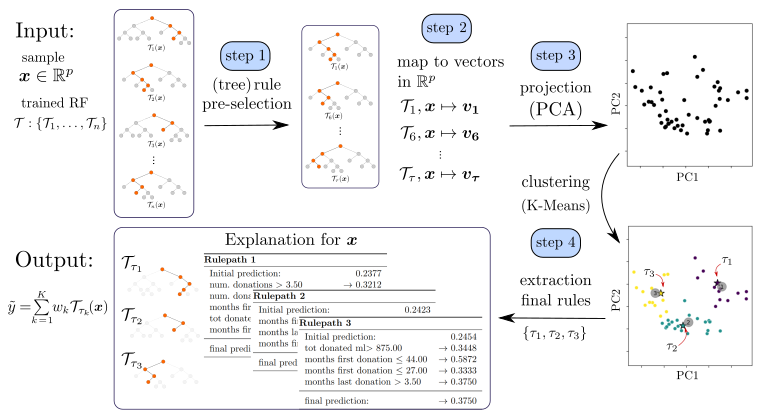
When explaining a prediction for a specific test instance, Bellatrex:
- pre-selects a subset of the rules used to make the prediction;
- creates a vector representation of such rules and (optionally) projects them into a low-dimensional space
- clusters such representations to pick a rule from each cluster to explain the instance prediction.
- Shows the selected rule through visually appealing plots, and the tool's GUI allows users to explore similar rules to those extracted.
|
| Overview of Bellatrex, starting from top left, proceeding clockwise, we reach the output with related explanations on the bottom left. |
Supported models and tasks
The current support of Bellatrex focuses on Random Forest models implemented via scikit-learn and scikit-survival:
- Classification tasks and multi-label classification via
RandomForestClassifier - Regression tasks and multi-target regression via
RandomForestRegressor - Survival Analysis (time-to-event predictions with censoring) via
RandomSurvivalForest
Set-up
To install Bellatrex, create an anaconda environment:
conda create -n bellatrex python=3.12
and install the package:
pip install bellatrex
If this step fails and you don't find a solution immediately, please open an issue. In the meantime, you can also try to clone the repository manually.
Interactive GUI mode
The NiceGUI-based interactive frontend is installed by default with:
pip install bellatrex
The legacy command still works as a compatibility alias:
pip install bellatrex[gui]
or you can install the browser GUI dependency manually:
pip install nicegui
Note: Bellatrex installs the browser GUI everywhere, and adds native window support automatically where the platform backend is available. On Windows with Python 3.14, Bellatrex currently falls back to browser-based GUI mode because the native pythonnet backend does not yet support that Python version. When running Bellatrex with the GUI for multiple test samples, the program will generate an interactive window in your browser. The user can explore the generated rules by clicking on the corresponding representation. To show the Bellatrex explanation for the next sample, interact with the interface and wait until Bellatrex generates the explanation for the new sample.
Quickstart
The following example explains individual predictions from a RandomForestClassifier on the breast cancer dataset:
from sklearn.datasets import load_breast_cancer
from sklearn.ensemble import RandomForestClassifier
from sklearn.model_selection import train_test_split
from bellatrex import BellatrexExplain

# 1. Train a Random Forest
X, y = load_breast_cancer(return_X_y=True, as_frame=True)
X_train, X_test, y_train, y_test = train_test_split(X, y, random_state=0)
clf = RandomForestClassifier(n_estimators=100, random_state=0).fit(X_train, y_train)

# 2. Fit the Bellatrex explainer on training data
explainer = BellatrexExplain(clf).fit(X_train, y_train)

# 3. Explain the prediction for the first test instance (method-chainable)
explainer.explain(X_test, idx=0).plot_overview()           # cluster overview plot
explainer.explain(X_test, idx=0).plot_visuals()            # rule-level detail plot
explainer.explain(X_test, idx=0).create_rules_txt()        # save explanation as text
explainer.explain(X_test, idx=0).print_rules_txt()         # print explanation to console
For a step-by-step walkthrough covering all supported tasks (regression, survival analysis, multi-label classification), see tutorial.ipynb.
API Overview
BellatrexExplain
The main class for generating explanations.
from bellatrex import BellatrexExplain

explainer = BellatrexExplain(
    clf,                          # trained (or untrained) RF / RSF model, or a packed dict
    set_up="auto",                # task type: "auto", "binary", "regression", "survival",
                                  #            "multi-label", "multi-target"
    p_grid={                      # hyperparameter search grid
        "n_trees":    [0.6, 0.8, 1.0],   # fraction (or count) of trees to pre-select
        "n_dims":     [2, None],          # PCA dimensions; None = no projection
        "n_clusters": [1, 2, 3],          # number of explanation rules to return
    },
    proj_method="PCA",            # dimensionality reduction: "PCA" (default) or None
    dissim_method="rules",        # tree dissimilarity metric
    feature_represent="weighted", # feature representation strategy
    n_jobs=1,                     # parallelism (experimental)
    verbose=0,                    # verbosity: 0 = silent, higher = more output
)
| Method | Description |
|---|---|
.fit(X_train, y_train) |
Fit the explainer (trains the RF if not yet fitted). Returns self. |
.explain(X_test, idx) |
Run Bellatrex for the sample at positional index idx. Returns self. |
.plot_overview(plot_gui=False) |
Cluster overview: representations, selected rules, and tree plots. |
.plot_visuals(...) |
Rule-level detail plot with optional prediction distribution and confidence bands. Single-output tasks only. |
.create_rules_txt(out_dir, out_file) |
Write the explanation rules to a .txt file. Returns the file paths. |
.print_rules_txt(out_dir, out_file) |
Print the explanation rules to stdout. |
pack_trained_ensemble
Converts a trained scikit-learn / scikit-survival forest into a compact dictionary
format, useful for serialisation or passing externally trained models to Bellatrex.
from bellatrex import pack_trained_ensemble

clf_packed = pack_trained_ensemble(clf)  # clf must already be fitted
explainer = BellatrexExplain(clf_packed).fit(X_train, y_train)
Support and Contributions
Bellatrex is an open-source project that was initially developed from research funding by Flanders AI. Since the end of that funding period, the project has been maintained through volunteer work, but there is always exciting work ahead: new features, performance improvements, tests for robustness... if you find Bellatrex useful or believe in its goals, there are several meaningful ways you can help support its ongoing development:
- 🐛 Test and Report Issues: if you encounter any bugs, inconsistencies, or simply find areas for improvement, open an issue and share example code and error traces.
- ⭐ Give a star Bellatrex: it will make the project more visible to others and motivate ongoing voluntary development.
- 🔧 Contribute code: open a PR directly for small fixes, or open an issue first to discuss larger changes. See ROADMAP.md for planned features.
References
Please cite the following paper if you are using Bellatrex:
Dedja, K., Nakano, F.K., Pliakos, K. and Vens, C., 2023. BELLATREX: Building explanations through a locally accurate rule extractor. Ieee Access, 11, pp.41348-41367.
@article{dedja2023bellatrex,
  title={BELLATREX: Building explanations through a locally accurate rule extractor},
  author={Dedja, Klest and Nakano, Felipe Kenji and Pliakos, Konstantinos and Vens, Celine},
  journal={Ieee Access},
  volume={11},
  pages={41348--41367},
  year={2023},
  publisher={IEEE}
}


Download files
Download the file for your platform. If you're not sure which to choose, learn more about installing packages.
Source Distribution
Built Distribution
Filter files by name, interpreter, ABI, and platform.
If you're not sure about the file name format, learn more about wheel file names.
Copy a direct link to the current filters
File details
Details for the file bellatrex-0.4.0.tar.gz.
File metadata
- Download URL: bellatrex-0.4.0.tar.gz
- Upload date:
- Size: 146.1 kB
- Tags: Source
- Uploaded using Trusted Publishing? Yes
- Uploaded via: twine/6.1.0 CPython/3.13.12
File hashes
| Algorithm | Hash digest | |
|---|---|---|
| SHA256 |
1da372b832e5bf0282babc9bb207e14f41fd619d8cda726db9ecf71e6bec5980
|
|
| MD5 |
450589be36dc0df6bf14ef2bddf88736
|
|
| BLAKE2b-256 |
38f9e0db4eaafb09b25bff93d4a0e6a1c62f23319766dd07a31fc4431368928c
|
Provenance
The following attestation bundles were made for bellatrex-0.4.0.tar.gz:
Publisher:
release.yaml on KlestDedja/Bellatrex
-
Statement:
-
Statement type:
https://in-toto.io/Statement/v1 -
Predicate type:
https://docs.pypi.org/attestations/publish/v1 -
Subject name:
bellatrex-0.4.0.tar.gz -
Subject digest:
1da372b832e5bf0282babc9bb207e14f41fd619d8cda726db9ecf71e6bec5980 - Sigstore transparency entry: 1758369601
- Sigstore integration time:
-
Permalink:
KlestDedja/Bellatrex@5bfbae0b3f1db37a3873476e9ecefbef85629203 -
Branch / Tag:
refs/tags/v0.4.0 - Owner: https://github.com/KlestDedja
-
Access:
public
-
Token Issuer:
https://token.actions.githubusercontent.com -
Runner Environment:
github-hosted -
Publication workflow:
release.yaml@5bfbae0b3f1db37a3873476e9ecefbef85629203 -
Trigger Event:
push
-
Statement type:
File details
Details for the file bellatrex-0.4.0-py3-none-any.whl.
File metadata
- Download URL: bellatrex-0.4.0-py3-none-any.whl
- Upload date:
- Size: 137.6 kB
- Tags: Python 3
- Uploaded using Trusted Publishing? Yes
- Uploaded via: twine/6.1.0 CPython/3.13.12
File hashes
| Algorithm | Hash digest | |
|---|---|---|
| SHA256 |
c574bbb5282a5832af01512fbb27724e77ac97d61772d238d2123a40cd595a01
|
|
| MD5 |
1efae4ab8a3808869dbf21cb6c5258a4
|
|
| BLAKE2b-256 |
7673489504214d717d7ea9933b85cc7e7640d791764de6707bd39f014c0d9384
|
Provenance
The following attestation bundles were made for bellatrex-0.4.0-py3-none-any.whl:
Publisher:
release.yaml on KlestDedja/Bellatrex
-
Statement:
-
Statement type:
https://in-toto.io/Statement/v1 -
Predicate type:
https://docs.pypi.org/attestations/publish/v1 -
Subject name:
bellatrex-0.4.0-py3-none-any.whl -
Subject digest:
c574bbb5282a5832af01512fbb27724e77ac97d61772d238d2123a40cd595a01 - Sigstore transparency entry: 1758369620
- Sigstore integration time:
-
Permalink:
KlestDedja/Bellatrex@5bfbae0b3f1db37a3873476e9ecefbef85629203 -
Branch / Tag:
refs/tags/v0.4.0 - Owner: https://github.com/KlestDedja
-
Access:
public
-
Token Issuer:
https://token.actions.githubusercontent.com -
Runner Environment:
github-hosted -
Publication workflow:
release.yaml@5bfbae0b3f1db37a3873476e9ecefbef85629203 -
Trigger Event:
push
-
Statement type:






