
A toolbox for Building Explanations through a LocaLly AccuraTe Rule EXtractor

Project description




Welcome to Bellatrex!
Random Forest models can be difficult to interpret, and Bellatrex addresses this challenge by generating explanations that are easy to understand, and by providing insights into how the model arrived at its predictions. Bellatrex does so by Building Explanations through a LocalLy AccuraTe Rule EXtractor (hence the name: Bellatrex) for a given test instance, by extracting only a few, diverse rules. See the published paper for more details. The code for reproducing its results is available in a different GitHub branch.
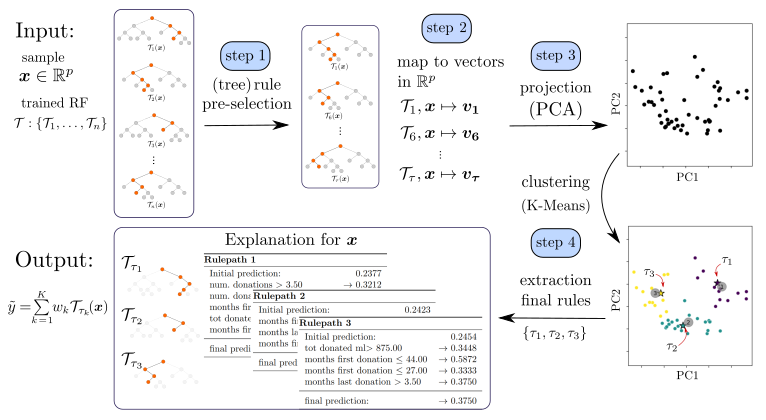
To illustrate how Bellatrex works, let's consider an example: when a user provides a test instance to Bellatrex, the tool begins by 1) pre-selecting a subset of the rules used to make the prediction; it then creates 2) a vector representation of such rules and 3) projects them to a low-dimensional space; Bellatrex then 4) clusters such representations to pick a rule from each cluster to explain the instance prediction. One rule per cluster is shown to the end user through visually appealing plots, and the tool's GUI allows users to explore similar rules to those extracted.
|
| Overview of Bellatrex, starting from top left, proceeding clockwise, we reach the output with related explanations on the bottom left. |
Another strength of Bellatrex lies in its ability to handle several prediction tasks within scikit-learn implementations of Random Forests. For instance, Bellatrex can generate explanations for binary classification and multi-label predictions tasks with RandomForestClassifier, as well as single- or multi-output regression tasks with RandomForestRegressor. Moreover, Bellatrex is compatible with scikit-survival's RandomSurvivalForest, allowing it to generate explanations for time-to-event predictions in the presence of right-censored data.
This repository contains:
- instructions to run Bellatrex on your machine
- an overview of the datasets used to test the effectiveness of the method
- access to such datasets, as they appear after the pre-processing step.
Set-up
To install the standard version of Bellatrex, run:
pip install bellatrex
In case the previous step does not work, then the pip distribution is not working as expected so please contact us, and in the meantime try with a manual clone from the repository.
Enable Graphical User Interface
For an enhanced user experience that includes interactive plots, you can run:
pip install bellatrex[gui]
or manually install the following packages on top of bellatrex:
pip install dearpygui==1.6.2
pip install dearpygui-ext==0.9.5
Note: When running Bellatrex with the GUI for multiple test samples, the program will generate an interactive window. The process may take a couple of seconds, and the the user has to click at least once within the generated window in order to activate the interactive mode. Once this is done, the user can explore the generated rules by clicking on the corresponding representation. To show the Bellatrex explanation for the next sample, close the interactive window and wait until Bellatrex generates the explanation for the new sample.
Ready to go!
If you have downloaded the content of this folder and installed the packages successfully, you can dive into tutorial.ipynb and try Bellatrex yourself.
Enjoying Bellatrex?
Bellatrex is an open-source project that was initially developed with support from research funding provided by Flanders AI. Since the end of that funding period, the project has been maintained through volunteer work, but there is always exiting work ahead: new features, performance improvements, tests for robustness... if you find Bellatrex useful or believe in its goals, there are several meaningful ways you can help support its ongoing development:
🐛 Test and Report Issues
Use Bellatrex in your own projects and let us know how it performs. If you encounter any bugs, inconsistencies, open an issue and share example code and error traces.
If you find areas for improvement, send us feedback alos by opening an issue.
⭐ Star Bellatrex
Easy: simply add a ⭐ to the project. It will make the project more visible to others and motivate ongoing voluntary development.


Download files
Download the file for your platform. If you're not sure which to choose, learn more about installing packages.
Source Distribution
Built Distribution
Filter files by name, interpreter, ABI, and platform.
If you're not sure about the file name format, learn more about wheel file names.
Copy a direct link to the current filters
File details
Details for the file bellatrex-0.2.4.tar.gz.
File metadata
- Download URL: bellatrex-0.2.4.tar.gz
- Upload date:
- Size: 120.3 kB
- Tags: Source
- Uploaded using Trusted Publishing? No
- Uploaded via: twine/6.1.0 CPython/3.12.9
File hashes
| Algorithm | Hash digest | |
|---|---|---|
| SHA256 |
c96611cdc6eb92d83ba445c97153d6fab455ee338dcee4cfcf7dbfc6c1c509e7
|
|
| MD5 |
82e085c237062554f0cbcc4e2dafb4de
|
|
| BLAKE2b-256 |
2cdb1d524577f6332b07fc0c9c21db05c6eb8d8560a78f65fdbceaf32ad5466b
|
File details
Details for the file bellatrex-0.2.4-py3-none-any.whl.
File metadata
- Download URL: bellatrex-0.2.4-py3-none-any.whl
- Upload date:
- Size: 121.8 kB
- Tags: Python 3
- Uploaded using Trusted Publishing? No
- Uploaded via: twine/6.1.0 CPython/3.12.9
File hashes
| Algorithm | Hash digest | |
|---|---|---|
| SHA256 |
a7923ccf1331ccc710995c1f21a9b822fd76496650a04178b46361a701591920
|
|
| MD5 |
0c2f6c96cd84544ecff3d636a3a17a9b
|
|
| BLAKE2b-256 |
11ff52a3d9f9013e44ce95d3863b69540e11256858629a4ff64aaea96556ad6d
|






