
Automatic data change tracking for Django

Project description

Website · Docs · Example · Report Bug · Request Feature · Discord · X · LinkedIn
Bemi Django
Bemi plugs into Django and your existing PostgreSQL database to track data changes automatically. It unlocks robust context-aware audit trails and time travel querying inside your application.
Designed with simplicity and non-invasiveness in mind, Bemi doesn't require any alterations to your existing database structure. It operates in the background, empowering you with data change tracking features.
This library is an optional Django integration, enabling you to pass application-specific context when performing database changes. This can include context such as the 'where' (API endpoint, worker, etc.), 'who' (user, cron job, etc.), and 'how' behind a change, thereby enriching the information captured by Bemi.
Contents
Highlights
- Automatic and secure database change tracking with application-specific context in a structured form
- 100% reliability in capturing data changes, even if executed through direct SQL outside the application
- High performance without affecting code runtime execution and database workload
- Easy-to-use without changing table structures and rewriting the code
- Time travel querying and ability to easily group and filter changes
- Scalability with an automatically provisioned cloud infrastructure
- Full ownership of your data
See an example repo for Django that automatically tracks all changes.
Use cases
There's a wide range of use cases that Bemi is built for! The tech was initially built as a compliance engineering system for fintech that supported $15B worth of assets under management, but has since been extracted into a general-purpose utility. Some use cases include:
- Audit Trails: Use logs for compliance purposes or surface them to customer support and external customers.
- Change Reversion: Revert changes made by a user or rollback all data changes within an API request.
- Time Travel: Retrieve historical data without implementing event sourcing.
- Troubleshooting: Identify the root cause of application issues.
- Distributed Tracing: Track changes across distributed systems.
- Testing: Rollback or roll-forward to different application test states.
- Analyzing Trends: Gain insights into historical trends and changes for informed decision-making.
Quickstart
Install the Python package
pip install bemi-django
Add the Bemi middleware to your Django project app and add the path to a get_bemi_context function to automatically pass application context with all tracked database changes made within an HTTP request:
# settings.py

MIDDLEWARE = [
  # Your other middleware
  'bemi-django.BemiMiddleware',
]

BEMI_CONTEXT_FUNCTION = 'your_project.utils.get_bemi_context'
# utils.py

def get_bemi_context(request):
  # Any custom context dict
  return {
    'user_id': request.user.id,
    'method': request.method,
    'path': request.path,
  }
Make database changes and check how they're stored with your context in a table called changes in the destination DB:
psql -h [HOSTNAME] -U [USERNAME] -d [DATABASE] -c 'SELECT "primary_key", "table", "operation", "before", "after", "context", "committed_at" FROM changes;'

 primary_key | table | operation |                       before                       |                       after                         |                        context                                                            |      committed_at
-------------+-------+-----------+----------------------------------------------------+-----------------------------------------------------+-------------------------------------------------------------------------------------------+------------------------
 26          | todo  | CREATE    | {}                                                 | {"id": 26, "task": "Sleep", "is_completed": false}  | {"user_id": 187234, "endpoint": "/todo", "method": "POST", "SQL": "INSERT INTO ..."}      | 2023-12-11 17:09:09+00
 27          | todo  | CREATE    | {}                                                 | {"id": 27, "task": "Eat", "is_completed": false}    | {"user_id": 187234, "endpoint": "/todo", "method": "POST", "SQL": "INSERT INTO ..."}      | 2023-12-11 17:09:11+00
 28          | todo  | CREATE    | {}                                                 | {"id": 28, "task": "Repeat", "is_completed": false} | {"user_id": 187234, "endpoint": "/todo", "method": "POST", "SQL": "INSERT INTO ..."}      | 2023-12-11 17:09:13+00
 26          | todo  | UPDATE    | {"id": 26, "task": "Sleep", "is_completed": false} | {"id": 26, "task": "Sleep", "is_completed": true}   | {"user_id": 187234, "endpoint": "/todo/complete", "method": "PUT", "SQL": "UPDATE ..."}   | 2023-12-11 17:09:15+00
 27          | todo  | DELETE    | {"id": 27, "task": "Eat", "is_completed": false}   | {}                                                  | {"user_id": 187234, "endpoint": "/todo/27", "method": "DELETE", "SQL": "DELETE FROM ..."} | 2023-12-11 17:09:18+00
Check out our Django Docs for more details.
Architecture overview
Bemi is designed to be lightweight and secure. It takes a practical approach to achieving the benefits of event sourcing without requiring rearchitecting existing code, switching to highly specialized databases, or using unnecessary git-like abstractions on top of databases. We want your system to work the way it already does with your existing database to allow keeping things as simple as possible.
Bemi plugs into both the database and application levels, ensuring 100% reliability and a comprehensive understanding of every change.
On the database level, Bemi securely connects to PostgreSQL's Write-Ahead Log and implements Change Data Capture. This allows tracking even the changes that get triggered via direct SQL.
On the application level, this Python package automatically passes application context to the replication logs to enhance the low-level database changes. For example, information about a user who made a change, an API endpoint where the change was triggered, a worker name that automatically triggered database changes, etc.
Bemi workers then stitch the low-level data with the application context and store this information in a structured easily queryable format, as depicted below:
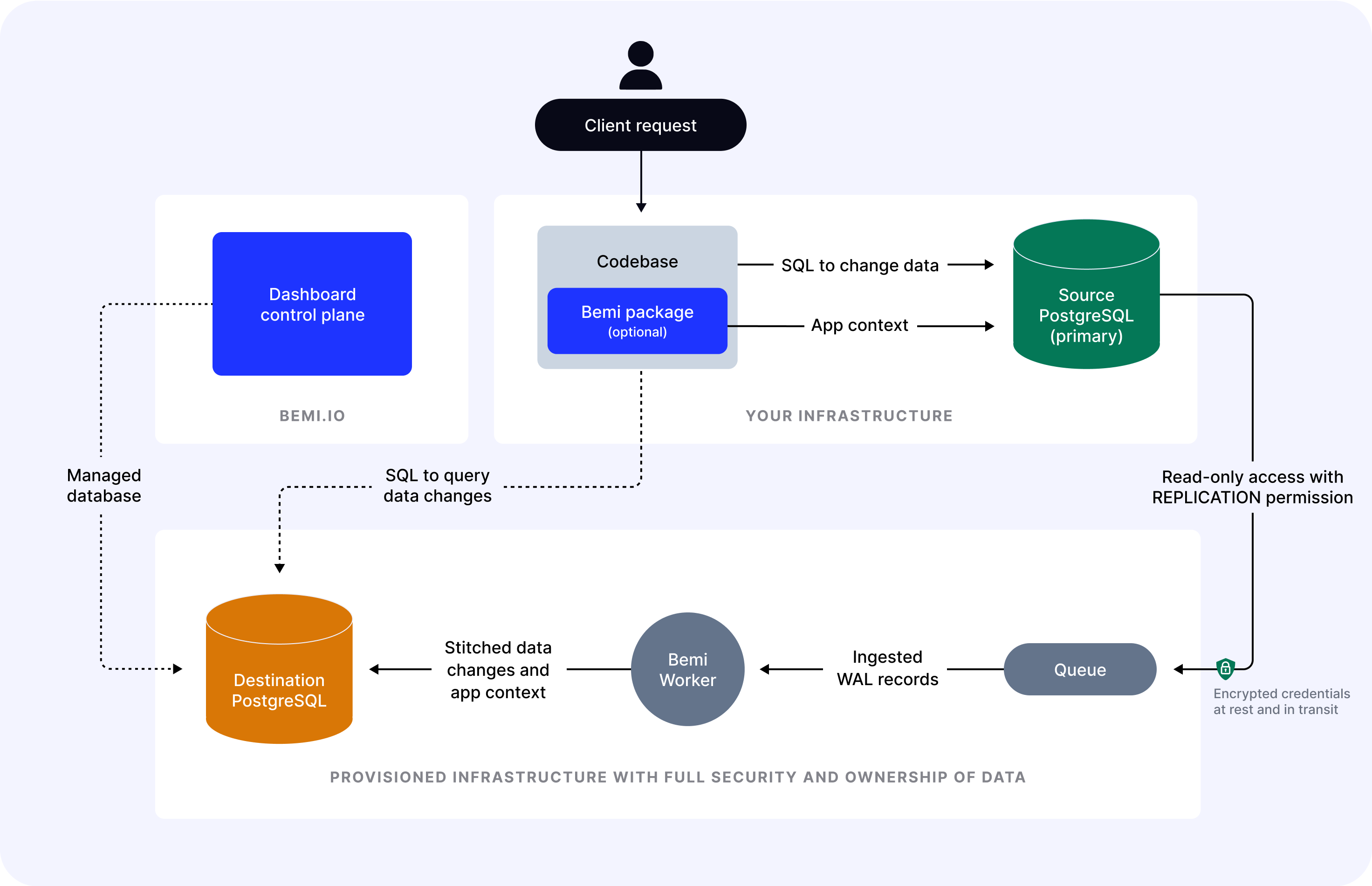
The cloud solution includes worker ingesters, queues for fault tolerance, and an automatically scalable cloud-hosted PostgreSQL. Bemi currently doesn't support a self hosted option, but contact us if this is required.
License
Distributed under the terms of the LGPL-3.0 License. If you need to modify and distribute the code, please release it to contribute back to the open-source community.
Release history Release notifications | RSS feed


Download files
Download the file for your platform. If you're not sure which to choose, learn more about installing packages.
Source Distribution
Built Distribution
Filter files by name, interpreter, ABI, and platform.
If you're not sure about the file name format, learn more about wheel file names.
Copy a direct link to the current filters
File details
Details for the file bemi_django-0.0.2.tar.gz.
File metadata
- Download URL: bemi_django-0.0.2.tar.gz
- Upload date:
- Size: 8.2 kB
- Tags: Source
- Uploaded using Trusted Publishing? No
- Uploaded via: twine/5.1.1 CPython/3.9.6
File hashes
| Algorithm | Hash digest | |
|---|---|---|
| SHA256 |
8731817a1a80d43c29440780e651fe12f8f9b506d180992dfad2697c577f6b70
|
|
| MD5 |
29b0d7317017453496ba87e6d2274350
|
|
| BLAKE2b-256 |
e44ab95cb4788ac6f9c7233ec818990b18bbd4cecac08bc732b96fe922d64f83
|
File details
Details for the file bemi_django-0.0.2-py3-none-any.whl.
File metadata
- Download URL: bemi_django-0.0.2-py3-none-any.whl
- Upload date:
- Size: 8.2 kB
- Tags: Python 3
- Uploaded using Trusted Publishing? No
- Uploaded via: twine/5.1.1 CPython/3.9.6
File hashes
| Algorithm | Hash digest | |
|---|---|---|
| SHA256 |
f3d8299c7e438db1e716f49a81933a347630ee3a31fa63fa51160b15dd692de5
|
|
| MD5 |
835c00413de04947c77fd5ee707fee6c
|
|
| BLAKE2b-256 |
6618c75e4f34ee7bd66a9bc1810527dfbc9f873ac1474552efb2fffca273d5af
|






