
A tool for easy benchmarking.

Project description
BenchFlow



Agent benchmark runtime to manage logs, results, and environment variable configurations consistently.
Overview
Benchflow is an AI benchmark runtime platform designed to provide a unified environment for benchmarking and performance evaluation of your intelligent agents. It not only offers a wide range of easy-to-run benchmarks but also tracks the entire lifecycle of an agent—including recording prompts, execution times, costs, and various metrics—helping you quickly evaluate and optimize your agent's performance.
Feature Overview
- Easy-to-Run Benchmarks: Comes with a large collection of built-in benchmarks that let you quickly verify your agent’s capabilities.
- Complete Lifecycle Tracking: Automatically records prompts, responses, execution times, costs, and other performance metrics during agent invocations.
- Efficient Agent Evaluation: Benchflow’s evaluation mechanism can deliver over a 3× speed improvement in assessments, helping you stand out from the competition.
- Benchmark Packaging: Supports packaging benchmarks into standardized suites, making it easier for Benchmark Developers to integrate and release tests.
Installation
pip install benchflow
Introduction
Benchflow caters to two primary roles:
- Agent Developer: Test and evaluate your AI agent.
- Benchmark Developer: Integrate and publish your custom-designed benchmarks.
For Agent Developers
You can start testing your agent in just two steps:
1. Integrate Your Agent
In your agent code, inherit from the BaseAgent class provided by Benchflow and implement the necessary methods. For example:
from benchflow import BaseAgent

class YourAgent(BaseAgent):
    def call_api(self, *args, **kwargs):
        # Define how to call your agent's API
        pass
2. Run the Benchmark
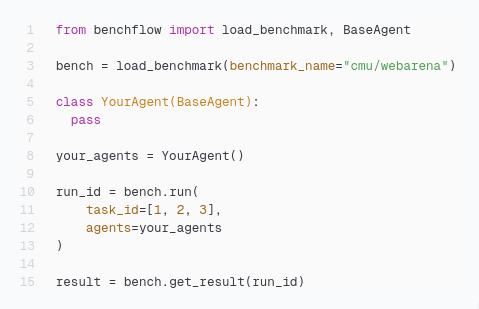
Load and run a benchmark using the provided Benchflow interface. For example:
import os
from benchflow import load_benchmark

# Load the specified benchmark
bench = load_benchmark("benchmark_name")
your_agent = YourAgent()

# Run the benchmark
run_ids = bench.run(
    agents=your_agent,
    requirements_dir="requirements.txt",
    api={"OPENAI_API_KEY": os.getenv("OPENAI_API_KEY")},
    params={}
)

# Retrieve the test results
results = bench.get_results(run_ids)
For Benchmark Developers
Integrating your benchmark into Benchflow involves three steps:
1. Create a Benchmark Client
Develop a Benchmark Client class that sets up the testing environment for the agent and parses its responses. For example:
from benchflow import BenchClient
from typing import Dict, Any

class YourBenchClient(BenchClient):
    def __init__(self, agent_url: str):
        super().__init__(agent_url)

    def prepare_environment(self, state_update: Dict) -> Dict:
        """Prepare environment information for the agent during the benchmark."""
        return {
            "env_info": {
                "info1": state_update['info1'],
                "info2": state_update['info2']
            }
        }

    def parse_action(self, raw_action: str) -> str:
        """Process the response returned by the agent."""
        # Process the raw response and return the parsed action
        return raw_action  # Modify as needed for your use case
2. Encapsulate Your Benchmark Logic
Package your benchmark logic into a Docker image. The image should be configured to read necessary environment variables (such as AGENT_URL, TEST_START_IDX, etc.) and encapsulate the benchmark logic within the container.
3. Upload Your Benchmark to Benchflow
Extend the BaseBench class provided by Benchflow to configure your benchmark and upload it to the platform. For example:
from benchflow import BaseBench, BaseBenchConfig
from typing import Dict, Any

class YourBenchConfig(BaseBenchConfig):
    # Define required and optional environment variables
    required_env = []
    optional_env = ["INSTANCE_IDS", "MAX_WORKERS", "RUN_ID"]

    def __init__(self, params: Dict[str, Any], task_id: str):
        params.setdefault("INSTANCE_IDS", task_id)
        params.setdefault("MAX_WORKERS", 1)
        params.setdefault("RUN_ID", task_id)
        super().__init__(params)

class YourBench(BaseBench):
    def __init__(self):
        super().__init__()

    def get_config(self, params: Dict[str, Any], task_id: str) -> BaseBenchConfig:
        """Return a benchmark configuration instance to validate input parameters."""
        return YourBenchConfig(params, task_id)

    def get_image_name(self) -> str:
        """Return the Docker image name that runs the benchmark."""
        return "your_docker_image_url"

    def get_results_dir_in_container(self) -> str:
        """Return the directory path inside the container where benchmark results are stored."""
        return "/app/results"

    def get_log_files_dir_in_container(self) -> str:
        """Return the directory path inside the container where log files are stored."""
        return "/app/log_files"

    def get_result(self, task_id: str) -> Dict[str, Any]:
        """
        Read and parse the benchmark results.
        For example, read a log file from the results directory and extract the average score and pass status.
        """
        # Implement your reading and parsing logic here
        is_resolved = True  # Example value
        score = 100        # Example value
        log_content = "Benchmark run completed successfully."
        return {
            "is_resolved": is_resolved,
            "score": score,
            "message": {"details": "Task runs successfully."},
            "log": log_content
        }

    def get_all_tasks(self, split: str) -> Dict[str, Any]:
        """
        Return a dictionary containing all task IDs, along with an optional error message.
        """
        task_ids = ["0", "1", "2"]  # Example task IDs
        return {"task_ids": task_ids, "error_message": None}
Examples
Explore two example implementations to understand how to use Benchflow effectively, please visit Examples.
Summary
Benchflow provides a complete platform for testing and evaluating AI agents:
- For Agent Developers: Simply extend
BaseAgentand call the benchmark interface to quickly verify your agent’s performance. - For Benchmark Developers: Follow the three-step process—creating a client, packaging your Docker image, and uploading your benchmark—to integrate your custom tests into the Benchflow platform.
For more detailed documentation and sample code, please visit the Benchflow GitBook.
BaseBenchConfig Class
Used to define and validate the environment variables required for benchmark execution. Extend this class to customize the configuration by overriding required_env, optional_env, and defaults.
License
This project is licensed under the MIT License.
By following these steps, you can quickly implement and integrate your own AI benchmarks using the latest version of BaseBench. If you have any questions or suggestions, please feel free to submit an issue or pull request.
Release history Release notifications | RSS feed


Download files
Download the file for your platform. If you're not sure which to choose, learn more about installing packages.
Source Distribution
Built Distribution
Filter files by name, interpreter, ABI, and platform.
If you're not sure about the file name format, learn more about wheel file names.
Copy a direct link to the current filters
File details
Details for the file benchflow-0.1.9.tar.gz.
File metadata
- Download URL: benchflow-0.1.9.tar.gz
- Upload date:
- Size: 149.1 kB
- Tags: Source
- Uploaded using Trusted Publishing? No
- Uploaded via: uv/0.6.3
File hashes
| Algorithm | Hash digest | |
|---|---|---|
| SHA256 |
6322e430113cba62451036cbe189dc5df0589631642c458a5e937bae18b7bb5a
|
|
| MD5 |
5b87e39f3b1f629afba5c8812477a7ed
|
|
| BLAKE2b-256 |
9bf7c626f98906bbeab56a86b3456aaeba266861c400aea7638b257223a50088
|
File details
Details for the file benchflow-0.1.9-py3-none-any.whl.
File metadata
- Download URL: benchflow-0.1.9-py3-none-any.whl
- Upload date:
- Size: 42.3 kB
- Tags: Python 3
- Uploaded using Trusted Publishing? No
- Uploaded via: uv/0.6.3
File hashes
| Algorithm | Hash digest | |
|---|---|---|
| SHA256 |
d6eab9abe3607d0151506b6097b995e2241dfd4ace264595b03e62da87ddb4a0
|
|
| MD5 |
bbf2a02a730acf3f7f659112979082d1
|
|
| BLAKE2b-256 |
cbff3a6bc1c5eb43f9d79f8c02087bc563f0145535913ba4503de8c04593dfad
|






