
bl


Why BL
Because ak is a bit slow and I was tired of waiting around
Install
You need Python >= 3.12.
pipx install bl-odoo
Usage
For all those command bl will try to look in the current directory. If it does find the spec file
it will try to look in the child odoo directory. (i.e. you can launch bl in the root of you project)
You can also override the default paths and verbosity with:
-c/--config: path to the project spec file (default:spec.yaml)-z/--frozen: path to the frozen spec file (default:frozen.yaml)-o/--config-override: path to an override config to extend the project specification-j/--concurrency: number of concurrent tasks (default:28)-b/--use-bindfs: use bindfs instead of creating symlinks (requiresuser_allow_otherin/etc/fuse.conf)-w/--workdir: working directory, defaults to the directory of--config-N/--no-check-version: do not check PyPI for a newer BL version before running--log-level: one ofDEBUG,INFO,WARNING,ERROR,CRITICAL(default:WARNING)
Per-project config is stored in $XDG_CONFIG_HOME/bl/<project>/config.ini.
Git commands run without terminal prompts, so credentials for private repos must already be configured.
Build
bl build [-c PATH_TO_SPEC] [-z PATH_TO_FROZEN] [-o CONFIG_OVERRIDE] [-j CONCURRENCY] [-b/--use-bindfs] [-w WORKDIR] [-N/--no-check-version] [--log-level LEVEL]
What does it do
It does what ak build does. Managed repos get a BL pre-commit hook to avoid accidental commits. Repos marked editable are skipped.
Params
PATH_TO_SPECpath to your spec (default:spec.yaml)PATH_TO_FROZENpath to your frozen spec (default:frozen.yaml)CONFIG_OVERRIDEpath to an override config to extend the project specificationCONCURRENCYnumber of module clone simultaneously (default:28)--use-bindfsuse bindfs instead of creating symlinks (requiresuser_allow_otherin/etc/fuse.conf)WORKDIRworking directory; if omitted, the directory containingspec.yaml--no-check-versionskip the PyPI version checkLEVELlog level (see--log-levelabove)
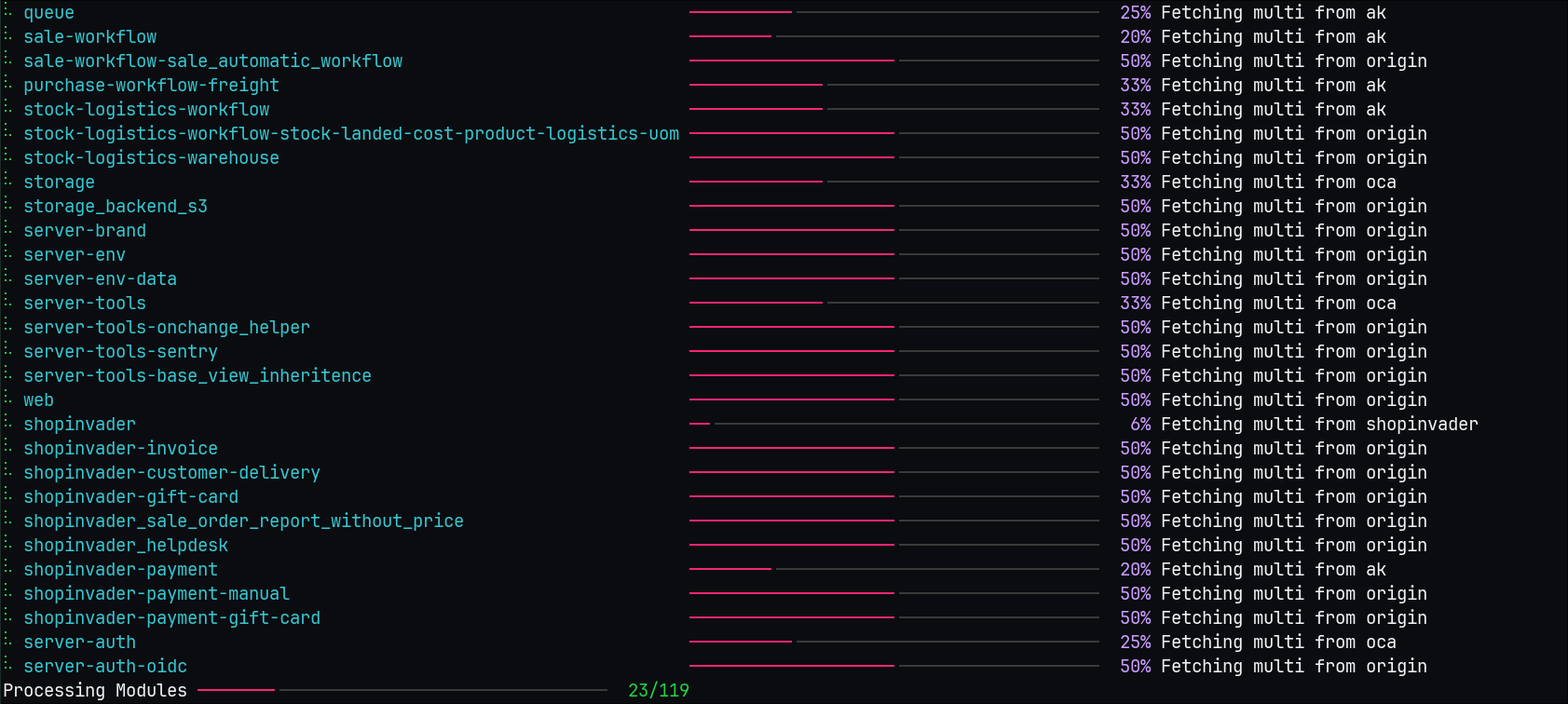
How it looks
Freeze
bl freeze [-c PATH_TO_SPEC] [-z PATH_TO_FROZEN] [-o CONFIG_OVERRIDE] [-j CONCURRENCY] [-w WORKDIR] [-N/--no-check-version] [--log-level LEVEL]
What does it do
It does what ak freeze does
Params
PATH_TO_SPECpath to your spec (default:spec.yaml)PATH_TO_FROZENpath to your frozen spec (default:frozen.yaml)CONFIG_OVERRIDEpath to an override config to extend the project specificationCONCURRENCYnumber of module clone simultaneously (default:28)WORKDIRworking directory; if omitted, the directory containingspec.yaml--no-check-versionskip the PyPI version checkLEVELlog level (see--log-levelabove)
Diff
bl diff [-c PATH_TO_SPEC] [-z PATH_TO_FROZEN] [-o CONFIG_OVERRIDE] [-j CONCURRENCY] [-w WORKDIR] [-N/--no-check-version] [--log-level LEVEL]
What does it do
Shows diff for all dirty repos in the project.
Params
PATH_TO_SPECpath to your spec (default:spec.yaml)PATH_TO_FROZENpath to your frozen spec (default:frozen.yaml)CONFIG_OVERRIDEpath to an override config to extend the project specificationCONCURRENCYnumber of module clone simultaneously (default:28)WORKDIRworking directory; if omitted, the directory containingspec.yaml--no-check-versionskip the PyPI version checkLEVELlog level (see--log-levelabove)
Edit
bl edit REPOSITORY_NAME [--remove] [options]
bl edit . [--remove] [options]
What does it do
Turns a managed repo into an editable/full checkout: disables sparse checkout, fetches full content/history, removes the BL locking hook, and saves the editable state.
Use bl edit <repo> before committing locally. Editable repos are remembered and skipped by future builds.
Use bl edit . from a repository or one of its subdirectories to make that repository editable.
BL uses the nearest spec.yaml in the current directory or up to five parent directories,
then matches your location against the repositories in that spec, including custom target_folder paths.
An explicit -c/--config selects the spec instead; -w/--workdir still overrides its working directory.
The command fails if no nearby spec exists or the current directory is outside its repositories.
Use bl edit <repo> --remove (or bl edit . --remove) to delete only the saved editable status. It does not reset or
otherwise change the checkout; the next bl build will manage the repo again.
Params
REPOSITORY_NAMErepo to make editable, or.for the current repo--removeremove the repo's saved editable statusoptionssame shared options as above
Clean
bl clean [-c PATH_TO_SPEC] [-o CONFIG_OVERRIDE] [-w WORKDIR] [-N/--no-check-version] [--log-level LEVEL] [--remove] [--unlink] [--force] [--dry-run]
What does it do
By default it scans all repos in the spec for dirty git state and resets them with git reset --hard.
Params
PATH_TO_SPECpath to your spec (default:spec.yaml)CONFIG_OVERRIDEpath to an override config to extend the project specificationWORKDIRworking directory; if omitted, the directory containingspec.yaml--no-check-versionskip the PyPI version checkLEVELlog level (see--log-levelabove)--removedeletesrcandexternal-srcdirectories--unlinkalso clean the links directory--forceremove confirmation prompts--dry-runjust output what it would do
Init
bl init [DESTINATION]
What does it do
Initializes a new project from the docky-odoo-template-shared template using Copier.
Params
DESTINATIONdestination directory (default: current directory)
Odoo is taking a really long time to clone
Yes !
You can add a locales entry to your odoo repo in spec.yaml like so:
odoo:
  modules:
    - account
    ...
  remotes:
    odoo: https://github.com/odoo/odoo
  merges:
    - odoo 14.0
  locales:
    - fr
    - en
It will only download the french and english translation instead of all of them
- without locales: 849MB and 40 seconds fresh build
- with locales fr, en: 169MB and 27 seconds fresh build
⚠️ WARNING: you must list all the odoo modules you need if you use the locales property
Repo specs can also set editable: true when you want BL to treat it as editable from the start (default is false):
folder_name:
  editable: true
  modules:
    ...
I have warnings about patch globs
There is a new property to handle git am <patch_glob> (the old one still works but I hope to remove it at some point)
Before:
folder_name:
  modules:
    ...
  remotes:
    ...
  merges:
    ...
  shell_command_after:
    - git am ../../patches/patch_folder/*
After:
folder_name:
  modules:
    ...
  remotes:
    ...
  merges:
    ...
  patch_globs:
    - ../../patches/patch_folder/*
Benchmarks
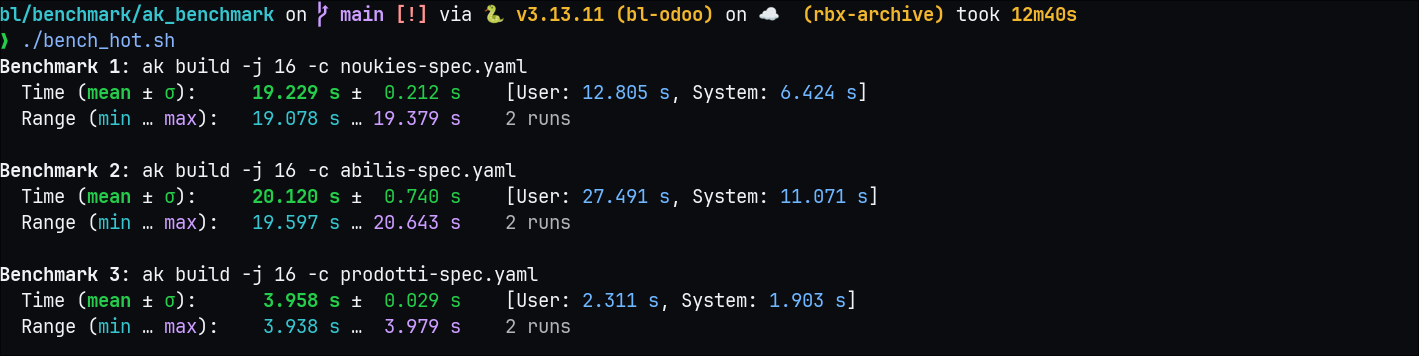
Ak benchmarks
Fresh install
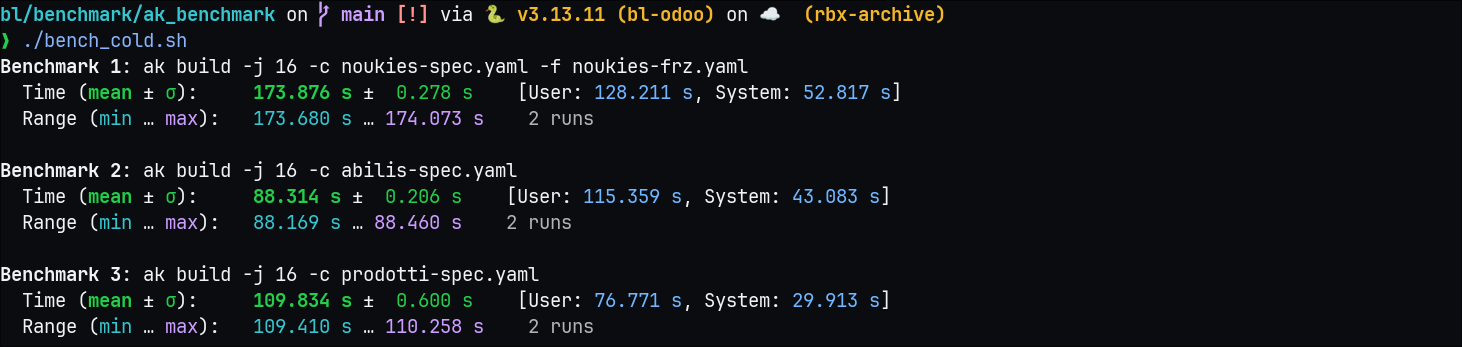
Already cloned once
Bl benchmarks
Fresh install
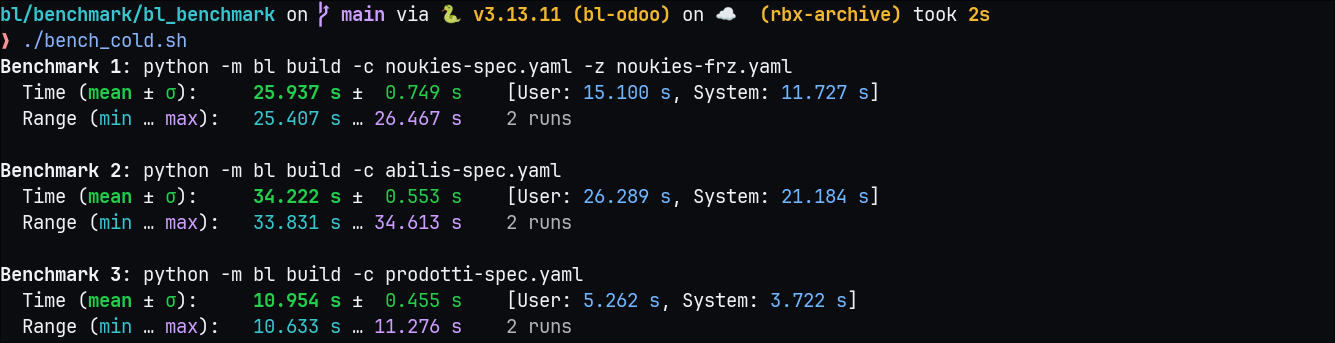
Already cloned once
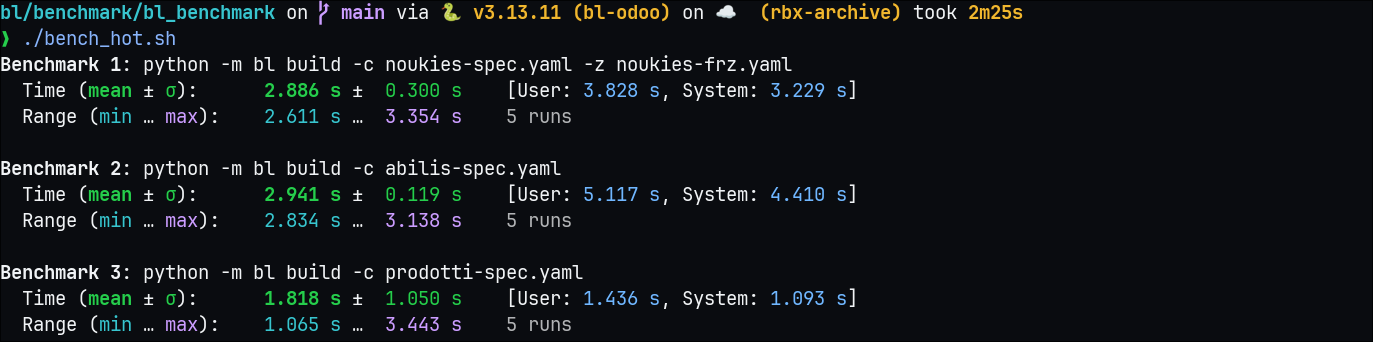
Results
| Type | AK | BL |
|---|---|---|
| Cold | ~100s | 2 - 10x faster |
| Hot | 3-20s | 2 - 10x faster |
1 maintainer

Metadata
1 maintainer
Release files for bl-odoo 0.5.1
For a detailed explanation of source distributions (sdists) and built distributions (wheels), please see the package formats documentation.
Source distribution (sdist)
| File | Size | Uploaded | Provenance | Actions |
|---|---|---|---|---|
| bl_odoo-0.5.1.tar.gz | 47.0 kB | Without provenance | Details for bl_odoo-0.5.1.tar.gz |
Built distribution (wheel)
| File | Interpreter | ABI | Platform | Actions Reset |
|---|---|---|---|---|
| bl_odoo-0.5.1-py3-none-any.whl | Python 3 | none | any | Details for bl_odoo-0.5.1-py3-none-any.whl |
Total release size: 75.0 kB
Release files / bl_odoo-0.5.1.tar.gz
| Download URL | bl_odoo-0.5.1.tar.gz |
|---|---|
| Size | 47.0 kB |
| Tags | Source |
|
SHA-256 checksum How to use checksums |
6edc8ea33f4d5b210895b6e46ae80450c93642ac63a80e3010c7c9b08e660452
|
|
BLAKE2b-256 checksum How to use checksums |
f048170a181487e954d181a72483048d70f94de74e6cf491cf7e23206bd57816
|
| Upload date | |
|
Uploaded using Trusted Publishing? What is trusted publishing? |
No |
| Uploaded via |
uv/0.12.21 {"installer":{"name":"uv","version":"0.12.21","subcommand":["publish"]},"python":null,"implementation":{"name":null,"version":null},"distro":{"name":"Ubuntu","version":"24.04","id":"noble","libc":null},"system":{"name":null,"release":null},"cpu":null,"openssl_version":null,"setuptools_version":null,"rustc_version":null,"ci":true}
|
Release files / bl_odoo-0.5.1-py3-none-any.whl
| Download URL | bl_odoo-0.5.1-py3-none-any.whl |
|---|---|
| Size | 28.0 kB |
| Tags | Python 3 |
|
SHA-256 checksum How to use checksums |
19fb51fa6ba6b86bf451800da63ca6cd16bc3263fec01a39fe4b033dc9496c10
|
|
BLAKE2b-256 checksum How to use checksums |
050dc77f7c7af24555e09ddb0ee2470acb6e18838c001c477aaf6731f14182a8
|
| Upload date | |
|
Uploaded using Trusted Publishing? What is trusted publishing? |
No |
| Uploaded via |
uv/0.12.21 {"installer":{"name":"uv","version":"0.12.21","subcommand":["publish"]},"python":null,"implementation":{"name":null,"version":null},"distro":{"name":"Ubuntu","version":"24.04","id":"noble","libc":null},"system":{"name":null,"release":null},"cpu":null,"openssl_version":null,"setuptools_version":null,"rustc_version":null,"ci":true}
|
Security for bl-odoo 0.5.1
Provenance
Provenance describes where a file came from. On PyPI, provenance is shared via attestations, which provide a verifiable record of the build or publishing details. View details, limitations and caveats.
No provenance found
None of the files in this release were uploaded with provenance metadata.
A note on package security
PyPI is a repository for distributing packages, not a service for auditing them. While third-party security researchers and our staff do their best to detect and remove malicious packages, PyPI cannot guarantee the quality, security or suitability of any given package.
To learn more about protecting yourself from malicious actors, visit our package security documentation.














