
⚡ BlastCode (blast)
Know what breaks before your agent edits.







An ultra-fast incremental code-graph engine, Model Context Protocol (MCP) server, and blast-radius analyzer for AI coding agents.
Features • Installation • Agent Integration • CLI Commands • Languages • Roadmap
⚡ Real-World Benchmarks & Live Demos
| Operation | Brute Force (Standard Agent) | With BlastCode | Real Savings |
|---|---|---|---|
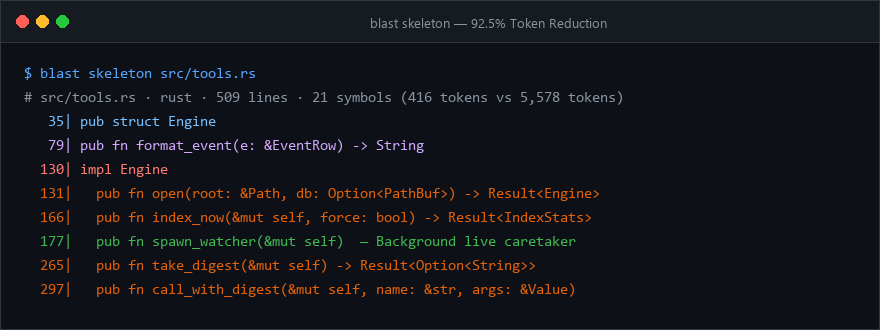
Inspect File Structure (src/tools.rs) |
5,578 tokens (Full file read) | 416 tokens (blast skeleton) |
🟢 92.5% Token Reduction |
Edit 1 Function (format_event) |
5,578 tokens (Full file read) | 560 tokens (blast source) |
🟢 90.0% Token Reduction |
| Workspace Orientation (14 files) | ~35,000 tokens (Reading files) | 640 tokens (blast map) |
🟢 98.2% Token Reduction |
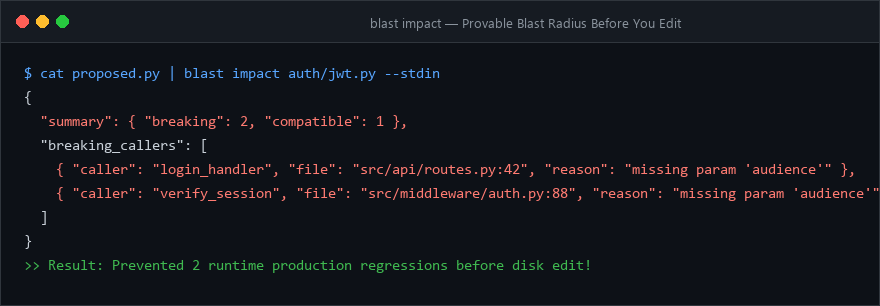
| Detect Signature Breakage | Fail + 30,000 token debug loop | 0 tokens wasted (blast impact) |
🟢 Eliminates regressions |
| Query Latency | 3.5s – 12.0s (Cloud LLM reading) | < 15ms (Local Tree-sitter SQLite) | ⚡ Instant responses |
🖥️ Live Preview 1: Surgical Skeleton (Instead of reading whole files)
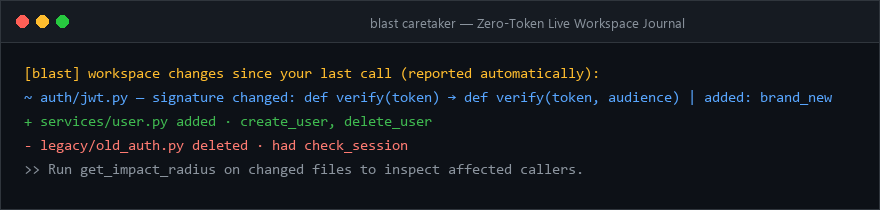
🖥️ Live Preview 2: The Caretaker Change Digest (Zero-Token Sync)
🖥️ Live Preview 3: Pre-Edit Blast Radius (Know what breaks before editing)
🚀 Installation & Zero-Install Running
Via npm / npx (Universal Zero-Install)
# Run stdio MCP server anywhere immediately:
npx blastcode serve

# Or install globally:
npm install -g blastcode
Via Python / PyPI / uvx
# Run stdio MCP server via uv:
uvx blastcode serve

# Or install via pip:
pip install blastcode
Via Cargo (Rust)
cargo install blastcode
Via Homebrew (macOS / Linux)
brew install isaim0011/tap/blastcode
Via Smithery / PulseMCP Registry
npx -y @smithery/cli install blastcode --client claude
Via VS Code / Cursor Extension
Install BlastCode from Open VSX or the VS Code Marketplace:
code --install-extension isaim0011.blastcode-vscode
# Or in Cursor:
cursor --install-extension isaim0011.blastcode-vscode
🤖 Agent Integration (MCP)
BlastCode works natively with any Model Context Protocol host (Claude Code, Cursor, Windsurf, Cline, Smithery).
Claude Code
claude mcp add blastcode -- npx blastcode serve --root .
Cursor / Windsurf / Claude Desktop (mcp.json)
{
  "mcpServers": {
    "blastcode": {
      "command": "npx",
      "args": ["-y", "blastcode", "serve", "--root", "/absolute/path/to/project"]
    }
  }
}
Instruct Your Agent (AGENTS.md / CLAUDE.md)
Add this instruction block so your AI agent uses BlastCode instead of brute-force reading files:
> Use the `blastcode` MCP tools before reading or modifying files:
> 1. `get_workspace_map`: Orient yourself across the project structure and exports.
> 2. `get_file_context` or `get_file_skeleton`: Use instead of opening and reading full files.
> 3. `get_symbol_source`: Retrieve the exact line range for a single function.
> 4. `trace_symbol`: Find all callers, callees, and type usages before refactoring.
> 5. `get_impact_radius`: Run with `new_source` BEFORE making an edit to verify what breaks.
> 6. `verify_patch`: Pre-flight validate proposed edit syntax and argument counts before writing to disk.
> 7. `get_affected_tests`: Find tests covering the changes and run the generated targeted test command.
> 8. `get_co_changed_files`: Discover implicit paired dependencies from git commit history.
> 9. `find_dead_code`: Detect unreferenced or orphaned symbols.
> 10. `grep_workspace`: Fast multi-threaded regex/token search across workspace files.
🛠️ MCP Tools Overview (14 Intelligent Capabilities)
| Tool | Purpose |
|---|---|
get_workspace_map |
Directory tree annotated with exported symbols per file. Call first. |
get_file_context |
Skeleton + classified imports (internal vs external) + dependents + recent edits in one call. |
get_file_skeleton |
Outline of a file without function bodies, with line numbers. |
get_symbol_source |
Surgical extraction of one symbol's exact lines instead of whole-file reads. |
search_symbols |
Fuzzy symbol lookup across the entire workspace (multi-word, camelCase/snake_case). |
trace_symbol |
Definition + callers / callees / type usages tagged with confidence (exact, probable, heuristic). |
get_impact_radius |
Pre-edit: test proposed signature changes. Post-edit: inspect working tree vs git HEAD. |
query_graph |
Structural filter by kind, name, path, callers, callees, and export status. |
get_workspace_changes |
View the change journal recorded by the caretaker background watcher. |
get_affected_tests |
🧪 Discovers test files/symbols covering changed files & generates targeted CLI test commands (cargo test, pytest, npm test, go test). |
verify_patch |
🛡️ Pre-flight validation of proposed code edits in memory: checks AST syntax and call-site arities before saving to disk. |
get_co_changed_files |
🔗 Mines Git commit history to discover files that frequently change together (implicit dependencies). |
find_dead_code |
🧹 Code graph analysis detecting unreferenced, dead, or orphaned functions and classes across the codebase. |
grep_workspace |
🔍 High-speed multi-threaded regex and token search across workspace files. Respects .gitignore, skips binaries. |
💻 CLI Reference
You can also use blast directly from your terminal:
blast index                     # Build or refresh the index (.blastradius/index.db)
blast map                       # Print compact workspace map with exports
blast stats                     # View symbol, reference, and file counts
blast context src/lib.rs        # Inspect skeleton, imports, dependents, and recent edits
blast skeleton src/lib.rs       # View file skeleton
blast source my_function        # Print source lines of a specific function
blast search "authenticate"     # Fuzzy search symbols
blast trace verify_token        # Trace callers, callees, and type usages
blast impact src/auth.py        # Check blast radius of uncommitted changes
blast tests src/tools.rs        # Find affected tests and targeted test command
blast verify src/auth.py        # Pre-flight syntax and arity validation
blast coupled Cargo.toml        # Find frequently co-committed files via Git
blast dead --limit 20           # Detect dead / unreferenced symbols
blast grep "pattern"            # Ultra-fast multi-threaded workspace regex search
blast watch                     # Live terminal stream of AST-level changes
🌐 Supported Languages (16 Languages & Web Formats)
| Tier | Languages & Formats | Details |
|---|---|---|
| Core Systems | Python, TypeScript, JavaScript (TSX/JSX), Rust, Go | Included by default, zero config |
| Frontend & Web | Svelte (.svelte), Vue (.vue), Astro (.astro), HTML (.html), CSS/SCSS (.css, .scss, .less) |
Svelte 5 runes ($props, $state), Vue SFC (defineProps, ref), Astro frontmatter, template components & CSS class selectors |
| Polyglot & Enterprise | Java, C#, C, C++, PHP, Ruby | Cargo features (lang-java, lang-csharp, lang-c, lang-cpp, lang-php, lang-ruby) |
🗺️ Universal Ecosystem Roadmap
- v0.1.0: Core Rust engine, 10 languages, MCP server, CLI (
blast). - crates.io: Official publication under
blastcode. - PyPI / uv:
pip install blastcode/uvx blastcode serve. - npm / npx:
npx blastcode serve. - Homebrew Tap:
brew install isaim0011/tap/blastcode. - VS Code / Cursor Extension: Embedded companion status and auto-launch.
📄 License
Licensed under the MIT License.
1 maintainer

Metadata
1 maintainer
Release files for blastcode 0.3.0
For a detailed explanation of source distributions (sdists) and built distributions (wheels), please see the package formats documentation.
Source distribution (sdist)
| File | Size | Uploaded | Provenance | Actions |
|---|---|---|---|---|
| blastcode-0.3.0.tar.gz | 687.1 kB | Without provenance | Details for blastcode-0.3.0.tar.gz |
Built distribution (wheel)
| File | Interpreter | ABI | Platform | Actions Reset |
|---|---|---|---|---|
| blastcode-0.3.0-py3-none-win_amd64.whl | Python 3 | none | Windows x86-64 | Details for blastcode-0.3.0-py3-none-win_amd64.whl |
Total release size: 5.1 MB
Release files / blastcode-0.3.0.tar.gz
| Download URL | blastcode-0.3.0.tar.gz |
|---|---|
| Size | 687.1 kB |
| Tags | Source |
|
SHA-256 checksum How to use checksums |
cf8f976415cd34810590bd25661576188762062f76980386c1c57a4c788d2334
|
|
BLAKE2b-256 checksum How to use checksums |
8aca31cdc32a956c2c800ff5c41b8cf9c13b2d297314d04eaff2c09aa53507d3
|
| Upload date | |
|
Uploaded using Trusted Publishing? What is trusted publishing? |
No |
| Uploaded via |
maturin/1.15.0
|
Release files / blastcode-0.3.0-py3-none-win_amd64.whl
| Download URL | blastcode-0.3.0-py3-none-win_amd64.whl |
|---|---|
| Size | 4.4 MB |
| Tags | Python 3 Windows x86-64 |
|
SHA-256 checksum How to use checksums |
c785e6493c756ee2173709f7e0eb788cc221a94b24b1a18eb5b5a42a8fae8f43
|
|
BLAKE2b-256 checksum How to use checksums |
e287f2648b39301c84c73ee0a90d81c711cbe2f6f0f7880dca49a05bea169599
|
| Upload date | |
|
Uploaded using Trusted Publishing? What is trusted publishing? |
No |
| Uploaded via |
maturin/1.15.0
|
Security for blastcode 0.3.0
Provenance
Provenance describes where a file came from. On PyPI, provenance is shared via attestations, which provide a verifiable record of the build or publishing details. View details, limitations and caveats.
No provenance found
None of the files in this release were uploaded with provenance metadata.
A note on package security
PyPI is a repository for distributing packages, not a service for auditing them. While third-party security researchers and our staff do their best to detect and remove malicious packages, PyPI cannot guarantee the quality, security or suitability of any given package.
To learn more about protecting yourself from malicious actors, visit our package security documentation.














