
This release is a pre-release and may not be stable for production use.
BlueArch AWS Steward
Local, MCP-first contextual AWS architecture reviews for Codex, Claude Code, Cursor, and other MCP clients.
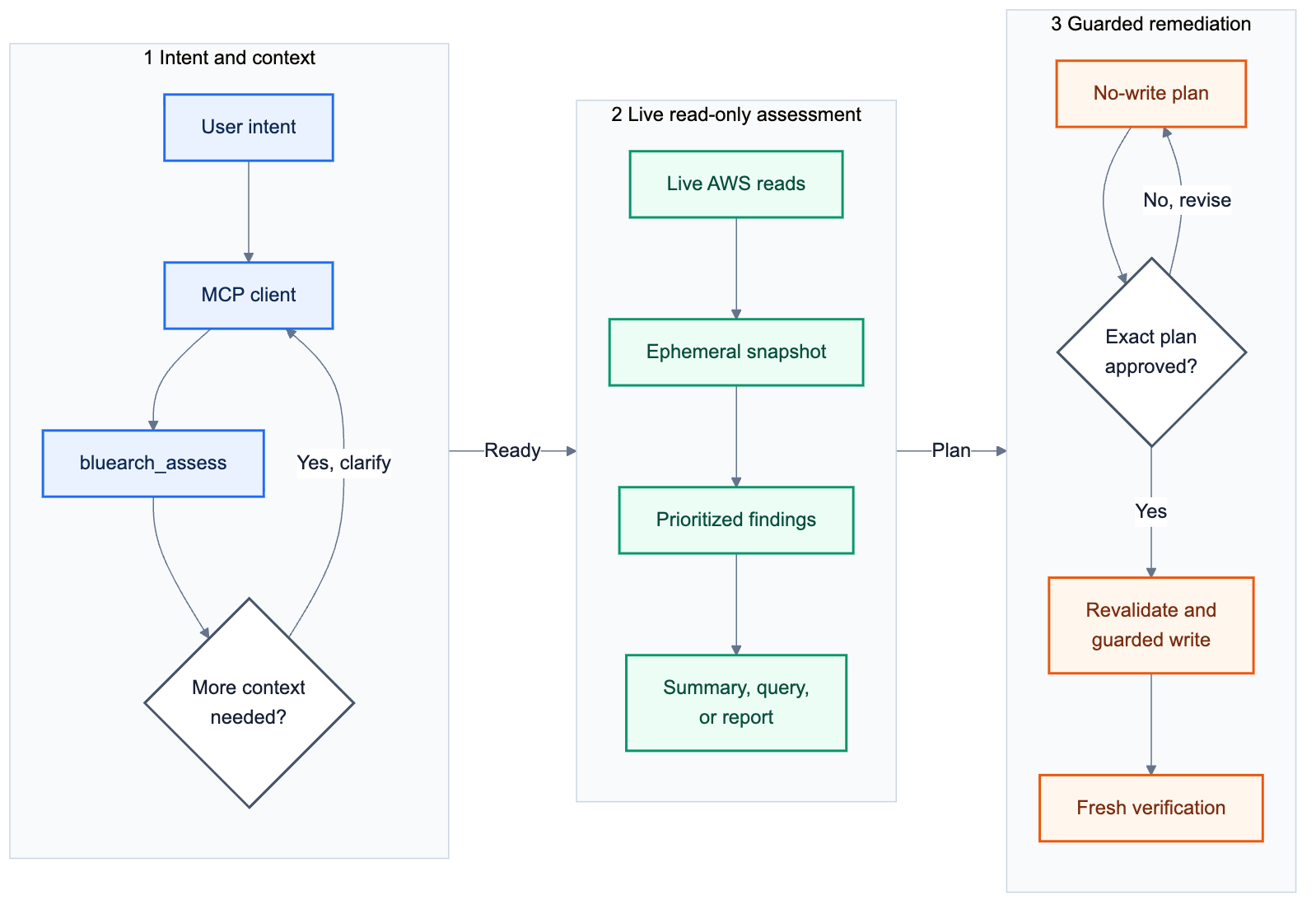
Steward reviews one live AWS resource or proposed Terraform/CloudFormation change and the dependencies relevant to that decision. It applies validated AWS Well-Architected knowledge, explains evidence and business impact, and builds a reviewable correction plan. Full-account scans run only when explicitly requested. Reviews are read-only by default.
Beta: use Steward as decision support. Review every recommendation and plan before changing production infrastructure.
Install
Steward requires Python 3.10 or newer. Install it in a virtual environment:
python3 -m venv .venv
source .venv/bin/activate
python -m pip install --upgrade bluearch-aws-steward
bluearch-steward --version
bluearch-steward mcp smoke
Windows activation:
.venv\Scripts\activate
For an isolated command without manually managing a virtual environment:
uv tool install --upgrade bluearch-aws-steward
uv tool update-shell
bluearch-steward mcp smoke
EKS and Kubernetes support is included in the standard package. AWS CLI,
kubectl, Terraform/OpenTofu, Helm, Kustomize, Docker, and kind remain
external tools used only by workflows that need them.
Connect Your Agent
bluearch-steward mcp install --client codex
bluearch-steward mcp install --client cursor
bluearch-steward mcp install --client claude
Use --dry-run to preview configuration changes. Restart the client after
registration. For another stdio MCP client:
bluearch-steward mcp config --runtime installed
Run Your First Review
Authenticate outside the agent conversation. AWS IAM Identity Center users can run:
aws sso login --profile my-sso-profile
Then ask your MCP client about one exact resource:
Review
s3://my-application-databefore I change its lifecycle policy. Ask only for context that changes which Well-Architected practices apply.
For a proposed change, give the agent a declared workspace root and explicit Terraform or CloudFormation path. Steward never searches arbitrary local files, executes Terraform, or modifies source. If no resource is identified, it asks for one instead of guessing.
Steward returns a bounded architecture neighborhood, WAF practice ledger, contextual recommendations, explicit unknowns, and excluded scope. Results are ephemeral and exportable as JSON, Markdown, HTML, CSV, SARIF, or PDF.
Use an explicit prompt only when you really need breadth:
Run a comprehensive assessment across all supported services. Show only resources caught by rules and report skipped rules and coverage.
Included In This Preview
- 121 native rules across 17 AWS runtime scopes.
- Versioned contextual knowledge packs for all 17 scopes and bounded typed relationship collection with a 50-read operation budget.
- Safe Terraform HCL, Terraform plan JSON, and CloudFormation JSON/YAML review.
- A 20-rule EKS and Kubernetes assessment and investigation pack.
- Searchable knowledge for the bundled BlueArch AWS misconfiguration catalog.
- Native, Security Hub, Compute Optimizer, Cost Optimization Hub, and optional imported Prowler findings in one deduplicated queue.
- Evidence, risk, confidence, freshness, remediation safety, and cost estimate status on presented findings.
- Read-only resource investigation and planning-only AWS/IaC change previews.
- Guarded writes for a small documented set of low-risk operations only.
Steward is standalone. It does not require BlueArch Core, hosted login, hosted telemetry, or a local AWS inventory database. AWS remains the source of truth.
Safety And Scope
- No assessment applies changes.
- Most recommendations are planning-only.
- Guarded writes require a fresh finding, exact short-lived plan, explicit approval, state revalidation, and post-change verification.
- Missing permissions or unavailable evidence are reported as incomplete, not as passing.
- The current preview is single-account and single-Region per assessment.
Full documentation:
1 maintainer

Metadata
1 maintainer
Release files for bluearch-aws-steward 0.10.0b1
For a detailed explanation of source distributions (sdists) and built distributions (wheels), please see the package formats documentation.
Source distribution (sdist)
| File | Size | Uploaded | Provenance | Actions |
|---|---|---|---|---|
| bluearch_aws_steward-0.10.0b1.tar.gz | 478.2 kB | With provenance | Details for bluearch_aws_steward-0.10.0b1.tar.gz |
Built distribution (wheel)
| File | Interpreter | ABI | Platform | Actions Reset |
|---|---|---|---|---|
| bluearch_aws_steward-0.10.0b1-py3-none-any.whl | Python 3 | none | any | Details for bluearch_aws_steward-0.10.0b1-py3-none-any.whl |
Total release size: 986.0 kB
Release files / bluearch_aws_steward-0.10.0b1.tar.gz
| Download URL | bluearch_aws_steward-0.10.0b1.tar.gz |
|---|---|
| Size | 478.2 kB |
| Tags | Source |
|
SHA-256 checksum How to use checksums |
c2539b167bace1a36b583ddbc89823811fd98864f99a77ed6f6f836bf7fad644
|
|
BLAKE2b-256 checksum How to use checksums |
3c2afe6433d4fca6cd1ee3c9fac1134335b492ba8f4a3915ed063c4b5e78f3fc
|
| Upload date | |
|
Uploaded using Trusted Publishing? What is trusted publishing? |
Yes |
| Uploaded via |
twine/7.0.0 CPython/3.13.14
|
Provenance
Provenance describes where a file came from. On PyPI, provenance is shared via attestations, which provide a verifiable record of the build or publishing details. View details, limitations and caveats.


PyPI Publish Attestation
PyPI verified that this artifact, at this checksum, originated from the publisher listed below.
Signed by GitHub Actions, verified by PyPI on Aug 20, 2026.
Transparency logRelease files / bluearch_aws_steward-0.10.0b1-py3-none-any.whl
| Download URL | bluearch_aws_steward-0.10.0b1-py3-none-any.whl |
|---|---|
| Size | 507.8 kB |
| Tags | Python 3 |
|
SHA-256 checksum How to use checksums |
22dd76d2608866d268cd48b1be80086be63305bef24f9044462244779bd65bf4
|
|
BLAKE2b-256 checksum How to use checksums |
4635d9ca61cac0b31a6e5d537b8768c1b446609c54f019e767e56d5316d3d13a
|
| Upload date | |
|
Uploaded using Trusted Publishing? What is trusted publishing? |
Yes |
| Uploaded via |
twine/7.0.0 CPython/3.13.14
|
Provenance
Provenance describes where a file came from. On PyPI, provenance is shared via attestations, which provide a verifiable record of the build or publishing details. View details, limitations and caveats.
PyPI Publish Attestation
PyPI verified that this artifact, at this checksum, originated from the publisher listed below.
Signed by GitHub Actions, verified by PyPI on Aug 20, 2026.
Transparency logSecurity for bluearch-aws-steward 0.10.0b1
Provenance
Provenance describes where a file came from. On PyPI, provenance is shared via attestations, which provide a verifiable record of the build or publishing details. View details, limitations and caveats.
Full provenance
All 2 files in this release have been uploaded with provenance metadata.
Attestation for bluearch_aws_steward-0.10.0b1.tar.gz
PyPI Publish Attestation
PyPI verified that this artifact, at this checksum, originated from the publisher listed below.
Signed by GitHub Actions, verified by PyPI on Aug 20, 2026.
Transparency logA note on package security
PyPI is a repository for distributing packages, not a service for auditing them. While third-party security researchers and our staff do their best to detect and remove malicious packages, PyPI cannot guarantee the quality, security or suitability of any given package.
To learn more about protecting yourself from malicious actors, visit our package security documentation.














